
SANITMAX Sm1050b
SANITMAX 41.3" Battery-Powered Walk-Behind Floor Sweeper User Manual
Model: Sm1050b
1. Introducció
This manual provides essential information for the safe and efficient operation, maintenance, and troubleshooting of your SANITMAX 41.3" Battery-Powered Walk-Behind Floor Sweeper, Model Sm1050b. Please read this manual thoroughly before operating the machine to ensure proper use and to prevent injury or damage.
2. Instruccions de seguretat
Always adhere to the following safety guidelines to prevent accidents and ensure safe operation.
Seguretat general
- Llegiu totes les instruccions abans d'utilitzar.
- Do not operate the sweeper in hazardous environments or near flammable liquids/gases.
- Mantingueu els nens i el personal no autoritzat allunyats de la zona d'operació.
- Utilitzeu equips de protecció individual (EPI) adequats, com ara ulleres de seguretat i calçat antilliscant.
- Assegureu-vos que totes les proteccions i dispositius de seguretat estiguin al seu lloc i funcionin correctament abans de l'operació.
Seguretat elèctrica
- Use only the provided battery charger.
- Do not operate the sweeper with a damaged power cord or plug.
- Keep the charger and battery dry. Do not expose to rain or wet conditions.
- Unplug the charger from the outlet before performing any maintenance or cleaning.
Seguretat de la bateria
- No curtcircuiteu els terminals de la bateria.
- No exposeu la bateria a temperatures extremes ni a la llum solar directa.
- Eliminar les bateries segons la normativa local.
3. Identificació de components i peces
Familiarize yourself with the main components of your SANITMAX floor sweeper.

Figura 3.1: global view of the SANITMAX floor sweeper with its included battery charger.
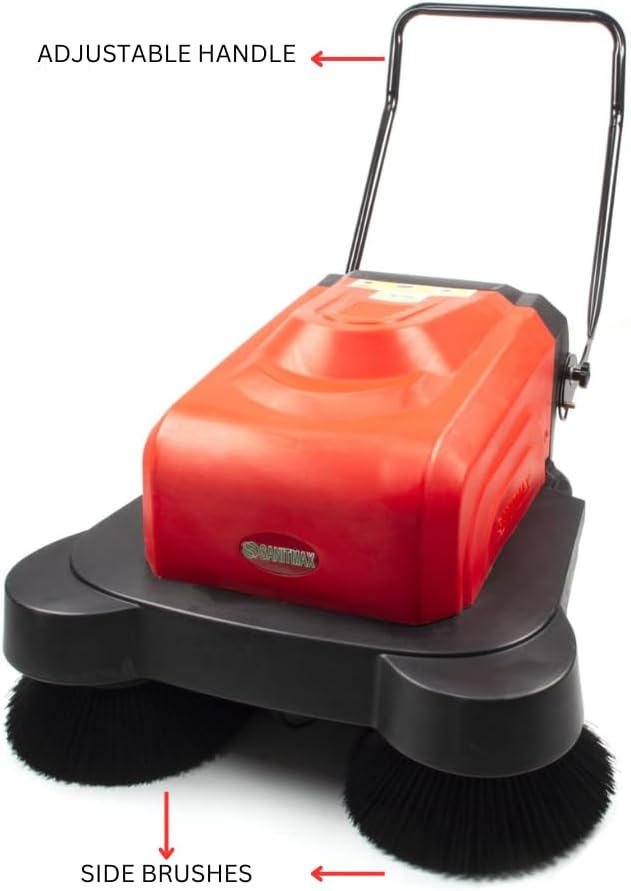
Figure 3.2: Key external components including the adjustable handle and side brushes.

Figura 3.3: Detallada view of the control panel with battery capacity display, main brush switch, side brush switch, watering switch, and key ignition.

Figura 3.4: lateral view highlighting the overload protection switches, charger interface, removable trash can, and water tank inlet.

Figura 3.5: Part inferior view showing the side brushes and the integrated water spray nozzles for dust suppression.
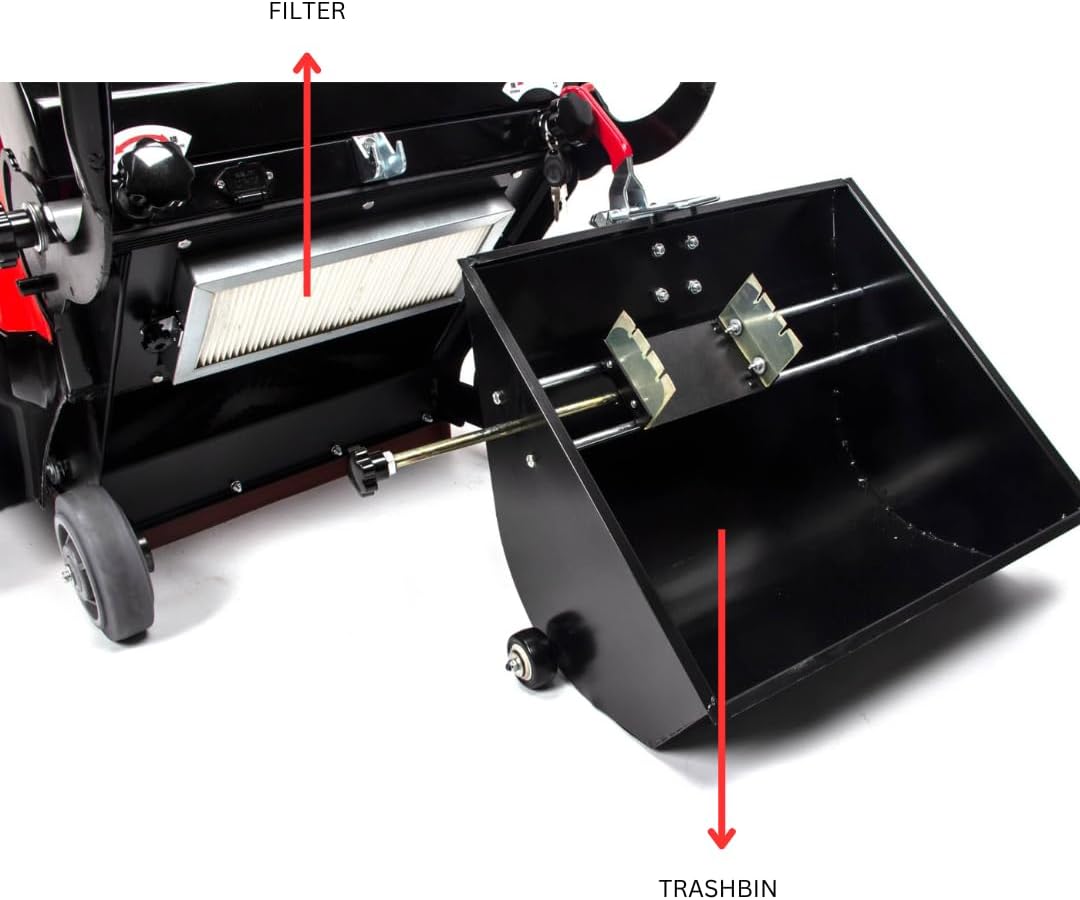
Figura 3.6: Intern view revealing the air filter and the large capacity trashbin.
4. Configuració
Assemblea Inicial
- Desembaleu tots els components de l'embalatge.
- Attach the adjustable handle to the main body of the sweeper, securing it with the provided fasteners. Ensure it is firmly in place.
- Verify that the side brushes are correctly installed and rotate freely.
- Ensure the trashbin is properly seated within its compartment.
Carregant la bateria
- Locate the charger interface on the side of the sweeper (refer to Figure 3.4).
- Connect the provided battery charger to the charger interface.
- Connecteu el carregador a una presa de corrent elèctrica estàndard.
- Allow the battery to charge fully before first use. The battery capacity display on the control panel (Figure 3.3) will indicate the charge level. A full charge typically takes approximately 4 hours.
- Once fully charged, disconnect the charger from both the sweeper and the outlet.
Omplint el dipòsit d'aigua
- Locate the water tank inlet (refer to Figure 3.4).
- Open the cap and fill the tank with clean water. Do not overfill.
- Tanqueu el tap de manera segura després d'omplir-lo.
5. Instruccions de funcionament
Starting the Sweeper
- Assegureu-vos que la bateria estigui prou carregada.
- Insert the key into the ignition on the control panel (Figure 3.3) and turn it to the "ON" position.
- Press the "Main Brush" switch to activate the main sweeping brush.
- Press the "Side Brush" switch to activate the side brushes, which help sweep debris from edges and corners into the path of the main brush.
- If dust suppression is desired, press the "Watering" switch to activate the water spray nozzles.
Operació d'escombrat
- Push the sweeper forward at a steady, comfortable pace.
- Overlap each pass slightly to ensure complete coverage.
- For heavily soiled areas, a slower pace or multiple passes may be required.
- The sweeper is designed for hard floor surfaces such as concrete, tile, hardwood, and linoleum.
Stopping the Sweeper
- Turn off the "Watering" switch, then the "Side Brush" switch, and finally the "Main Brush" switch.
- Turn the key to the "OFF" position and remove it.
6. Manteniment
Regular maintenance ensures optimal performance and extends the lifespan of your sweeper.
Emptying the Trashbin
- Empty the trashbin after each use or when it is full (refer to Figure 3.6).
- Pull out the trashbin, dispose of collected debris, and reinsert it securely.
Neteja del filtre
- Regularly inspect and clean the air filter (refer to Figure 3.6).
- Remove the filter and gently tap it to dislodge dust. For deeper cleaning, use compressed air or wash with water if the filter type allows (consult product specifications for filter type). Ensure it is completely dry before reinstallation.
Brush Inspection and Replacement
- Periodically check the main and side brushes for wear or damage.
- Replace brushes when bristles are significantly worn or damaged to maintain effective sweeping performance.
Cura de la bateria
- Carregueu sempre completament la bateria després de cada ús.
- If storing the sweeper for an extended period, ensure the battery is fully charged and recharge it every 1-2 months to prevent deep discharge.
Neteja general
- Wipe down the exterior of the sweeper with a damp tela.
- No utilitzeu productes químics ni productes de neteja abrasius.
7. Solució De Problemes
Consulteu aquesta secció per conèixer els problemes comuns i les seves solucions.
| Problema | Causa possible | Solució |
|---|---|---|
| Sweeper does not turn on. | La bateria està descarregada. Key not fully inserted/turned. Protecció de sobrecàrrega activada. | Carregueu la bateria. Ensure key is fully inserted and turned to "ON". Check overload protection switches (Figure 3.4) and reset if tripped. |
| Brushes not rotating. | Interruptor del raspall apagat. Obstruction in brushes. Problema motor. | Ensure main/side brush switches are "ON". Inspect brushes for tangled debris and remove. Poseu-vos en contacte amb el servei d'atenció al client si sospiteu que hi ha un problema amb el motor. |
| Water spray not working. | Dipòsit d'aigua buit. Watering switch off. Broquets obstruïts. | Omplir el dipòsit d'aigua. Ensure watering switch is "ON". Clean water spray nozzles (Figure 3.5) to remove blockages. |
| Poor sweeping performance. | Trashbin full. Brushes worn or dirty. Filtre tapat. | Empty trashbin. Clean or replace brushes. Netegeu o substituïu el filtre. |
8. Especificacions
Key technical specifications for the SANITMAX Sm1050b Floor Sweeper.
| Característica | Detall |
|---|---|
| Nom del model | Sm1050b |
| Camí de neteja | 41.3 polzades |
| Font d'alimentació | Funciona amb piles |
| Temps d'operació | Fins a 4 hores (continuades) |
| Eficiència de neteja | Up to 64,500 sq ft/hr |
| Capacitat de la paperera | 9.25 galons |
| Característiques especials | Triple Brushes, Water Sprinklers For Dust Control |
| Superfícies recomanades | Hardwood, Tile and Grout, Vinyl and Linoleum, Concrete, Marble and Natural Stone, Laminated Floors |
| Dimensions del producte | 41.3 cm d'amplada x 55 cm d'alçada |
| Pes de l'article | 178.5 lliures |
| Material | Plàstic, metall |
| Components inclosos | Carregador de bateria |
9. Garantia i Suport
For warranty information and customer support, please contact SANITMAX directly or refer to your purchase documentation.
- Devolucions: This product typically offers a 30-day easy return policy. Please refer to your retailer's return policy for specific details.
- Fabricant: Sanitmax
- Atenció al client: For technical assistance, parts, or service, please visit the official SANITMAX store on Amazon or contact their customer support channels.
Ask a question about this manual
Ask about setup, troubleshooting, compatibility, parts, safety, or missing instructions. Manuals+ will review the question and use this page’s manual context to help answer it.