
1. Introducció
Gràcies per la compraasing the Moman FS04A S2 Camera Cooling Fan. This device is designed to prevent your camera from overheating during extended recording sessions, especially when shooting 4K video, conducting long interviews, video conferences, or live streams. By maintaining optimal operating temperatures, the FS04A S2 helps ensure stable performance and extends the lifespan of your camera.

Image: The Moman FS04A S2 Camera Cooling Fan actively cools your camera to prevent overheating, ensuring stable performance during demanding tasks.
2. Informació de seguretat
- No exposeu el dispositiu a l'aigua ni a una humitat excessiva.
- Avoid operating the device in extremely high or low temperatures.
- No intenteu desmuntar ni modificar el dispositiu. Això anul·larà la garantia.
- Mantenir fora de l'abast dels nens.
- Ensure proper ventilation and do not block the fan's air intake or exhaust vents.
- Use only the provided USB Type-C cable or a certified equivalent for power.
3. Contingut del paquet
Si us plau, comproveu que tots els elements següents estiguin inclosos al vostre paquet:
- Moman FS-04A Camera Cooling Fan x 1
- 2M USB-Type-C Power Cable x 1
- Mounting Clips x 4 (for various camera models)

Image: The package includes the Moman FS04A S2 cooling fan, a 2-meter USB Type-C power cable, and four different mounting clips for broad compatibility.
4. Producte acabatview & Característiques
4.1. Compact Aluminum Alloy Design
The Moman FS04A S2 is constructed from high-quality aluminum alloy, ensuring efficient heat dissipation while maintaining a compact and lightweight profile. Its dimensions are approximately 70 x 50 x 21mm, and it weighs only 114g, making it easy to store and transport.

Image: The Moman FS04A S2 features a compact design (70x50x21mm) and lightweight aluminum construction (114g) for portability and efficient cooling.
4.2. Advanced Semiconductor Cooling System with Low Noise
Equipped with an advanced semiconductor cooling system, the FS04A S2 operates at a low noise level of just 26dB, minimizing audio interference during recording. The cooling temperature can be freely adjusted between 12°C and 30°C to suit various shooting environments.

Image: The fan utilizes an advanced semiconductor cooling system, offering adjustable temperatures from 12°C to 30°C with a low noise output of 26dB.
4.3. USB Type-C Power Supply
The FS04A S2 is powered via a USB Type-C port, allowing for unlimited operation time when connected to an external power source such as a power bank or V-mount battery. This ensures continuous cooling during long recording sessions without interruption.
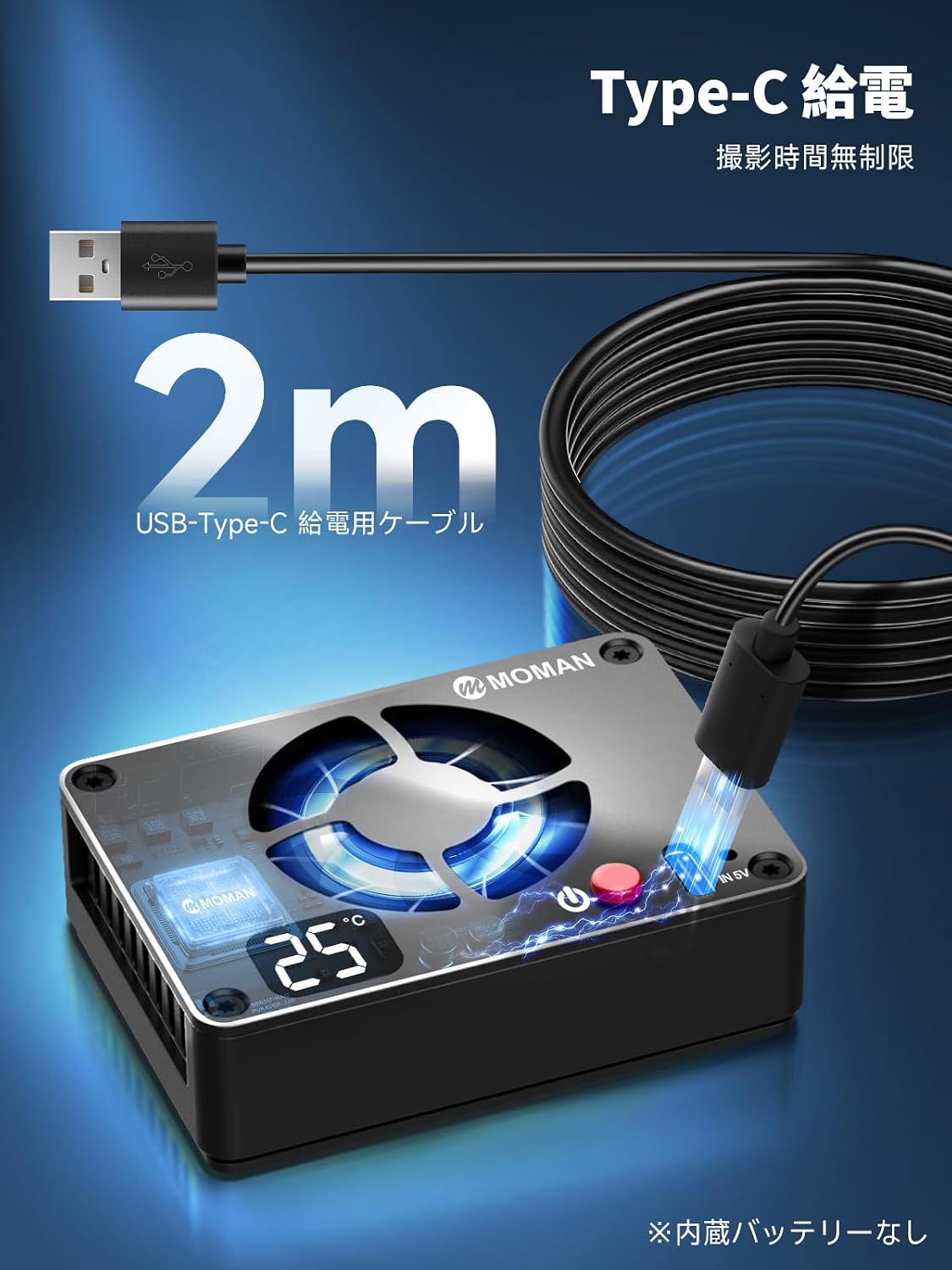
Image: The Moman FS04A S2 is powered by a USB Type-C cable, enabling continuous operation from external power sources.
4.4. Àmplia compatibilitat
The cooling fan comes with four different mounting clips, providing broad compatibility with various camera models from brands like Sony and Canon. Compatible models include Canon R8, R10, RP, R5, R50, and Sony FX30, A7S3. Please note that compatibility may vary between 'Set 1' and 'Set 2' versions of the product; ensure your camera model is listed for 'Set 2' before use.

Image: The fan includes four mounting clips for compatibility with a wide range of cameras, including Canon R8, R10, RP, R5, R50, and Sony FX30, A7S3.
4.5. Escenaris d'ús
The Moman FS04A S2 is ideal for various demanding shooting conditions, including:
- Outdoor shooting under direct sunlight or in summer.
- Long-duration 4K video recording.
- Video conferences and interviews.
- Live streaming events.

Image: The cooling fan is suitable for various applications such as outdoor shooting, live broadcasts, video conferences, and 4K video recording.
5. Configuració
- Select the Correct Clip: Choose the appropriate mounting clip from the four provided clips that best fits your camera model.
- Adjunta el clip: Securely attach the selected clip to your camera. Ensure it is firmly in place.
- Muntar el ventilador: Slide the Moman FS04A S2 cooling fan onto the attached clip. Make sure it clicks into position and is stable.
- Connectar l'alimentació: Connect the USB Type-C power cable to the fan's Type-C port and then to a suitable power source (e.g., camera, power bank, V-mount battery).

Image: A visual guide demonstrating the simple four-step attachment process for the Moman FS04A S2 cooling fan to a camera.
6. Instruccions de funcionament
- Encès/apagat: Press the power button located on the fan to turn the device on or off.
- Ajust de temperatura: Use the control buttons (if available, or refer to the display for adjustment) to set your desired cooling temperature between 12°C and 30°C. The fan will automatically adjust its speed to maintain the set temperature.
- Monitorització de la temperatura: The integrated display screen shows the real-time cooling temperature, allowing you to monitor the fan's performance.

Image: The fan features a screen for adjusting the cooling temperature within a range of 12°C to 30°C.

Image: The integrated display clearly shows the real-time cooling temperature, providing immediate feedback on the camera's thermal status.
7. Manteniment
- Neteja: Regularly clean the fan blades and air vents with a soft, dry cloth or a small brush to prevent dust accumulation, which can hinder cooling performance.
- Emmagatzematge: When not in use, store the cooling fan in a dry, cool place away from direct sunlight and extreme temperatures.
- Eviteu les obstruccions: Ensure that the fan's air intake and exhaust vents are never blocked during operation.
8. Solució De Problemes
| Problema | Causa possible | Solució |
|---|---|---|
| El ventilador no s'encén. | Sense corrent o connexió fluixa. | Check if the USB Type-C cable is securely connected to both the fan and the power source. Ensure the power source is active. |
| Fan is not cooling effectively. | Blocked air vents or incorrect temperature setting. | Ensure air vents are clear of obstructions. Verify the cooling temperature is set appropriately (e.g., lower temperature for more cooling). |
| Fan feels loose on the camera. | Mounting clip not secure or incompatible. | Ensure the correct mounting clip is used for your camera model and that it is securely fastened. If the attachment remains loose, consider using additional securing methods (e.g., a hair tie or strap) to prevent accidental detachment during movement. |
| Soroll inusual del ventilador. | Dust or debris in the fan blades. | Turn off the fan and carefully clean the fan blades and surrounding area. |
9. Especificacions
- Marca: mare
- Model: FS04A S2
- Número de model del fabricant: Moman-FS-04A-S2-JP02
- Tipus de connector d'alimentació: USB tipus C
- Nivell de soroll: 26 dB
- Material: Aliatge d'alumini
- Dimensions: Aproximadament 70 x 50 x 21 mm
- Pes: Aproximadament 114 g
- Interval de temperatura de refrigeració: 12 °C a 30 °C
- Articles inclosos: 1x Camera Cooling Fan, 1x 2M USB Type-C Power Cable, 4x Mounting Clips
10. Garantia i Suport
Moman provides comprehensive customer support for your FS04A S2 Camera Cooling Fan.
- Servei postvenda: Enjoy 365 days of after-sales service.
- Suport tècnic: Our support team is available to respond to inquiries within 24 business hours, providing technical assistance and optimal solutions.
For any questions or assistance, please contact Moman customer service through the official channels.

Image: Moman offers 365 days of after-sales service and technical support with responses within 24 business hours.