
1. Introducció
This manual provides essential information for the safe and efficient operation of your TOPBULL 40A MPPT Solar Charge Controller. This device is designed to optimize power harvesting from your solar panels and efficiently charge various battery types in 12V or 24V systems. It features advanced Maximum Power Point Tracking (MPPT) technology, comprehensive protection functions, and a user-friendly LCD interface.

Imatge 1: Frontal view of the TOPBULL 40A MPPT Solar Charge Controller, showing the LCD display and control buttons.
2. Instruccions de seguretat
Please read all safety instructions carefully before installation and operation. Failure to follow these instructions may result in personal injury or damage to the controller or other components.
- Ensure all connections are correct and secure before applying power.
- Do not disassemble or attempt to repair the controller. Refer to qualified personnel for service.
- Install the controller in a well-ventilated area, away from flammable materials and moisture.
- Connecteu sempre primer la bateria al controlador, després el panell solar i finalment la càrrega. Desconnecteu-ho en ordre invers.
- Wear appropriate personal protective equipment, including eye protection, when working with batteries and electrical systems.
- The controller includes multiple electronic protections such as reverse polarity, overcharge, over-discharge, overload, short-circuiting, TVS lightning, overpower, reverse current, and overtemperature protection. However, proper installation is crucial for optimal safety.
3. Contingut del paquet
Verifiqueu que tots els elements siguin presents al paquet:
- TOPBULL 40A MPPT Solar Charge Controller
- Cargols de muntatge
- Manual d'usuari (aquest document)

Image 2: Contents of the product package, showing the controller, user manual, and mounting hardware.
4. Producte acabatview
The TOPBULL 40A MPPT Solar Charge Controller features a clear LCD display and intuitive buttons for monitoring and configuration. It is equipped with terminals for solar panel input, battery connection, DC load output, and dual USB ports.
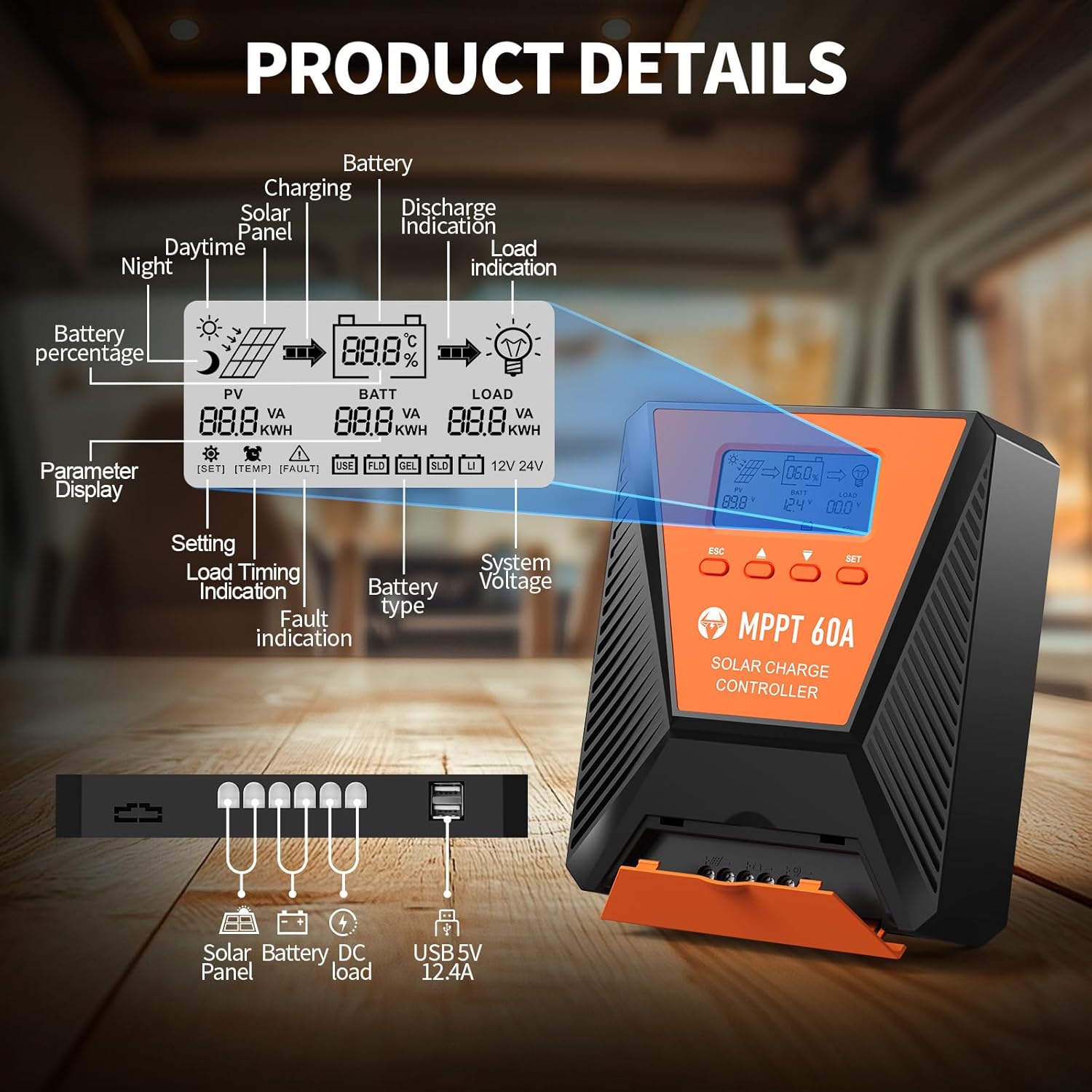
Imatge 3: Detallada view of the controller's LCD display, showing various indicators and parameters, along with the connection ports at the bottom.
Indicadors de la pantalla LCD:
- Periodista: Panell solar voltage i poder.
- BATT: Bateria voltage, charge status, and type.
- CÀRREGA: Load status and power.
- Bateria Percentage: Current battery charge level.
- Charging/Discharge Indication: Arrows indicating power flow.
- Indicació d'error: Error codes displayed if issues occur.
- Volum del sistematage: Automatically detected 12V or 24V.
Botons de control:
- ESC: Exit menu or cancel setting.
- Fletxes AMUNT/AVALL: Navigate menus or adjust values.
- SET: Enter menu or confirm setting.
5. Configuració i instal·lació
Segueix aquests passos per a una instal·lació correcta del teu controlador de càrrega solar:
- Muntatge: Choose a suitable location for the controller, ensuring adequate ventilation and protection from direct sunlight, high temperatures, and moisture. Use the provided mounting screws to secure the controller.
- Connexió de la bateria: Connect the battery to the controller's battery terminals first. Ensure correct polarity (positive to positive, negative to negative). The controller will automatically detect the 12V or 24V system voltage.
- Connexió del panell solar: Connect the solar panel to the controller's solar input terminals. Ensure correct polarity. The controller will begin charging the battery.
- DC Load Connection (Optional): Connect your DC loads to the load terminals. Ensure correct polarity.

Image 4: Connection diagram illustrating how to connect the solar panel, battery bank, inverter (for AC load), and DC load to the MPPT controller.
The controller supports various deep cycle battery types, including FLD, LiFePO4, SLD, GEL, and AGM. It also supports 0V lithium battery charging (lithium battery activation function).

Image 5: The controller is compatible with various 12V/24V battery types, automatically identifying voltage and supporting custom parameters and 0V lithium battery charging.
6. Instruccions de funcionament
LCD Display and Parameter Settings:
The LCD display provides real-time information about your solar charging system. Use the four buttons (ESC, UP, DOWN, SET) to navigate menus and adjust parameters.
- Premeu SET per entrar al menú principal.
- Ús Amunt/Avall to scroll through options such as battery type, load timer settings, and other customizable parameters.
- Premeu SET again to select an option and then use Amunt/Avall per canviar els valors.
- Premeu SET to confirm changes, or ESC per sortir sense desar.
Procés de càrrega:
The controller utilizes a smart 4-stage charging process to optimize battery health and longevity:
- Càrrega massiva: Rapid charging to bring the battery to approximately 80% capacity.
- Càrrega d'absorció: Charging at a constant voltage to bring the battery to 100% capacity.
- Càrrega del flotador: Maintaining the battery at full charge with a lower voltage.
- Equalization Charge (for specific battery types): Periodically overcharging to balance cell voltages.
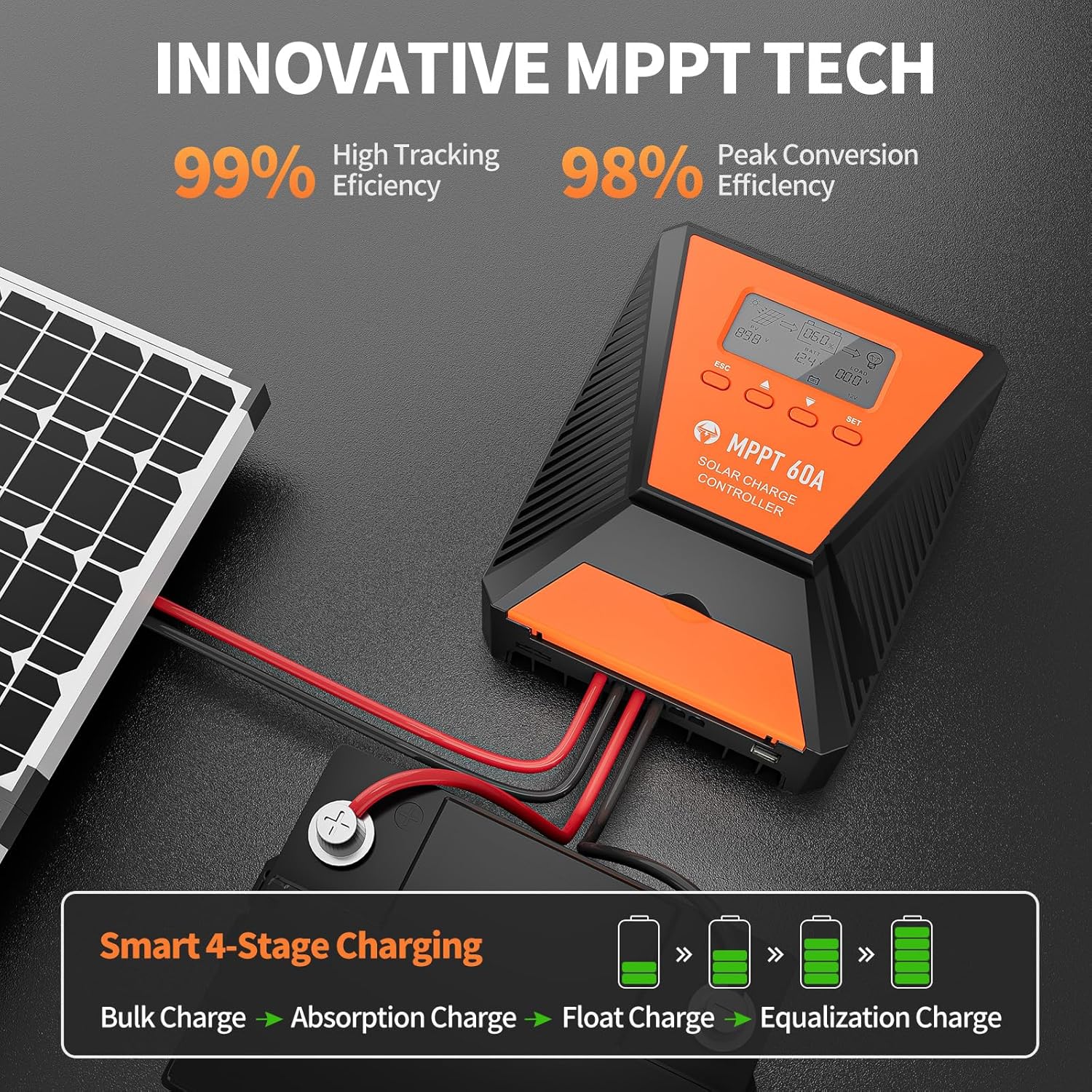
Image 6: The controller features 99% high tracking efficiency and 98% peak conversion efficiency, along with a smart 4-stagprocés de càrrega electrònica.
Càrrega USB:
The controller includes dual USB ports for charging electronic devices. These ports provide 5V DC output.
7. Manteniment
Regular maintenance ensures optimal performance and extends the lifespan of your solar charge controller and battery system.
- Comproveu les connexions: Periodically inspect all wiring connections for tightness and corrosion.
- Controlador net: Mantingueu el controlador net i lliure de pols i brutícia. Feu servir un drap sec per netejar-lo.
- Ventilació: Ensure the installation area remains well-ventilated to prevent overheating. The controller is designed with a metal case and dual high-speed intelligent fans for enhanced heat dissipation.
- Inspecció de la bateria: Follow the manufacturer's maintenance guidelines for your specific battery type.
- Compensació de temperatura: The controller features a temperature compensation function that automatically adjusts charging and discharging parameters to prolong battery life.
8. Solució De Problemes
If you encounter issues with your controller, refer to the LCD display for error codes and consult the following common troubleshooting steps:
- Sense pantalla: Check battery connections and ensure the battery has sufficient voltage.
- Sense càrrega: Verify solar panel connections and ensure adequate sunlight. Check for any fault indications on the LCD.
- La càrrega no funciona: Check load connections and ensure the load is within the controller's rated capacity. Verify load timer settings.
- Codis d'error: The LCD display will show specific error codes for various issues (e.g., overvoltage, minvartage, overtemperature, short circuit). Refer to the controller's internal error code list (if provided in a separate document) for detailed explanations and solutions.
The controller incorporates 9 intelligent protection features to safeguard your system:
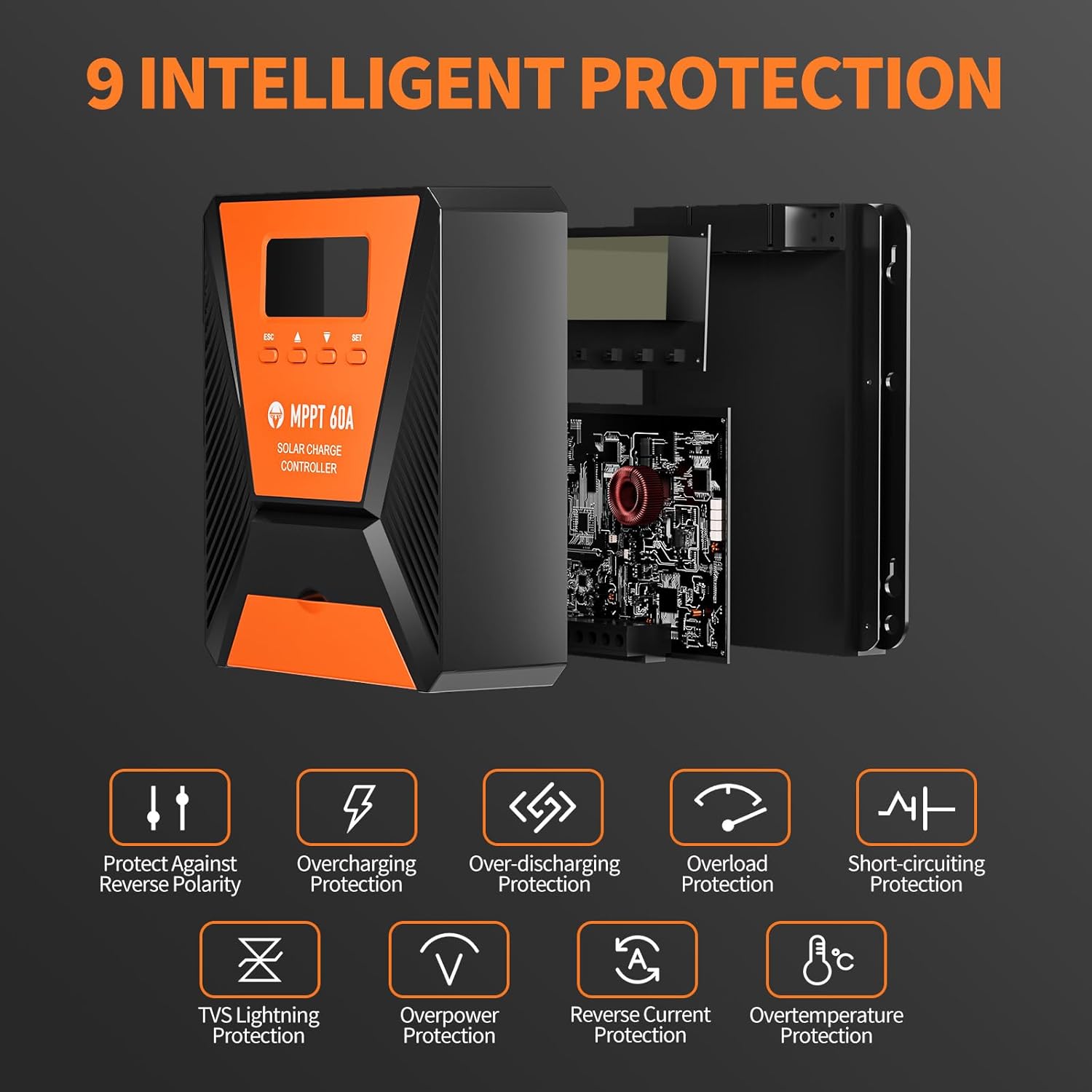
Image 7: The controller provides 9 intelligent protection features, including protection against reverse polarity, overcharging, over-discharging, overload, short-circuiting, TVS lightning, overpower, reverse current, and overtemperature.
9. Especificacions
| Característica | Especificació |
|---|---|
| Model | 40A |
| Marca | TOPBULL |
| Volum del sistematage | 12V/24V Automatic Recognition |
| Eficiència de seguiment | >99% |
| Peak Conversion Efficiency | Màxim 98% |
| Tipus de bateries compatibles | FLD, LiFePO4, SLD, GEL, AGM |
| Volum d'entrada PV màximtage | 100V DC |
| Max Solar Input Power (12V System) | 720W |
| Max Solar Input Power (24V System) | 1440W |
| Sortida USB | Dual USB Ports, 5V DC |
| Tipus de visualització | LCD |
| Dimensions (paquet) | 23.6 x 22.1 x 10.59 cm |
| Pes (paquet) | 1.25 kg |
| Accessoris inclosos | Cargols de muntatge |
10. Garantia i Suport
TOPBULL is committed to providing professional technical support. If you have any questions or require assistance with your MPPT solar charge controller, please contact our customer service. We strive to meet your needs and provide the best possible support.