
PWNAGE MAG-S-BLG
PWNAGE Stormbreaker Wireless Magnesium Gaming Mouse User Manual
Model: MAG-S-BLG
Introducció
The PWNAGE Stormbreaker Wireless Magnesium Gaming Mouse is engineered for professional gamers, offering unparalleled precision and a lightweight design. Featuring Pure Aim Technology with a Pixart 3395 optical sensor, it delivers up to 26,000 DPI for flawless tracking. Its premium magnesium construction ensures durability while maintaining an ultralight 50-gram weight for superior aim control. The ergonomic shape is designed for comfort during extended gaming sessions and productivity tasks. With a 4000Hz wireless polling rate and finely tuned firmware, this mouse provides ultra-low click latency and industry-leading motion latency.

Imatge: Superior view of the PWNAGE Stormbreaker mouse, highlighting its distinctive gradient finish and lightweight perforated design.
Guia de configuració
1. Càrrega del ratolí
Before first use, ensure the mouse is fully charged. Connect the included USB-C cable to the front port of the mouse and the other end to a powered USB port on your computer or a USB wall adapter. The mouse features a Lithium Ion battery (included). An indicator light will typically show charging status.

Imatge: Frontal view of the mouse, illustrating the USB-C port for charging and wired connection.
2. Wireless Connectivity (2.4GHz)
- Locate the 2.4GHz wireless dongle, usually stored in a compartment on the underside of the mouse or in the packaging.
- Plug the wireless dongle into an available USB port on your computer.
- Enceneu el ratolí amb l'interruptor d'encesa situat a la part inferior.
- Your computer should automatically detect and install the necessary drivers. If not, visit the official PWNAGE weblloc per a la descàrrega de controladors.
3. Instal·lació de programari (opcional)
For advanced customization of DPI settings, button remapping, macro creation, and polling rate adjustment (up to 4000Hz), download and install the official PWNAGE software from the manufacturer's website. This software allows you to unlock the full potential of your Stormbreaker mouse.
Instruccions de funcionament
Ajust de DPI
The Stormbreaker mouse features a dedicated DPI button, typically located behind the scroll wheel. Press this button to cycle through pre-set DPI levels. You can customize these levels and add more steps using the PWNAGE software to match your preferred sensitivity, up to 26,000 DPI.
Taxa de votació
The mouse supports a 4000Hz polling rate, which means it reports its position to your computer 4000 times per second, significantly reducing input lag. This setting can usually be adjusted within the PWNAGE software. Ensure your system can handle the higher polling rate for optimal performance.
Funcions del botó
- Clic esquerre: Acció primària.
- Clic dret: Menú contextual/d'acció secundària.
- Roda de desplaçament: Desplaça't amunt/avall, fes clic amb el botó central.
- Botó DPI: Cycles through DPI profiles.
- Botons laterals: Typically assigned to forward/backward navigation by default. Customizable via software.

Imatge: Anglesa view del ratolí, espectacleasing its ergonomic design and accessible side buttons.
Manteniment
Neteja
Per mantenir un rendiment i un aspecte òptims, netegeu el ratolí regularment.
- Feu servir un drap suau i sense borrissol, lleugerament humitampened with water or a mild cleaning solution, to wipe the surface of the mouse.
- For hard-to-reach areas or the perforated shell, use compressed air to remove dust and debris.
- Eviteu utilitzar productes químics agressius, netejadors abrasius o humitat excessiva, ja que poden danyar el ratolí.
Emmagatzematge
Quan no l'utilitzeu durant períodes prolongats, guardeu el ratolí en un lloc sec i fresc, allunyat de la llum solar directa i de temperatures extremes.
Resolució de problemes
| Problema | Possible solució |
|---|---|
| El ratolí no respon |
|
| Retard o moviment erràtic |
|
| La bateria no manté la càrrega |
|
Especificacions
| Característica | Detall |
|---|---|
| Marca | PWNAGE |
| Número de model | MAG-S-BLG |
| Tecnologia de connectivitat | Lag Free 2.4GHz Wireless |
| Tecnologia de detecció de moviment | Òptic (Pixart 3395) |
| DPI màxim | 26,000 DPI |
| Taxa de votació | 4000 Hz |
| Pes de l'article | 1.76 unces (aproximadament 50 grams) |
| Material | Magnesi |
| Patins | 100% PTFE |
| Tipus de bateria | 1 bateria de ions de liti (inclosa) |
| Disseny ergonòmic | Sí |
| Color | Limited Edition (Gradient) |
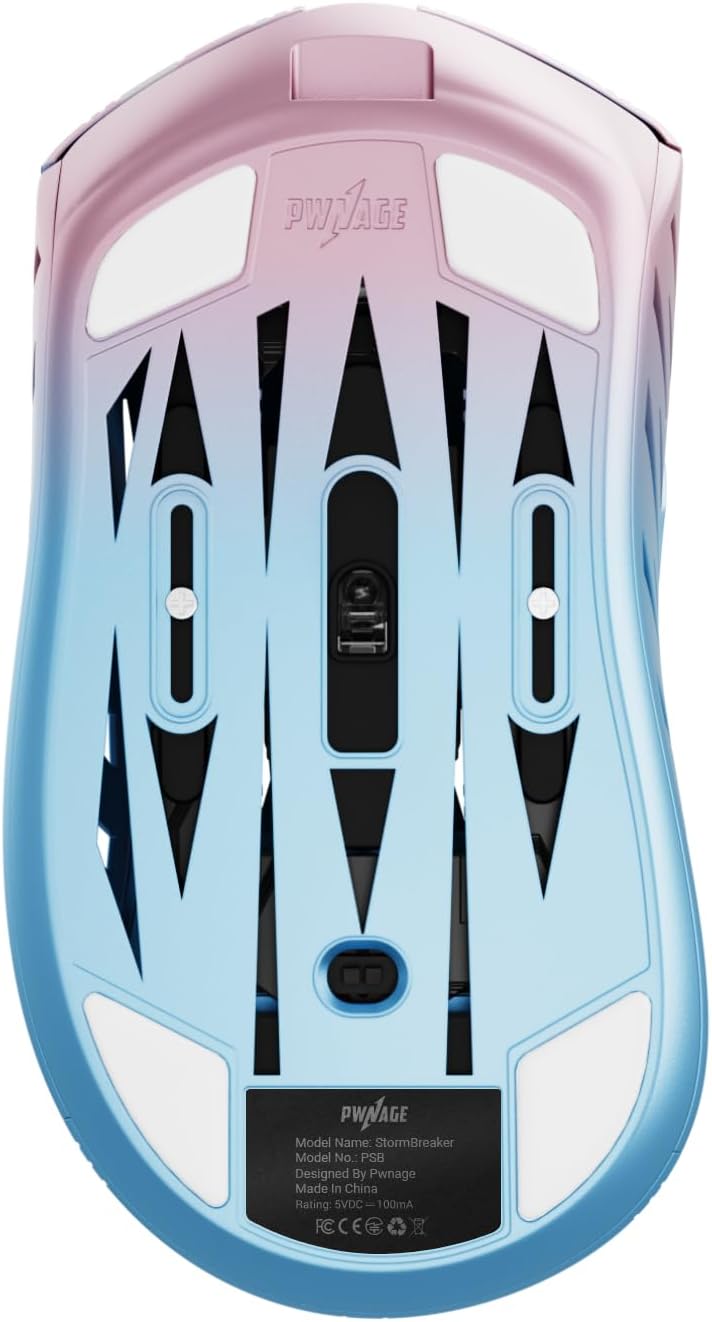
Image: Underside of the mouse, displaying the smooth PTFE skates and optical sensor.
Garantia i Suport
For warranty information and technical support, please refer to the official PWNAGE weblloc web o contacteu directament amb el seu servei d'atenció al client. Conserveu el comprovant de compra per a qualsevol reclamació de garantia.
Recursos en línia: Visita www.pwnage.com per a controladors, programari, preguntes freqüents i informació de contacte d'assistència.
Ask a question about this manual
Ask about setup, troubleshooting, compatibility, parts, safety, or missing instructions. Manuals+ will review the question and use this page’s manual context to help answer it.