
Introducció
This manual provides essential information for the safe and efficient operation of your Bose S1 Pro+ Multi-Position PA System and Wireless Mic/Line Transmitter. Please read this manual thoroughly before using the product and retain it for future reference.
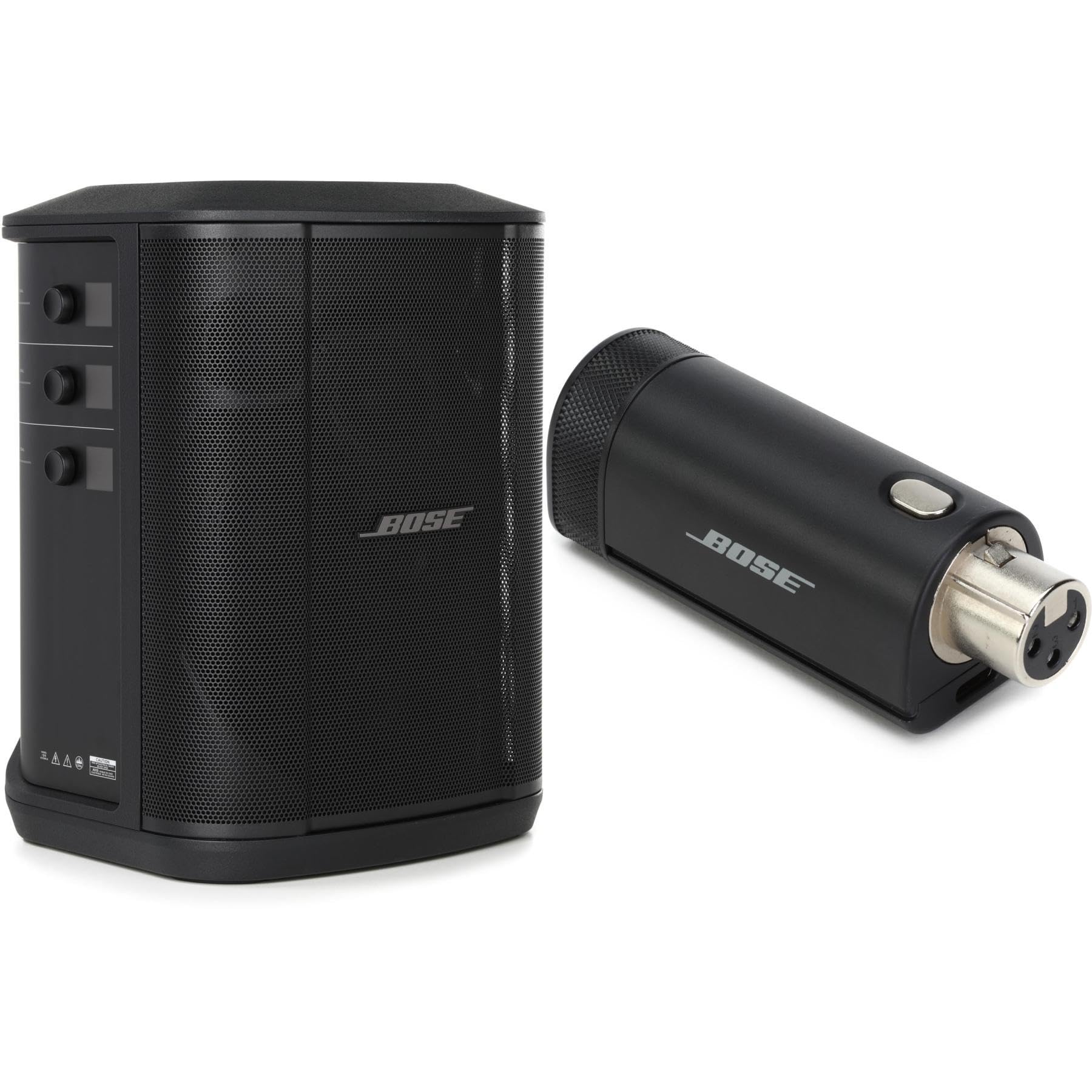
Image: The Bose S1 Pro+ Multi-Position PA System, shown with a wireless microphone transmitter connected.
Informació de seguretat
Seguiu sempre les precaucions de seguretat bàsiques quan utilitzeu aquest producte per reduir el risc d'incendi, descàrrega elèctrica i lesions a les persones.
- Llegeix aquestes instruccions.
- Conserveu aquestes instruccions.
- Compte amb totes les advertències.
- Seguiu totes les instruccions.
- No utilitzeu aquest aparell prop de l'aigua.
- Netegeu només amb un drap sec.
- No bloquegeu cap obertura de ventilació. Instal·leu-ho d'acord amb les instruccions del fabricant.
- No instal·leu a prop de cap font de calor com ara radiadors, registres de calor, estufes o altres aparells (inclosos amplificadors) que produeixen calor.
- Utilitzeu només accessoris/accessoris especificats pel fabricant.
- Demaneu tot el servei a personal de servei qualificat. Cal fer servei quan l'aparell s'hagi fet malbé d'alguna manera.
Contingut del paquet
- Bose S1 Pro+ Multi-Position PA System
- Wireless Mic/Line Transmitter (XLR type)
- Cable d'alimentació de CA.
- Manual d'usuari (aquest document)
Configuració
1. Carregant la bateria
The S1 Pro+ system includes a factory-installed Li-ion battery. Before initial use, fully charge the battery by connecting the AC power cable to the system and a power outlet. The charging indicator will illuminate.
2. Posicionament del sistema
The S1 Pro+ is designed for multi-position use. It can be placed in four main positions:
- On a table: Lay the system horizontally on a flat surface.
- Tilted back: Tilt the system back on its edge for upward sound projection.
- On a speaker stand: Use the integrated pole mount for elevated sound.
- Verticalment: Stand the system upright for a traditional PA setup.
The system features Auto EQ, which automatically adjusts the sound based on its orientation to ensure optimal performance.
3. Connecting the Wireless Mic/Line Transmitter
The included wireless mic/line transmitter pairs effortlessly with the S1 Pro+'s integrated wireless RF receiver.
- Ensure the S1 Pro+ system is powered on.
- Insert the XLR connector of the wireless transmitter into a microphone or line-level source.
- Power on the transmitter. It will automatically connect to the S1 Pro+ system.
- The S1 Pro+ has dedicated compartments for storing and charging these transmitters.
4. Connexions amb cable
The S1 Pro+ offers various wired input options:
- Canals 1 i 2: XLR/1/4-inch combo jacks for microphones or instruments.
- Canal 3: 1/8-inch (3.5mm) aux input for external audio devices.
- USB-C: For livestreaming or connecting to a computer.
En funcionament
1. Encès / apagat
Press and hold the power button located on the rear panel to turn the system on or off.
2. Adjusting Volume and ToneMatch
Each channel (1 and 2) has independent controls for volume, EQ (bass/treble), and reverb. The integrated OLED screens provide visual feedback.
- Volum: Rotate the corresponding knob to adjust the input level.
- EQ: Press the knob to cycle through EQ settings (e.g., flat, microphone, guitar). ToneMatch technology optimizes the sound for the selected source.
- Reverb: Rotate the knob to add reverberation to the channel.
3. Transmissió Bluetooth
The S1 Pro+ supports stereo Bluetooth streaming for channel 3.
- Activa el Bluetooth al teu dispositiu mòbil.
- Press the Bluetooth pairing button on the S1 Pro+ (usually on Channel 3).
- Select "Bose S1 Pro+" from your device's Bluetooth list.
- Once paired, audio from your device will stream to the S1 Pro+.
4. Livestream Mode (USB-C)
Connect a USB-C cable from the S1 Pro+ to your computer for direct audio output for livestreaming applications. The system will appear as an audio interface.
5. Using the Bose Music App
For advanced control and features, download the Bose Music App from your device's app store. The app allows remote control of settings and access to additional functionalities.
Manteniment
1. Neteja
Clean the exterior of the S1 Pro+ system with a soft, dry cloth. Do not use liquid cleaners or solvents.
2. Cura de la bateria
The integrated Li-ion battery provides up to 4 hours of operation for the wireless transmitter. For optimal battery life, avoid fully discharging the battery frequently and store the system in a cool, dry place when not in use for extended periods.
3. Emmagatzematge
Store the system in a protective case or cover to prevent dust and physical damage.
Resolució de problemes
| Problema | Causa possible | Solució |
|---|---|---|
| Sense sortida de so |
|
|
| Mala qualitat del so |
|
|
| Wireless transmitter not connecting |
|
|
Especificacions
| Nom del model | S1 Pro+ |
| Fabricant | Bose |
| Tecnologia de connectivitat | Bluetooth, USB, Wi-Fi |
| Color | Negre |
| Dispositius compatibles | Laptop, Projector, Smartphone, Tablet |
| Tipus de muntatge | Tabletop, Pole Mount |
| Font d'alimentació | Battery Powered (Li-ion), AC Power |
| Tipus de connector | XLR, 1/4-inch, USB-C, 1/8-inch (3.5mm) |
| Nombre de canals | 3 |
| Material de tancament | Metall, plàstic |
| Pes de l'article | 14.4 lliures (6.53 kg) |
| Wireless Transmitter Range | 30 peus (9 metres) |
| Durada de la bateria del transmissor sense fil | Fins a 4 hores |
| UPC | 645781082625 |
Informació de la garantia
Bose products are covered by a limited warranty. For specific warranty terms and conditions applicable to your region, please refer to the warranty card included with your product or visit the official Bose weblloc web. Conserveu el comprovant de compra per a reclamacions de garantia.
Suport
For technical support, product registration, or to download the latest firmware updates, please visit the official Bose support weblloc: www.bose.com/support.
You can also contact Bose customer service directly. Contact information can be found on the support weblloc.