
R-MUSIC RM484529
R-MUSIC Party Boost S High Power Speaker User Manual
Model: RM484529
Introducció
The R-MUSIC Party Boost S speaker is designed to provide an immersive audio experience, perfect for parties and events. This high-power speaker features Bluetooth 5.3 connectivity, dynamic RGB light effects, a dedicated karaoke mode, and an impressive battery life, combining robust performance with portable design.
This manual provides essential information for setting up, operating, and maintaining your Party Boost S speaker to ensure optimal performance and longevity.
Què hi ha a la caixa
Upon unboxing your R-MUSIC Party Boost S, please verify that all components are present:
- Party Boost S Speaker
- Micròfon per cable
- Cable de càrrega
- Carregador
- Manual d'usuari (aquest document)
Producte acabatview
Familiarize yourself with the key features and components of your Party Boost S speaker.

The R-MUSIC Party Boost S speaker, showcasing its integrated RGB lighting on the front grille and top control panel. The speaker is black with a textured finish on the sides and a convenient carry handle on top.
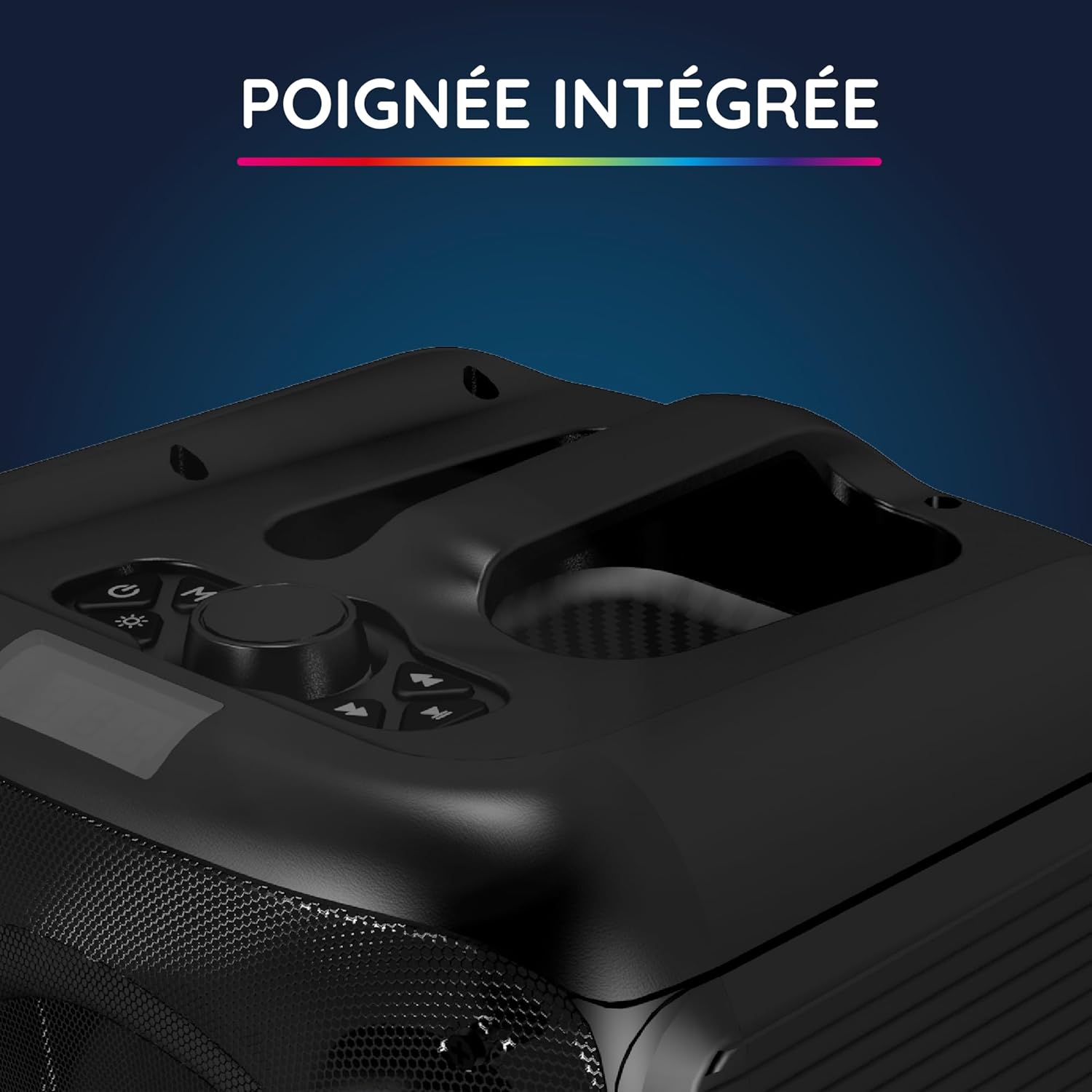
Un primer pla view of the integrated handle located on the top of the Party Boost S speaker, designed for easy portability and transport.

The connectivity panel of the Party Boost S speaker, featuring various input ports including USB, USB-C, AUX, and Micro-SD slots for versatile device connections.

The top control panel of the Party Boost S speaker, showing buttons for equalizer settings, volume adjustment, and echo control, along with a digital display.
Configuració
Carregant l'altaveu
Before first use, fully charge the speaker. Connect the provided charging cable to the speaker's charging port and the other end to the charger. Plug the charger into a power outlet. The charging indicator will show the charging status. A full charge takes approximately 5 hours and provides up to 10 hours of continuous playback.
Encès inicial
Locate the power button on the speaker's control panel. Press and hold the power button for a few seconds until the speaker powers on and the LED lights illuminate.
Instruccions de funcionament
Connexió Bluetooth
- Ensure the Party Boost S speaker is powered on.
- Activate Bluetooth on your smartphone, tablet, PC, or laptop.
- Cerca "R-MUSIC Party Boost S" in your device's Bluetooth settings.
- Select the speaker to pair. A confirmation sound will indicate a successful connection.
- The speaker uses Bluetooth 5.3 for a stable connection up to 10 meters.
Using Other Connectivity Options
- Port USB: Inseriu una unitat USB amb àudio files al port USB. L'altaveu detectarà i reproduirà la música automàticament.
- Entrada AUX: Connect an external audio device (e.g., MP3 player) using a 3.5mm AUX cable to the AUX port.
- Targeta micro SD: Inseriu una targeta Micro SD amb àudio files into the Micro SD slot.
- Jack de 6.35 mm: This port is primarily for the wired microphone.
Karaoke Mode and Microphone Use
To use the karaoke feature:
- Connect the wired microphone to the 6.35mm jack port on the speaker.
- Play your desired instrumental track via Bluetooth or other input methods.
- Adjust the microphone volume and echo effects using the controls on the speaker's top panel for an optimal karaoke experience.

The wired microphone included with the Party Boost S speaker, featuring an on/off switch and a standard audio jack for connection.
Sound Adjustment (Bass & Treble)
Use the dedicated controls on the speaker's top panel to adjust the bass and treble levels according to your audio preferences. This allows for fine-tuning the sound output for various music genres or environments.
Efectes de llum RGB
The speaker features integrated RGB light shows that synchronize with your music. Use the light mode button on the control panel to cycle through different light animations or turn them off.
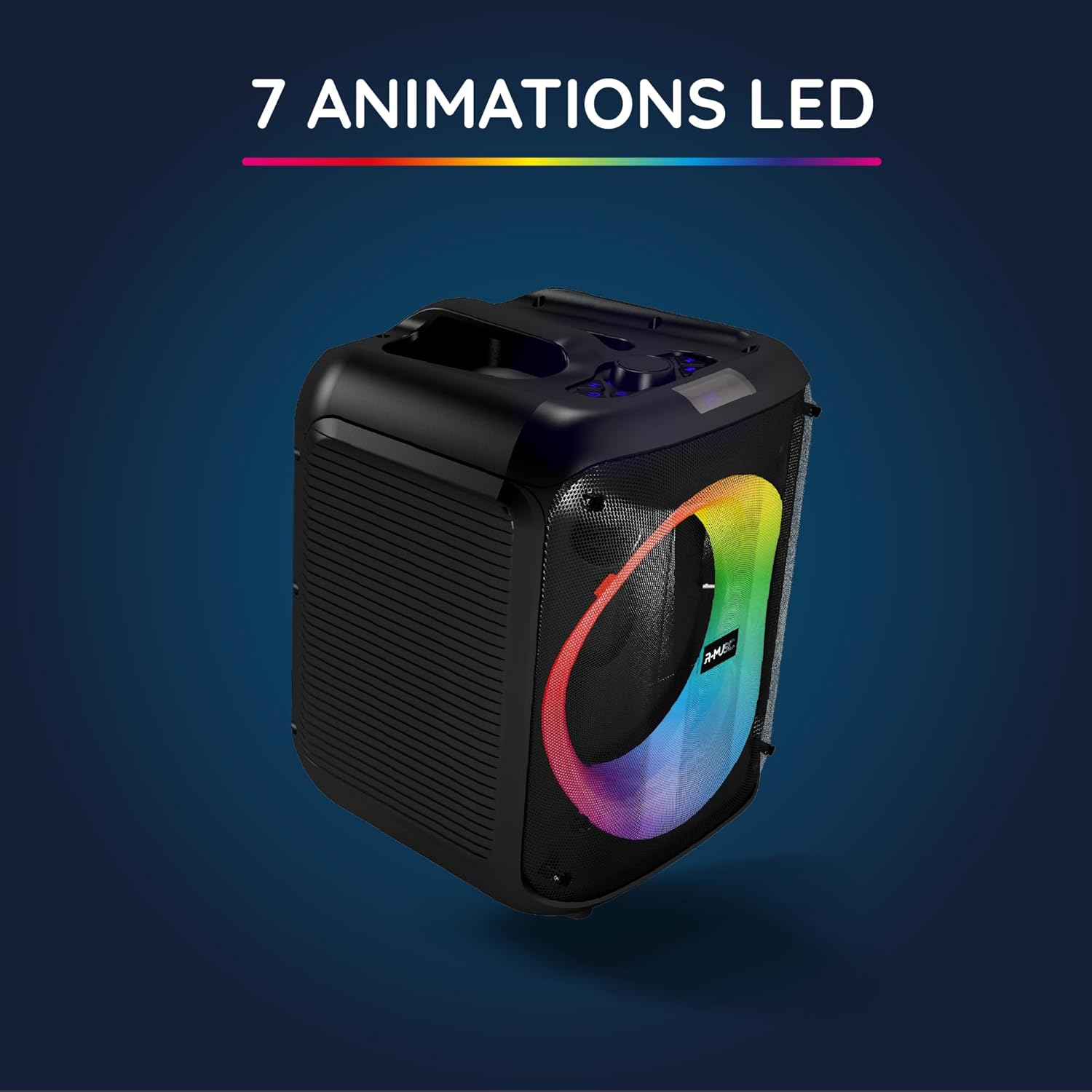
The Party Boost S speaker illuminated with vibrant RGB LED animations, showcasing its ability to create a dynamic visual experience synchronized with audio.
Connexió de diversos altaveus
For an enhanced stereo experience, you can connect two Party Boost S speakers together. Refer to the specific instructions for TWS (True Wireless Stereo) pairing, usually initiated by a dedicated button or a long press on the Bluetooth button on both speakers. Ensure both speakers are in pairing mode before attempting to connect them to each other.
Manteniment
- Neteja: Feu servir un drap suau i sec per netejar l'exterior de l'altaveu. No utilitzeu netejadors abrasius, ceres ni dissolvents.
- Emmagatzematge: Quan no l'utilitzeu durant períodes prolongats, guardeu l'altaveu en un lloc fresc i sec, allunyat de la llum solar directa i de temperatures extremes.
- Cura de la bateria: Per allargar la durada de la bateria, eviteu descarregar-la completament amb freqüència. Carregueu l'altaveu regularment, fins i tot si no l'esteu fent servir.
- Resistència a l'aigua: This speaker is not water-resistant. Avoid exposure to liquids.
Resolució de problemes
| Problema | Causa possible | Solució |
|---|---|---|
| Sense poder | Battery is depleted; Power cable not connected properly. | Carregueu l'altaveu completament; assegureu-vos que el cable d'alimentació estigui connectat correctament. |
| Sense so | Volume is too low; Incorrect input source selected; Device not paired correctly. | Increase volume on speaker and connected device; Select correct input (Bluetooth, AUX, USB, SD); Re-pair Bluetooth device. |
| Connexió Bluetooth inestable | Device is out of range; Interference from other devices. | Move device closer to speaker (within 10m); Move speaker away from other wireless devices. |
| El micròfon no funciona | Microphone not plugged in correctly; Microphone switch is off. | Ensure microphone is fully inserted into the 6.35mm jack; Turn on the microphone switch. |
Especificacions
| Número de model | 484529 RM |
| Marca | R-MÚSICA |
| Tipus de connectivitat | Bluetooth 5.3 |
| Entrades d'àudio | Bluetooth, USB, 6.35mm Jack, AUX, Micro SD |
| Resposta de freqüència | 20 Hz - 20 kHz |
| Durada de la bateria | Up to 10 hours (3600mAh Lithium-ion) |
| Temps de càrrega | Aprox. 5 hores |
| Dimensions (L x A x A) | 29 x 34 x 26 cm |
| Pes | 3.95 kg |
| Color | Negre |
| Dispositius compatibles | Smartphones, Tablets, PCs, Laptops |
| Característiques especials | Integrated RGB Lights, Karaoke Mode, Wired Microphone Included, Bass & Treble Adjustment, Multi-speaker Connection (TWS), Integrated Handle |
Garantia i Suport
Garantia del fabricant
The R-MUSIC Party Boost S speaker comes with a Garantia del fabricant de 2 anys des de la data de compra. Aquesta garantia cobreix els defectes de materials i fabricació en condicions d'ús normal. No cobreix els danys causats per un mal ús, accidents, modificacions no autoritzades o desgast normal.
Conserveu el vostre comprovant de compra per a reclamacions de garantia.
Atenció al client
For technical assistance, warranty claims, or any questions regarding your R-MUSIC Party Boost S speaker, please contact your retailer or the manufacturer's customer support. Refer to the product packaging or the retailer's weblloc per obtenir informació de contacte.
Ask a question about this manual
Ask about setup, troubleshooting, compatibility, parts, safety, or missing instructions. Manuals+ will review the question and use this page’s manual context to help answer it.