
1. Introducció
Gràcies per la compraasing the HOCO HA1 Portable Party Speaker. This manual provides essential information for the safe and efficient operation of your device. Please read it thoroughly before use and retain it for future reference.
Informació de seguretat
- No exposeu l'altaveu a l'aigua ni a una humitat excessiva.
- Eviteu col·locar l'altaveu a prop de fonts de calor o sota la llum solar directa.
- No intenteu desmuntar ni reparar la unitat vosaltres mateixos. Poseu-vos en contacte amb personal de servei qualificat.
- Mantenir fora de l'abast dels nens.
- Feu servir només els accessoris de càrrega especificats.
2. Contingut del paquet
Si us plau, comproveu que tots els elements siguin presents al paquet:
- HOCO HA1 Portable Party Speaker
- Micròfon per cable
- Charging Cable (USB-A to DC barrel jack, inferred)
- Manual d'instruccions (aquest document)

Image: The HOCO HA1 speaker packaging, illustrating the speaker and its accessories, including a wired microphone.
3. Producte acabatview: Controls i ports
Familiarize yourself with the various controls and connection ports on your HOCO HA1 speaker.

Imatge: Superior view of the HOCO HA1 speaker, highlighting the control panel with buttons, rotary knob, and integrated carrying handle.
Tauler de control (superior)
- Botó d'encesa: Manteniu premut per encendre/apagar l'altaveu.
- Botó de mode: Short press to switch between Bluetooth, USB, AUX, and FM radio modes.
- Pom de volum: Rotate to adjust the master volume.
- Botó Reproduir/Pausa: Premeu per reproduir o posar en pausa l'àudio.
- Botons de pista anterior/següent: Press to skip tracks in Bluetooth/USB mode, or change FM stations.
- Botó del mode de llum: Press to cycle through different LED light effects or turn them off.

Imatge: Part posterior view of the HOCO HA1 speaker, displaying the various input ports for USB, AUX, and microphone connections.
Ports posteriors
- Port USB: Per reproduir àudio des d'una unitat flash USB.
- Entrada AUX (3.5 mm): Per connectar dispositius d'àudio externs mitjançant un cable d'àudio.
- Microphone Input (6.35mm): Per connectar el micròfon amb cable.
- Port de càrrega DC 5V: Per connectar el cable de càrrega.
4. Configuració
4.1 Càrrega de l'altaveu
- Connect the charging cable to the DC 5V charging port on the rear of the speaker.
- Connecteu l'altre extrem del cable de càrrega a un adaptador de corrent USB compatible (no inclòs) o a un port USB.
- L'indicador lluminós de càrrega s'il·luminarà. Espereu aproximadament de 3 a 4 hores per a una càrrega completa.
- Desconnecta el cable de càrrega un cop estigui completament carregat.
4.2 Connexió del micròfon
- Locate the Microphone Input (6.35mm) port on the rear of the speaker.
- Insert the microphone cable securely into this port.
- The microphone is now ready for use in Karaoke mode.
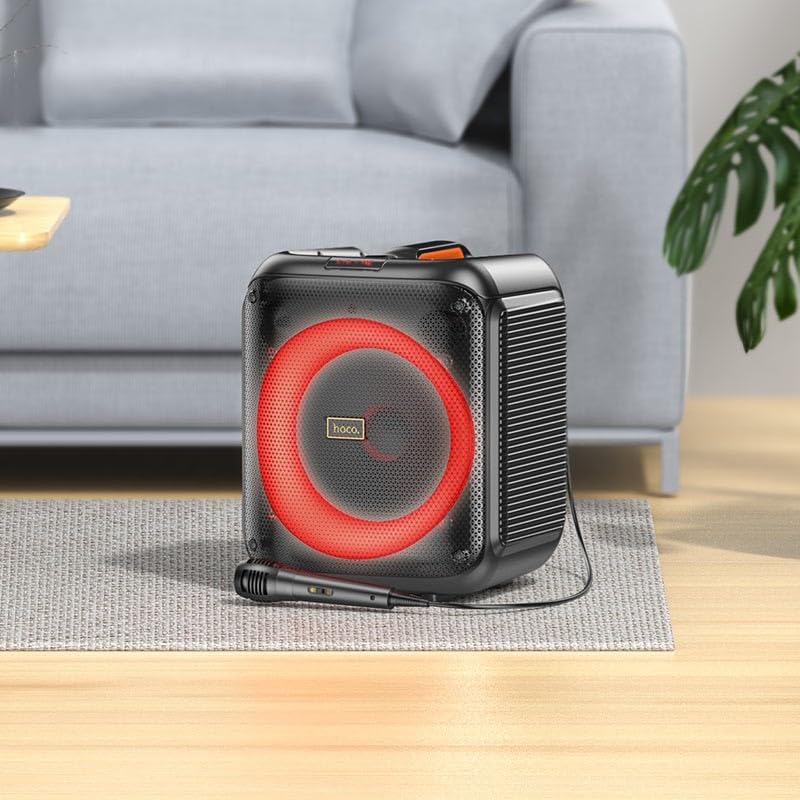
Image: The HOCO HA1 speaker set up with its wired microphone, demonstrating its readiness for karaoke or vocal use.
5. Instruccions de funcionament
5.1 Encès/Apagat
Manteniu premut el botó Botó d'engegada on the control panel for approximately 3 seconds to turn the speaker On or Off.
5.2 Vinculació Bluetooth
- Engegueu l'altaveu. Entrarà automàticament en mode d'emparellament Bluetooth, cosa que indicarà un LED intermitent.
- Al dispositiu mòbil, activeu el Bluetooth i cerqueu els dispositius disponibles.
- Select "HOCO HA1" from the list of devices.
- Un cop emparellat, l'altaveu emetrà un so de confirmació i el LED deixarà de parpellejar.
- Ara pots reproduir àudio des del teu dispositiu a través de l'altaveu.
Reproducció USB 5.3
- Inseriu una unitat flash USB que contingui àudio MP3 files al port USB de la part posterior de l'altaveu.
- Premeu el botó Botó de mode until "USB" mode is selected.
- The speaker will automatically begin playing audio from the USB drive.
- Utilitza el Reproduir/Pausa i Pista anterior / següent botons per controlar la reproducció.
5.4 Entrada AUX
- Connect an external audio device (e.g., smartphone, MP3 player) to the AUX Input port using a 3.5mm audio cable (not included).
- Premeu el botó Botó de mode until "AUX" mode is selected.
- Play audio from your connected device. The speaker will output the sound.
5.5 Ràdio FM
- Premeu el botó Botó de mode until "FM" mode is selected.
- Per escanejar automàticament i desar les emissores disponibles, manteniu premut el botó Botó Reproduir/Pausa. The speaker will scan and store stations.
- Utilitza el Botons de pista anterior/següent to navigate between saved FM stations.
5.6 Karaoke Function (Microphone Use)
Once the microphone is connected (as described in Section 4.2), simply speak or sing into it. The microphone audio will be mixed with any music playing through the speaker (Bluetooth, USB, AUX). Adjust the master volume using the Pom de volum.
5.7 Efectes de llum LED
Premeu el botó Botó de mode de llum on the control panel to cycle through various LED light effects. Pressing it repeatedly will change the pattern or turn the lights off.

Image: The HOCO HA1 speaker showcasing its dynamic, multi-colored LED lighting feature, enhancing the party atmosphere.
6. Manteniment
6.1 Neteja
- Assegureu-vos que l'altaveu estigui apagat i desendollat abans de netejar-lo.
- Feu servir un drap suau i sec per netejar les superfícies exteriors.
- No utilitzeu netejadors abrasius, ceres ni dissolvents.
6.2 Emmagatzematge
- Guardeu l'altaveu en un lloc fresc i sec, allunyat de la llum solar directa i de temperatures extremes.
- If storing for an extended period, charge the battery periodically (e.g., every 3 months) to maintain battery health.
7. Solució De Problemes
| Problema | Causa possible | Solució |
|---|---|---|
| L'altaveu no s'encén. | La bateria està esgotada. | Carregueu l'altaveu durant almenys 30 minuts. |
| No hi ha so de l'altaveu. | El volum és massa baix; s'ha seleccionat un mode incorrecte; el dispositiu no està emparellat (Bluetooth). | Increase volume; press Mode button to select correct input; re-pair Bluetooth device. |
| El dispositiu Bluetooth no es pot emparellar. | L'altaveu no està en mode d'emparellament; el dispositiu és massa lluny; interferències. | Ensure speaker is in Bluetooth mode and flashing; move device closer; turn off other Bluetooth devices. |
| El micròfon no funciona. | Microphone not properly connected; microphone switch off (if applicable). | Ensure microphone is fully plugged into the correct port; check if microphone has an On/Off switch. |
| La recepció de ràdio FM és deficient. | Senyal feble; interferències ambientals. | Relocate the speaker; try auto-scanning again. |
8. Especificacions
| Número de model | HA1 (20000463) |
| Marca | HOCO |
| Potència de sortida dels altaveus | 45 watts (màx.) |
| Connectivitat | Bluetooth, USB, AUX (3.5mm), FM Radio |
| Entrada de micròfon | Sí (6.35 mm) |
| Tipus de bateria | Ió de liti (1 inclosa) |
| Pes de l'article | 3.6 quilos |
| Tipus de muntatge | Suport de sobretaula |
9. Garantia i Suport
The HOCO HA1 Portable Party Speaker comes with a standard manufacturer's warranty. For detailed warranty terms and conditions, please refer to the warranty card included with your purchase or visit the official HOCO weblloc.
For technical support, troubleshooting assistance beyond this manual, or service inquiries, please contact HOCO customer support through their official channels. Contact information can typically be found on the product packaging or the HOCO official weblloc.