
1. Producte acabatview
The DOOGEE Fire 6 Power is a rugged outdoor smartphone designed for durability and high performance. It features a massive 15500mAh battery, advanced camera capabilities, and robust protection against environmental elements.

Imatge: Anvers i revers view of the DOOGEE Fire 6 Power Outdoor Smartphone, showcasing its rugged design, large battery capacity (15500mAh), memory (20GB+256GB), and flashlight (120LM).
Característiques principals:
- Durada de la bateria ultrallarga: Equipped with a 15500mAh battery, supporting 33W fast charging and 18W OTG reverse charging.
- Rendiment potent: Features 20GB DDR4X RAM (8GB base + 12GB extended) and 256GB ROM, expandable up to 2TB via TF card.
- High-Resolution Camera System: Includes a 50MP main camera and an 8MP front camera with various shooting modes.
- Llanterna brillant: Integrated 120LM dual light flashlight with multiple modes for diverse lighting needs.
- Durabilitat robusta: IP68/IP69K certified for water and dust resistance, and MIL-STD-810H compliant for shockproof durability.
- Connectivitat avançada: Supports Dual SIM 4G, WiFi 5, NFC for payments, and precise navigation with GPS/GLONASS/BeiDou/Galileo.
- Accés segur: Features Face ID and fingerprint recognition for quick and secure unlocking.
- Últim sistema operatiu Android: Runs on Android 14, offering enhanced privacy and security features.
2. Guia de configuració
2.1. Contingut del paquet
Abans de començar, comproveu que tots els elements siguin presents al paquet:

Image: A visual representation of the DOOGEE Fire 6 Power package contents, including the smartphone, USB Type-C cable, 3-in-1 reverse charging cable, charger, pre-applied screen protector, explosion-proof film, packaging box, user manual, and warranty card.
- 1 x DOOGEE Fire 6 Power Outdoor Smartphone
- 1 x cable USB tipus C
- 1 x Carregador
- 1 x Pre-applied Screen Protector
- 1 x Explosion-proof Film
- 1 x Caixa d’envasos
- 1 x Manual d'usuari
- 1 x Targeta de garantia
- 1 x 3-in-1 Charging Cable
2.2. Instal·lació de la targeta SIM i la targeta TF
The DOOGEE Fire 6 Power supports a 3-slot design, allowing for two SIM cards and one TF (microSD) card simultaneously.

Image: Illustration of the triple card slot for two SIM cards and one TF card, along with the side-mounted fingerprint sensor for unlocking.
- Localitza la safata de la targeta SIM al lateral del dispositiu.
- Insert the SIM ejector tool (if provided) or a small pin into the small hole next to the tray to open it.
- Traieu la safata amb cura.
- Col·loqueu les targetes Nano-SIM i/o la targeta TF a les ranures designades de la safata, assegurant-vos que l'orientació sigui correcta.
- Empenyeu suaument la safata cap enrere dins del dispositiu fins que quedi alineada amb el lateral.
2.3. Càrrega inicial i engegada
Es recomana carregar completament el dispositiu abans del primer ús.

Image: The DOOGEE Fire 6 Power highlighting its 15500mAh battery, 33W fast charging capability, and estimated usage times: 1410 hours standby, 361 hours music, 52 hours video, and 111 hours talk time.
- Connect the USB Type-C cable to the charging port on the phone.
- Connect the other end of the cable to the provided 33W charger.
- Connecteu el carregador a una presa de corrent. L'indicador de càrrega apareixerà a la pantalla.
- Once sufficiently charged, press and hold the Power button (located on the side) until the DOOGEE logo appears to turn on the device.
- Per apagar l'aparell, manteniu premut el botó d'engegada i, a continuació, seleccioneu "Apagar" de les opcions.
3. Instruccions de funcionament
3.1. Basic Phone Functions
- Fer trucades: Obriu l'aplicació Telèfon, marqueu el número i toqueu la icona de trucada.
- Enviament de missatges: Open the Messages app, start a new conversation, enter the recipient and message, then send.
- Connectivitat a Internet: Connect to Wi-Fi via Settings > Network & internet > Wi-Fi, or enable mobile data via Settings > Network & internet > Mobile network.
3.2. Ús de la càmera
The DOOGEE Fire 6 Power is equipped with a 50MP main camera and an 8MP front camera, offering various modes for capturing moments.

Imatge: Detallada view of the DOOGEE Fire 6 Power's camera system, highlighting the 50MP Super-Anti-Shake main camera, 2MP macro camera, and 8MP front camera.

Imatge: Examples of different camera applications and modes, including Beauty Mode for portraits, HDR Mode for balanced lighting, Panorama for wide shots, Pro Mode for manual controls, and Bokeh for depth effects.
- Obriu l'aplicació Càmera.
- Select your desired mode (e.g., Photo, Video, Portrait, Panorama, Beauty, Filter).
- Toqueu el botó de l'obturador per fer una foto o iniciar/aturar la gravació d'un vídeo.
- Canvieu entre la càmera frontal i la posterior mitjançant la icona de canvi de càmera.
3.3. Funcionament de la llanterna
The device features a powerful 120LM dual light flashlight with various illumination modes.

Image: The DOOGEE Fire 6 Power's 120LM dual light flashlight, illustrating its various brightness levels (Extremely Bright 100%, Strong Light 50%, Weak Light 25%) and special modes like Flash and SOS.

Image: Diverse application possibilities of the flashlight, showing its use during hiking at night, inspecting car engines, and general illumination in dark environments.
- Access the flashlight function from the quick settings panel (swipe down from the top of the screen).
- Tap the flashlight icon to turn it on/off.
- Some models may allow adjusting brightness or selecting modes (very bright, bright, dim, blink, SOS) through a dedicated app or long-pressing the icon.
3.4. Càrrega inversa OTG
The 18W OTG (On-The-Go) function allows your Fire 6 Power to act as a power bank for other devices.
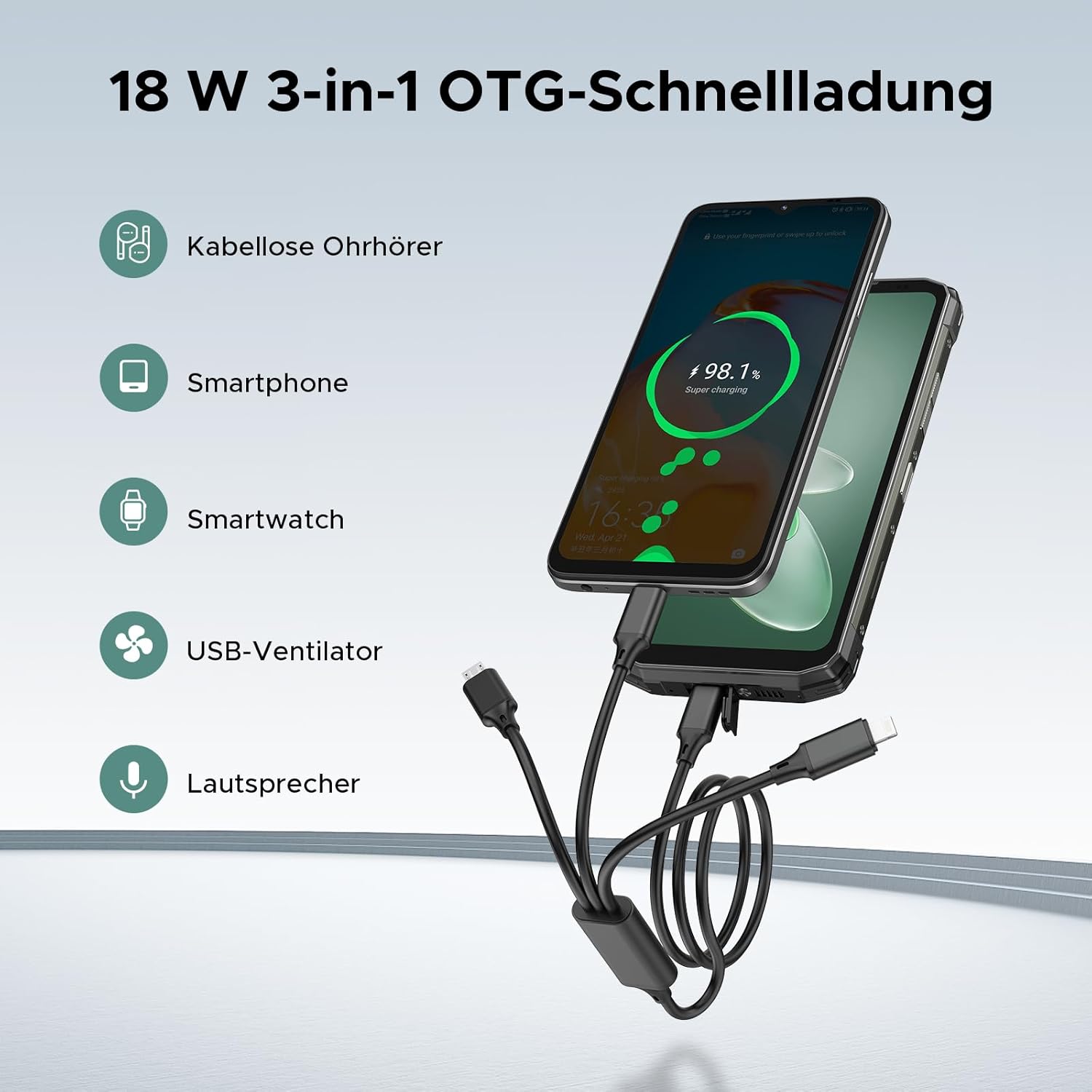
Image: The DOOGEE Fire 6 Power demonstrating its 18W 3-in-1 OTG fast charging capability, showing it can charge wireless earphones, other smartphones, smartwatches, USB fans, and speakers.

Image: The DOOGEE Fire 6 Power functioning as a power station, connected via a 3-in-1 cable to charge a tablet and another device, highlighting its versatility as an emergency charger.
- Connect the 3-in-1 charging cable to the USB Type-C port of your Fire 6 Power.
- Connect the appropriate connector of the 3-in-1 cable to the device you wish to charge.
- Ensure OTG is enabled in your phone's settings if charging does not begin automatically.
3.5. Navegació i connectivitat
The device supports multiple global navigation satellite systems (GNSS) and various connectivity options.
- GPS/GLONASS/BeiDou/Galileo: For accurate location tracking and navigation. Use with mapping applications for outdoor activities.
- NFC: For contactless payments and quick data exchange. Ensure NFC is enabled in settings and follow payment terminal instructions.
- Dual 4G SIM: Allows for two active 4G connections simultaneously, providing flexibility for personal and work numbers or improved network coverage.
- WiFi 5: For high-speed wireless internet connection.
3.6. Característiques de seguretat
Unlock your device securely using Face ID or the side-mounted fingerprint sensor.
- Identificació facial: Register your face in Settings > Security & privacy > Face unlock. Look at the front camera to unlock.
- Reconeixement d'empremtes digitals: Register your fingerprints in Settings > Security & privacy > Fingerprint unlock. Place your registered finger on the side-mounted sensor to unlock.
4. Manteniment i cura
Proper maintenance ensures the longevity and optimal performance of your DOOGEE Fire 6 Power.
4.1. Instruccions de neteja
- Feu servir un drap suau i sense borrissol per netejar la pantalla i la carcassa del telèfon.
- Per a la brutícia persistent, lleugerament dampNetegeu el drap amb aigua o un netejador de pantalles. Eviteu productes químics agressius.
- Ensure all ports (USB-C, SIM tray) are dry before charging or using in wet conditions.
4.2. Cura de la bateria
- Avoid exposing the phone to extreme temperatures (below -20°C or above 55°C) as this can degrade battery performance.
- While the phone supports fast charging, occasional full discharge and recharge cycles can help calibrate the battery.
- Use only the provided charger and cable for optimal charging and to prevent damage.
4.3. Robustesa i protecció
The DOOGEE Fire 6 Power is built to withstand harsh environments, but proper handling is still advised.

Image: The DOOGEE Fire 6 Power showcasing its robust features: waterproof (IP68), dustproof (IP69K), and drop-proof (MIL-STD-810H), with images of the phone submerged in water, covered in dust, and a person hiking in rugged terrain.
- Water and Dust Resistance (IP68/IP69K): The phone can withstand immersion in 1.5 meters of water for 30 minutes and is protected against dust ingress. Ensure all port covers are securely closed before exposure to water or dust.
- Shockproof Durability (MIL-STD-810H): Designed to endure drops and impacts. While robust, avoid intentional drops from excessive heights.
- Regularly inspect the device for any physical damage that might compromise its protective features.
5. Solució De Problemes
This section addresses common issues you might encounter with your DOOGEE Fire 6 Power.
| Problema | Possible solució |
|---|---|
| El telèfon no s'encén. | Ensure the battery is charged. Connect to the charger for at least 10 minutes. If still unresponsive, perform a forced restart by holding the Power button for 10-15 seconds. |
| La bateria s'esgota ràpidament. | Check for background apps consuming power. Reduce screen brightness. Disable unnecessary features like Wi-Fi, Bluetooth, GPS when not in use. Consider a factory reset if the issue persists after checking app usage. |
| No es pot connectar a la xarxa Wi-Fi/dades mòbils. | Toggle Wi-Fi/Mobile Data off and on. Restart the phone. For Wi-Fi, forget the network and reconnect. For mobile data, ensure SIM card is properly inserted and APN settings are correct (contact your carrier if unsure). |
| Camera not working or dark images. | Clear the Camera app's cache and data (Settings > Apps > Camera > Storage). Ensure sufficient lighting. Check camera settings for exposure or brightness adjustments. Restart the phone. |
| Device is slow or unresponsive. | Close background applications. Clear cache from apps. Free up storage space. Restart the device. If performance issues persist, consider a factory reset (back up data first). |
If the problem persists after attempting these solutions, please contact DOOGEE customer support for further assistance.
6. Especificacions
Detailed technical specifications for the DOOGEE Fire 6 Power.

Image: Illustration of the powerful Octa-Core Processor, highlighting 8GB base RAM, 12GB extended RAM, 256GB ROM, and 2TB expandable storage.

Image: Specifications of the 6.56-inch HD+ display, including 84% screen-to-body ratio, 720*1612 HD+ resolution, 90Hz refresh rate, 20:9 aspect ratio, 16.7 million display colors, and 1500:1 contrast ratio.
| Característica | Detall |
|---|---|
| Marca | DOOGEE |
| Nom del model | doogee fire6 power |
| Sistema operatiu | Android 14 |
| Mida de la RAM instal·lada | 20 GB (8GB base + 12GB extended) |
| Capacitat d'emmagatzematge | 256 GB (ampliable fins a 2 TB) |
| Mida de la pantalla | 6.56 polzades (16.7 cm) |
| Resolució | 720*1612 HD+ |
| Freqüència d'actualització | 90 Hz |
| Bateria | 15500mAh Lithium-Polymer (2 required, included) |
| Carregant | 33W Fast Charging, 18W OTG Reverse Charging |
| Càmera principal | 50MP |
| Càmera frontal | 8MP |
| Llanterna | 120LM Dual Light |
| Tecnologia mòbil | 4G |
| Tecnologia de connectivitat | WIFI: 2.4G/5G, Bluetooth: BT5.0, FM, NFC, OTG, GPS |
| Durabilitat | IP68/IP69K, MIL-STD-810H |
| Dimensions del producte | 17.41 x 8.12 x 2.07 cm |
| Pes | 430 grams |
7. Garantia i Suport
DOOGEE is committed to providing excellent customer service and support for your Fire 6 Power.
- Garantia de devolució de 30 dies: Enjoy a 30-day period for returns and a full refund if you are not satisfied with your purchase.
- Garantia limitada de 2 anys: Your device is covered by a 2-year limited warranty against manufacturing defects. Please refer to the warranty card included in your package for detailed terms and conditions.
- 24/7 Personal Online Support: For any inquiries or technical assistance, DOOGEE offers 24/7 online support.
For further support, please visit the official DOOGEE website or contact their customer service team through the contact information provided in the warranty card or on the brand's Amazon store page: DOOGEE Store on Amazon.