
1. Introducció
Thank you for choosing the EVRAIN T8 PRO Mini PC. This compact and powerful device is designed for various computing needs, featuring an 8-inch touch screen, robust connectivity options, and efficient performance. This manual provides essential information for setting up, operating, maintaining, and troubleshooting your Mini PC to ensure optimal performance and longevity.
2. Producte acabatview
2.1. Contingut del paquet
- EVRAIN T8 PRO Mini PC
- Adaptador d'alimentació
- Manual d'usuari (aquest document)
2.2. Disseny i ports del dispositiu
Familiarize yourself with the various ports and features of your EVRAIN T8 PRO Mini PC.

Figure 2.2.1: Front and Rear Port Layout of the EVRAIN T8 PRO Mini PC. The image displays the mini PC with its 8-inch touch screen showing a Windows desktop. Below it, two detailed diagrams illustrate the front and rear ports. The rear ports include two RJ45 Gigabit LAN ports, two USB 3.0 ports, a DisplayPort (DP), an HDMI port, and a DC power input. The front ports include a 3.5mm audio jack, a Type-C port, two USB 3.0 ports, two USB 2.0 ports, a TF-card slot, and the power button.

Figure 2.2.2: EVRAIN T8 PRO Mini PC Dimensions and Port Identification. This image provides a visual representation of the mini PC's dimensions (8.3 inches wide, 5.1 inches deep, 1.57 inches high) and clearly labels all available ports on both the front and rear panels. Rear ports include Double Gigabit LAN ports, USB 3.0, DP, HDMI, and DC. Front ports include Jack, Type-C, USB 3.0, USB 2.0, TF-card, and Power button.
- Pantalla tàctil de 8 polzades: Integrated display for direct interaction.
- Dual Gigabit LAN Ports (RJ45): Per a connexions de xarxa per cable estables.
- Ports USB 3.0 (x4): High-speed data transfer for peripherals.
- Ports USB 2.0 (x2): Per connectar dispositius USB estàndard.
- Port HDMI: Per connectar a pantalles externes.
- DisplayPort (DP): Per connectar a pantalles externes.
- Port de tipus C: Versatile port for data and display.
- Conector d'àudio de 3.5 mm: Per a auriculars o altaveus externs.
- TF-Card Slot: For expandable storage via microSD cards.
- Entrada d'alimentació de CC: Per connectar l'adaptador de corrent.
- Botó d'encesa: Per encendre/apagar el dispositiu.
3. Configuració
3.1. Connexió inicial
- Connecteu els perifèrics: Connect your keyboard, mouse, and any other necessary USB devices to the available USB ports.
- Connexió de xarxa: For wired internet, connect an Ethernet cable to one of the RJ45 LAN ports. For wireless internet, the device supports WiFi 6 and will prompt for network setup during initial Windows configuration.
- Pantalla externa (opcional): If using an external monitor, connect it to the HDMI or DisplayPort.
- Connexió d'alimentació: Connect the provided power adapter to the DC power input port on the Mini PC, then plug the adapter into a power outlet.
Video 3.1.1: Unpacking and Initial Setup Guide. This video demonstrates the process of unboxing the EVRAIN T8 PRO Mini PC and connecting essential peripherals like a keyboard and mouse, followed by powering on the device for the first time.
3.2. Primer inici i configuració del Windows 11 Pro
- Press the Power Button on the front of the Mini PC.
- The device will boot into Windows 11 Pro. Follow the on-screen instructions to complete the initial setup, including language selection, region, network connection, and user account creation.
- Assegureu-vos que teniu una connexió a Internet activa per a l'activació i les actualitzacions de Windows.
4. Instruccions de funcionament
4.1. Ús de la pantalla tàctil
The 8-inch touch screen allows for intuitive interaction with Windows 11 Pro. Use gestures similar to a tablet or smartphone for navigation, selection, and input.

Figure 4.1.1: Convenient Touch Operation. This image shows a hand touching the 8-inch display of the EVRAIN T8 PRO Mini PC, highlighting its touch screen functionality for direct user interaction.
4.2. Connexió de dispositius externs
The EVRAIN T8 PRO Mini PC supports a wide range of external devices for enhanced productivity and entertainment.

Figure 4.2.1: Supports Connection of Multiple Devices. This image illustrates the EVRAIN T8 PRO Mini PC connected to an external monitor displaying Windows 11, and a printer, demonstrating its capability to connect to various peripherals like printers, monitors, keyboards, and mice.
- Monitors: Use the HDMI or DisplayPort for connecting external monitors. The Mini PC can extend or duplicate your display.
- Dispositius USB: Connect keyboards, mice, external hard drives, USB flash drives, and other USB peripherals to the USB 2.0 or USB 3.0 ports.
- Dispositius d'àudio: Use the 3.5mm audio jack for headphones or speakers, or connect Bluetooth audio devices via Bluetooth 5.2.
- TF-Card: Insert a TF (microSD) card into the dedicated slot for additional storage.
4.3. Connectivitat de xarxa
- Xarxa per cable: Utilize the dual Gigabit LAN ports for high-speed and stable wired internet connections.
- Wireless Network (WiFi 6): Connect to wireless networks using the integrated WiFi 6 module for fast and reliable wireless connectivity.
- Bluetooth 5.2: Pair with Bluetooth-enabled devices such as headphones, speakers, and input devices.

Figure 4.3.1: Powerful Network Connection. This image highlights the EVRAIN T8 PRO Mini PC's advanced wireless capabilities, including WiFi 6 and Bluetooth 5.2, ensuring fast and stable network and peripheral connections.
5. Ampliació d'emmagatzematge
The EVRAIN T8 PRO Mini PC comes with 128GB of M.2 SSD storage and supports additional storage expansion.

Figure 5.1.1: Internal Components and Storage Expansion. This image provides an internal view of the EVRAIN T8 PRO Mini PC, highlighting the 8GB DDR4 RAM and the 128GB M.2 SSD. It also shows the accessible compartment for adding a 2.5-inch SATA SSD (up to 2TB) or an M.2 2280 NVMe PCIe or SATA SSD (up to 2TB).
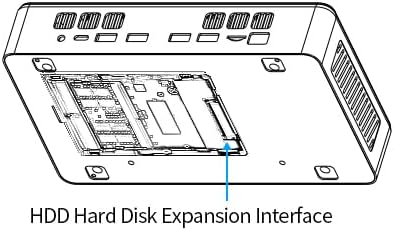
Figure 5.1.2: HDD Hard Disk Expansion Interface. This diagram illustrates the location of the HDD Hard Disk Expansion Interface on the underside of the EVRAIN T8 PRO Mini PC, indicating where additional storage can be installed.
- 2.5" SATA SSD/HDD: You can add a 2.5-inch SATA SSD or HDD (not included) up to 2TB for additional storage.
- M.2 2280 NVMe PCIe/SATA SSD: The device supports adding an M.2 2280 NVMe PCIe or SATA SSD (not included) up to 2TB.
For detailed instructions on installing additional storage, please refer to the technical support section on the EVRAIN website or consult a qualified technician.
6. Especificacions
Below are the key technical specifications for the EVRAIN T8 PRO Mini PC:
| Característica | Especificació |
|---|---|
| Model | T8 PRO |
| Processador | Intel N95 (4 Cores, 4 Threads, 6MB L3 Cache, 15W TDP, up to 3.40 GHz Burst Frequency) |
| RAM | 8 GB DDR4 |
| Emmagatzematge intern | 128 GB SSD (M.2) |
| Mostra | 8-inch Touch Screen, 1280x800 Resolution |
| Coprocessador gràfic | Gràfics integrats |
| Sistema operatiu | Windows 11 Pro |
| Connectivitat sense fil | WiFi 6 (802.11a/b/g/n/ac), Bluetooth 5.2 |
| Ports LAN | Dual Gigabit RJ45 |
| Ports USB | 4x USB 3.0, 2x USB 2.0 |
| Sortida de vídeo | HDMI, DisplayPort (DP), Type-C |
| Àudio | 3.5mm Àudio Jack |
| Lector de targetes | Ranura per a targetes TF |
| Dimensions (LxWxH) | 8.31 x 51.18 x 1.61 polzades |
| Pes | 2.86 lliures |

Figure 6.1.1: Alder Lake-N95 Processor. This image highlights the specifications of the Intel N95 processor, including its 4 cores, 4 threads, 6MB L3 cache, 15W TDP, and 3.40 GHz burst frequency, which powers the EVRAIN T8 PRO Mini PC.
Video 6.1.1: T8 PRO Introduction of Specification. This video provides a visual overview of the EVRAIN T8 PRO Mini PC's key specifications and features, including its various ports and internal components.
7. Solució De Problemes
7.1. Problemes comuns i solucions
- Sense energia:
- Assegureu-vos que l'adaptador de corrent estigui connectat correctament tant al Mini PC com a una presa de corrent que funcioni.
- Verifiqueu que la presa de corrent funciona connectant-hi un altre dispositiu.
- Sense pantalla:
- If using an external monitor, ensure the HDMI/DP cable is securely connected and the monitor is powered on and set to the correct input source.
- Check the integrated 8-inch touch screen for any signs of power or activity.
- Try restarting the Mini PC.
- Sense connexió a Internet:
- Amb cable: Check Ethernet cable connections and router status.
- Sense fil: Verify WiFi is enabled in Windows settings, ensure you are connected to the correct network, and check router functionality.
- La pantalla tàctil no respon:
- Reinicieu el mini PC.
- Check for updated display or touch screen drivers in Windows Device Manager.
- Rendiment lent:
- Tanca les aplicacions innecessàries que s'executen en segon pla.
- Assegureu-vos que Windows estigui actualitzat.
- Check disk space and consider adding more storage if needed (refer to Section 5).
8. Manteniment
- Neteja: Use a soft, dry cloth to clean the exterior of the Mini PC. For the screen, use a microfiber cloth specifically designed for electronics. Avoid abrasive cleaners or solvents.
- Ventilació: Assegureu-vos que les obertures de ventilació estiguin lliures de pols i obstruccions per evitar el sobreescalfament. No bloquegeu les reixetes d'aire.
- Actualitzacions de programari: Actualitzeu regularment el Windows 11 Pro i els controladors de dispositiu per garantir un rendiment, una seguretat i una compatibilitat òptims.
- Còpia de seguretat de dades: Feu còpies de seguretat periòdiques de les dades importants en un disc dur extern o en un emmagatzematge al núvol per evitar la pèrdua de dades.
9. Garantia i Suport
For warranty information, technical support, or service inquiries, please refer to the official EVRAIN weblloc web o contacteu directament amb el servei d'atenció al client. Conserveu el rebut de compra com a comprovant de compra per a reclamacions de garantia.
Recursos en línia: Visit the EVRAIN support page for FAQs, driver downloads, and additional troubleshooting guides.