
1. Producte acabatview
The Awei Y525 is a portable Bluetooth 5.3 speaker designed for wireless audio playback. It features True Wireless Stereo (TWS) functionality for pairing two speakers, Hifi sound, and integrated RGB lighting effects. The speaker supports multiple input methods including Bluetooth, USB, and TF card, making it suitable for various outdoor and indoor listening environments.
2. Contingut del paquet
Si us plau, comproveu el paquet per veure si hi ha els elements següents:
- Altaveu Bluetooth Awei Y525
- Cable de càrrega (USB-C)
- Manual d'usuari
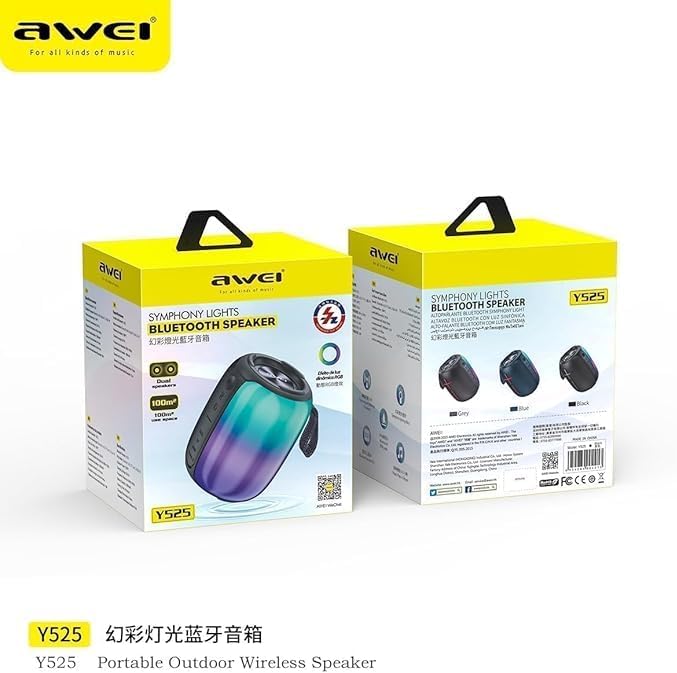
Image: Awei Y525 speaker packaging. The image displays two Awei Y525 speakers in their retail boxes, highlighting the product's branding and model number.
3. Controls i indicadors
Familiarize yourself with the speaker's controls and indicators:
- Botó d'encesa: Premeu i manteniu premut per encendre/apagar. Premeu breument per reproduir/pausar.
- Puja el volum (+): Premeu curt per augmentar el volum. Premeu llargament per passar a la següent pista.
- Baixar el volum (-): Premeu curt per baixar el volum. Premeu llargament per anar a la pista anterior.
- Botó de mode (M): Short press to switch between Bluetooth, USB, TF card, and AUX modes.
- Botó de llum RGB: Short press to cycle through light modes or turn off lights.
- Port de càrrega: Port USB-C per carregar.
- Indicador LED: Mostra l'estat de càrrega i l'estat de la connexió Bluetooth.

Image: Awei Y525 speaker controls. This image displays several Awei Y525 speakers in various colors, providing a clear view of the control buttons and input ports on the side of the device.
4. Carregant l’altaveu
Abans del primer ús, carregueu completament l'altaveu.
- Connecteu el cable de càrrega USB-C proporcionat al port de càrrega de l'altaveu.
- Connecteu l'altre extrem del cable a un adaptador de corrent USB (no inclòs) o al port USB d'un ordinador.
- L'indicador LED s'il·luminarà durant la càrrega i s'apagarà quan estigui completament carregat.
5. Configuració i emparellament
5.1 Vinculació Bluetooth
- Assegureu-vos que l'altaveu estigui carregat i encès.
- L'altaveu entrarà automàticament en mode d'emparellament Bluetooth, cosa que s'indicarà amb un llum LED intermitent.
- Al dispositiu (telèfon intel·ligent, tauleta, etc.), activeu el Bluetooth i cerqueu els dispositius disponibles.
- Select "Awei Y525" from the list of devices.
- Once paired, the LED indicator will stop flashing and remain solid, and you will hear a confirmation tone.
5.2 True Wireless Stereo (TWS) Interconnection
To achieve a stereo sound experience, you can pair two Awei Y525 speakers together.
- Ensure both Awei Y525 speakers are powered on and not connected to any other Bluetooth device.
- On one of the speakers (this will be the primary speaker), double-press the Power button or a dedicated TWS button (if available, refer to specific model instructions if different).
- The speakers will search for each other and automatically pair. You will hear a confirmation tone when TWS pairing is successful.
- Once TWS paired, connect your device to the primary speaker via Bluetooth as described in section 5.1.

Image: TWS Interconnection. This image illustrates two Awei Y525 speakers positioned to demonstrate their True Wireless Stereo (TWS) interconnection capability for enhanced sound.
6. Funcionament de l'altaveu
Reproducció d'àudio bàsica 6.1
- Reproduir/pausa: Premeu breument el botó d'engegada.
- Control de volum: Short press '+' to increase volume, short press '-' to decrease volume.
- Seguiment anterior / següent: Long press '+' for the next track, long press '-' for the previous track.
6.2 modes de llum RGB
The speaker features dynamic RGB lighting effects.
- Short press the RGB Light button to cycle through different light modes.
- Continue pressing to turn off the lights.
6.3 Trucades de mans lliures
Quan es connecta mitjançant Bluetooth, l'altaveu es pot utilitzar per a trucades de mans lliures.
- Respon a la trucada: Premeu breument el botó d'engegada.
- Finalitzar la trucada: Premeu breument el botó d'engegada durant una trucada.
- Rebutja la trucada: Premeu llargament el botó d'engegada.
6.4 Other Playback Modes (USB, TF Card, AUX)
Insert a USB drive or TF card into the respective port, or connect an audio device via an AUX cable. The speaker will automatically switch to the corresponding mode or you can manually switch using the Mode button.
7. Manteniment i cura
- Keep the speaker away from water and excessive moisture. The product is not waterproof.
- Eviteu exposar l'altaveu a temperatures extremes.
- Netegeu l'altaveu amb un drap suau i sec. No utilitzeu productes de neteja abrasius ni dissolvents.
- Guardeu l'altaveu en un lloc fresc i sec quan no l'utilitzeu durant períodes prolongats.
8. Solució De Problemes
| Problema | Solució |
|---|---|
| L'altaveu no s'encén. | Ensure the speaker is fully charged. Press and hold the Power button for a few seconds. |
| No es pot emparellar per Bluetooth. | Make sure the speaker is in pairing mode (flashing LED). Disable and re-enable Bluetooth on your device. Ensure no other devices are connected to the speaker. |
| Sense so o amb un volum baix. | Comproveu els nivells de volum tant de l'altaveu com del dispositiu connectat. Assegureu-vos que esteu seleccionat el mode d'entrada correcte. |
| L'emparellament TWS falla. | Ensure both speakers are charged and not connected to any other Bluetooth device. Try resetting both speakers and repeating the TWS pairing steps. |
| Les llums RGB no funcionen. | Press the RGB Light button to cycle through modes or turn them on. |
9. Especificacions
| Característica | Detall |
|---|---|
| Nom del model | Y525 |
| Versió Bluetooth | 5.3 |
| Tecnologia de comunicació sense fils | Bluetooth |
| Tipus d'altaveu | Exterior, portàtil |
| Mode de sortida d'àudio | Estèreo (amb TWS) |
| Font d'alimentació | Funciona amb bateria |
| Mètode de control | Toca |
| Pes de l'article | 500 grams |
| Mida de l'altaveu | 17 centímetres |
| Característiques especials | Anti-shocking, Lightweight, Volume Control, RGB Light Effects, TWS Function |
| Dispositius compatibles | Ordinador portàtil, telèfon intel·ligent, tauleta, televisió |
| És impermeable | No |
10. Informació de seguretat
- No desmunteu, repareu o modifiqueu l'altaveu.
- Mantenir fora de l'abast dels nens.
- Eliminar el producte de manera responsable segons la normativa local.
- Eviteu escoltar a volums elevats durant períodes prolongats per evitar danys auditius.
11. Garantia i Suport
Specific warranty information and customer support details are typically provided with your purchase documentation or on the manufacturer's official website. Please refer to those resources for assistance.