
Introducció
Thank you for choosing the AWEI T36 Bluetooth Earbuds. This manual provides detailed instructions on how to set up, operate, and maintain your new earbuds. Please read this manual carefully before use to ensure optimal performance and longevity of your device.
Contingut del paquet
- Auriculars sense fil AWEI T36 (esquerra i dreta)
- Estoig de càrrega
- Cable de càrrega USB-C
- Puntes d'orella (diverses mides)
- Manual d'usuari
Producte acabatview
Familiaritzeu-vos amb els components dels vostres auriculars AWEI T36 i l'estoig de càrrega.
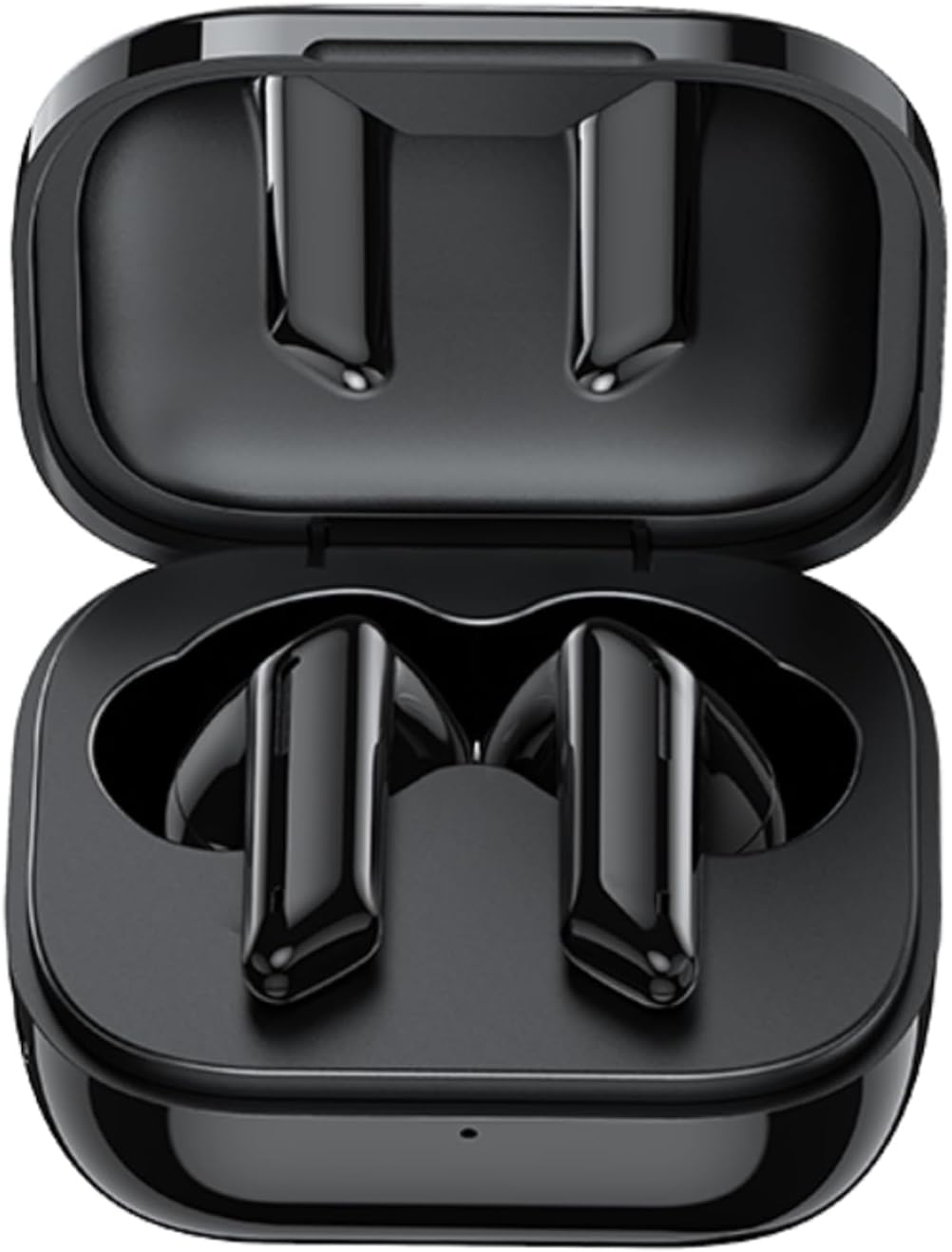
Image: AWEI T36 earbuds securely placed inside their open charging case, showcasing the sleek black design of both the earbuds and the case interior.
Components dels auriculars
- Àrea de control tàctil: Per gestionar la reproducció de música, les trucades i l'assistent de veu.
- Micròfon: For clear call performance.
- Contactes de càrrega: Situat a la part inferior de cada auricular.
- Indicador LED: Mostra l'estat de l'emparellament i el nivell de la bateria.
Components de la caixa de càrrega
- Ranures de càrrega per a auriculars: Subjecteu els auriculars amb fermesa i carregueu-los.
- Port de càrrega USB-C: Per carregar la funda.
- Indicador LED: Displays charging status of the case.
Configuració
1. Càrrega dels auriculars i l'estoig
Abans del primer ús, carregueu completament els auriculars i l'estoig de càrrega.
- Place the earbuds into the charging case, ensuring they are correctly seated. The earbuds' LED indicators will light up to show they are charging.
- Connecteu el cable de càrrega USB-C al port de càrrega de la funda i l'altre extrem a un adaptador de corrent USB (no inclòs) o al port USB d'un ordinador.
- The charging case LED indicator will show charging progress. A full charge takes approximately 1.5 hours for the case.

Image: AWEI T36 earbuds and their charging case resting on a circular charging pad, illustrating the product's battery life and charging capabilities. The image indicates a 320mAh charging case, 4-5 hours playtime, and 1.5 hours charging time.
Note: The product specifications indicate 7 hours of continuous use per charge for earbuds and 35 hours of playback with the charging case.
2. Emparellament amb el dispositiu
The earbuds support Bluetooth 5.3 for a stable and fast connection.
- Primera parella:
- Obre l'estoig de càrrega. Els auriculars s'encendran automàticament i entraran en mode d'emparellament.
- Al dispositiu (telèfon intel·ligent, tauleta, ordinador portàtil), activeu el Bluetooth.
- Cerca "AWEI T36" in the list of available Bluetooth devices and select it to connect.
- Once connected, you will hear a confirmation tone, and the earbud LED indicators will turn off or flash slowly.
- Maridatge posterior:
- Once paired, the earbuds will automatically connect to the last paired device when taken out of the charging case, provided Bluetooth is enabled on the device.

Image: A smartphone displaying a game, with the AWEI T36 earbuds and their charging case in the foreground, illustrating the Bluetooth connection. The image highlights "Bluetooth 5.1 Faster & More Stable" (Note: Product specifications state Bluetooth 5.3 for this model, which offers improved performance.)

Image: Two AWEI T36 earbuds, one in its open charging case and one outside, demonstrating that both earbuds can function independently as "hosts" or "main engines" for flexible use.
Instruccions de funcionament
The AWEI T36 earbuds feature smart touch controls for easy operation.
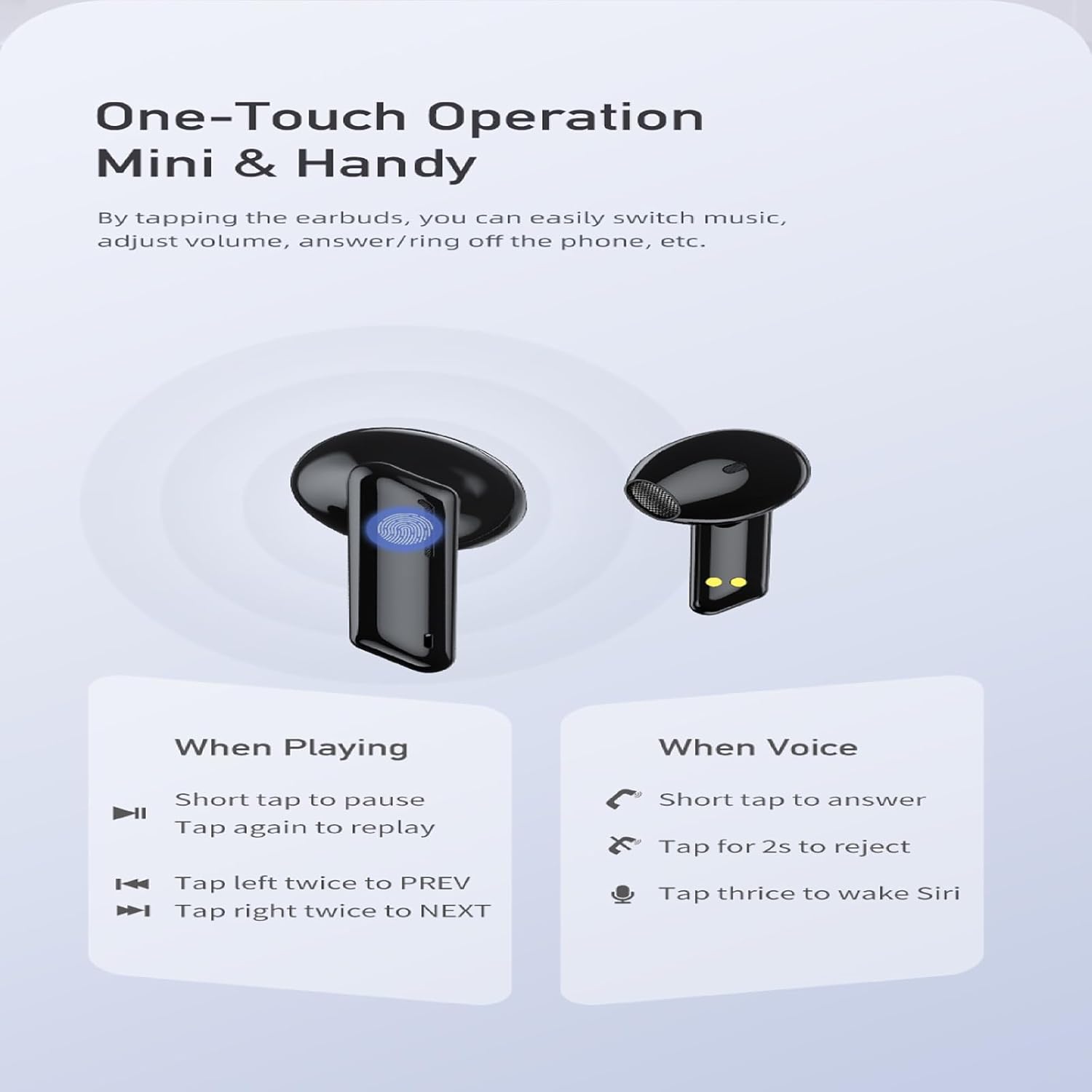
Image: A visual guide to the one-touch operation of the AWEI T36 earbuds, detailing touch commands for music playback (pause/play, previous/next song) and call management (answer/reject, activate voice assistant).
Reproducció de música
- Reproduir/pausa: Short tap on either earbud.
- Següent cançó: Toqueu l'auricular dret dues vegades.
- Cançó anterior: Toqueu l'auricular esquerre dues vegades.
- Control de volum: (Specific gesture not detailed in image, typically long press or multiple taps. Refer to device settings if not working as expected.)
Gestió de trucades
- Respon a la trucada: Short tap on either earbud.
- Rebutja la trucada: Manteniu premut qualsevol dels auriculars durant 2 segons.
- Finalitzar la trucada: Short tap on either earbud during a call.
Assistent de veu
- Activa l'assistent de veu (Siri/Assistent de Google): Toqueu qualsevol dels auriculars tres vegades.
Encès/Apagat
- Encès: Earbuds automatically power on when removed from the charging case.
- Apagar: Earbuds automatically power off when placed back into the charging case and the lid is closed.
Manteniment
Neteja
- Netegeu regularment els auriculars i l'estoig de càrrega amb un drap suau, sec i sense borrissol.
- Feu servir un bastonet de cotó lleugeramentampened with isopropyl alcohol to clean the charging contacts on both the earbuds and inside the case.
- No utilitzeu productes de neteja abrasius ni submergiu els auriculars ni la funda a l'aigua.
Emmagatzematge
- Guardeu els auriculars a la funda de càrrega quan no els feu servir per protegir-los i mantenir-los carregats.
- Avoid storing the device in extreme temperatures (hot or cold) or in highly humid environments.
Cura de la bateria
- To preserve battery life, charge the earbuds and case regularly, even if not used frequently.
- Eviteu esgotar completament la bateria abans de tornar-la a carregar.

Image: AWEI T36 earbuds and their charging case with water droplets on them, emphasizing their IPX4 waterproof rating, which protects against sweat and light rain during exercise.
Resolució de problemes
If you encounter any issues with your AWEI T36 earbuds, please refer to the following common solutions:
- Auriculars que no s'aparellen amb el dispositiu:
- Assegureu-vos que els auriculars estiguin completament carregats.
- Make sure Bluetooth is enabled on your device and the earbuds are within range (up to 10 meters).
- Oblida't de "AWEI T36" de la llista Bluetooth del teu dispositiu i intenta tornar a emparellar-lo.
- Place both earbuds back into the charging case, close the lid, wait a few seconds, then open the lid to reset them.
- Només funciona un auricular:
- Assegureu-vos que els dos auriculars estiguin carregats.
- Place both earbuds back into the charging case, close the lid, then open it again. This often re-syncs them.
- Netegeu els contactes de càrrega dels dos auriculars i de l'interior de la funda.
- Auriculars que no es carreguen:
- Comproveu si el cable de càrrega està connectat correctament tant a la carcassa com a la font d'alimentació.
- Assegura't que els contactes de càrrega dels auriculars i de l'interior de la funda estiguin nets i lliures de residus.
- Proveu un cable USB-C o un adaptador d'alimentació diferent.
- Volum baix o qualitat de so deficient:
- Ajusta el volum tant al dispositiu com als auriculars.
- Ensure the eartips are properly seated in your ears to create a good seal. Try different sized eartips.
- Clean any earwax or debris from the earbud speaker mesh.
Especificacions
| Característica | Descripció |
|---|---|
| Nom del model | T36 |
| Marca | AWEI |
| Tecnologia de connectivitat | Sense fil (Bluetooth 5.3) |
| Interval Bluetooth | Fins a 10 metres (33 peus) |
| Durada de la bateria dels auriculars | Fins a 7 hores (una sola càrrega) |
| Temps de reproducció total (amb estoig) | Fins a 35 hores |
| Temps de càrrega (cas) | Aprox. 1.5 hores |
| Resistència a l'aigua | IPX4 (Sweat and splash proof) |
| Tipus de control | Control tàctil |
| Forma de l'auricular | In-orella |
| Material | Silicone (Eartips) |
| Components inclosos | Earbuds, Charging Case, USB-C Cable, Eartips, User Manual |
Garantia i Suport
AWEI products are manufactured to the highest quality standards. For information regarding warranty coverage, technical support, or customer service, please refer to the warranty card included in your package or visit the official AWEI weblloc.
For further assistance, please contact AWEI customer support with your product model number (T36) and purchase details.