
1. Introducció
This manual provides essential instructions for the safe and efficient operation, maintenance, and troubleshooting of your Roborock Saros 10R Robot Vacuum and Mop. Please read this manual thoroughly before using the product and retain it for future reference.
2. Informació de seguretat
Before operating the Roborock Saros 10R, please observe the following safety precautions:
- Assegureu-vos que el robot estigui completament carregat abans del primer ús.
- Keep loose cables, curtains, and other objects that could entangle the robot out of its path.
- No permeteu que els nens ni les mascotes juguin amb el robot.
- Do not use the robot on wet surfaces or in areas with standing water.
- Avoid using the robot near open flames or flammable materials.
- Netegeu regularment els raspalls i els sensors per mantenir un rendiment òptim.
- Only use official Roborock accessories and replacement parts.
3. Producte acabatview
3.1 Característiques clau
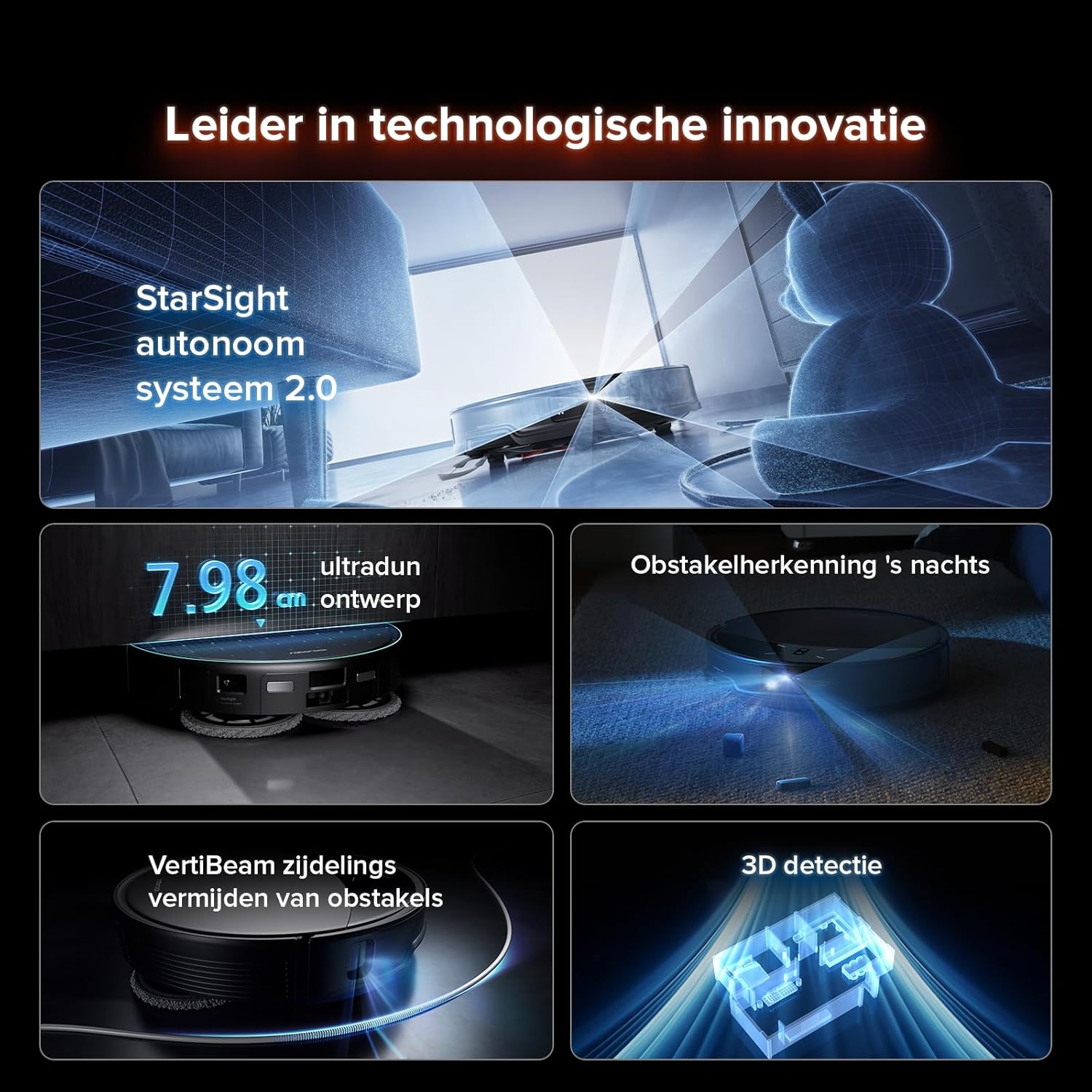
- StarSight 2.0 Autonomous System: Utilizes dual-transmitter solid-state LiDAR with over 21,600 sensor points and a 38,400 Hz sampling rate, 3D Time-of-Flight (ToF) technology, and an RGB camera for enhanced navigation, mapping, and obstacle avoidance in a compact 7.98 cm design.
- Quadruple Lift Design: Chassis, main brush, side brush, and lift mops adapt to various scenarios, including effortlessly cleaning thresholds up to 4 cm and adjusting to medium-pile carpets and U-shaped furniture legs.
- Superior Anti-Tangle System: DuoDivide main brush efficiently transports hair to the dust inlet, while the asymmetric curved FlexiArm Riser side brush prevents tangling, ideal for pet owners. SGS-certified 0% tangle rate for main and side brushes.
- Enhanced Obstacle Avoidance: VertiBeam lateral obstacle avoidance technology allows the robot to navigate around furniture and uneven walls, ensuring thorough cleaning even around unfolded cables.
- Multifunctional Dock 4.0: Features automatic mop removal, 80°C hot water mop washing, intelligent dirt detection, 55°C hot air drying, and automatic detergent dispensing for a low-maintenance cleaning experience.
- Mètodes de control versàtils: Built-in intelligent voice assistant ('Hello Rocky'), Roborock app, and compatibility with Amazon Alexa, Apple Siri, Google Home, and Matter protocol for integrated smart home control.
3.2 Components
The Roborock Saros 10R package includes the following items:



4. Configuració
4.1 Initial Charging and Dock Placement
Place the multifunctional docking station against a wall in an open area with good Wi-Fi coverage. Ensure there is sufficient space around the dock for the robot to maneuver. Connect the power cable to the dock and plug it into a power outlet. Place the robot on the charging contacts to begin initial charging.
4.2 App Download and Network Configuration
Download the Roborock app from your device's app store. Follow the in-app instructions to add your Saros 10R. This typically involves pressing and holding the Power and Dock buttons on the robot until you hear a voice alert, then scanning a QR code on the robot or manually selecting the device in the app. Connect the robot to your home Wi-Fi network (2.4GHz is recommended).
4.3 Mapatge inicial
After successful network configuration, initiate a Quick Mapping run through the app. The robot will navigate your home to create a detailed map, which is crucial for efficient cleaning and setting up custom cleaning zones and routines.

5. Funcionament
5.1 Inici i pausa de la neteja
You can start or pause a cleaning cycle using the physical buttons on the robot, the Roborock app, or voice commands.
5.2 modes de neteja
The Saros 10R offers various cleaning modes, including Vacuum Only, Mop Only, and Vacuum & Mop. Select the appropriate mode based on your cleaning needs via the Roborock app.


5.3 Control de veu
Activate the built-in voice assistant by saying "Hello Rocky". You can then issue commands such as "Clean here", "Clean the bedroom", "Increase suction", or "Empty the dustbin". The robot also supports voice commands via Amazon Alexa, Apple Siri, and Google Home.

5.4 App Control and Mapping
The Roborock app provides comprehensive control over your robot. You can view and edit maps, set up no-go zones, schedule cleaning routines, adjust suction power and water flow, and monitor cleaning progress. The app also offers SmartPlan 2.0, which recognizes floor types and rooms to intelligently adapt cleaning strategies.


6. Manteniment
Regular maintenance ensures optimal performance and extends the lifespan of your Roborock Saros 10R.
6.1 Cleaning the Robot
- Polvorí: Buidar la paperera després de cada cicle de neteja.
- Pinzell principal: Remove the main brush and clean any tangled hair or debris. The Zero-Tangle DuoDivide Main Brush is designed to minimize tangles.
- Raspall lateral: Clean the FlexiArm Riser Side Brush, removing any hair or debris.
- Fregones: Remove and wash the mop pads after each mopping session.
- Sensors: Wipe all sensors (cliff sensors, wall sensors, charging contacts) with a dry, soft cloth.
6.2 Cleaning the Docking Station
The Multifunctional Dock 4.0 requires periodic cleaning to maintain its self-cleaning functions.
- Dipòsit d'aigua bruta: When the dirty water tank is full, remove it, empty the contents, and rinse it thoroughly with clean water.
- Dipòsit d'aigua neta: Ensure the clean water tank is filled with fresh water.
- Bossa de pols: Replace the disposable dust bag when it is full. Wipe the filter area clean before installing a new bag.
- Cleaning Rib and Filter: Detach the cleaning rib and filter from the dock's cleaning tank. Rinse them clean and wipe them dry before reinstalling.
- Charging Contacts and Dock Location Beacon: Use a dry, soft cloth to clean these components on the dock base.
7. Solució De Problemes
If you encounter issues with your Roborock Saros 10R, refer to the following common solutions:
| Problema | Causa possible | Solució |
|---|---|---|
| Robot gets stuck or reports "Mop mount fell off" | Mop pads not correctly attached or a temporary software glitch. | Ensure mop pads are securely attached. Try removing and reattaching them. Restart the robot and/or the docking station by unplugging and replugging the power cable. |
| Cannot connect to Wi-Fi / App connection issues | Incorrect Wi-Fi password, 5GHz network selected, or interference from network extenders (PLCs). | Ensure you are connecting to a 2.4GHz Wi-Fi network. Verify the password. If using a network extender, try connecting directly to the main router or using a guest network on the extender. Restart your router and the robot. |
| Robot scratches furniture | Robot navigating too close to delicate furniture or sharp edges. | Use the Roborock app to set up No-Go Zones or Invisible Walls around sensitive furniture. Consider placing physical barriers if necessary. |
| Loud drying sound from dock | Normal operation sound during hot air drying (approx. 45dB). | This is a normal operational sound. If sensitive to noise, schedule drying cycles for times when you are not in the same room or when background noise is present (e.g., TV). |
| Mops run dry during cleaning | Water flow setting is too low. | Adjust the water flow setting in the Roborock app to a higher level (e.g., 15-20) to ensure adequate moisture for mopping. |
| Robot avoids or struggles with dark/black carpets | Cliff sensors may misinterpret dark surfaces as drops. | This is a common limitation for some robot vacuums. Try adjusting carpet settings in the app or setting a No-Go Zone for very dark carpets if the issue persists. |
8. Especificacions
| Característica | Detall |
|---|---|
| Marca | roborock |
| Nom del model | roborock Saros 10R |
| Dimensions del producte | 38.1L x 47.5W x 48.8H cm (Robot and Dock) |
| Robot Height | 7.98 cm (Ultra-slim design) |
| Pes de l'article | 12.8 quilos |
| Durada de la bateria | 192 minuts |
| Composició de la bateria | Ió de liti |
| Tipus de controlador | Control d'aplicacions |
| Dispositius compatibles | Amazon Echo, Google Home, Telèfons intel·ligents, Rellotges intel·ligents |
| Tipus de filtre | Tela |
| Superfície recomanada | Multiple surfaces (carpets, tiles, wood, laminate floors) |
| Característiques especials | Boost-intellectual technology, Advanced custom cleaning, Precise laser navigation, Edge cleaning, Pet hair removal, StarSight System 2.0, Zero-Tangle System, AdaptiLift chassis, Multifunctional Dock 4.0 |
9. Garantia i Suport
For warranty information, technical support, or to purchase replacement parts and accessories, please visit the official Roborock website or contact Roborock customer service. Keep your purchase receipt as proof of purchase for warranty claims.