
Introducció
This manual provides comprehensive instructions for the setup, operation, maintenance, and troubleshooting of your HUAYU RM-DS909 Replacement TV Remote Control. Designed for seamless compatibility with DSTV LCD/LED televisions, this remote offers intuitive control and reliable performance. Please read this manual carefully to ensure optimal use of your new remote control.
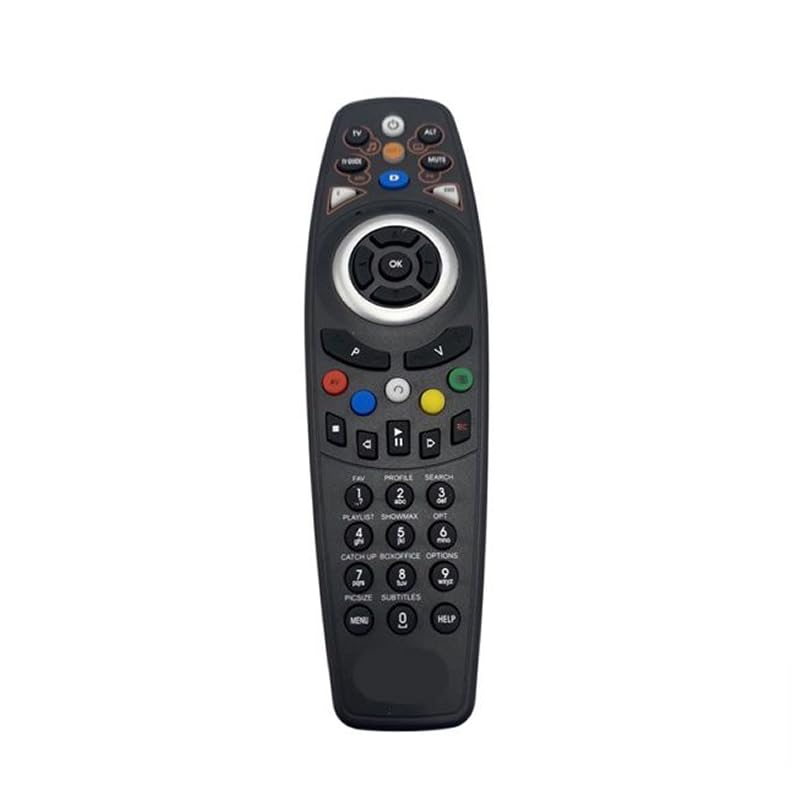
Imatge: Frontal view of the HUAYU RM-DS909 Replacement TV Remote Control.
Configuració
1. Instal·lació de la bateria
- Localitzeu el compartiment de la bateria a la part posterior del comandament a distància.
- Feu lliscar la tapa del compartiment de la bateria cap avall i retireu-la.
- Insert two (2) AAA batteries (not included) into the compartment, ensuring the positive (+) and negative (-) terminals align correctly with the indicators inside.
- Torneu a col·locar la tapa del compartiment de la bateria fent-la lliscar fins que faci clic de manera segura.

Image: Battery compartment with cover removed, showing AAA battery slots.
2. Ús inicial
The HUAYU RM-DS909 remote control is designed for direct use with compatible DSTV LCD/LED televisions. No complex programming or pairing is required. Once batteries are installed, the remote is ready to operate your television.
Instruccions de funcionament
This remote control provides access to all standard functions of your DSTV LCD/LED television. Below is a general guide to common button functions:
- Botó d'encesa: Encén o apaga el televisor.
- Canal amunt/avall: Canvia el canal de televisió.
- Pujar/baixar el volum: Ajusta el volum d'àudio.
- Botó de silenci: Silences or restores the audio.
- Navigation (Arrow) Buttons & OK: S'utilitza per navegar pels menús i confirmar seleccions.
- Menu/Home Button: Accedeix al menú principal o a les funcions intel·ligents del televisor.
- Botó de guia de TV: Mostra la guia electrònica de programes.
- Botons de colors (vermell, verd, groc, blau): These buttons typically correspond to specific functions within menus or interactive services, as indicated on your TV screen.
- Playback Controls (Play, Pause, Stop, Rewind, Fast Forward, Record): Used for media playback functions, often with PVR or connected devices.
- Teclat numèric (0-9): Per a entrada directa de canal.
For specific functions related to your DSTV decoder or TV model, refer to your television's or decoder's user manual.
Manteniment
- Neteja: Netegeu el comandament a distància amb un drap suau i sec. No utilitzeu netejadors líquids ni materials abrasius, ja que poden danyar la superfície o els components interns.
- Substitució de la bateria: Replace batteries when the remote's response becomes sluggish or stops working. Always replace both batteries simultaneously with new AAA batteries. Do not mix old and new batteries, or different types of batteries.
- Emmagatzematge: Si no feu servir el comandament a distància durant un període prolongat, traieu-ne les piles per evitar fuites i possibles danys. Guardeu el comandament a distància en un lloc fresc i sec, allunyat de la llum solar directa i de temperatures extremes.
Resolució de problemes
- El comandament a distància no respon:
- Assegureu-vos que les piles estiguin inserides correctament amb la polaritat correcta.
- Substitueix les piles velles per piles AAA noves.
- Comproveu si hi ha alguna obstrucció entre el comandament a distància i el sensor d'infrarojos del televisor.
- Ensure you are within the effective operating range and pointing the remote towards the TV.
- Rang de funcionament limitat:
- Weak batteries can reduce the remote's range. Replace them if necessary.
- Bright light sources (e.g., direct sunlight, fluorescent lights) can interfere with the infrared signal.
- Botons específics que no funcionen:
- Ensure the remote is clean and there is no debris obstructing the buttons.
- If only certain buttons fail, it might indicate internal damage. Consider replacing the remote.
Especificacions
| Número de model | RM-DS909 (Internal Model: 930) |
| Marca | HUAYU |
| Tecnologia de connectivitat | Infrarojos (IR) |
| Dispositius compatibles | DSTV LCD/LED Televisions |
| Tipus de bateria | 2 x AAA (no inclòs) |
| Material | ABS |
| Color | Negre |
| Característica especial | Funcionalitat intel·ligent |
| Nombre màxim de dispositius compatibles | 1 |
Garantia i Suport
Garantia del fabricant
This HUAYU remote control comes with a Garantia del fabricant d'1 any from the date of purchase. This warranty covers defects in materials and workmanship under normal use. It does not cover damage caused by misuse, accidents, unauthorized modifications, or battery leakage.
Atenció al client
For further assistance, troubleshooting not covered in this manual, or warranty claims, please contact your retailer or the point of purchase. Please have your purchase receipt and product model number (RM-DS909) available when seeking support.