
1. Introducció
Thank you for choosing the Loddery 7 Inch Android 13 Car Stereo. This manual provides essential information for the proper installation, operation, and maintenance of your new car multimedia system. Please read this manual thoroughly before use to ensure optimal performance and to prevent damage.
This car stereo is specifically designed for the Saab 9-3 93 models from 2007 to 2011, offering an integrated multimedia and navigation experience.
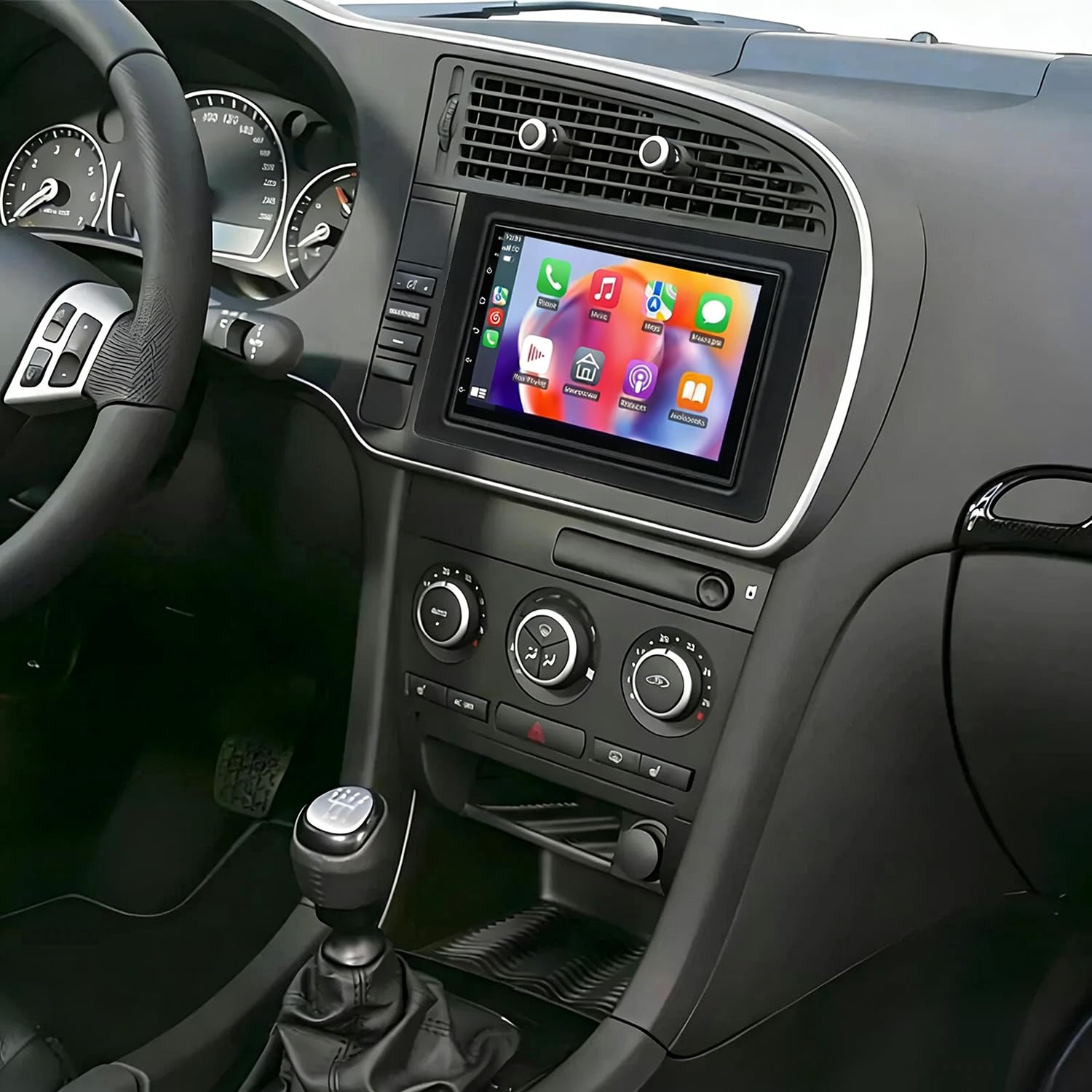
Imatge 1.1: Frontal view of the Loddery 7 Inch Android 13 Car Stereo. This image displays the main unit with its 7-inch touchscreen display, designed to integrate seamlessly into the dashboard of compatible Saab 9-3 models.
2. Contingut del paquet
Si us plau, verifiqueu que tots els elements que s'enumeren a continuació estiguin inclosos al vostre paquet:
- 1 x Reproductor MP5 per a cotxe (unitat principal)
- 1 x cable d'alimentació
- 1 x Antena GPS
- 1 x Cable d'entrada de la càmera posterior
- 1 x cable RCA
- 2 x cables USB
- 1 x Manual d'instruccions (aquest document)
- 1 x AHD Camera (Backup Camera)
3. Configuració i instal·lació
This car stereo is designed for a plug-and-play installation in compatible Saab 9-3 93 models (2007-2011). While designed for ease of installation, professional installation is recommended to ensure correct wiring and functionality, especially for power connections and accessory integration.
3.1. Comprovacions prèvies a la instal·lació
- Assegureu-vos que el vehicle estigui apagat i que la bateria estigui desconnectada abans de començar la instal·lació.
- Confirmeu que hi hagi tot el contingut del paquet.
- Review the wiring diagrams provided in the included physical instruction manual for specific vehicle connections.
3.2. Passos d'instal·lació (generals)
- Eliminar la unitat existent: Carefully remove the factory radio from your Saab 9-3 dashboard.
- Connecteu el cable d'alimentació: Connect the provided power cable harness to the car stereo and the vehicle's wiring. Ensure all connections are secure.
- Connecteu l'antena GPS: Munteu l'antena GPS en un lloc amb llum clara view of the sky (e.g., dashboard, under the windshield) and connect it to the stereo.
- Connecteu els cables USB: Route the USB cables to a convenient location (e.g., glove compartment) and connect them to the stereo.
- Connecteu la càmera posterior (opcional): If installing the AHD backup camera, route the camera cable from the rear of the vehicle to the stereo and connect it to the 'Rear Camera Input' port. Connect the camera's power to the vehicle's reverse light circuit.
- Connect RCA Cables (Optional): Si s'utilitza extern amplifiers or other audio/video devices, connect the RCA cables as needed.
- Funcionalitat de prova: Before fully reassembling the dashboard, reconnect the vehicle battery and power on the unit to test basic functions (power, audio, touchscreen, GPS signal, camera input).
- Unitat segura: Once tested, carefully slide the car stereo into the dashboard opening and secure it. Reassemble any removed trim pieces.
3.3. Control del volant
The unit supports the vehicle's steering wheel control function. After installation, you may need to access the unit's settings to map the steering wheel buttons to the desired functions.
4. Instruccions de funcionament
This section details the primary functions and features of your Loddery Android 13 Car Stereo.
4.1. Funcionament general
- Encès/apagat: Press and hold the power button (if available) or turn the vehicle ignition on/off.
- Pantalla tàctil: The 7-inch 2.5D Tempered Glass Mirror display is a full capacitance touchscreen. Navigate the interface by tapping, swiping, and pinching.
- Pantalla d'inici: Access various applications and settings from the customizable home screen.
- Configuració d'idioma: The system supports multiple languages including English, Chinese, French, Italian, Korean, Japanese, Arabic, Spanish, Portuguese, Russian, Turkish, Vietnamese, Hebrew, Polish, and German. Adjust in system settings.
4.2. Connectivitat
- Wi-Fi: Connect to available Wi-Fi networks or use your mobile phone's hotspot for internet access. Go to Settings > Network & Internet > Wi-Fi.
- Bluetooth 5.0: Pair your smartphone for hands-free calling, phone book synchronization, and audio streaming. Go to Settings > Connected devices > Bluetooth.
- USB: Use the double USB interfaces to connect USB drives for media playback or to charge compatible devices.
4.3. Navegació
- Built-in Offline Maps: The unit comes with built-in offline map capabilities. An internet connection is required to download map data initially.
- Navegació en línia: Once connected to Wi-Fi, you can use online navigation applications for real-time traffic and updated maps.
- GPS: The dedicated GPS antenna ensures accurate positioning for navigation.
4.4. CarPlay / Android Auto
- Wireless & Wired CarPlay: For iOS devices, connect via Bluetooth for wireless CarPlay or use a USB cable for wired CarPlay. This integrates your iPhone's features like navigation, calls, messages, and music directly onto the car stereo display.
- Android Auto: Connect your Android smartphone via USB for Android Auto functionality, mirroring essential apps and features.
4.5. Reproducció multimèdia
- Formats d'àudio: Supports APE, FLAC, WAV, MP3, WMA, and other audio formats.
- Formats de vídeo: Supports MKV, RMVB, AVI, MP4, MDV, and other video formats. Video output is supported for external displays.
- Formats d'imatge: Supports PNG, JPEG, JPG, GIF, WBMP, BNP, and other picture formats.
- Ràdio: Tune into FM radio stations. RDS (Radio Data System) is supported for displaying station information.
- Funció DSP: The integrated DSP (Digital Signal Processor) ensures high-fidelity audio reproduction, closely matching the original sound quality.
4.6. Funcionalitat de la càmera posterior
- The unit supports AHD (Analog High Definition) 1080P camera image input.
- When the vehicle is in reverse gear, the display will automatically switch to the rear camera view.
- You can switch between CVBS and AHD camera input types within the system settings if needed.
4.7. Pantalla dividida
The split-screen feature allows you to run two applications simultaneously on the display, such as navigation and music playback.
5. Manteniment
Un manteniment adequat garanteix la longevitat i el rendiment òptim de l'equip de música del vostre cotxe.
- Neteja de pantalla: Utilitzeu un drap suau i sense pelusa lleugerament dampNetegeu-ho amb aigua o amb un netejador de pantalles dissenyat específicament per a pantalles electròniques. Eviteu productes químics agressius o materials abrasius.
- Actualitzacions de programari: Periodically check for system software updates via Wi-Fi to ensure you have the latest features and bug fixes.
- Condicions ambientals: Eviteu exposar la unitat a temperatures extremes, a la llum solar directa durant períodes prolongats o a una humitat excessiva.
- Connexions: Ensure all cables and connections remain secure. Loose connections can lead to intermittent issues.
6. Solució De Problemes
This section addresses common issues you might encounter. For more complex problems, please refer to the included physical manual or contact customer support.
- Sense energia:
- Comproveu totes les connexions del cable d'alimentació.
- Verifiqueu que el fusible de la ràdio del vehicle estigui intacte.
- Assegureu-vos que la bateria del vehicle estigui connectada i carregada correctament.
- Unit Does Not Turn Off with Car / Battery Drain:
- This indicates an incorrect wiring connection, specifically the ACC (accessory) wire. The unit's power should be cut when the ignition is off. Consult a professional installer to verify the ACC and constant power (B+) wires are correctly connected to the vehicle's harness.
- Check the unit's power settings for any 'always on' options, though this is typically a wiring issue.
- Sense so o qualitat de so deficient:
- Comproveu les connexions dels cables de l'altaveu.
- Verify volume levels and mute settings.
- Adjust equalizer and DSP settings in the audio menu.
- Ensure RCA cables (if used) are securely connected.
- GPS Signal Not Found:
- Assegureu-vos que l'antena GPS estigui connectada correctament i muntada en un lloc amb visibilitat clara. view del cel.
- Reviseu la configuració del GPS al menú del sistema.
- Pantalla tàctil que no respon:
- Reinicieu la unitat.
- Assegureu-vos que la pantalla estigui neta i lliure de residus.
- CarPlay/Android Auto no es connecta:
- For wireless CarPlay, ensure Bluetooth is on and paired.
- Per a connexions amb cable, proveu un cable USB diferent.
- Assegureu-vos que el sistema operatiu del vostre telèfon estigui actualitzat.
- Revisa la configuració del telèfon per obtenir permisos de CarPlay/Android Auto.
- Paraula clau de configuració de fàbrica: If prompted for a factory setting password, use 000000.
7. Especificacions
| Característica | Especificació |
|---|---|
| Sistema | Android 13 |
| Chipset | 8227L-DEMO |
| Mida de la pantalla | 7 polzades |
| Resolució de pantalla | 1024 x 600 |
| Memòria | 4 GB de RAM + 64 GB de ROM |
| Xip de ràdio | MT6625 |
| Potència de sortida | 4x45W |
| Temperatura de treball | -20 ℃ a 75 ℃ |
| Poder AmpXip lificador | TDA7388 |
| Banda de ràdio | FM/RDS |
| Sortida de vídeo | Suport |
| Entrada d'inversió | AHD/CVBS |
| Micròfon extern | Suport |
| Pantalla dividida | Suport |
| Mapes | Mapes fora de línia integrats (cal Internet per descarregar dades) |
| Wi-Fi | Suport |
| USB | Doble interfície USB |
| Tecnologia de connectivitat | Bluetooth |
| Mode de sortida d'àudio | estèreo |
| Tipus de muntatge | Muntatge al quadre de comandament |
| Pes de l'article | 4.98 lliures |
| Dimensions del paquet | 16.93 x 13.39 x 6.3 polzades |
8. Garantia i Suport
For warranty inquiries or technical support regarding your Loddery 7 Inch Android 13 Car Stereo, please contact the manufacturer or seller directly through your purchase platform. Please have your purchase details and product model number (fit for Saab 9-3 93 2007-2011) available when contacting support.