
WIWU SW01 Pro Lite
WIWU SW01 Pro Lite Smart Watch User Manual
Model: SW01 Pro Lite
Introducció
This manual provides detailed instructions for the setup, operation, and maintenance of your WIWU SW01 Pro Lite Smart Watch. This device is designed to offer comprehensive fitness tracking and smart notification features, compatible with both Android and iOS devices. Please read this manual thoroughly to ensure proper use and to maximize your experience with the product.
Què hi ha a la caixa
En obrir el paquet, comproveu que hi hagi tots els elements següents:
- WIWU SW01 Pro Lite Smart Watch
- Cable de càrrega
- Manual d'usuari (aquest document)
Producte acabatview
The WIWU SW01 Pro Lite is a versatile smart sports watch featuring a 2.01-inch display. It is equipped with advanced sensors for fitness tracking and smart chips for efficient performance.

Image: WIWU SW01 Pro Lite Smart Sports Watches.
Característiques principals:
- Seguiment de la forma física: Monitors heart rate, steps, calories burned, sleep duration, and stress levels.
- Modes multiesportiu: Supports various sports activities for detailed performance analysis.
- Notificacions intel·ligents: Rep alertes de trucades, missatges i notificacions d'aplicacions directament al teu canell.
- Compatibilitat: Seamlessly integrates with Android and iOS smartphones.
- Pantalla tàctil: Full touch screen for easy navigation.
- Llarga vida útil de la bateria: Designed for extended use between charges.
Internal Components and Sensors:
The watch incorporates smart chips for fast computing and smooth operation, handling complex application switching and data processing efficiently.

Image: Smart chips for superfast computing.
The rear of the watch houses the optical sensors responsible for heart rate monitoring and other health metrics.

Image: Back of the smartwatch with sensors.
The display interface provides real-time fitness data, such as workout progress and activity counts.
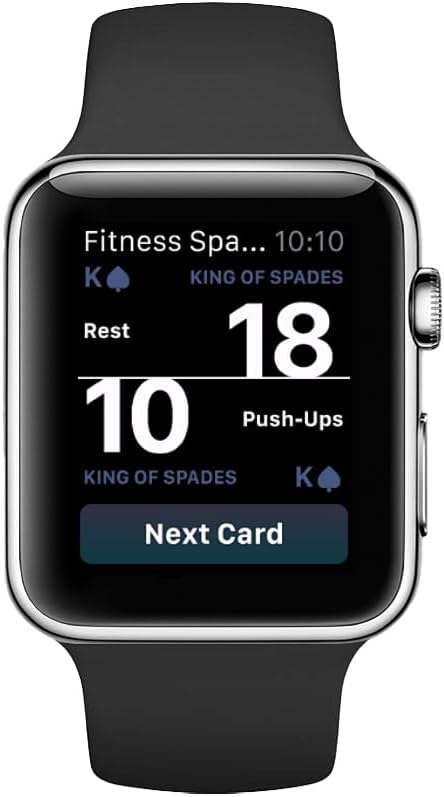
Image: Fitness tracking display on the smartwatch.
Configuració
1. Càrrega del rellotge intel·ligent
- Connecteu el cable de càrrega als contactes de càrrega de la part posterior del rellotge.
- Connecteu l'extrem USB del cable a un adaptador de corrent USB estàndard (no inclòs) o al port USB d'un ordinador.
- La pantalla del rellotge indicarà l'estat de càrrega. Assegureu-vos que el rellotge estigui completament carregat abans del primer ús. Una càrrega completa sol trigar aproximadament 2 hores.
2. Instal·lació de l'aplicació complementària
To unlock the full functionality of your smart watch, you need to install the dedicated companion application on your smartphone. Cerca the official WIWU app in your device's app store (Google Play Store for Android or Apple App Store for iOS).
- Per a Android: Open the Google Play Store, search for "WIWU" (or the specific app name if provided in packaging), and install.
- Per a iOS: Open the Apple App Store, search for "WIWU" (or the specific app name if provided in packaging), and install.
Follow the on-screen instructions within the app to create an account and set up your profile.
3. Emparellament amb el telèfon intel·ligent
- Assegureu-vos que el Bluetooth estigui habilitat al vostre telèfon intel·ligent.
- Open the WIWU companion app on your smartphone.
- Navegueu fins a la secció "Dispositiu" o "Afegeix dispositiu" dins de l'aplicació.
- The app will search for available devices. Select "SW01 Pro Lite" from the list.
- Confirma la sol·licitud d'emparellament tant al teu telèfon intel·ligent com al rellotge intel·ligent si se't demana.
- Un cop emparellat, el rellotge sincronitzarà les dades amb l'aplicació.
Instruccions de funcionament
Navegació bàsica
- Pantalla tàctil: Llisca cap a l'esquerra, la dreta, amunt o avall per navegar pels menús i les pantalles. Toca per seleccionar una opció.
- Botó lateral: Typically used to wake the screen, return to the home screen, or access the app list. Refer to the on-screen prompts for specific functions.
Accés a les funcions
- Monitorització de la freqüència cardíaca: Swipe to the heart rate screen or select the heart rate app. Ensure the watch is snug on your wrist for accurate readings.
- Comptador de passos: Steps are automatically tracked throughout the day. View your daily step count on the main watch face or in the activity summary.
- Modes esportius: Access the sports mode menu to select specific activities like running, cycling, or walking. The watch will track relevant metrics for your chosen activity.
- Seguiment del son: Wear the watch to bed for automatic sleep analysis. Data will be available in the companion app.
- Notificacions: When paired, notifications from your smartphone will appear on the watch screen. Swipe down from the top of the screen (or as per watch UI) to view notificacions recents.
Manteniment
Neteja del rellotge
- Netegeu la pantalla i la carcassa del rellotge amb un drap suau i sense borrissol.
- Per a la brutícia persistent, lleugerament dampRenta el drap amb aigua. Evita utilitzar productes químics agressius o materials abrasius.
- Netegeu els contactes de càrrega regularment per garantir una càrrega correcta.
Cura de la bateria
- Eviteu descarregar completament la bateria amb freqüència.
- Charge the watch regularly, even if not in daily use, to maintain battery health.
- Guardeu el rellotge en un lloc fresc i sec quan no l'utilitzeu durant períodes prolongats.
Resistència a l'aigua
The WIWU SW01 Pro Lite Smart Watch is designed with a certain level of water resistance. However, it is not suitable for diving or high-pressure water activities. Avoid prolonged submersion and exposure to hot water or steam. Always dry the watch thoroughly after exposure to water.
Resolució de problemes
El rellotge no s'encén
- Assegura't que el rellotge estigui completament carregat. Connecta'l al carregador durant almenys 30 minuts.
- Press and hold the side button for 10-15 seconds to attempt a forced restart.
Cannot Pair with Smartphone
- Verify Bluetooth is enabled on your smartphone and the watch.
- Ensure the watch is within Bluetooth range of your smartphone (typically 10 meters).
- Reinicieu tant el telèfon intel·ligent com el rellotge intel·ligent.
- Clear the Bluetooth cache on your smartphone (Android) or forget the device in Bluetooth settings (iOS) and try pairing again.
- Make sure the companion app is updated to the latest version.
Inaccurate Readings (Heart Rate, Steps)
- Assegureu-vos de portar el rellotge ben ajustat al canell, aproximadament un dit per sobre de l'os del canell.
- Clean the optical sensors on the back of the watch.
- Avoid excessive movement or vibrations during heart rate measurements.
Durada de la bateria curta
- Redueix la brillantor de la pantalla.
- Desactiva les notificacions innecessàries.
- Limiteu la monitorització contínua de la freqüència cardíaca si no és necessari.
- Ensure the watch firmware and companion app are up to date.
Especificacions
| Característica | Detall |
|---|---|
| Marca | WIWU |
| Nom del model | SW01 Pro Lite |
| Número de model | 6976975615003 |
| Mida de la pantalla | 1.95 polzades |
| Forma | Rectangular |
| Color | Negre |
| Dispositius compatibles | Smartphone, Tablet (Android & iOS) |
| Tipus de material de la banda | Silicona |
| Entrada de la interfície humana | Pantalla tàctil |
| Tipus de comptador | Heart Rate Monitor, Step Counter, Calorie Tracker, Sleep Duration Monitor, Stress Monitor |
| Composició de les cèl·lules de la bateria | Ió de liti |
| Pes de l'article | 230 grams |
| Fabricant | Dongguan Wiwu Technology Co., Ltd. |
Garantia i Suport
The WIWU SW01 Pro Lite Smart Watch comes with a standard warranty. For detailed warranty terms and conditions, please refer to the documentation included with your purchase or visit the official WIWU weblloc.
For technical support, troubleshooting assistance, or further inquiries, please contact WIWU customer service or visit the official brand store:
Ask a question about this manual
Ask about setup, troubleshooting, compatibility, parts, safety, or missing instructions. Manuals+ will review the question and use this page’s manual context to help answer it.