
Spigen SA-TW P20
Spigen SA-TW P20 True Wireless Earbuds Instruction Manual
Model: SA-TW P20
Introducció
Thank you for choosing the Spigen SA-TW P20 True Wireless Earbuds. This manual provides essential information for setting up, operating, maintaining, and troubleshooting your new earbuds. Please read it carefully to ensure optimal performance and longevity of your device.
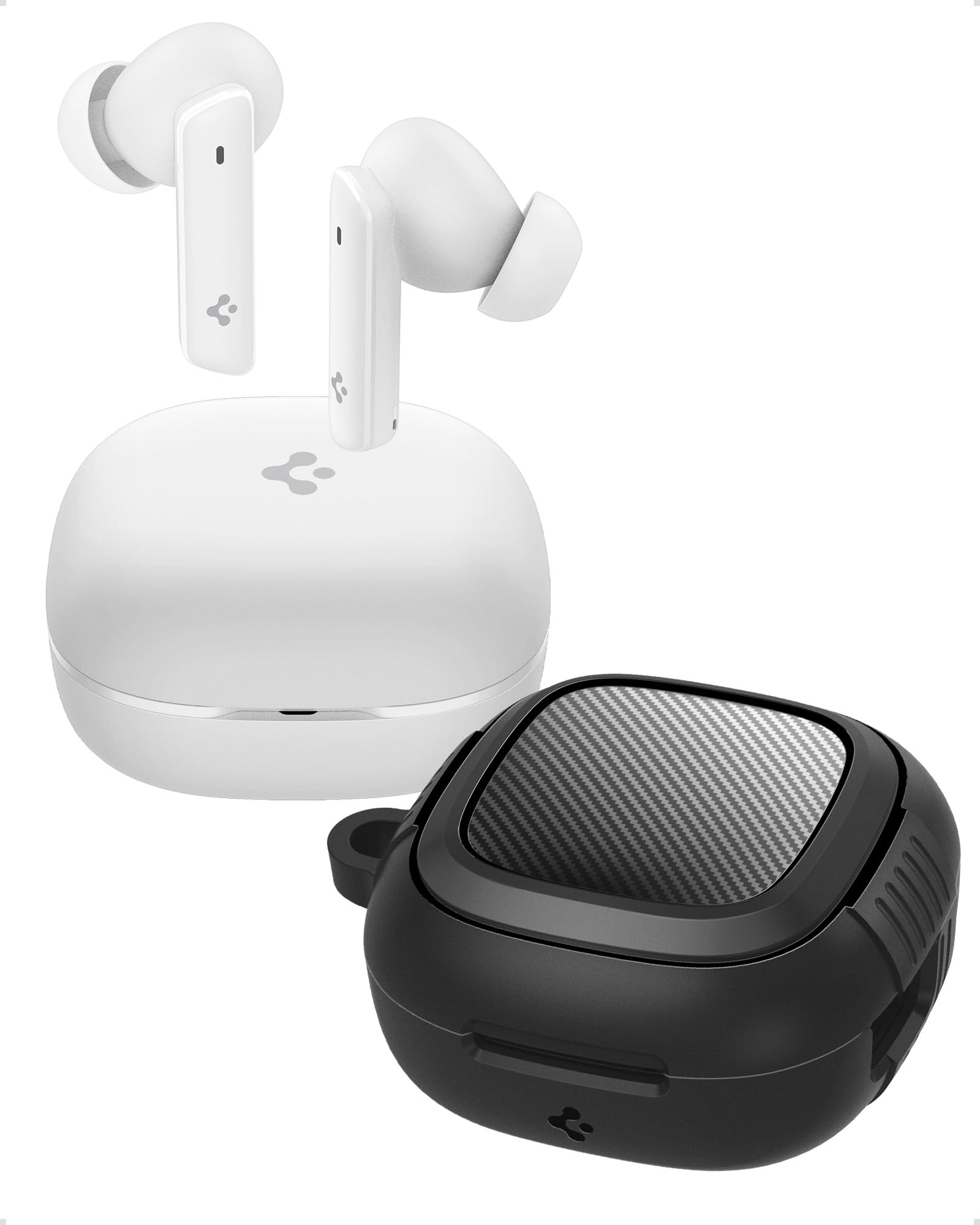
Image: Spigen SA-TW P20 True Wireless Earbuds in white, shown with their charging case.
Què hi ha a la caixa
The Spigen SA-TW P20 package includes the following items:
- 1 SA-TW P20 True Wireless Earbuds (White)
- 1 Charging Case for SA-TW P20
- 1 Rugged Armor Case for SA-TW P20
- 1 cable de càrrega USB
- 1 Set of Eartips (S/M - installed/L)

Image: The Spigen SA-TW P20 earbuds, their white charging case, and the included black Rugged Armor protective case.
Producte acabatview
The SA-TW P20 earbuds are designed for high-fidelity audio and clear communication. They feature 10mm LCP Graphene Dynamic Drivers for precise sound reproduction and 6 high-sensitivity microphones for clear calls. The included Rugged Armor case provides enhanced protection for your charging case.
Rugged Armor Case
The Rugged Armor case is designed to safeguard your charging case from daily drops and scratches. It incorporates Air-Cushion Technology, an advanced corner system that absorbs impacts, turning drops into harmless bumps. The case also features a carbon fiber accent and includes a strap for easy portability.

Imatge: Una imatge detallada view of the Spigen Rugged Armor case, highlighting its Air-Cushion Technology for impact protection.

Image: An illustration showing the internal components of the 10mm LCP Graphene drivers, the touch control area on an earbud, and the Bluetooth v5.2 logo.
Configuració
1. Càrrega inicial
- Col·loqueu els dos auriculars a la caixa de càrrega.
- Connecteu el cable de càrrega USB al port de càrrega de la carcassa i a una font d'alimentació.
- Allow the earbuds and case to fully charge before first use. The LED indicator on the case will show charging status.
2. Emparellament Bluetooth
- Obre l'estoig de càrrega. Els auriculars entraran automàticament en mode d'emparellament.
- Al dispositiu (telèfon intel·ligent, tauleta, ordinador portàtil), activeu el Bluetooth.
- Cerca "Spigen SA-TW P20" in the list of available devices.
- Select "Spigen SA-TW P20" to connect. A voice prompt will confirm successful pairing.
3. Spigen Audio App Installation
- Download the "Spigen Audio" app from your device's app store (Google Play Store for Android, Apple App Store for iOS).
- Instal·leu i obriu l'aplicació.
- Ensure your SA-TW P20 earbuds are connected via Bluetooth. The app will automatically detect and connect to your earbuds, allowing for customization.

Image: Screenshot of the Spigen Audio App interface, showing options for sound effects, noise change modes (Indoor, Commuting, Noisy), and channel balance.
Instruccions de funcionament
1. Toqueu Controls
The SA-TW P20 earbuds feature intuitive touch controls. Specific functions can be customized via the Spigen Audio App.
- Toc senzill: Reproduir/Pausar música, Respondre/Finalitzar trucada.
- Doble toc (auricular esquerre): Pista anterior.
- Doble toc (auricular dret): Pista següent.
- Toca tres vegades: Activa l'assistent de veu.
- Premsa llarga: Switch between ANC modes (ANC On, Transparency, Normal).
2. Modes de cancel·lació activa de soroll (ANC)
The earbuds offer up to 40dB of active noise cancellation with 3 Multi-Mode Hybrid Adaptive ANC settings.
- ANC Pro: Reduces ambient noise by up to 40dB for an immersive listening experience.
- Mode de transparència: Allows you to hear your surroundings while listening to audio, enhancing awareness.
- Mode normal: Disables ANC and Transparency for standard audio playback.

Image: Black Spigen SA-TW P20 earbuds illustrating 40dB ANC Pro, Transparency Mode, 3 Multi-Mode Hybrid Adaptive ANC, and Clear Calls with 6 MICs.
3. Mode de joc (latència baixa)
Activate Gaming Mode for crystal-clear, low-latency audio transmission, ensuring an uninterrupted and synchronized gaming experience. This mode minimizes audio delay between your device and the earbuds.

Image: Spigen SA-TW P20 earbuds positioned near a smartphone displaying a game, emphasizing low latency for gaming.
4. Funcions de crida
Equipped with 6 high-sensitivity microphones, the SA-TW P20 ensures crystal-clear calls. Advanced noise-cancellation technology helps remove ambient noise, allowing your voice to be heard clearly in various environments.

Image: A close-up diagram of the Spigen SA-TW P20 earbuds, indicating the locations of the three microphones on each earbud (MIC 1, MIC 2, MIC 3).
5. Sound Customization (Spigen Audio App)
The Spigen Audio App allows you to personalize your listening experience. You can choose from 5 preset sound profiles or use the customizable equalizer to adjust audio settings to your preferences. The app also provides control over ANC modes and touch functions.
6. Durada de la bateria
Enjoy up to 7.5 hours of playtime on a single charge. The charging case extends the total playtime to a generous 30 hours, allowing for multiple recharges on the go.

Image: White Spigen SA-TW P20 earbuds and their open charging case, with a prominent display of "30 HRS" indicating total battery life.
Manteniment
1. Neteja
- Netegeu suaument els auriculars i l'estoig de càrrega amb un drap suau, sec i sense borrissol.
- No utilitzeu productes químics aggressivs, dissolvents de neteja o detergents forts.
- Remove eartips and clean them separately with water and mild soap if necessary, ensuring they are completely dry before reattaching.
- Netegeu els contactes de càrrega tant dels auriculars com de la funda regularment amb un bastonet de cotó sec per garantir una càrrega correcta.
2. Resistència a l'aigua (IPX5)
The SA-TW P20 earbuds are IPX5 water-resistant, meaning they are protected against low-pressure water jets from any direction. This makes them suitable for workouts and light rain. However, they are not designed for submersion in water or exposure to heavy rain. Do not wear them while swimming or showering.
3. Cura de la bateria
- Eviteu descarregar completament la bateria amb freqüència.
- Guarda els auriculars i la funda en un lloc fresc i sec quan no els facis servir.
- Carregueu el dispositiu regularment, fins i tot si no l'utilitzeu durant períodes prolongats, per mantenir la bateria en bon estat.
Resolució de problemes
1. Els auriculars no s'emparellan
- Assegureu-vos que els dos auriculars estiguin completament carregats.
- Place earbuds back into the charging case, close the lid, wait a few seconds, then open it again to re-enter pairing mode.
- Desactiva i activa el Bluetooth al dispositiu.
- Forget "Spigen SA-TW P20" from your device's Bluetooth list and attempt to pair again.
2. Sense so o volum baix
- Comprova el nivell de volum tant del dispositiu com dels auriculars.
- Assegureu-vos que els auriculars estiguin correctament col·locats a les orelles.
- Netegeu qualsevol residu dels broquets i les puntes dels auriculars.
- Try resetting the earbuds (refer to the Spigen Audio App or manufacturer's weblloc web per obtenir instruccions específiques de restabliment).
3. Problemes de càrrega
- Assegureu-vos que el cable de càrrega estigui connectat correctament tant a la carcassa com a la font d'alimentació.
- Prova un cable de càrrega USB i un adaptador de corrent diferents.
- Netegeu els contactes de càrrega dels auriculars i de l'interior de la funda.
- Assegureu-vos que la caixa de càrrega tingui prou energia.
Especificacions
| Nom del model | SA-TW P20 |
| Control de soroll | Cancel·lació activa de soroll (fins a 40 dB) |
| Tecnologia de connectivitat | Sense fil (Bluetooth 5.2) |
| Tipus de controlador d'àudio | 10mm LCP Graphene Dynamic Driver |
| Micròfons | 6 (per a trucades clares) |
| Durada de la bateria (auriculars) | Fins a 7.5 hores |
| Temps de reproducció total (amb estoig) | Fins a 30 hores |
| Resistència a l'aigua | IPX5 (Sweatproof, Water Resistant) |
| Mètode de control | Toca |
| Dispositius compatibles | Cellphones, Tablets, Laptops, Gaming Consoles |
| Material | Plàstic, silicona |
| Dimensions del producte | 5.5 x 5.51 x 2.9 cm |
| Pes de l'article | 91.1 g |
| País d'origen | Xina |
Informació de seguretat
- Do not expose earbuds or charging case to extreme temperatures.
- Eviteu deixar caure o aplicar una força excessiva al dispositiu.
- Mantenir fora de l'abast dels nens i mascotes.
- No intenteu desmuntar ni modificar el producte. Això anul·larà la garantia.
- Feu servir només el cable de càrrega proporcionat o un equivalent certificat.
- L'exposició prolongada a sons forts pot causar danys auditius. Ajusteu el volum a un nivell segur.
Garantia i Suport
Política de garantia
Refunds or exchanges are not allowed after shrink wrap removal. For products with shrink wrapping already removed upon receipt, please request an immediate exchange.
Atenció al client
For further assistance, technical support, or warranty inquiries, please contact Spigen customer support:
- Correu electrònic: spigen.support@spigen.com
- Fabricant: Spigen Korea Co.,Ltd.
- Importador/Empacador (Índia): Spigen India Pvt. Ltd., No.295-296, Ecotech-1, Extension, Greater Noida, UP
Ask a question about this manual
Ask about setup, troubleshooting, compatibility, parts, safety, or missing instructions. Manuals+ will review the question and use this page’s manual context to help answer it.