
1. Introducció
Thank you for choosing the ORGSTA S001 Portable Bluetooth Thermal Label Maker. This compact and efficient device is designed to simplify your labeling needs for home, office, and school organization. Utilizing direct thermal printing technology, it offers high-resolution labels without the need for ink or toner. Its portable design and user-friendly app make it an ideal tool for creating custom labels on the go.
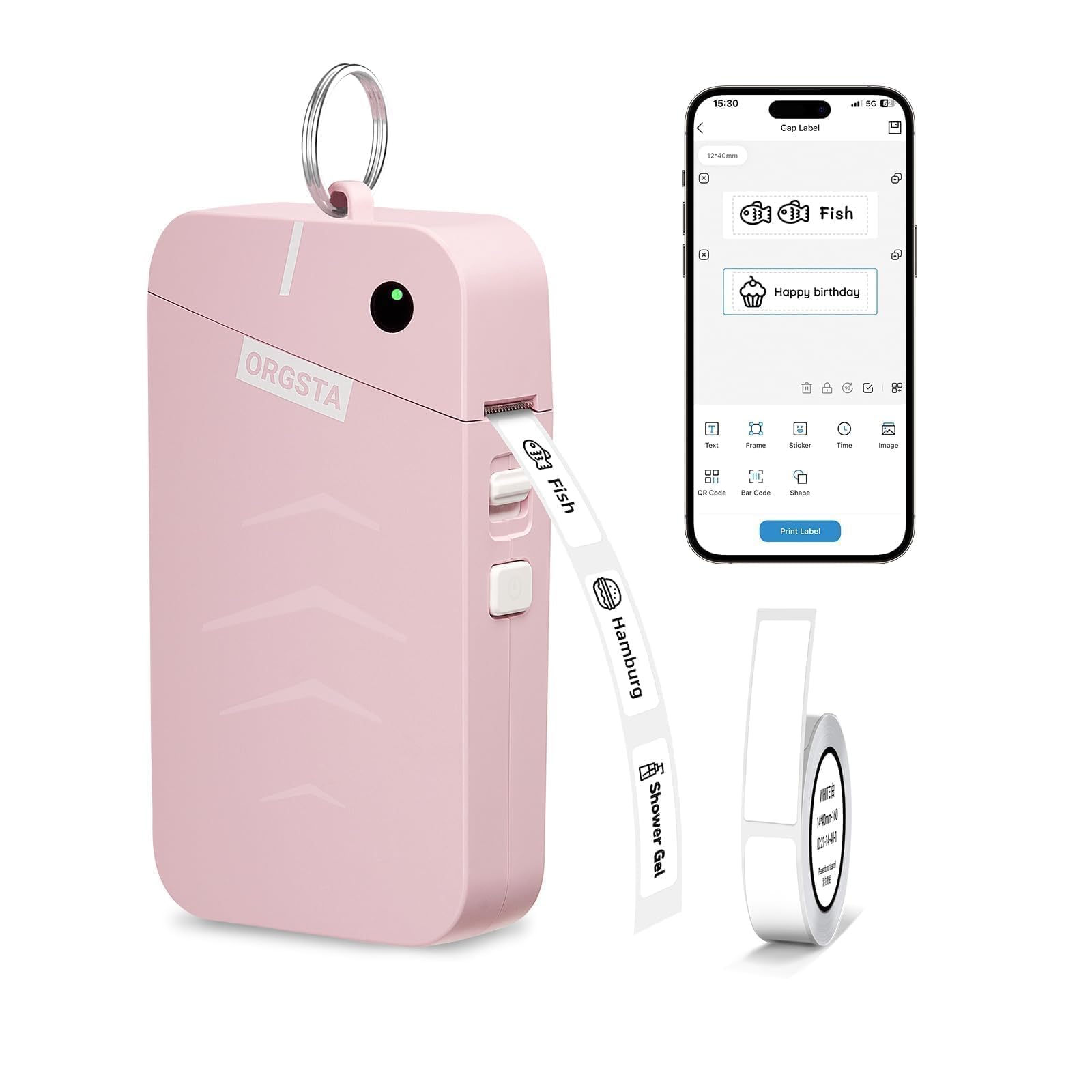
Image: The ORGSTA S001 Portable Bluetooth Thermal Label Maker in pink, showcasing el seu disseny compacte.
2. Què hi ha a la caixa
Upon unboxing your ORGSTA S001 Label Maker, please ensure all the following items are included:
- Etiquetadora S001
- 1 x Roll Label Tape
- 1 x Clauer
- 1 x cable tipus C
- 1 x Manual d'usuari

Image: A visual representation of all items included in the ORGSTA S001 Label Maker package.
3. Producte acabatview
The ORGSTA S001 features a minimalist design with essential controls for ease of use.
Buttons & Indicator Light
- Botó d'encesa: Press and hold for 1.5 seconds to power on/off. Double-press to print the device's QR code for Bluetooth connection. Triple-press to print the device SN.
- Botó de coberta: Slide down to open the label compartment.
- Indicador LED:
- Green (Steady): Mode d'espera.
- Verd (Intermitent): Impressió en curs.
- Red (Steady): Sense paper.
- Vermell (parpellejant): Low battery (less than 5%).
- Port de càrrega: Type-C USB port for charging.
- Clau de restabliment: Insert a pin into the reset hole and press firmly for a few seconds to reset the device if it's functioning abnormally.
4. Configuració
4.1. Descàrrega de l'aplicació
To utilize the full functionality of your ORGSTA S001 Label Maker, download the "Snap & Tag" app on your smartphone. You can find the app by:
- Scanning the QR code provided in the user manual or on the device packaging.
- Searching for "Snap & Tag" in your phone's app store (available for Android and iOS).
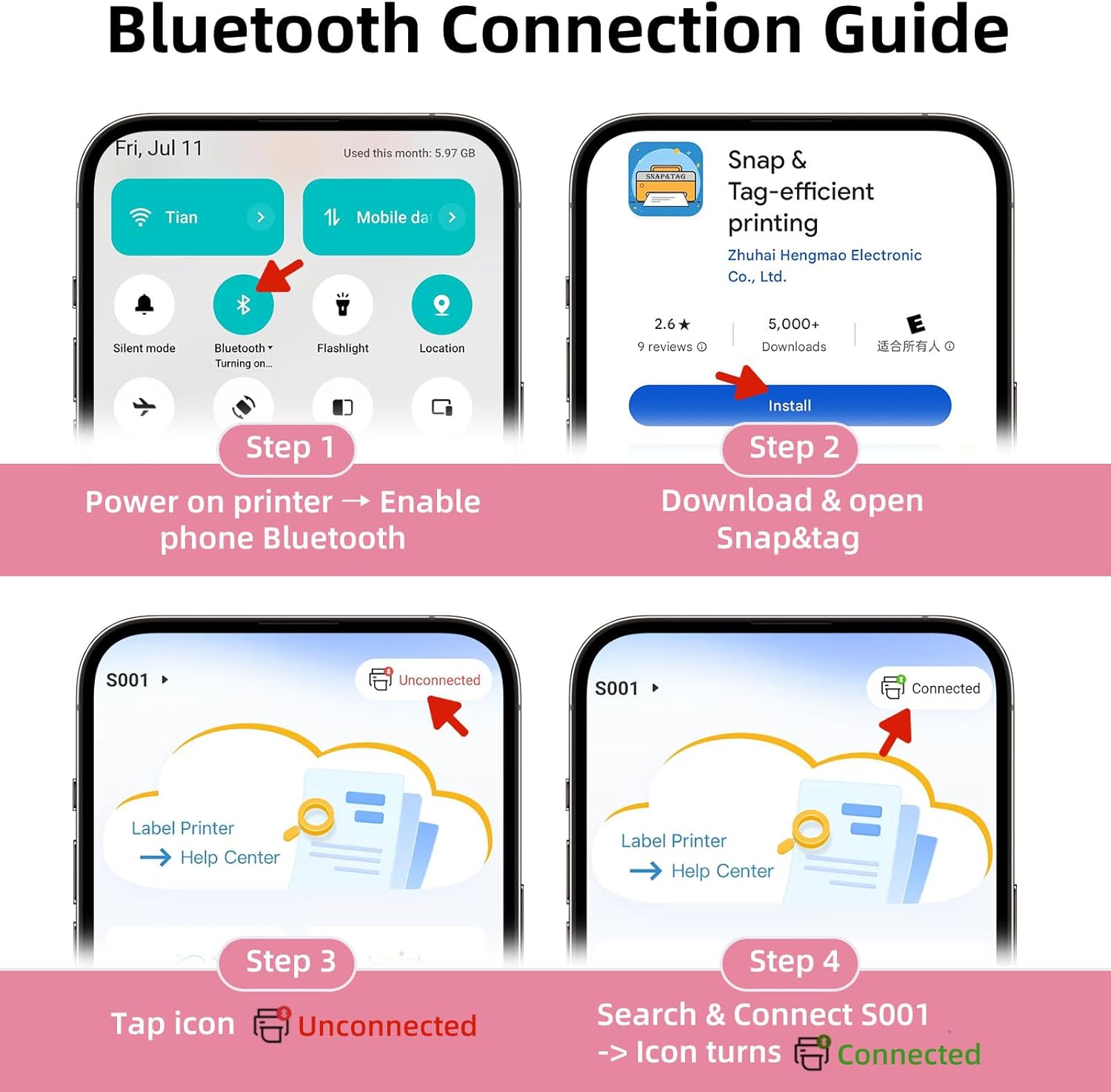
Image: A visual guide to downloading and opening the Snap & Tag aplicació.
4.2. Connexió de l'aplicació (Bluetooth)
Connect your label maker to your smartphone via Bluetooth:
- Enceneu el dispositiu mantenint premut el botó d'engegada fins que l'indicador s'encengui.
- Open the "Snap & Tag" app and enable Bluetooth on your phone.
- In the top left corner of the app, tap "Unconnected". Select your device from the list that appears. The app will then pair with your device. Once connected, you're ready to print!

Image: Steps for connecting the label maker to the app via Bluetooth.
4.3. Consumable Installation (Loading Label Tape)
Properly loading the label tape ensures optimal printing quality:
- Slide down the cover button to open the cover of the label maker.
- Load the paper roll with the printed side facing up. Ensure it is inserted correctly.
- Unroll the label paper so that it slightly extends beyond the print slot.
- Close the cover, then press and hold the power button to power on.

Image: Detailed steps for installing the label tape.
5. Instruccions de funcionament
The "Snap & Tag" app offers multiple creative functions to design and print your labels.
5.1. Creating a Label
From the app's home screen, select "Create a New Label" to begin designing. You can add:
- Text: Customize fonts, sizes, and styles.
- Marcs: Choose from over 100 decorative frames.
- Adhesius: Select from over 550 stickers to enhance your labels.
- Hora/Data: Automatically insert current time or date.
- Imatges: Upload your own images.
- QR Codes/Barcodes: Generate and print QR codes or barcodes.
- Formes: Add various shapes to your design.
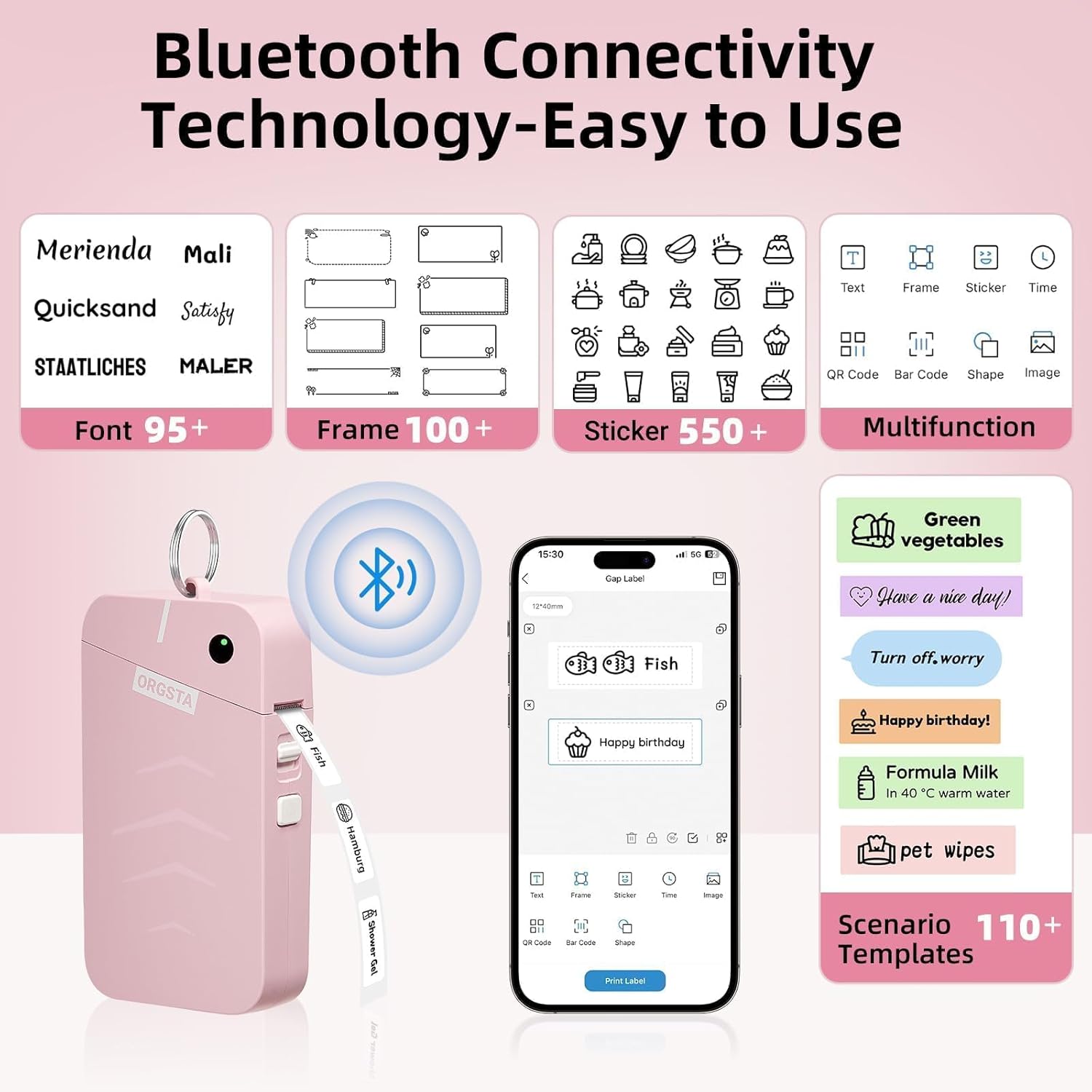
Image: The Snap & Tag app interface highlighting various customization features.
5.2. Imprimir una etiqueta
Un cop hàgiu acabat el disseny de l'etiqueta:
- Tap the "Print Label" button in the app.
- Adjust the quantity if you need multiple copies of the same label.
- You can also adjust the print density for darker or lighter prints.
- Confirm your settings and tap "Print Label" again to send the job to the printer.
5.3. Label Types and Sizes
The ORGSTA S001 supports various label types and sizes, including gap labels and continuous length tape. You can customize label lengths with continuous tape or use fixed-size labels for batch printing.

Imatge: Examples of different label types and sizes, including gap labels and continuous tape.
5.4. Wide Application
The ORGSTA S001 is versatile for various organizational tasks:
- Inici: Organize clothes, food storage, cosmetics, and mail.
- Oficina: Manage notebook tags, preu tags, reminder tags, and other supplies.
- Escola: Label classroom items, personal belongings, and name tags.

Imatge: Examples of the label maker's wide application in home and office settings.
6. Manteniment
To ensure the longevity and optimal performance of your ORGSTA S001 Label Maker:
- Neteja: Regularly clean the print head with a soft, lint-free cloth. Do not use harsh chemicals or abrasive materials.
- Emmagatzematge: Guardeu el dispositiu en un lloc fresc i sec, allunyat de la llum solar directa i de temperatures extremes.
- Cura de la bateria: For optimal battery health, we recommend charging your lithium battery every three months, even if it's not fully drained.
- Rotlles d'etiquetes: Use only genuine ORGSTA label rolls to prevent damage to the print head and ensure print quality.
7. Solució De Problemes
If you encounter issues with your ORGSTA S001 Label Maker, please refer to the following common solutions:
- Sense energia: Ensure the device is fully charged. Connect it to a power source using the provided Type-C cable.
- Printing Issues (Faint/Blank): Check if the label roll is inserted correctly with the printed side facing up. Ensure the label tape is not exhausted. Clean the print head.
- Error de connexió Bluetooth: Ensure Bluetooth is enabled on your phone and within the "Snap & Tag" app settings. Try restarting both the label maker and your phone. If the device is not listed, double-press the power button on your device; it will print a QR code. Use the scanner button at the bottom of the device list screen to scan the QR code to connect.
- Embús de paper: Open the cover, carefully remove any jammed paper, and re-insert the label roll correctly.
- Mal funcionament del dispositiu: If the device is functioning abnormally, insert a pin into the reset hole and press firmly for a few seconds to reset it.
8. Especificacions
| Característica | Especificació |
|---|---|
| Marca | ORGSTA |
| Model | S001 |
| Tecnologia de connectivitat | Bluetooth |
| Tecnologia d'impressió | Tèrmica |
| Resolució d'impressió màxima | 203 ppp |
| Velocitat màxima d'impressió (monocrom) | 15 mm/s (35 inches per minute) |
| Capacitat de la bateria | Ió de liti de 2000 mAh (inclosa) |
| Entrada de càrrega | 5V - 1A |
| Port de càrrega | Tipus-C |
| Dimensions del producte | 29 x 72.5 x 135.5 mm de profunditat x 2.9 polzades d'amplada x 5.3 polzades d'alçada |
| Dispositius compatibles | Smartphones (Android/iOS) |
| Mitjans impresos | Labels (Gap / Continuous) |
| Pes de l'article | 0.32 unces |
9. Garantia i Suport
ORGSTA is committed to providing quality products and customer satisfaction. Your ORGSTA S001 Label Maker comes with a limited warranty.
- Període de garantia: Please refer to the warranty card included in your package for specific details regarding the warranty period and terms.
- Atenció al client: If you have any quality problems or suggestions, please contact us promptly through the after-sales service email provided in the warranty card or user manual.
- Correu electrònic: orgsta_service@outlook.com
Please note that returns and exchanges require that the goods are intact and do not affect the sale. We will provide you with service as soon as possible after receiving the product.
10. Vídeos oficials de productes
Watch these official videos for more information and usage tips:
ORGSTA S001 Label Maker: Your Secret Weapon for a Neat Home
Video: This video demonstrates how the ORGSTA S001 Label Maker can help organize your home efficiently.
The Story of S001 Label Maker
Video: A short video highlighting the features and benefits of the S001 Label Maker.