
1. Producte acabatview
The MageGee Captain72 is a 65% wired mechanical gaming keyboard featuring advanced Hall Effect magnetic switches. Designed for high-performance gaming, it offers rapid trigger response, adjustable actuation points, and a durable CNC aluminum frame with a gasket-mounted structure for a premium typing experience. The keyboard also includes customizable RGB backlighting and hot-swappable switches.

Imatge 1.1: De dalt a baix view of the MageGee Captain72 keyboard, showcasing its compact 65% layout and keycap colors.
Característiques principals:
- Ultra-Low Latency Magnetic Switches: Utilizes the Hall effect for precise and fast key commands without physical contact, ensuring smooth operation.
- Funcionalitat de disparador ràpid: Achieves super-fast response with a minimum trigger distance of 0.1 mm, allowing for quick key presses and lifts.
- Adjustable Actuation Point: Customize the trigger distance for each key from 0.1 mm to 4 mm with 0.1 mm accuracy. Includes three preset key travel modes (Comfort, Sensitive, Game).
- Gasket-Mounted Structure: Features gaskets and multiple sound-absorbing pads for reduced vibrations, suppressed hollow sounds, and a soft, even typing feel.
- Interruptors intercanviables en calent: Magnetic switches are individually removable and replaceable without soldering, allowing for personalization. Compatible only with OUTEMU magnetic switches.
- South-Facing RGB Backlit: Offers various pre-programmed backlight modes and color choices, with adjustable speed and brightness.
- CNC Aluminum Case & Double-Shot PBT Keycaps: Durable aluminum top cover and abrasion/oil-resistant PBT keycaps for longevity and a premium feel.

Imatge 1.2: Primer pla view illustrating the aluminum alloy top enclosure of the Captain72 keyboard, highlighting its robust construction.

Image 1.3: Exploded diagram showing the internal gasket-mounted structure of the keyboard, including PBT keycaps, aluminum top enclosure, magnetic switches, PC positioning plate, IXPE foam pad, PORON foam, PCB board, silicone pad, and bottom cover.
2. Contingut del paquet
Marqueu la casella per als elements següents:
- MageGee Captain72 Rapid Trigger Keyboard
- Cable USB tipus C
- Manual d'usuari
- Guia d'usuari
- Extractor de tecles
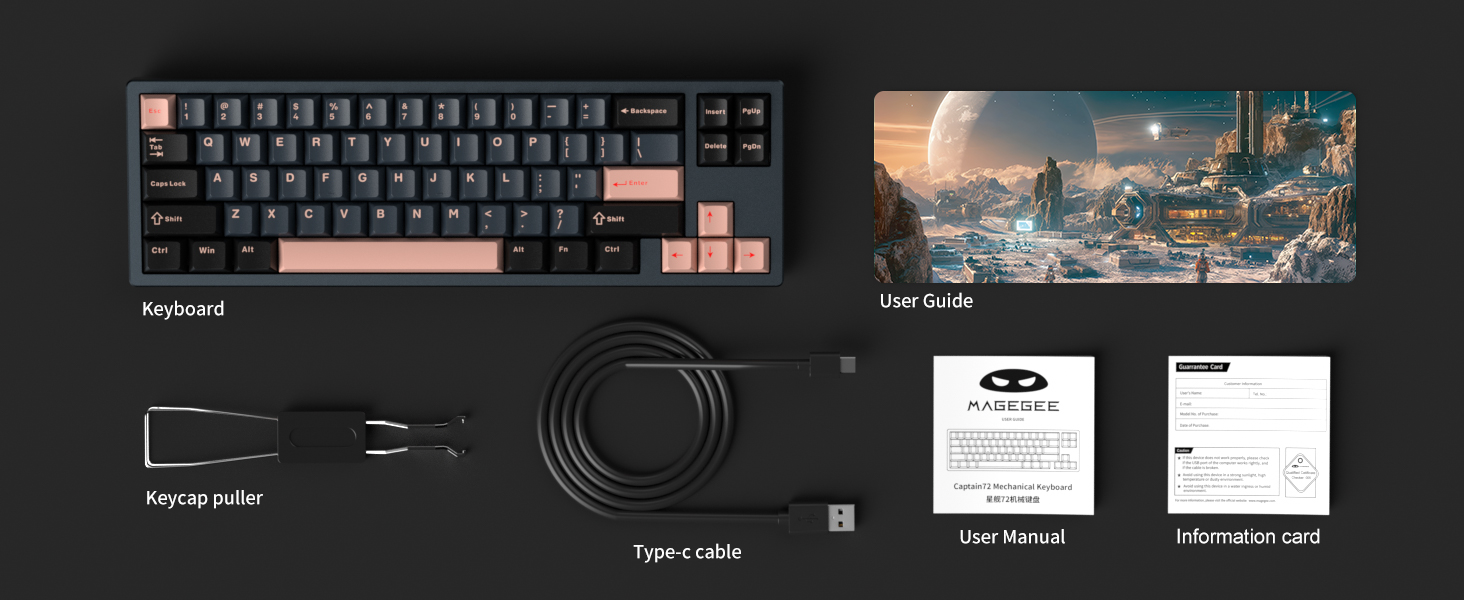
Image 2.1: An illustration of the package contents, including the keyboard, keycap puller, Type-C cable, user manual, user guide, and an information card.
3. Especificacions tècniques
| Característica | Especificació |
|---|---|
| Número de model | Capità72 |
| Tecnologia de connectivitat | USB-C (amb cable) |
| Descripció del teclat | Hall Effect Magnetic Switches, Mechanical |
| Dispositius compatibles | Laptop, PC (Windows, Mac OS) |
| Característiques especials | Backlit, Gasket Mount, Hot-Swappable, Hotkeys and Media Keys, Programmable Keys |
| Color | Blau Reial |
| Il·luminació del teclat | RGB (LED orientats al sud) |
| Material | Aluminum (Top Cover), Plastic (Bottom Cover), PBT (Keycaps) |
| Pes de l'article | 2.28 lliures |
| Dimensions del paquet | 14.96 x 5.98 x 2.56 polzades |
Magnetic Switch Specifications (Fairy Rabbit Magnetic Switch):
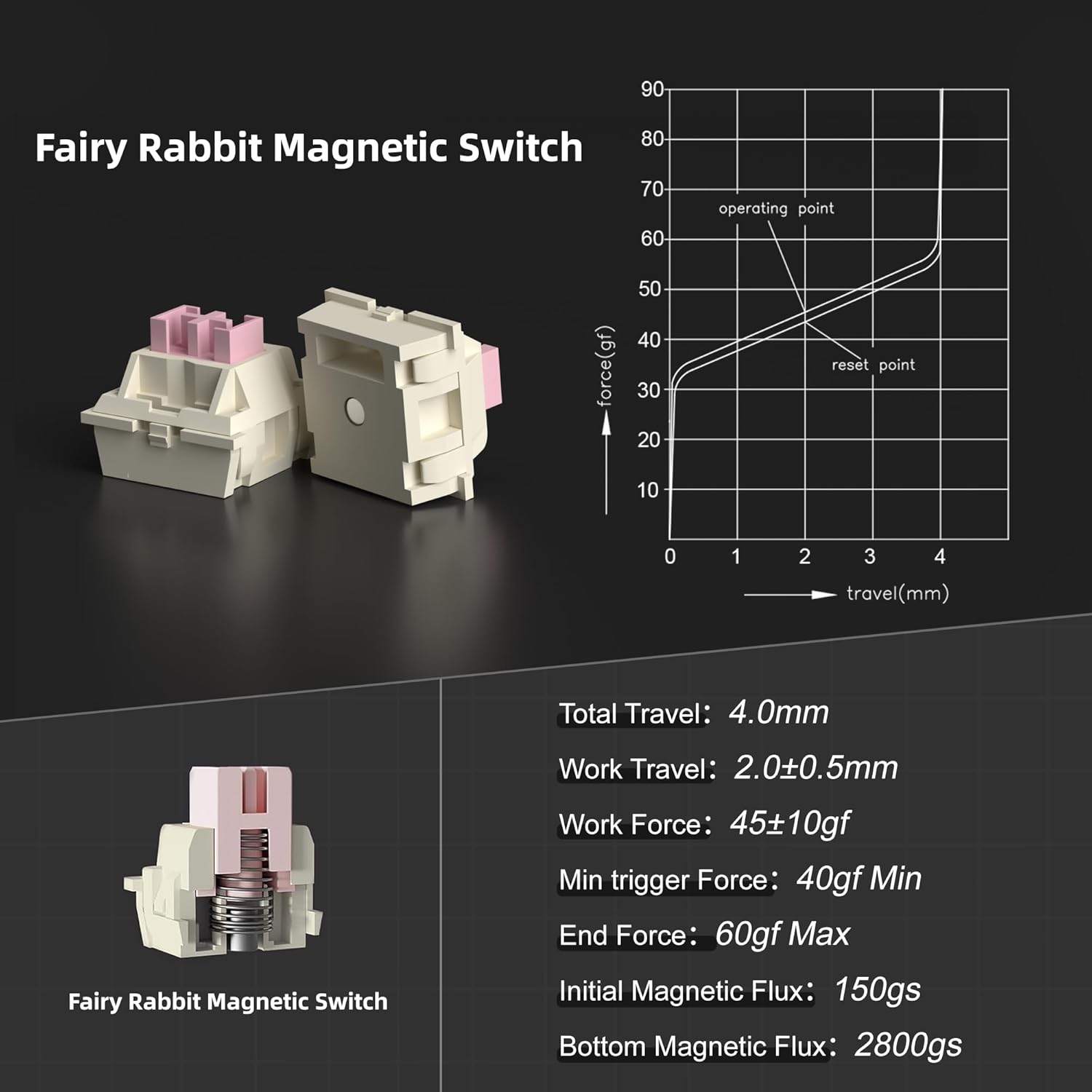
Image 3.1: Detailed specifications for the Fairy Rabbit Magnetic Switch, including force-travel graph, total travel (4.0mm), work travel (2.0±0.5mm), work force (45±10gf), minimum trigger force (40gf Min), end force (60gf Max), initial magnetic flux (150gs), and bottom magnetic flux (2800gs).
4. Guia de configuració
Follow these steps to set up your MageGee Captain72 keyboard:
- Descomprimir el teclat: Traieu amb cura el teclat i tots els accessoris de l'embalatge.
- Connecteu el cable USB-C: Insert one end of the provided Type-C USB cable into the USB-C port on the keyboard.
- Connexió a l'ordinador: Plug the other end of the USB-C cable into an available USB port on your computer (Laptop or PC).
- Driver Installation (Optional but Recommended): For full customization and advanced features, download and install the MageGee proprietary driver from the official MageGee website. Note: The Captain72 driver only supports Windows systems.
- Compatibilitat del sistema: The keyboard is compatible with both Windows and Mac OS systems.
5. Funcionament del teclat
Rapid Trigger and Adjustable Actuation:
The Captain72 keyboard features magnetic switches that allow for dynamic active/reset points, enabling rapid trigger functionality. This means keys can be pressed and reset quickly without needing to lift the key completely, providing a competitive edge in fast-paced applications.

Image 5.1: Diagram explaining the rapid trigger mechanism, showing the fastest trigger point at 0.1mm and adjustable trigger travel from 0.1mm to 4.0mm for magnetic gaming keyboards, contrasting with fixed active/reset points of regular gaming keyboards.
The trigger distance can be adjusted for each individual key from 0.1 mm to 4 mm with an accuracy of 0.1 mm. The keyboard also comes with three preset key travel modes:
- Mode de confort: General typing and casual use.
- Mode sensible: Increased responsiveness for faster input.
- Mode de joc: Optimized for gaming with the fastest possible response.
These modes can be switched using a dedicated button or through the software.
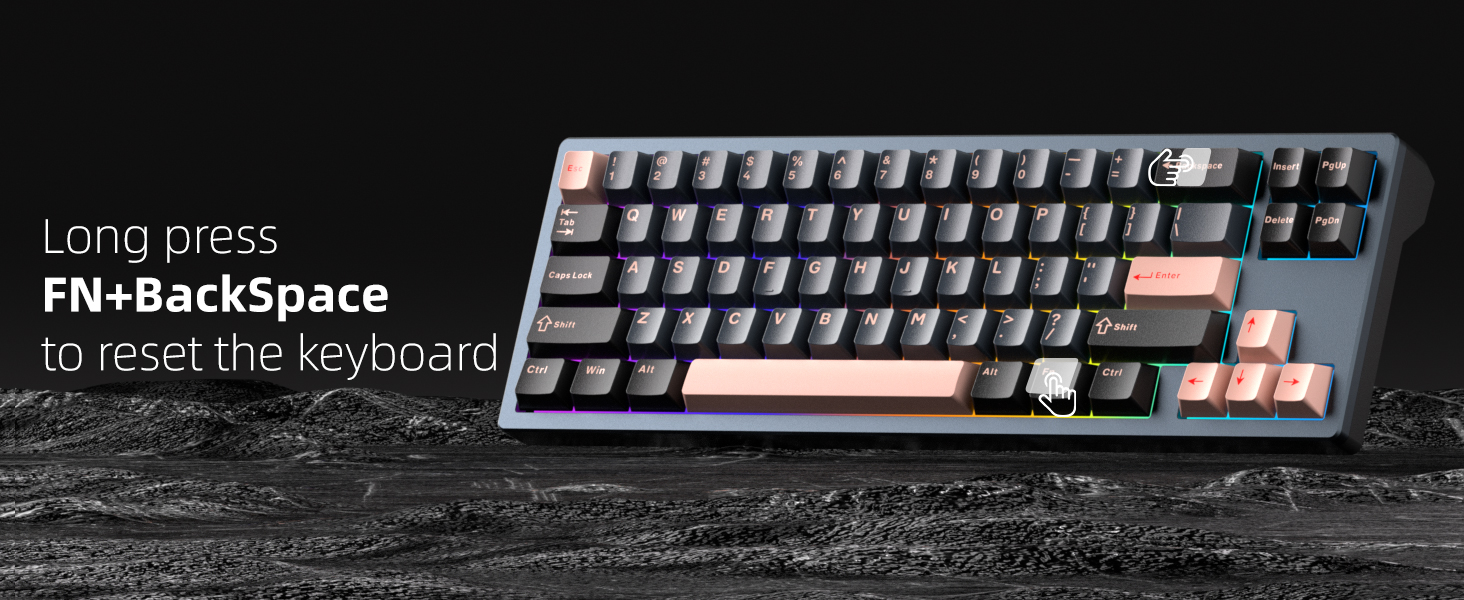
Image 5.2: Close-up of the keyboard's side, showing a physical switch for 'One Key Switch Mode', indicated by three icons (smiley face, star, game controller) representing different profiles or modes.
Retroil·luminació RGB:
The Captain72 features south-facing RGB LEDs, providing vibrant and visible illumination. You can cycle through various pre-programmed backlight modes and color choices directly from the keyboard.

Image 5.3: The Captain72 keyboard illuminated with colorful RGB backlighting, showcasing the south-facing LEDs.
Use function key combinations (e.g., Fn + specific keys) to change the speed and brightness of the lighting effects. Refer to the included User Guide for specific key combinations.
6. Software & Customization
The MageGee Captain72 Hall Effect Keyboard comes with a proprietary driver software that allows for extensive customization. This software is essential for unlocking the full potential of your keyboard.
Característiques del programari:
- RGB Settings: Customize backlight modes, colors, and effects.
- Reassignació de tecles: Reassignar funcions a tecles individuals.
- Macro Recording & Editing: Create and manage complex macros for gaming or productivity.
- Key Trigger Range: Precisely set the actuation point for each key.
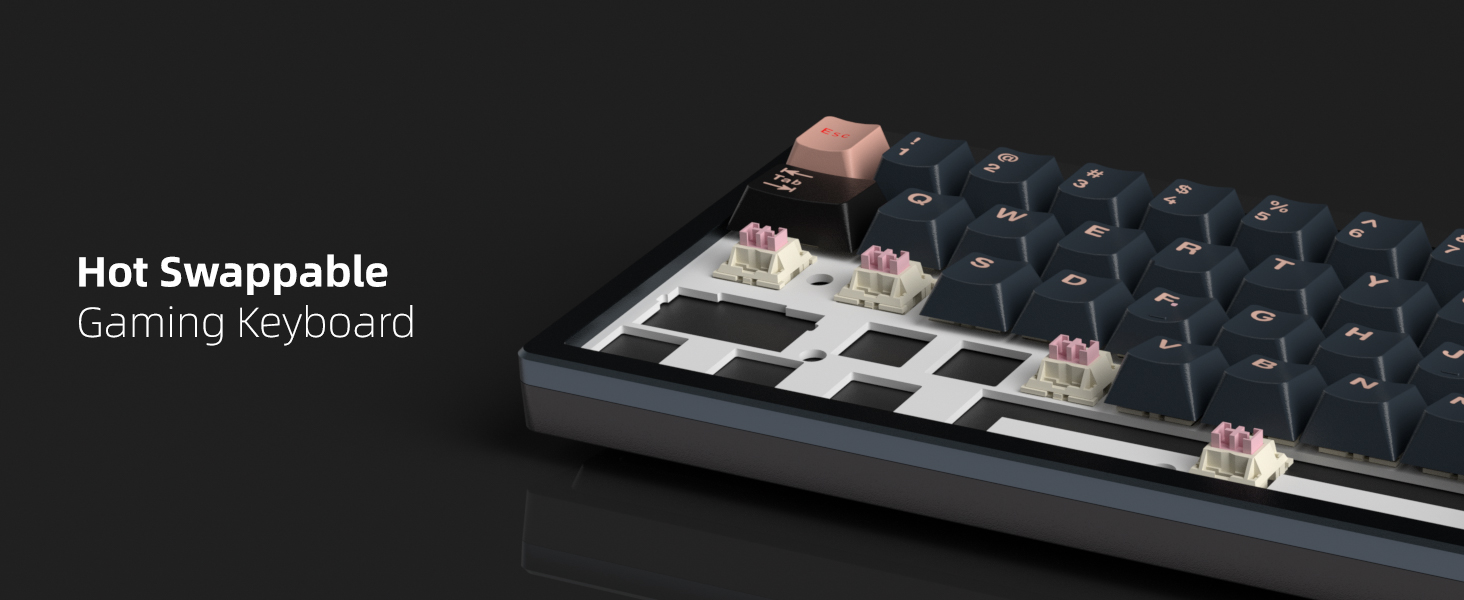
Image 6.1: Screenshot of the MageGee Driver software interface, showing options for key settings, advanced settings, macro customization, and lighting controls.
Nota: The Captain72 driver only supports Windows operating systems. To restore default settings, click the 'Reset' button located at the bottom right corner of the driver interface.
7. Manteniment
Un manteniment adequat garanteix la longevitat i el rendiment òptim del teclat.
- Neteja: Regularly clean the keyboard with a soft, dry cloth. For dust and debris between keycaps, use compressed air.
- Eliminació de la tapa de les tecles: Use the provided keycap puller to carefully remove keycaps for deeper cleaning or switch replacement. Pull straight up to avoid damaging the switch.
- Substitució de l'interruptor: The keyboard is hot-swappable with OUTEMU magnetic switches. If a switch needs replacement, gently pull it out using a switch puller (not included, but compatible with standard switch pullers) and insert a new compatible switch, ensuring pins align correctly.
- Eviteu líquids: No exposeu el teclat a líquids. En cas de vessament, desconnecteu immediatament el teclat i deixeu-lo assecar completament abans de tornar-lo a connectar.
Image 7.1: Illustration demonstrating the hot-swappable nature of the keyboard, showing a keycap and switch removed to reveal the socket.
8. Solució De Problemes
If you encounter issues with your MageGee Captain72 keyboard, try the following solutions:
- El teclat no respon:
- Assegureu-vos que el cable USB-C estigui connectat correctament tant al teclat com a l'ordinador.
- Prova de connectar el teclat a un port USB diferent de l'ordinador.
- Prova el teclat en un altre ordinador per descartar problemes específics del sistema.
- Claus que no es registren o escrivien dues vegades:
- Check if any debris is lodged under the keycap or around the switch.
- If using the software, ensure the actuation point for the affected key is set appropriately and not too sensitive.
- Consider replacing the magnetic switch if the issue persists and is isolated to a single key (requires compatible OUTEMU magnetic switch).
- Problemes d'il·luminació RGB:
- Assegureu-vos que el teclat estigui connectat correctament i que rebi alimentació.
- Use the function key combinations to cycle through lighting modes and adjust brightness.
- Check the RGB settings within the MageGee driver software.
- El programari no detecta el teclat:
- Ensure the software is the correct version for the Captain72 model.
- Verify that your operating system is Windows, as the driver only supports Windows.
- Desactiveu temporalment qualsevol programari antivirus o tallafocs que pugui estar bloquejant el controlador.
- Resetting the Keyboard:
If you experience persistent issues or wish to revert all settings to factory defaults, you can perform a hardware reset:
Image 8.1: Visual instruction to reset the keyboard by long pressing the FN + BackSpace keys simultaneously.
Premeu llargament el botó FN clau i la Espai enrere key simultaneously for a few seconds until the keyboard lights indicate a reset.
9. Garantia i Suport
MageGee products are designed and manufactured to the highest quality standards. For warranty information, technical support, or service inquiries, please refer to the official MageGee weblloc web o contacteu directament amb el seu servei d'atenció al client. Conserveu el rebut de compra com a comprovant de compra per a qualsevol reclamació de garantia.
For additional assistance, you may visit the MageGee Store on Amazon: MageGee Store
