
1. Introducció
This manual provides detailed instructions for the setup, operation, and maintenance of your ADREAMER Ariebox10 Mini PC. Please read this manual thoroughly before using the device to ensure proper functionality and to maximize your user experience.
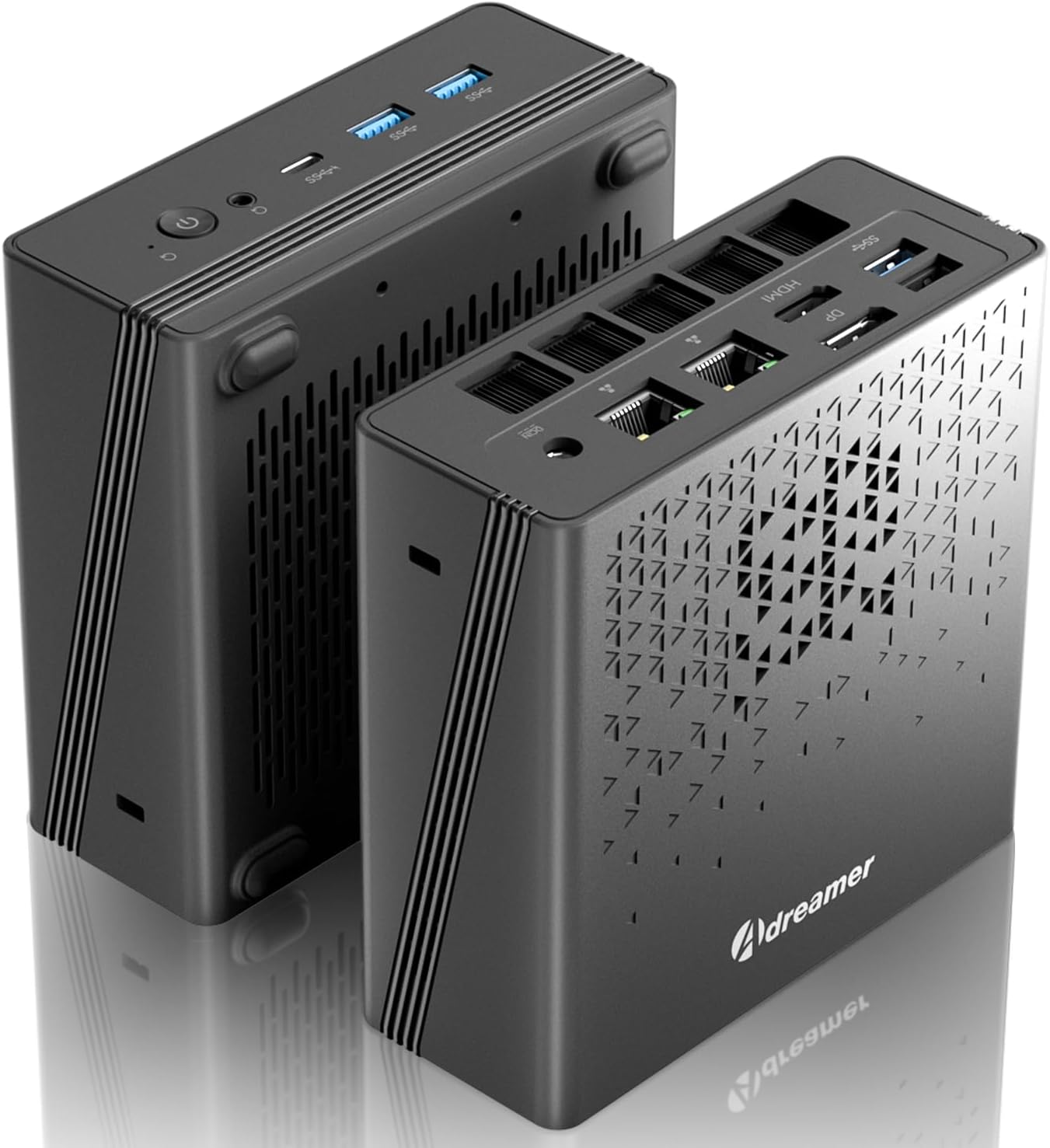
Image 1.1: The ADREAMER Ariebox10 Mini PC, showcasinel seu disseny compacte i els seus diversos ports.
2. Contingut del paquet
Verifiqueu que tots els elements que s'enumeren a continuació siguin presents al vostre paquet:
- ADREAMER Ariebox10 Mini PC
- Adaptador d'alimentació
- Manual d'usuari (aquest document)
3. Producte acabatview
3.1 Components i ports externs
The ADREAMER Ariebox10 Mini PC features a compact design with various ports for connectivity. Familiarize yourself with the port layout for optimal setup.

Imatge 3.1: Davant i darrere view of the ADREAMER Ariebox10 Mini PC, detailing port locations.
- Panell frontal: Power Button, Reprovision Button, 3.5mm Audio Jack, Type-C (USB4), 3x USB 3.2 Gen2 ports.
- Panell posterior: 1x USB 2.0 port, 1x USB 3.2 port, DisplayPort (DP), HDMI 2.0, 2x RJ45 (2.5G LAN) ports, DC IN (19V/6.32A).
3.2 Internal Components and Cooling
The Ariebox10 is designed with efficient internal components and a robust cooling system to ensure stable performance.

Imatge 3.2: Desplegada view showing internal components including the cooling fan, DDR5 RAM, and M.2 SSD slots.
- Processador: AMD Ryzen 7 7840HS (8 Cores, 16 Threads, up to 5.1GHz).
- Memòria: Dual-channel DDR5 5600MHz SODIMM (up to 96GB).
- Emmagatzematge: 2x M.2 2280 PCIe 4.0 SSD slots (up to 2TB).
- Sistema de refrigeració: Features a powerful and advanced silent cooling system with dual copper turbine cooling pipes and a high-temperature resistant base.
4. Instruccions de configuració
Follow these steps to set up your ADREAMER Ariebox10 Mini PC:
- Connecta la pantalla: Connect your monitor or display to the Mini PC using either the HDMI or DisplayPort. The device supports 4K@60Hz output.
- Connecteu els perifèrics: Plug in your USB keyboard and mouse to the available USB ports.
- Connectar l'alimentació: Connect the power adapter to the DC IN port on the rear panel of the Mini PC, then plug the adapter into a power outlet.
- Encès: Press the power button located on the front panel. The system will boot up.
- Configuració inicial de Windows: Follow the on-screen instructions to complete the Windows 11 initial setup. This includes setting up your user account and network connection.
5. Instruccions de funcionament
5.1 Connectivitat de xarxa
- Connexió per cable: Connect an Ethernet cable from your router or modem to one of the 2.5G RJ45 ports on the rear panel.
- Connexió sense fil: The Mini PC supports WiFi 6. During Windows setup or via Windows settings, select your Wi-Fi network and enter the password.
5.2 Bluetooth Devices
The device includes Bluetooth 5.0 for connecting wireless peripherals such as keyboards, mice, and headphones. Access Bluetooth settings in Windows to pair new devices.
5.3 Configuració de pantalla dual
The Ariebox10 supports dual 4K displays simultaneously via its HDMI and DisplayPort outputs. Connect two monitors to these ports, then configure display settings within Windows (Right-click on desktop > Display settings) to extend or duplicate your desktop.

Image 5.1: The Mini PC can be connected to various display types and used for diverse applications.
5.4 Ús general
The Mini PC is suitable for a range of tasks including office work, multimedia consumption, and light gaming, leveraging its AMD Ryzen 7 7840HS processor and Radeon 680M Graphics.

Image 5.2: Summary of key features including processor, GPU, OS, connectivity, cooling, storage, and RAM.
6. Especificacions
| Característica | Especificació |
|---|---|
| Processador | AMD Ryzen 7 7840HS (8C/16T, 3.8~5.1GHz) |
| Gràfics | AMD Radeon 680M (integrada) |
| RAM | 16GB DDR5 5600MHz (Expandable up to 96GB) |
| Emmagatzematge | 1TB PCIe 4.0 SSD (2x M.2 2280 slots, up to 2TB) |
| Sistema operatiu | Windows 11 |
| Connectivitat sense fil | WiFi 6, Bluetooth 5.0 |
| Ethernet | 2x 2.5G RJ45 LAN ports |
| Sortida de vídeo | HDMI 2.0, DisplayPort (DP) (Supports 4K@60Hz Dual Display) |
| Ports USB | 3x USB 3.2 Gen2, 1x USB 2.0, 1x Type-C (USB4) |
| Àudio | 3.5mm Àudio Jack |
| Dimensions (LxWxH) | 5.1 x 5 x 2 polzades |
| Pes | 1.3 lliures |
7. Solució De Problemes
This section addresses common issues you might encounter with your Mini PC.
- Sense energia:
- Assegureu-vos que l'adaptador de corrent estigui connectat correctament tant al Mini PC com a una presa de corrent que funcioni.
- Verifiqueu que la presa de corrent funciona provant-la amb un altre dispositiu.
- Sense sortida de pantalla:
- Check that the HDMI or DisplayPort cable is firmly connected to both the Mini PC and the monitor.
- Ensure the monitor is powered on and set to the correct input source (HDMI/DP).
- Prova un cable de pantalla o monitor diferent si estàs disponible.
- Sense connexió a Internet:
- For wired connections, ensure the Ethernet cable is properly connected and your router is working.
- For wireless connections, verify that Wi-Fi is enabled in Windows settings and you are connected to the correct network with the correct password.
- Reinicieu el vostre encaminador/mòdem i el mini PC.
- Windows Activation Issues:
- If Windows 11 is not activated, navigate to Windows Settings > System > Activation. Follow the on-screen prompts. If issues persist, contact ADREAMER support.
8. Manteniment
Proper maintenance helps extend the lifespan of your Mini PC.
- Neteja: Use a soft, dry cloth to clean the exterior of the Mini PC. For dust accumulation in ventilation areas, use compressed air. Do not use liquid cleaners directly on the device.
- Ventilació: Ensure the Mini PC is placed in a well-ventilated area. Avoid blocking the ventilation holes to prevent overheating.
- Actualitzacions de programari: Actualitzeu regularment el sistema operatiu i els controladors de Windows per garantir un rendiment i una seguretat òptims.
9. Garantia i Suport
ADREAMER offers a 1-year limited warranty for the Ariebox10 Mini PC, covering defects in design and workmanship. For warranty claims or technical assistance, please refer to the contact information provided with your purchase or visit the official ADREAMER weblloc de recursos de suport.
Our dedicated support team is available to assist you with any product-related inquiries or issues.