
Introducció
Experience your music in style with the Hello Kitty Bluetooth Wireless Earbuds! These adorable earbuds feature a cute Cinnamoroll design with a blue and white finish, perfect for fans of all ages. Whether you’re listening to your favorite playlist or taking an important call, these earbuds deliver high-quality sound while showcasing your love for Hello Kitty.
Què hi ha a la caixa
- Hello Kitty Bluetooth Wireless Earbuds
- Cinnamoroll-themed Charging Case
- Cable de càrrega USB
- Manual d'usuari (aquest document)
Producte acabatview

The Hello Kitty Cinnamoroll Bluetooth Wireless Earbuds, shown with their unique Cinnamoroll-themed charging case. The earbuds are white and designed for a comfortable in-ear fit.

The charging case is open, revealing the two white earbuds nestled inside their respective charging slots. The case features the Cinnamoroll design on the front.

Davant view of the product packaging, showcasing the Hello Kitty and Friends branding, the earbuds, and the Cinnamoroll charging case. Key features like "Built-in Mic" and "Easy Pairing" are highlighted.
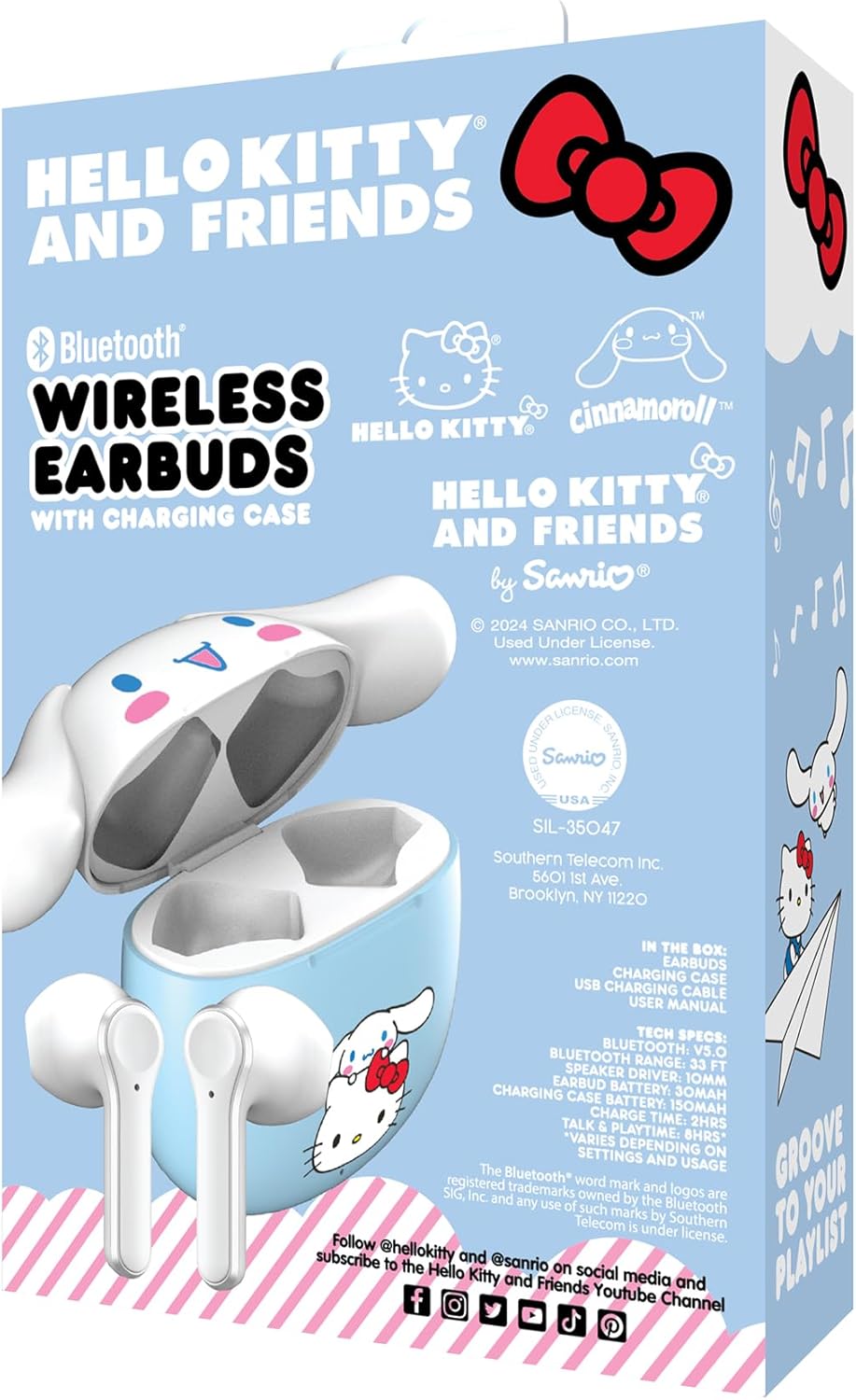
Enrere view of the product packaging, displaying detailed technical specifications and contents of the box. It also shows licensing information and social media handles.
Configuració
1. Càrrega inicial
Before first use, fully charge the earbuds and the charging case. Connect the provided USB charging cable to the charging port on the case and plug the other end into a USB power source (e.g., computer, wall adapter). The indicator light on the case will show charging status and turn off when fully charged. The portable charging case provides up to 30 hours of playback.
2. Encès / apagat
- Encès: Obriu la funda de càrrega i els auriculars s'encendran automàticament.
- Apagar: Torneu a col·locar els auriculars a l'estoig de càrrega i tanqueu la tapa. S'apagaran automàticament i començaran a carregar-se.
Instruccions de funcionament
1. Emparellament Bluetooth
- Assegureu-vos que els auriculars estiguin completament carregats.
- Open the charging case. The earbuds will enter pairing mode, and an indicator light on the earbuds will flash.
- Al dispositiu (telèfon intel·ligent, tauleta, ordinador), aneu a la configuració de Bluetooth.
- Cerca "Hello Kitty Earbuds" or a similar name in the list of available devices.
- Select the earbuds to connect. Once connected, the indicator light will stop flashing, and you may hear a confirmation tone.
- Els auriculars es tornaran a connectar automàticament a l'últim dispositiu emparellat quan es treguin de l'estoig, si el Bluetooth està activat al dispositiu.
2. Gestió de trucades
The earbuds feature a built-in microphone for hands-free calls.
- Respondre/Finalitzar la trucada: Toqueu qualsevol dels auriculars una vegada.
- Rebutja la trucada: Manteniu premut qualsevol dels auriculars durant 2 segons.
3. Reproducció de música
- Reproduir/pausa: Toqueu qualsevol dels auriculars una vegada.
- Pista següent: Fes doble toc a l'auricular dret.
- Pista anterior: Fes doble toc a l'auricular esquerre.
- Control de volum: Volume is controlled via your connected device.
Manteniment
- Neteja: Feu servir un drap suau i sec per netejar els auriculars i l'estoig de càrrega. No utilitzeu productes químics agressius ni materials abrasius.
- Emmagatzematge: Quan no els utilitzeu, guardeu els auriculars a la seva funda de càrrega per protegir-los i mantenir-los carregats.
- Eviteu l'aigua: Aquests auriculars no són impermeables. Eviteu l'exposició a l'aigua o a la humitat excessiva.
Resolució de problemes
| Problema | Solució |
|---|---|
| Els auriculars no s'aparellen. |
|
| Només funciona un auricular. |
|
| Sense so o amb un volum baix. |
|
Especificacions
| Característica | Detall |
|---|---|
| Nom del model | Hello Kitty Bluetooth Wireless Earbuds with Charging Case - Built-in Mic, Easy Pairing, Cute Cinnamoroll Design, Blue and White, Perfect for Kids, Teens, and Hello Kitty Fans |
| Número de model | HKTWSMD-CR-MFN |
| Marca | Hola Kitty |
| Tecnologia de connectivitat | Sense fil (Bluetooth) |
| Forma de l'auricular | Bud |
| Col·locació de l'orella | A l'orella |
| Factor de forma | A l'orella |
| Control de soroll | Cap |
| Interval de freqüència | 20 Hz - 20,000 Hz |
| Impedància | 32 ohms |
| Pes de l'article | 7.2 unces |
| Dimensions del paquet | 6 x 4 x 1.5 polzades |
| Fabricant | Southern Telecom |
| UPC | 680079035372 |
| Data de primera disponibilitat | 14 d'octubre de 2024 |
Garantia i Suport
For warranty information and technical support, please refer to the documentation included with your product or contact the manufacturer, Southern Telecom, directly. Keep your proof of purchase for any warranty claims.
Per obtenir ajuda addicional, podeu visitar el pàgina del producte a Amazon.