
1. Introducció
El Fender Champion II 25 is a versatile electric guitar amplifier designed for a wide range of players, from beginners to experienced musicians. It offers 25 watts of power and features a variety of amp voices and effects, making it suitable for practice, recording, and small performances. This manual will guide you through the amplifier's features, setup, operation, and maintenance to ensure optimal performance and longevity.
2. Instruccions de seguretat
- Font d'alimentació: Connecteu el amplifier only to a power supply of the specified voltage (100V JP). Ensure the power cord is securely plugged into both the amplifier and a grounded outlet.
- Ventilació: Do not block any ventilation openings. Maintain adequate space around the amplifier for proper airflow to prevent overheating.
- Humitat: No exposar el amplifier to rain, moisture, or excessive humidity. Keep liquids away from the unit.
- Calor: No col·loqueu el ampa prop de fonts de calor com ara radiadors, registres de calor, estufes o altres aparells que produeixen calor.
- Manteniment: No intenteu fer el servei amplifier yourself. Refer all servicing to qualified service personnel.
- Neteja: Desconnecteu el amplifier from the power outlet before cleaning. Use a dry cloth for cleaning.
- Entrada d'objecte/líquid: No introduïu mai cap objecte dins d'aquest producte a través de les obertures, ja que poden tocar un volum perillóstage punts o curtcircuitar peces que podrien provocar un incendi o una descàrrega elèctrica.
3. Contingut del paquet
Si us plau, comproveu que tots els elements siguin presents al paquet:
- Fender Champion II 25 Electric Guitar Ampmés viu
- Cable d'alimentació
- Manual d'usuari (aquest document)
4. Producte acabatview
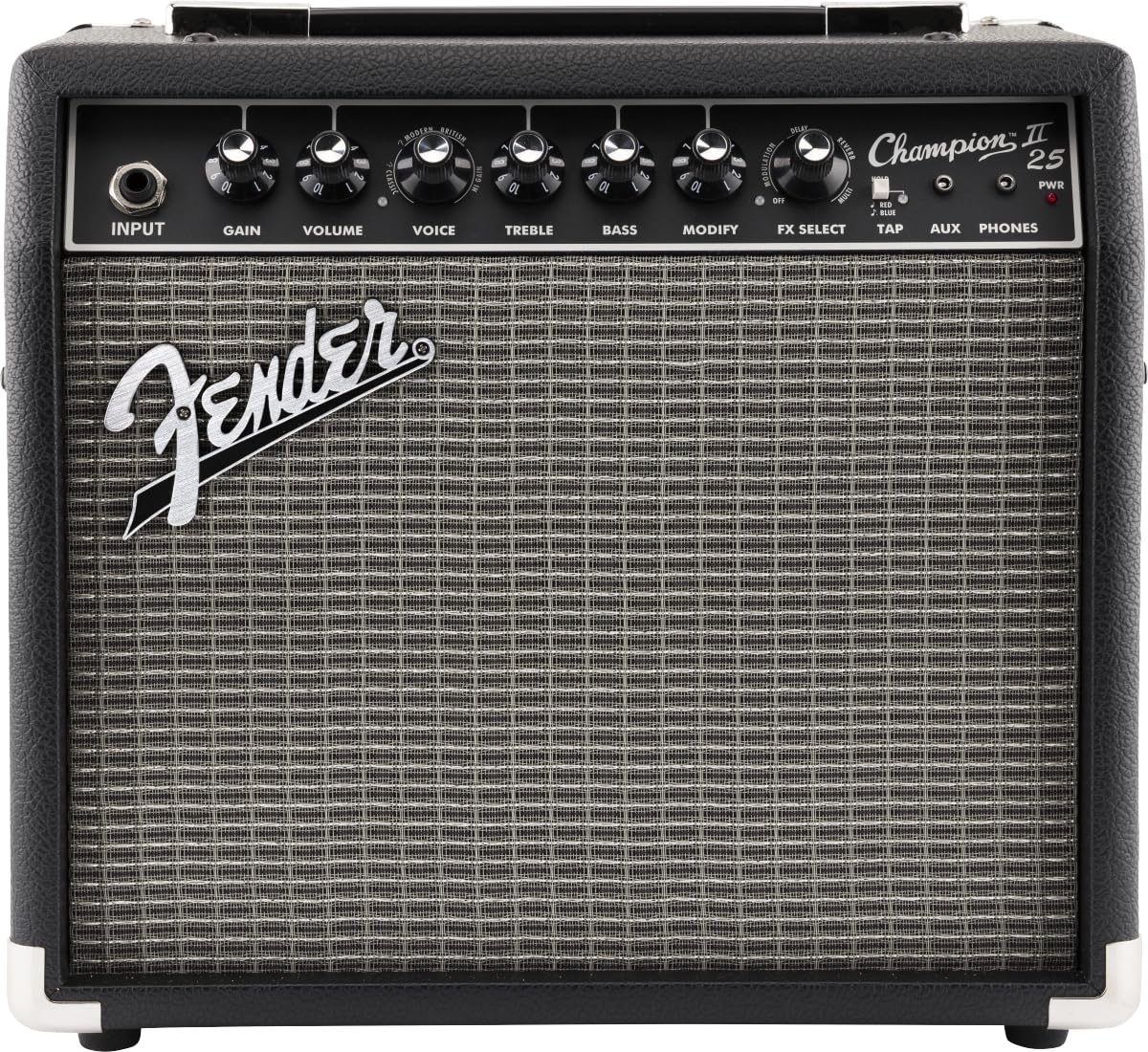
4.1 Controls del panell frontal
The front panel provides access to all primary controls for shaping your sound.

Imatge: Frontal view of the Fender Champion II 25 amplifier, showing the input jack, control knobs, and speaker grille.

Image: Close-up of the Fender Champion II 25 amplifier's front panel controls, including Input, Gain, Volume, Voice, Treble, Bass, Modify, FX Select, Tap, AUX, Phones, and Power switch.
- ENTRADA: Connecta la teva guitarra aquí amb un cable d'instrument estàndard de 1/4 de polzada.
- GUANY: Adjusts the amount of pre-amp distortion and sustain. Higher settings produce more aggressive tones.
- VOLUM: Controla el nivell de sortida general del ampmés viu.
- VEU: Selecciona diferents amplifier voicings (amp models) from clean to various overdrive and distortion types.
- AGUTS: Adjusts the high-frequency content of your sound.
- BAIX: Adjusts the low-frequency content of your sound.
- MODIFICAR: Adjusts a specific parameter for the currently selected effect.
- SELECCIÓ D'EFECTES: Chooses from various built-in effects such as Reverb, Delay/Echo, Chorus, Tremolo, and Vibratone.
- AIXETA: Used to set the tempo for time-based effects like Delay and Tremolo. Tap the button twice at your desired tempo.
- AUX: Connect an external audio device (e.g., MP3 player, phone) using a 1/8-inch stereo cable to play along with music.
- TELÈFONS: Connect stereo headphones here for silent practice. This mutes the internal speaker.
- PWR (Power Switch): Gira el amplifier on or off. The LED indicates power status.
4.2 Panell posterior
The rear panel houses the power input and USB port.
Imatge: Part posterior view of the Fender Champion II 25 amplifier, showing the power input, USB port, and speaker. Warning labels are visible.
- INPUT POWER (100-120V ~ 50/60Hz): Connect the provided power cord here.
- USB: Connect to a computer for potential firmware updates or recording capabilities (refer to Fender's official website for software/driver information).
5. Configuració
- Col·locació: Col·loca el amplifier on a stable, flat surface. Ensure there is adequate ventilation around the unit.
- Connexió d'alimentació: Connect the power cord to the INPUT POWER receptacle on the rear panel and then to a suitable grounded electrical outlet.
- Connexió de guitarra: Amb el amplifier turned OFF and VOLUME set to minimum, connect your electric guitar to the INPUT jack on the front panel using a standard 1/4-inch instrument cable.
- External Devices (Optional): If desired, connect an external audio player to the AUX input or headphones to the PHONES output.
- Encès: Flip the PWR switch to the ON position. The power indicator LED will illuminate.
6. Instruccions de funcionament
6.1 Basic Tone Shaping
- Start with the VOLUME knob at a low setting.
- Turn the VOICE knob to select an amplifier model. Experiment with different settings to find your preferred base tone (e.g., clean, crunch, lead).
- Adjust the GAIN knob to control the amount of overdrive or distortion. Lower gain for cleaner tones, higher gain for more aggressive sounds.
- Use the TREBLE and BASS knobs to fine-tune the high and low frequencies of your sound.
- Slowly increase the VOLUME to your desired listening level.
6.2 Using Effects
- Rotate the FX SELECT knob to choose from the available effects (Reverb, Delay/Echo, Chorus, Tremolo, Vibratone).
- Once an effect is selected, use the MODIFY knob to adjust its specific parameters (e.g., decay for reverb, delay time for delay, depth for chorus).
- For time-based effects like Delay and Tremolo, you can set the tempo by tapping the TAP button twice in rhythm with your desired speed.
6.3 Using AUX Input and Headphones
- Connect your external audio device to the AUX input using a 1/8-inch stereo cable. The volume of the external device will be controlled by its own volume control.
- Plug stereo headphones into the PHONES jack for private practice. This will automatically mute the internal speaker.
7. Manteniment
- Neteja: Netegeu regularment el amplifier's exterior with a soft, dry cloth. Avoid using abrasive cleaners or solvents.
- Emmagatzematge: Quan no s’utilitzi, emmagatzemeu el fitxer amplifier in a dry, dust-free environment, away from extreme temperatures.
- Transport: En moure el amplifier, ensure it is powered off and unplugged. Use the handle provided.
- Atenció a l'altaveu: Avoid poking or pressing on the speaker cone, as this can cause damage.
8. Solució De Problemes
| Problema | Causa possible | Solució |
|---|---|---|
| Sense so | Ampl'alimentador no està encès Volume knob set to zero Guitar cable faulty or disconnected Auriculars connectats | Check power switch and power cord Increase VOLUME knob Check/replace guitar cable Unplug headphones |
| So distorsionat o feble | GAIN too high Guitar volume too low Faulty guitar or cable | Reduce GAIN Increase guitar volume Test with another guitar/cable |
| Els efectes no funcionen | FX SELECT knob not set MODIFY knob set to minimum | Rotate FX SELECT to choose an effect Increase MODIFY knob setting |
| Soroll de brunzit o brunzit | Bucle de terra Interferències d'altres aparells electrònics Cable defectuós | Proveu una presa de corrent diferent Mou-te amplifier away from other devices Replace guitar cable |
If the problem persists after trying these solutions, please contact Fender customer support or a qualified service technician.
9. Especificacions
- Potència de sortida: 25 watts
- Ponent: 1 x 8-inch Fender Special Design Speaker
- Canals: 1
- Entrades: 1 x 1/4-inch Instrument Input, 1 x 1/8-inch AUX Input
- Sortides: 1 x 1/8-inch Headphone Output
- Efectes: Reverb, Delay/Echo, Chorus, Tremolo, Vibratone
- Amp Tipus: Various built-in amp models and distortion types
- Controls: Input, Gain, Volume, Voice, Treble, Bass, Modify, FX Select, Tap, AUX, Phones, PWR
- Dimensions (P x A x A): 32 cm x 19 cm x 35 cm (approximately 12.6 inches x 7.5 inches x 13.8 inches)
- Font d'alimentació: AC Power Cord (100V JP)
- AmpTipus més viu Estat sòlid
- Color: Negre
- Accessoris inclosos: Cable d'alimentació
- Número de model del fabricant: 2330707900
10. Garantia i Suport
This Fender Champion II 25 amplifier ve amb a Garantia del fabricant de 1 anys des de la data de compra. Aquesta garantia cobreix els defectes de materials i de mà d'obra en ús normal.
For warranty claims, technical support, or service inquiries, please contact Fender customer support through their official website or authorized service centers. Please retain your proof of purchase for warranty validation.
For the latest information, software updates, and additional resources, please visit the official Fender weblloc: www.fender.com