
1. Introducció
The SainSmart Genmitsu GGW-USB Wireless Wi-Fi Module Kit provides wireless connectivity for your CNC milling machine. This module enables G-code file transmission, remote control, and monitoring capabilities through a dedicated application on your mobile device. It is designed to enhance the operational experience by offering a more flexible and efficient way to manage your CNC projects.
Característiques principals:
- Àmplia compatibilitat: Features an upgraded USB interface and Dual DC cable, ensuring compatibility with all current Genmitsu CNC machines and most mainstream CNC machines equipped with a Grbl main board (containing a CH34X Chip USB to Uart).
- Rendiment millorat: Utilizes USB transmission for significantly faster app button response, up to 10 times quicker than previous generation offline interfaces, reducing lag and improving user interaction.
- Effortless G-Code Management: Facilitates easy downloading, sharing, and wireless transmission of G-code files from your phone to the CNC machine via the dedicated app. Supports 2.4G Wi-Fi only.
- Multi-Machine Monitoring: Allows simultaneous monitoring of multiple CNC machines from a single app interface, providing real-time status updates.
- Experiència d'usuari millorada: Offers remote control from a phone or tablet, providing a larger display for a more intuitive and flexible operating experience.
2. Contingut del paquet
Verifiqueu que tots els components siguin presents al paquet:
- SainSmart Genmitsu GGW-USB Wireless Wi-Fi Module
- Cable USB
- Targeta SD
- Dual DC Cable (if applicable for your CNC model)
3. Guia de configuració
3.1 Connexió física
- Identifica els ports de connexió: Locate the USB port on your CNC machine's Grbl main board.
- Connecteu el mòdul: Plug the provided USB cable into the GGW-USB Wi-Fi module and then into the USB port of your CNC machine.
- Power Connection (if necessary): If your CNC machine requires external power for the module, connect the Dual DC cable (if included) to the module and the appropriate power source on your CNC.
The module is designed for easy installation across various Genmitsu CNC machines.

Image: The GGW-USB module connected to different Genmitsu CNC models, demonstrating its versatile installation.
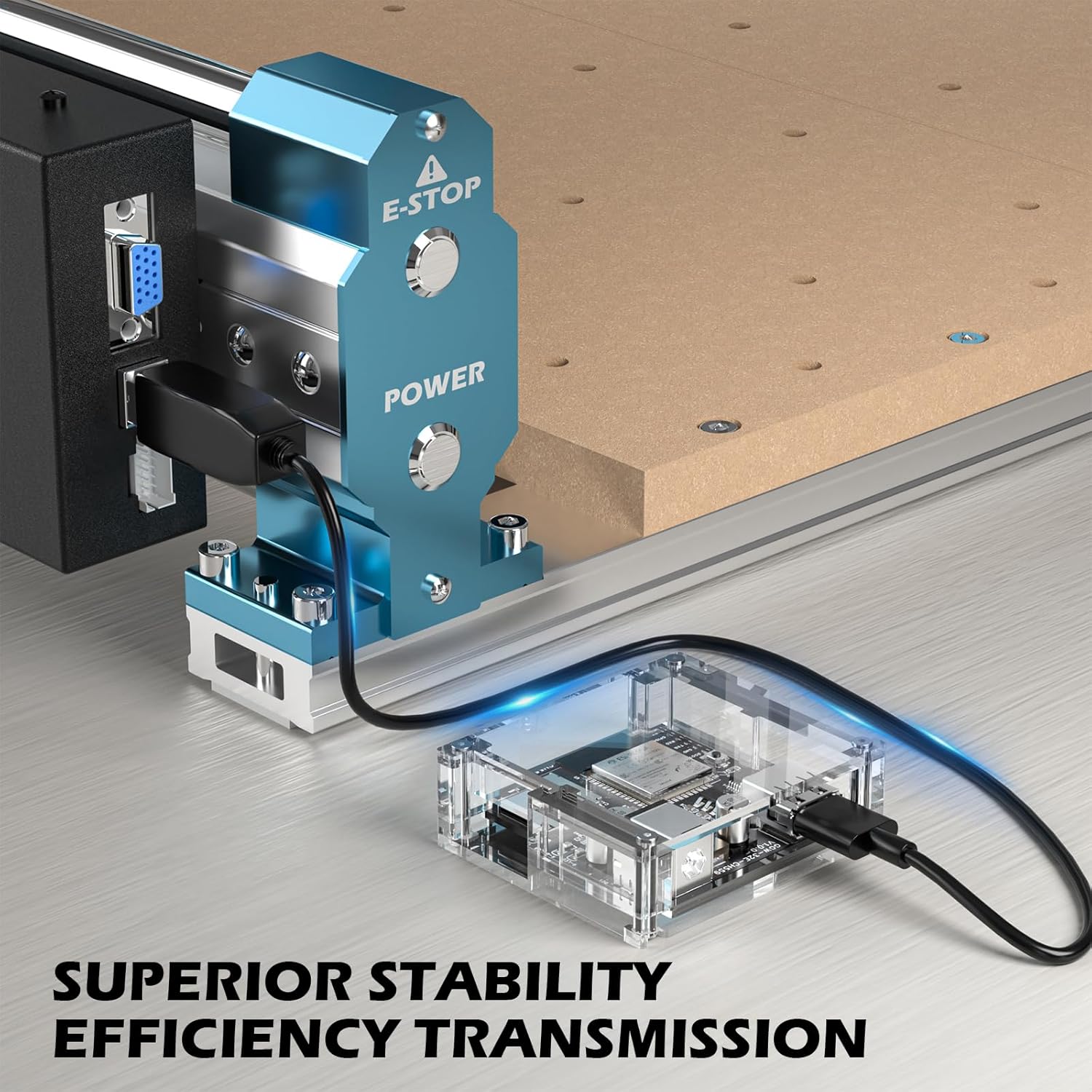
Imatge: Un primer pla view of the GGW-USB module connected to a CNC machine, highlighting the USB connection for stable data transmission.
3.2 App Installation and Initial Pairing
- Descarrega l'aplicació: Cerca the official Genmitsu app on your mobile device's app store (iOS or Android).
- Instal·lar i obrir: Instal·la l'aplicació i inicia-la.
- Connecta't a Wi-Fi: Ensure your mobile device is connected to a 2.4G Wi-Fi network. The GGW-USB module only supports 2.4G Wi-Fi.
- Pair with Module: Follow the in-app instructions to discover and pair with your GGW-USB Wi-Fi module. This typically involves selecting the module from a list of available devices.
4. Instruccions de funcionament
4.1 G-Code File Transmissió
- Obtain G-Code: Download G-code files from online resources or create them using your preferred CAM software. Save these files al vostre dispositiu mòbil.
- Upload via App: Within the Genmitsu app, navigate to the file management section. Select the G-code file you wish to send to your CNC machine.
- Transferència sense fils: Initiate the wireless transfer. The app will send the G-code file to the GGW-USB module, which then relays it to the CNC machine for execution.

Image: A visual representation of downloading G-code files and wirelessly transferring them to the CNC machine via the Genmitsu app.
4.2 Control remot i monitorització
- Jog Control: Use the app's interface to manually move the CNC axes (X, Y, Z) for precise positioning. Adjust step sizes (e.g., 0.1mm, 1mm, 10mm) and feed rates as needed.
- Spindle Control: Start, stop, and adjust the spindle speed directly from the app.
- Homing and Zeroing: Utilize the app to perform homing cycles and set workpiece zero points (X0, Y0, Z0) for your projects.
- Monitorització en temps real: The app displays real-time information about the CNC machine's status, including current coordinates, progress, and any alerts.
- Botons de macro: Configure custom macro buttons within the app for frequently used commands or sequences.

Image: A tablet displaying the Genmitsu app interface, showing real-time control and monitoring of a CNC machine during operation.
5. Manteniment
To ensure the longevity and optimal performance of your GGW-USB Wireless Wi-Fi Module, follow these maintenance guidelines:
- Mantenir net: Regularly wipe the module with a dry, soft cloth to remove dust and debris. Avoid using liquid cleaners directly on the module.
- Protect from Environment: Keep the module away from excessive moisture, extreme temperatures, and direct sunlight. Ensure it is not exposed to metal shavings or other conductive materials common in CNC environments.
- Connexions segures: Periodically check that all cable connections (USB, DC) are secure and free from damage.
- Actualitzacions de programari: Check the Genmitsu app regularly for firmware updates for the module to ensure you have the latest features and bug fixes.
6. Solució De Problemes
If you encounter issues with your GGW-USB Wireless Wi-Fi Module, refer to the following common problems and solutions:
| Problema | Causa possible | Solució |
|---|---|---|
| El mòdul no s'encén | Loose power connection; CNC machine not powered on. | Ensure USB and/or Dual DC cables are securely connected. Verify the CNC machine is powered on. |
| App cannot find the module | Mobile device not on 2.4G Wi-Fi; module not powered; module out of range; incorrect app settings. | Connect your mobile device to a 2.4G Wi-Fi network. Ensure the module is powered. Move closer to the module. Check app's connection settings. |
| G-code transfer fails or is slow | Weak Wi-Fi signal; interference; large file mida. | Improve Wi-Fi signal strength. Reduce interference from other devices. For very large files, consider breaking them into smaller segments if possible. |
| App is unresponsive or crashes | Outdated app version; mobile device resource issues; temporary software glitch. | Update the Genmitsu app to the latest version. Restart the app and your mobile device. Clear app cache if necessary. |
| CNC machine does not respond to app commands | Module not properly connected to CNC; CNC machine in an error state; incorrect Grbl settings. | Verify the USB connection between the module and CNC. Check the CNC's display or status indicators for errors. Consult your CNC machine's manual for Grbl settings. |
If the issue persists after attempting these solutions, please contact SainSmart customer support for further assistance.
7. Especificacions
| Característica | Detall |
|---|---|
| Número de model | GGW-USB |
| Fabricant | Genmitsu |
| Pes de l'article | 4.2 unces |
| Dimensions del paquet | 4.06 x 3.15 x 1.14 polzades |
| Font d'alimentació | AC/DC |
| Components inclosos | SD Card, Wireless Module |
| Piles necessàries | No |
| Suport Wi-Fi | 2.4G Wi-Fi only |
8. Garantia i Suport
SainSmart products are typically covered by a manufacturer's warranty. For specific warranty details, including coverage period and terms, please refer to the warranty information provided with your product packaging or visit the official SainSmart website. For technical support, troubleshooting assistance beyond this manual, or to inquire about replacement parts, please contact SainSmart customer service through their official channels.