
1. Introducció
This manual provides detailed instructions for the setup, operation, and maintenance of your CHROX H96 MAX M9 Android 14.0 TV Box. Please read this guide thoroughly before using the device to ensure proper functionality and to maximize your viewexperiència.

Image 1.1: The CHROX H96 MAX M9 AI Smart TV Box highlighting its key features.

Image 1.2: Visual representation of Android 14.0, indicating a smoother and safer user experience compared to previous Android versions.
2. Contingut del paquet
Verifiqueu que tots els elements que s'enumeren a continuació s'inclouen a l'embalatge del producte:
- 1 x CHROX H96 MAX M9 Android 14.0 TV Box
- 1 x adaptador de corrent
- 1 x comandament a distància
- 1 x Manual d'usuari (aquest document)
- 1 x cable HDMI
3. Producte acabatview
3.1 Característiques del dispositiu
The CHROX H96 MAX M9 is an advanced Android TV Box designed for high-definition media streaming and smart home entertainment. Key features include:
- Sistema operatiu: Latest Android 14.0 for a stable and smooth user interface.
- Processador: Powerful RK3576 Quad-core Cortex-A76 and Quad-core Cortex-A55 CPU, ensuring fast and stable performance.
- Gràfics: ARM Mali-G610 MP4 GPU for professional image processing and clear display.
- Memòria i emmagatzematge: 8GB RAM and 128GB ROM for ample space for applications and data.
- Connectivitat: 1000M Ethernet, Dual-Band Wi-Fi (2.4G/5G) with Wi-Fi 6 support, and Bluetooth 5.0.
- Sortida de vídeo: Supports 8K Ultra HD, 3D output, and H.265 decoding via HDMI 2.0.
- Ports USB: 1 High-speed USB 3.0 and 1 High-speed USB 2.0.

Image 3.1: The CHROX H96 MAX M9 Android TV Box and its accompanying remote control.
3.2 Interfícies de dispositius
Familiarize yourself with the various ports and connections on your TV Box:

Image 3.2: A detailed diagram illustrating all available interfaces on the CHROX H96 MAX M9 TV Box, including power input, audio output, SPDIF, Ethernet, HDMI 2.1, USB 3.0, and USB 2.0 ports.
- CC (entrada d'alimentació): Connecteu aquí l'adaptador de corrent proporcionat.
- Àudio: Port de sortida d'àudio analògic.
- SPDIF: Digital audio output for connecting to compatible audio systems.
- Ethernet (LAN): RJ-45 port for wired network connection (10/100/1000M).
- HD 2.1 (HDMI): Connect to your TV or display for video and audio output. Supports up to 8K resolution.
- USB 3.0: High-speed USB port for connecting external storage devices or peripherals.
- USB 2.0: Standard USB port for connecting external devices.
4. Guia de configuració
Follow these steps to set up your CHROX H96 MAX M9 TV Box:
- Connectar-se al televisor: Connect one end of the provided HDMI cable to the HD 2.1 port on the TV Box and the other end to an available HDMI input on your television.
- Connecteu-vos a l'alimentació: Plug the power adapter into the DC port on the TV Box, then plug the adapter into a wall outlet.
- Connectar-se a la xarxa (opcional):
- Connexió per cable: For optimal performance, connect an Ethernet cable from your router to the Ethernet port on the TV Box.
- Connexió sense fil: If using Wi-Fi, you will configure this during the initial setup wizard.
- Encès: The TV Box should automatically power on. If not, press the power button on the remote control.
- Seleccioneu l'entrada: On your TV, select the correct HDMI input source using your TV's remote control.
- Assistent de configuració inicial: Seguiu les instruccions que apareixen a la pantalla per completar la configuració inicial, inclosa la selecció d'idioma, la configuració de la xarxa i l'inici de sessió al compte de Google.
5. Instruccions de funcionament
5.1 Navegació per la interfície
Use the provided remote control to navigate the Android 14.0 interface. The directional buttons allow you to move between icons, and the 'OK' button selects items. The 'Back' button returns to the previous screen, and the 'Home' button takes you to the main launcher.
5.2 Installing and Uninstalling Applications
- Instal·lar: Access the Google Play Store from the home screen to browse and install applications. A Google account is required.
- Desinstal·la: Go to Settings > Apps, select the desired application, and choose 'Uninstall'.
5.3 Reproducció multimèdia
The TV Box supports various media formats and resolutions up to 8K. You can play media from:
- Pre-installed streaming services (e.g., Netflix, Hulu, Amazon Prime Video).
- External USB drives connected to the USB 2.0 or USB 3.0 ports.
- Network shares (requires a file manager app).
5.4 Screen Casting
The device supports screen casting, allowing you to mirror content from compatible mobile devices to your TV. Refer to the specific casting application's instructions on your mobile device for details.

Image 5.1: Illustration of the screen casting feature, showing content from a smartphone being displayed on a television via the TV Box.
6. Connectivitat
The CHROX H96 MAX M9 offers robust connectivity options:
- Wi-Fi 6: Supports the latest Wi-Fi 6 standard for faster speeds, greater capacity, and reduced network congestion on both 2.4GHz and 5GHz bands.
- Dual-Band Wi-Fi (2.4G/5G): Provides flexibility for connecting to various Wi-Fi networks, with 5GHz offering higher speeds and 2.4GHz offering wider range.
- 1000M Ethernet: A gigabit Ethernet port ensures a stable and high-speed wired internet connection, ideal for 8K streaming and large file transferències.
- Bluetooth 5.0: Connect wireless peripherals such as keyboards, mice, game controllers, or audio devices.

Image 6.1: An explanation of Wi-Fi 6 technology, illustrating its benefits in terms of speed and network efficiency compared to previous generations.
7. Especificacions
Detailed technical specifications for the CHROX H96 MAX M9 TV Box:
| Característica | Especificació |
|---|---|
| Nom del model | H96 MAX M9 |
| Sistema operatiu | Android 14.0 |
| CPU | RK3576 Quad-core Cortex-A76 and Quad-core Cortex-A55 |
| GPU | ARM Mali-G610 MP4 |
| RAM | 8 GB DDR3 |
| Emmagatzematge | EMMC de 128 GB |
| Wi-Fi | Wi-Fi 6, Dual-Band (2.4G/5G) |
| Ethernet | 10/100/1000M RJ-45 |
| Bluetooth | BT 5.0 |
| Sortida HDMI | HDMI 2.0 (up to 8K@30fps) with HDR, CEC, HDCP 2.2 |
| Ports USB | 1x USB 3.0, 1x USB 2.0 |
| Lector de targetes | Targetes SD / SDHC / MMC |
| Descodificació de vídeo | 4K H.265 Hardware Video Decode, 8K support |
| Serveis d'Internet compatibles | Netflix, Hulu, Amazon Prime Video (via apps) |
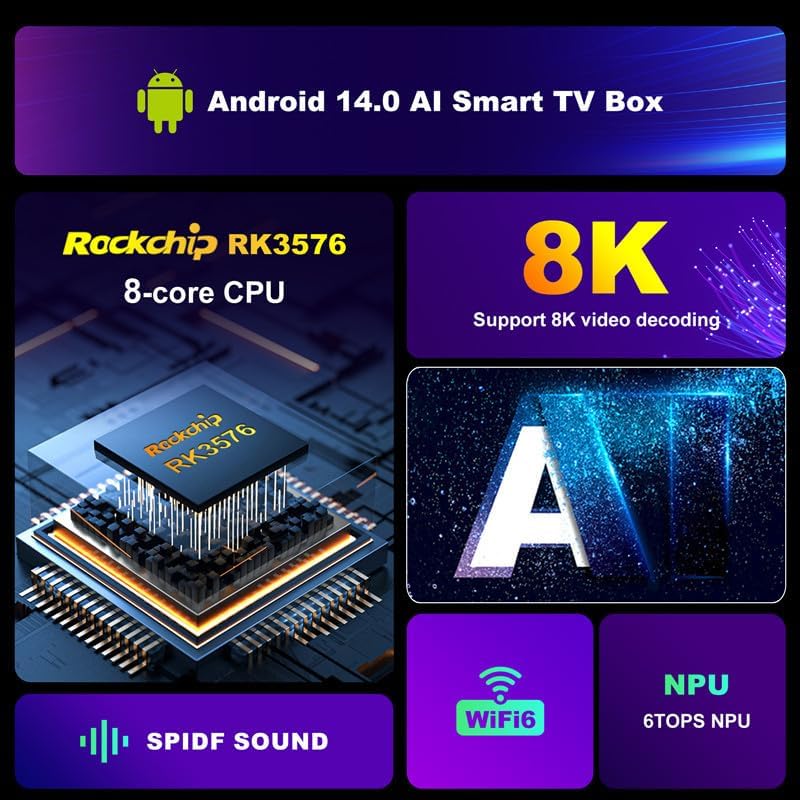
Imatge 7.1: Un sobreview of the internal architecture and key features, including the Rockchip RK3576 8-core CPU, 8K video decoding, Wi-Fi 6, NPU, and SPDIF audio output.
8. Solució De Problemes
If you encounter issues with your TV Box, refer to the following common problems and solutions:
- Sense energia:
- Assegureu-vos que l'adaptador de corrent estigui connectat correctament al televisor i a una presa de corrent que funcioni.
- Proveu una presa de corrent diferent.
- Sense imatge a la televisió:
- Verify the HDMI cable is correctly connected to both the TV Box and the TV.
- Assegureu-vos que el televisor estigui configurat a la font d'entrada HDMI correcta.
- Prova un altre cable HDMI o port HDMI al televisor.
- Sense so:
- Check the volume levels on both the TV Box and your TV.
- Ensure audio settings on the TV Box are configured correctly (Settings > Sound).
- Problemes de connexió Wi-Fi:
- Assegureu-vos que el vostre encaminador Wi-Fi estigui activat i funcioni.
- Go to Settings > Network & Internet > Wi-Fi and ensure Wi-Fi is enabled and you are connected to the correct network.
- Re-enter your Wi-Fi password if prompted.
- Move the TV Box closer to the router or reduce interference from other devices.
- El control remot no respon:
- Substituïu les piles del comandament a distància.
- Assegureu-vos que no hi hagi obstacles entre el comandament a distància i el televisor.
- System Lag or Freezing:
- Tanca les aplicacions de fons innecessàries.
- Clear cache for problematic applications (Settings > Apps > [App Name] > Clear Cache).
- Restart the TV Box by unplugging the power adapter for 10 seconds and plugging it back in.
9. Manteniment
To ensure the longevity and optimal performance of your CHROX H96 MAX M9 TV Box, consider the following maintenance tips:
- Mantenir net: Netegeu suaument el dispositiu amb un drap suau i sec. Eviteu utilitzar netejadors líquids o materials abrasius.
- Ventilació: Ensure the TV Box is placed in a well-ventilated area to prevent overheating. Do not block ventilation holes.
- Actualitzacions de programari: Periodically check for system updates via Settings > About > System Update to ensure you have the latest features and security patches.
- Eviteu condicions extremes: No exposeu el dispositiu a temperatures extremes, humitat o llum solar directa.
- Apagada segura: Always power off the device properly through the system menu or by pressing the power button on the remote, rather than simply unplugging it.
10. Garantia i Suport
For warranty information, please refer to the warranty card included with your purchase or visit the official CHROX website. If you require technical support or have questions not covered in this manual, please contact CHROX customer service through the channels provided on their official weblloc.