
1. Introducció
Gràcies per la compraasing the Audizio Genua DAB Radio. This manual provides essential information for the safe and efficient operation of your device. Please read it thoroughly before use and retain it for future reference. The Audizio Genua is a versatile DAB+/FM stereo radio featuring Bluetooth connectivity, USB playback, and an alarm function, designed for both home and portable use.
2. Informació de seguretat
- Font d'alimentació: Feu servir només l'adaptador de corrent proporcionat. Assegureu-vos que el volumtage coincideix amb els requisits de la vostra regió.
- Aigua i humitat: No exposeu la unitat a la pluja, la humitat ni a líquids que gotegen o esquitxen. No col·loqueu objectes plens de líquids, com ara gerros, sobre l'aparell.
- Ventilació: Assegureu-vos que hi hagi una ventilació adequada. No bloquegeu les obertures de ventilació.
- Calor: Mantingueu la unitat allunyada de fonts de calor com ara radiadors, registres de calor, estufes o altres aparells (inclosos amplificadors) que produeixen calor.
- Neteja: Netegeu només amb un drap sec.
- Manteniment: No intenteu atendre aquest producte vosaltres mateixos. Consulteu tots els serveis a personal de servei qualificat.
- Antena: Do not bend or force the antenna.
3. Contingut del paquet
Si us plau, comproveu que tots els articles estiguin presents i en bon estat en desempaquetar-los:
- Audizio Genua DAB Radio
- Control remot
- Adaptador d'alimentació
- Quick Start Guide (language not guaranteed)
4. Producte acabatview
4.1 Controls i pantalla del tauler frontal

Figura 4.1: Frontal view of the Audizio Genua DAB Radio.
The front panel features a clear color TFT display, two speaker grilles, and an array of control buttons and a central rotary knob. The display shows station information, track details, time, and menu options. Buttons include Menu, Preset, Scan, Dimmer, Alarm, and playback controls (Play/Pause, Skip). The central knob is used for volume adjustment, tuning, and selection.
4.2 Connexions del panell posterior
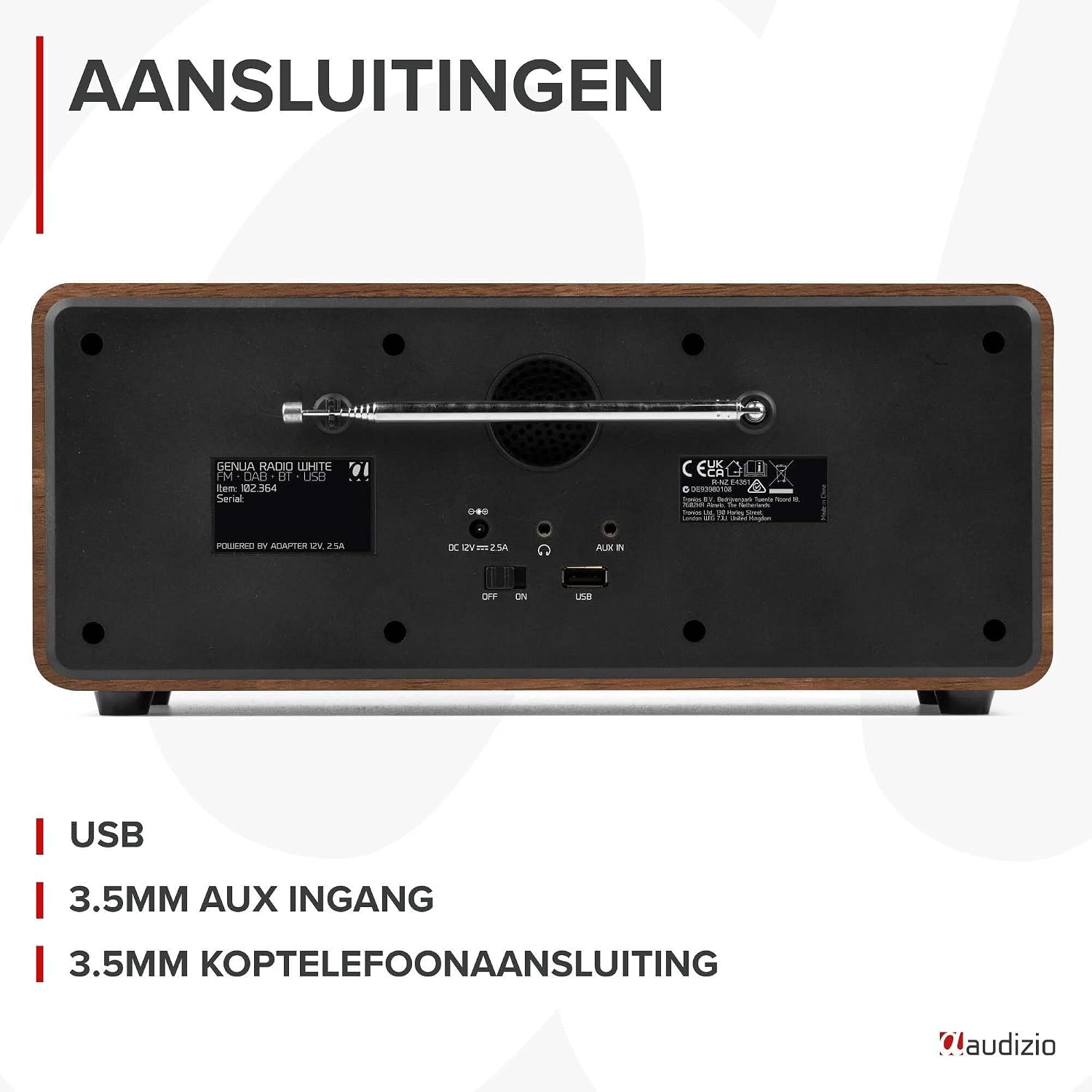
Figura 4.2: posterior view of the Audizio Genua DAB Radio with connections.
The rear panel includes the telescopic antenna for radio reception, a USB port for media playback, a 3.5mm AUX input for external audio devices, a 3.5mm headphone output, a DC 12V power input, and a main power ON/OFF switch.
4.3 Control remot

Figure 4.3: Remote control for the Audizio Genua DAB Radio.
The included remote control provides full functionality, allowing you to power on/off, adjust volume, change modes, navigate menus, set alarms, and control playback from a distance.
5. Configuració
5.1 Connexió d'alimentació
- Connect the power adapter to the DC 12V input on the rear of the radio.
- Connecteu l'adaptador de corrent a una presa de corrent adequada.
- Flip the main power switch on the rear panel to the 'ON' position.
5.2 Ajust de l'antena
Extend the telescopic antenna fully for optimal DAB+ and FM radio reception. Adjust its position for the best signal quality.
5.3 Configuració inicial i escaneig automàtic
- Upon first power-on, the radio may prompt you to perform an auto-scan for DAB+ stations. Select 'Yes' or press the 'Scan' button.
- The radio will scan for available DAB+ stations and store them. This process may take a few minutes.
- Un cop finalitzada la cerca, la ràdio sintonitzarà la primera emissora disponible.
6. Instruccions de funcionament
6.1 Selecció del mode
Press the 'Mode' button on the remote control or the 'Menu' button on the unit to cycle through available modes: DAB+, FM, Bluetooth, USB, and AUX In.
6.2 Funcionament de la ràdio DAB+
- Seleccioneu el mode DAB+.
- If no stations are found or you wish to rescan, press the 'Scan' button to perform a full scan.
- Use the 'Tune/Select' knob or the navigation buttons on the remote to browse through the list of available stations.
- Press the 'OK' button (on remote) or push the 'Tune/Select' knob to select a station.
- Emmagatzematge de valors predeterminats: To store a favorite station, press and hold the 'Preset' button until the preset menu appears. Use the knob/navigation to select a preset number (1-30) and press 'OK' to confirm.
- Recordant presets: Briefly press the 'Preset' button, then use the knob/navigation to select the desired preset and press 'OK'.
6.3 Funcionament de la ràdio FM
- Seleccioneu el mode FM.
- Escaneig automàtic: Press the 'Scan' button to automatically scan for and store available FM stations.
- Sintonització manual: Use the 'Tune/Select' knob to manually tune to a specific frequency.
- Emmagatzematge de valors predeterminats: Similar to DAB+ mode, press and hold 'Preset', select a number, and confirm.
- Recordant presets: Briefly press 'Preset', select the desired preset, and confirm.
6.4 Connectivitat Bluetooth
- Seleccioneu el mode Bluetooth. La pantalla mostrarà "Emparellament" o "Esperant connexió".
- Al telèfon intel·ligent o a un altre dispositiu amb Bluetooth, activeu el Bluetooth i cerqueu els dispositius disponibles.
- Select "Audizio Genua" from the list of devices.
- Once paired, the radio will confirm the connection, and you can start playing audio from your device.
Reproducció USB 6.5
- Inseriu una unitat flash USB que contingui MP3 files al port USB del panell posterior.
- Select USB mode. The radio will automatically detect the USB drive and begin playing the first compatible audio file.
- Use the playback control buttons (Play/Pause, Skip Forward/Backward) on the unit or remote to manage your music.
6.6 Entrada AUX
- Connect an external audio device (e.g., MP3 player, smartphone) to the 3.5mm AUX IN port on the rear panel using an audio cable (not included).
- Seleccioneu el mode AUX.
- Controla la reproducció i el volum des del teu dispositiu extern.
6.7 Alarma i temporitzador de son
- Configuració d'alarma: Press the 'Alarm' button on the unit or remote. Follow the on-screen prompts to set Alarm 1 and Alarm 2, including time, source (DAB/FM/Buzzer), and volume.
- Funció de posposar: When the alarm sounds, press any button (except Power) to activate snooze. The alarm will sound again after a set interval.
- Temporitzador de son: Press the 'Sleep' button on the remote to set a sleep timer (e.g., 15, 30, 60 minutes). The radio will automatically turn off after the selected time.
6.8 Regulador d'intensitat de la pantalla
Press the 'Dimmer' button on the unit or remote to adjust the brightness of the display. This is useful for different lighting conditions or for use in a bedroom.
7. Manteniment
- Neteja: Feu servir un drap suau i sec per netejar l'exterior de la ràdio. No utilitzeu productes de neteja abrasius, ceres ni dissolvents.
- Antena: Manipuleu l'antena telescòpica amb cura per evitar danys.
- Emmagatzematge: If storing the radio for an extended period, disconnect it from the power supply.
8. Solució De Problemes
| Problema | Causa possible | Solució |
|---|---|---|
| Sense poder | Power adapter not connected; Main power switch off | Ensure power adapter is securely connected and plugged in; Turn main power switch to 'ON' |
| Poor radio reception (DAB+/FM) | Antenna not extended; Weak signal area; Interference | Fully extend and adjust the telescopic antenna; Try repositioning the radio; Move away from other electronic devices |
| Bluetooth no emparellat | Radio not in Bluetooth mode; Device not discoverable; Already paired with another device | Select Bluetooth mode on the radio; Ensure Bluetooth is enabled on your device and it's in pairing mode; Disconnect from other Bluetooth devices |
| La reproducció USB no funciona | Unitat USB no inserida correctament; Incompatible file format; USB drive corrupted | Ensure USB drive is fully inserted; Check if files are in MP3 format; Try a different USB drive |
| Sense so | Volume too low; Mute activated; Incorrect source selected | Increase volume; Check if mute is active; Ensure correct input source (DAB/FM/BT/USB/AUX) is selected |
9. Especificacions

Figure 9.1: Audizio Genua DAB Radio dimensions.
- Marca: Audizio
- Número de model: Genua
- Color: Blanc
- Característica especial: Bluetooth Connectivity, DAB+ Radio
- Tecnologia de connectivitat: Aux, Bluetooth, USB
- Dimensions del producte (L x A x A): 13.5 x 31 x 13.3 cm
- Tecnologia del sintonitzador: DAB+
- Estil: Modern
- Font d'alimentació: Elèctric amb cable
- Bandes de ràdio compatibles: FM, DAB+
- Dispositius compatibles: Smartphone, Tablet, Laptop, MP3 Player, Headphones, Speaker
- Voltage: 220 Volts
- Potència màxima de sortida de l'altaveu: 50 watts
- Nombre de bateries: 1 Non-standard battery (Type of battery required)
- Tipus de pantalla: TFT
- Pes de l'article: 2.25 quilos
10. Garantia i Suport
This product is covered by a standard manufacturer's warranty. For detailed warranty terms and conditions, please refer to the documentation provided at the time of purchase or contact your retailer. For technical support or service inquiries, please contact the Audizio customer support team through their official weblloc web o el vostre punt de compra.


