
1. Producte acabatview
The LOFREE DOT Foundation Mechanical Keyboard is a 75% layout, hot-swappable keyboard featuring GATERON Baby Racoon switches and multiple connectivity options. It is designed for use with Windows, Mac OS, personal computers, laptops, and smartphones. This product also includes a Milk Tea Mouse and a Jelly Palm Rest for enhanced user experience.
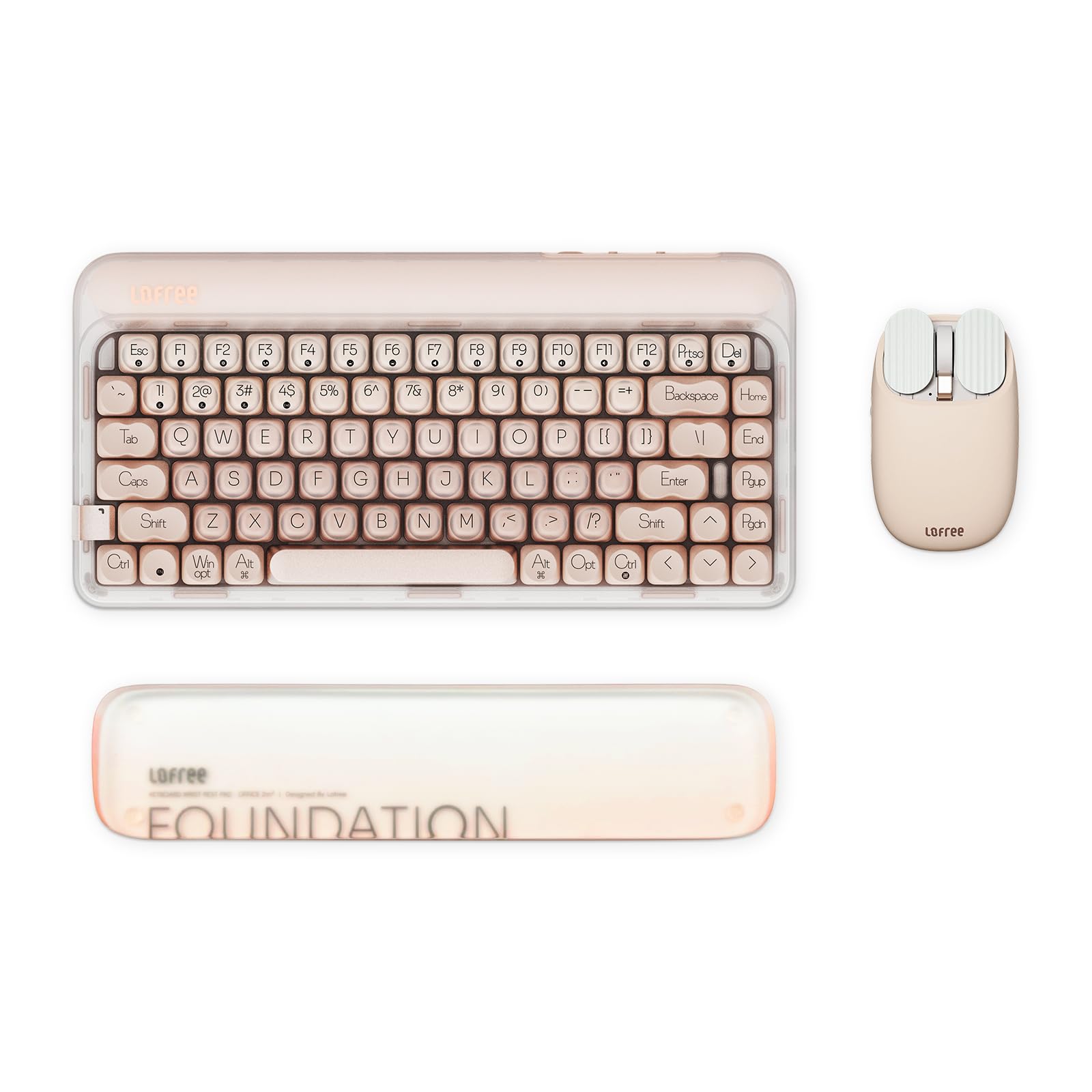
Image 1.1: LOFREE DOT Foundation Mechanical Keyboard. This image displays the keyboard with its distinctive round keycaps and compact 75% layout.
Vídeo 1.1: Presentació oficial del producte en vídeoasing the LOFREE DOT Foundation Mechanical Keyboard's design and typing experience.
2. Guia de configuració
2.1 Desembalatge i inspecció inicial
Carefully remove all components from the packaging. Verify that the keyboard, mouse, palm rest, USB-C cable, and 2.4G wireless receiver are present and undamaged.
2.2 Càrrega dels dispositius
Before first use, fully charge the keyboard and mouse using the provided USB-C cable. Connect the cable to the device and a compatible USB power source. An indicator light will typically show charging status.
2.3 Connexió del teclat
The keyboard supports three connection types:
- Sense fil 2.4G: Insert the 2.4G wireless receiver into an available USB port on your computer. Switch the keyboard to 2.4G mode. The keyboard should connect automatically.
- Bluetooth 5.3: Switch the keyboard to Bluetooth mode. On your device, search for Bluetooth devices and select "LOFREE DOT Foundation" to pair.
- Cablejat tipus C: Connect the keyboard to your device using the USB-C cable. The keyboard will function as a wired device and charge simultaneously.

Image 2.1: Illustration of the three connectivity options: 2.4G wireless, Bluetooth 5.3, and Type-C wired, available on the LOFREE DOT Foundation Keyboard.
2.4 Connecting the Milk Tea Mouse
The mouse supports dual-mode connection:
- Sense fil 2.4G: Use the same 2.4G wireless receiver as the keyboard. Switch the mouse to 2.4G mode.
- Bluetooth: Switch the mouse to Bluetooth mode. On your device, search for Bluetooth devices and select "LOFREE Milk Tea Mouse" to pair. The mouse can connect to two devices simultaneously via Bluetooth.
2.5 Attaching the Jelly Palm Rest
Position the Jelly Palm Rest in front of the keyboard. The palm rest is equipped with non-slip mats to keep it stable during use. Its 19mm height is designed for ergonomic comfort.

Image 2.2: The Jelly Palm Rest features non-slip mats on its underside for stability.

Image 2.3: The 19mm height of the Jelly Palm Rest provides ergonomic support for comfortable typing.
3. Instruccions de funcionament
3.1 Funcions del teclat
The keyboard features 7 white backlight effects. These can be adjusted using specific key combinations to change modes, frequency, and brightness. Refer to the quick start guide for detailed key combinations.

Image 3.1: The keyboard features a white backlight with 7 different effects.
The keyboard's 4-layer gasket design contributes to a distinct typing sound and feel.

Image 3.2: Diagram illustrating the internal 4-layer gasket structure of the keyboard, designed for optimal sound and typing experience.
3.2 Funcions del ratolí
The Milk Tea Mouse offers 5 adjustable DPI levels. To change the DPI, locate the DPI button on the mouse and press it to cycle through the available settings (e.g., 800, 1600, 2400, 3600 DPI). The mouse also includes a thumb wheel and button for multi-gesture use, enhancing navigation and productivity.

Image 3.3: The Milk Tea Mouse features 5 adjustable DPI levels, easily changed via a dedicated button.
4. Manteniment
4.1 Neteja
To clean the keyboard and mouse, use a soft, dry, lint-free cloth. For stubborn dirt, a slightly damp cloth with mild soap can be used, ensuring no liquid enters the device. Avoid harsh chemicals or abrasive materials. The Jelly Palm Rest is made of acrylic, which is sweat-proof and fingerprint-proof, and can be wiped clean easily.
4.2 Cura de la bateria
To prolong battery life, avoid fully discharging the devices frequently. Store them in a cool, dry place when not in use for extended periods. Recharge when the battery indicator suggests low power.
5. Solució De Problemes
5.1 Problemes de connectivitat
- Sense fil (2.4G/Bluetooth): Ensure the keyboard/mouse is switched to the correct mode. Check battery levels. For Bluetooth, ensure your device's Bluetooth is enabled and the device is discoverable. Try re-pairing.
- Cablejat (Tipus C): Assegureu-vos que el cable USB-C estigui connectat correctament tant al teclat com al dispositiu. Proveu un altre port o cable USB.
5.2 La retroiluminació no funciona
Check if the backlight feature is enabled using the designated key combination. Ensure the keyboard has sufficient battery charge if operating wirelessly.
5.3 Mouse Cursor Jumps or is Unresponsive
Clean the mouse sensor. Ensure the mouse is on a clean, non-reflective surface. Check battery levels and connectivity mode.
6. Especificacions
| Característica | Detall |
|---|---|
| Marca | LOFREE |
| Model | DOT Foundation Mechanical Keyboard |
| Tecnologia de connectivitat | Sense fil 2.4G, Bluetooth 5.3, USB-C amb cable |
| Special Feature (Keyboard) | 4 Layers Filter Gasket Design, Hot-swappable, 7 White Backlight Effects |
| Special Feature (Mouse) | Dual mode (Bluetooth/2.4GHz), 5 Adjustable DPI Levels, Thumb wheel and button for multi-gesture use |
| Special Feature (Palm Rest) | Jelly Palm Rest, Semi-transparent Frosted, Non-slip mats, Acrylic Material, High Temperature Resistance, No Deformation, Sweat-proof, Fingerprint-proof, 19mm Height for Ergonomic Design |
| Dispositius compatibles | Ordinador portàtil, ordinador personal, telèfon intel·ligent |
| Data de primera disponibilitat | 22 d'octubre de 2024 |
7. Garantia i Suport
For warranty information and technical support, please refer to the documentation included with your product or visit the official LOFREE weblloc. Conserveu el rebut de compra per a reclamacions de garantia.