
1. Introducció
This manual provides essential information for the installation, operation, and maintenance of the LTS LTN6216N-P16 16-Channel Network Video Recorder (NVR). Please read this manual thoroughly before using the product and retain it for future reference.
The LTN6216N-P16 is a high-performance 16-channel NVR designed for advanced surveillance systems. It supports 4K recording, H.265+ compression, and offers a maximum bitrate of 160Mbps. Key features include dual SATA drive support (up to 10TB each), 8MP preview and playback, a new 4.0 user interface, and comprehensive AI capabilities when paired with compatible cameras.
2. Informació de seguretat
Observeu les següents precaucions de seguretat per evitar lesions o danys al producte:
- Assegureu-vos que la font d'alimentació voltage is stable and meets the NVR's requirements.
- Do not expose the NVR to water or moisture.
- Avoid placing the NVR in direct sunlight or near heat sources.
- Install the NVR in a well-ventilated area to prevent overheating.
- Utilitzeu només accessoris especificats pel fabricant.
- Do not attempt to disassemble or modify the NVR. Refer all servicing to qualified personnel.
3. Contingut del paquet
Verifiqueu que tots els elements siguin presents al paquet:
- LTS LTN6216N-P16 NVR Unit
- Adaptador/cable de corrent
- Ratolí USB
- Installation Hardware (Screws for HDD, SATA cables)
- Guia d'inici ràpid
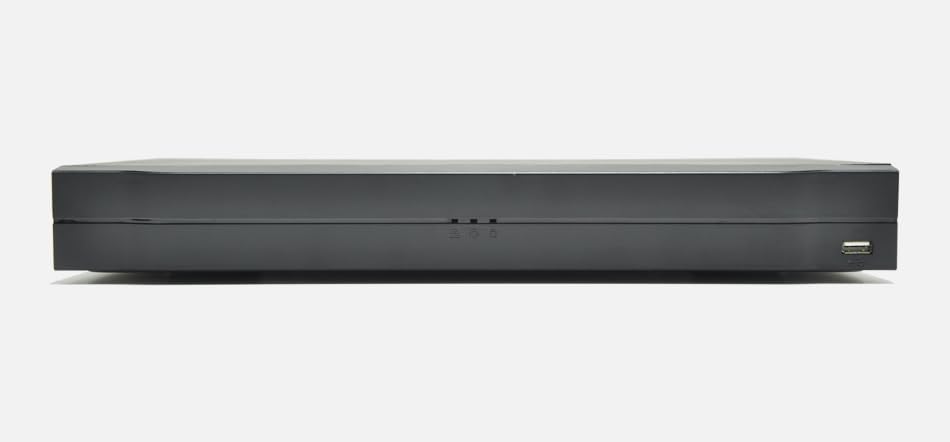
Figure 3.1: LTN6216N-P16 NVR and included accessories.
4. Sobrecàrrega físicaview
4.1 Tauler frontal
The front panel typically includes status indicators and a USB port for mouse or backup devices.
- Indicador d'alimentació: S'il·lumina quan l'NVR està encès.
- Indicador d'estat: Indicates system status (e.g., recording, alarm).
- Port USB: Per connectar un ratolí USB o un emmagatzematge extern.
4.2 Panell posterior
The rear panel houses all essential connectivity ports.
- Entrada d'alimentació: Connecteu l'adaptador de corrent proporcionat.
- Sortida HDMI: Connect to a monitor for high-resolution display (up to 4K).
- Sortida VGA: Connect to a monitor for standard display.
- Port LAN (RJ45): Connect to your network for internet access and camera communication.
- PoE Ports (RJ45 x 16): Connect IP cameras directly for power and data transmission.
- Ports USB: Ports USB addicionals per a perifèrics.
- Entrada/Sortida d'àudio: For connecting external audio devices (if applicable).
5. Configuració
5.1 Instal·lació del disc dur
The NVR supports two SATA hard drives, up to 10TB each (hard drives not included).
- Unscrew and remove the NVR's top cover.
- Connect the SATA data and power cables to the hard drive(s).
- Secure the hard drive(s) to the NVR chassis using the provided screws.
- Torneu a col·locar la coberta superior i fixeu-la amb cargols.
5.2 Connexió de perifèrics
- Connecteu un monitor al port de sortida HDMI o VGA.
- Connect the USB mouse to a USB port.
- Connect IP cameras to the PoE ports on the rear panel.
- Connect the NVR's LAN port to your network router/switch.
- Connect the power adapter to the NVR and a power outlet.
5.3 Configuració inicial
Upon first boot, the NVR will guide you through a setup wizard:
- Estableix la contrasenya: Create a strong password for the admin account.
- Configuració de la xarxa: Configure network parameters (DHCP or Static IP).
- Inicialització del disc dur: Format the newly installed hard drive(s).
- Cerca de càmera: The NVR will automatically search for connected IP cameras. Add them to the system.
- Hora i data: Set the correct system time and date.
6. Funcionament de l'enregistrador NVR
6.1 User Interface (UI 4.0)
The NVR features an intuitive new 4.0 user interface. Navigate using the connected USB mouse. Right-click to access the main menu.
6.2 Viu View i Enregistrament
- Viu View: Mostra foo en temps realtage de càmeres connectades.
- Configuració de gravació: Configure continuous, motion-triggered, or scheduled recording. The NVR supports 4K recording with H.265+ compression for efficient storage.
- Taxa de bits: The NVR supports a maximum bitrate of 160Mbps.
6.3 Reproducció
Accés gravat footage through the playback menu.
- Cerca: Search by date, time, event, or camera.
- Descodificació: Supports 8MP preview and playback, with flexible decoding options of 2 channels at 4K or 8 channels at 1080P.
6.4 Accés remot
The NVR supports P2P remote surveillance and mobile video playback for convenient access from anywhere.
- Aplicació mòbil: Download the official mobile application (refer to the Quick Start Guide for app name).
- P2P Cloud Service: Enable P2P in the network settings for easy remote connection without complex port forwarding.
6.5 AI Features (by Camera)
When paired with compatible IP cameras, the NVR can process and record advanced AI events:
- Detecció de cares: Identifies human faces in the video stream.
- Protecció perimetral: Detecta intrusions en zones definides.
- Intelligent Video Analysis (IVS): Includes tripwire and intrusion detection.
- Recompte de persones: Counts individuals entering or exiting a specified zone.
- Mapes de calor: Visualitza zones d'alta activitat.
- Smart Motion Detection (SMD): Differentiates between human/vehicle motion and other movements.
7. Manteniment
7.1 actualitzacions de microprogramari
Regularly check for and install firmware updates to ensure optimal performance and security. Updates can typically be performed via the NVR's web interface or local UI.
7.2 Gestió del disc dur
Monitor the health of your hard drives and ensure sufficient storage space. The NVR supports overwriting old footage quan l'emmagatzematge està ple.
7.3 Còpia de seguretat del sistema
Feu còpies de seguretat regularment dels vídeos importantstage to external storage (e.g., USB drive, network storage) to prevent data loss.
8. Solució De Problemes
| Problema | Causa possible | Solució |
|---|---|---|
| No hi ha sortida de vídeo al monitor. | Loose cable connection; incorrect input source on monitor; NVR not powered on. | Check HDMI/VGA cable connections; select correct input on monitor; ensure NVR is powered. |
| Les càmeres no mostren el vídeo. | Camera not powered; network issue; incorrect camera settings. | Verify PoE connection to cameras; check network cables; ensure cameras are added and configured correctly in NVR. |
| No es pot accedir a l'NVR de forma remota. | P2P disabled; network firewall; incorrect mobile app settings. | Enable P2P in NVR settings; check router firewall; ensure correct NVR details in mobile app. |
| Disc dur no detectat. | Loose SATA cables; faulty drive; drive not initialized. | Check SATA power/data connections; try a different drive; initialize drive in NVR settings. |
9. Especificacions
| Característica | Descripció |
|---|---|
| Model | LTN6216N-P16 |
| Canals | 16 canals |
| Factor de forma | 1U |
| Unitats SATA | 2 SATA interfaces, up to 10TB each (20TB total) |
| Ports PoE | 16 PoE ports |
| Compressió de vídeo | H.265+, H.265, H.264+, H.264 |
| Taxa de bits màxima | 160 Mbps |
| Sortida de vídeo | HDMI (up to 4K), VGA (simultaneous) |
| Preview/Reproducció | Resolució de 8MP |
| Capacitat de descodificació | 2ch@4K or 8ch@1080P |
| Interfície d'usuari | New 4.0 UI |
| AI Features (by camera) | Face detection, perimeter protection, IVS, people counting, heat mapping, SMD |
| Accés remot | P2P, Mobile App |
10. Garantia i Suport
For warranty information and technical support, please refer to the official LTS weblloc web o poseu-vos en contacte amb el vostre distribuïdor autoritzat. Conserveu el rebut de compra per a reclamacions de garantia.
Nota: Les especificacions i les característiques del producte estan subjectes a canvis sense previ avís.