
LEAUDIO XD-05T X24014
XDUOO XD05T Dual ES9039Q2M Portable DAC & Headphone AmpManual d'usuari més viu
Model: XD-05T X24014
1. Introducció
The XDUOO XD05T is a high-fidelity portable DAC and headphone amplifier designed to deliver exceptional audio performance. It features dual ESS ES9039Q2M DAC chips and an XMOS XU316 USB chip, supporting high-resolution audio formats including PCM up to 768kHz and DSD512. Unique to the XD05T, it incorporates two miniature vacuum tubes from the 1960s in its amplification circuit, providing a warm, analog sound character.
This device offers versatile connectivity with multiple input and output interfaces, including USB, Coaxial/Optical, AUX, and Balanced I/O. It supports both portable use via its built-in 6000mAh battery and desktop use with DC power. The XD05T is compatible with various operating systems, including Windows, Linux, Mac OS, iOS, and Android.
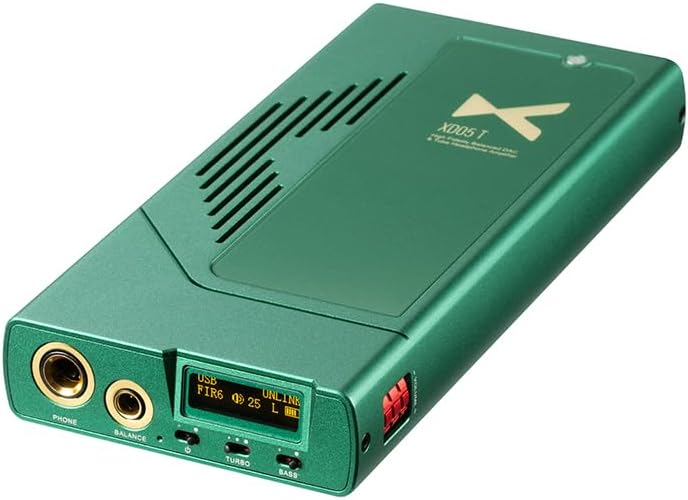
Figure 1: XDUOO XD05T Portable DAC and Headphone Amplifier, showing its sleek green design and front panel.
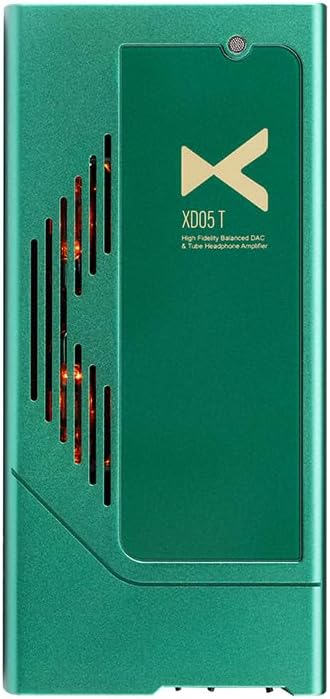
Figura 2: superior view of the XDUOO XD05T, revealing the glowing vacuum tubes through the ventilation grille.

Figure 3: Diagram illustrating the "Classic Sound from the Flavor of Tubes" feature, highlighting the unique harmonic distortion characteristics of vacuum tubes.
2. Producte acabatview
2.1 Controls i ports del panell frontal
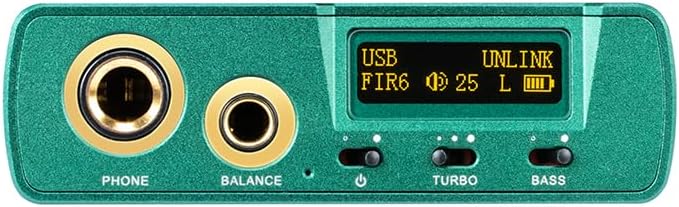
Figura 4: Primer pla view of the XDUOO XD05T front panel, showing headphone outputs, display, and control switches.
- PHONE (6.35mm) Output: Standard unbalanced headphone output.
- BALANCE (4.4mm) Output: Sortida d'auriculars balancejada per a una qualitat d'àudio millorada.
- Pantalla de visualització: Mostra l'entrada actual, sample rate, volume level, and battery status.
- Power/Input Switch: Toggles power and cycles through input sources.
- TURBO Switch: Activates high-gain mode for demanding headphones.
- BASS Switch: Engages bass boost function.
- Control de volum: Digital volume adjustment with 99 levels.
2.2 Ports del panell posterior
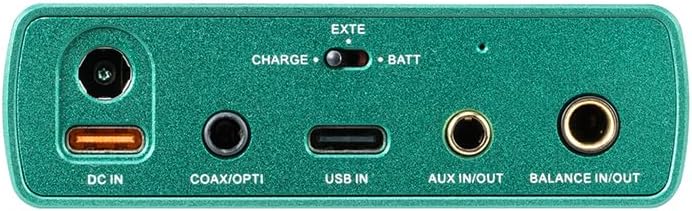
Figura 5: Primer pla view of the XDUOO XD05T rear panel, displaying various input and output ports.
- Entrada de CC (12 V): Power input for desktop use and charging.
- COAX/OPTI: Coaxial and Optical digital audio input.
- ENTRADA USB: USB Type-C input for connecting to computers, smartphones, or tablets.
- AUX IN/OUT: 3.5mm analog auxiliary input/output.
- BALANCE IN/OUT: 4.4mm balanced analog input/output.
- CHARGE/BATT Switch: Selects between external power (CHARGE) and internal battery (BATT).
3. Configuració
3.1 Engegada i càrrega
The XD05T can be powered by its internal battery or an external 12V DC power adapter. Before first use, it is recommended to fully charge the device. Connect the included power adapter to the DC IN port. The charging time is approximately 3.5 hours for fast charging or 10 hours for slow charging.
- To use with battery power, ensure the CHARGE/BATT switch is set to "BATT".
- To use with external DC power and/or charge, set the CHARGE/BATT switch to "CHARGE".

Figure 6: Diagram illustrating the power selection switch and DC input port.
3.2 Connexió de dispositius d'àudio
The XD05T offers various connection options for different audio sources and output devices.

Figure 7: Comprehensive diagram showing how to connect the XD05T to various audio devices like phones, PCs, players, CD players, DACs, and active speakers.
- Connexió USB: Connect your computer (Windows, Linux, Mac OS), smartphone (iOS, Android), or tablet to the USB IN port using a compatible USB cable. The device will be recognized as an audio output device.
- Coaxial/Optical Connection: For digital audio sources like CD players or media streamers, connect to the COAX/OPTI port.
- AUX IN/OUT: Use a 3.5mm audio cable for analog input from devices like portable music players or for analog output to external ampaltaveus/altaveus.
- Balanced IN/OUT: For high-fidelity analog connections, use a 4.4mm balanced cable to connect to compatible sources or output devices.
- Connexió d'auriculars: Plug your headphones into either the 6.35mm PHONE output (unbalanced) or the 4.4mm BALANCE output (balanced).
3.3 Vinculació Bluetooth
The XD05T features Bluetooth 5.1 connectivity with support for SBC, AAC, APTX, APTX LL, APTX HD, and LDAC codecs.
- Power on the XD05T.
- Cycle through the input modes using the Power/Input switch until "Bluetooth" or "BT" is displayed on the screen.
- On your source device (smartphone, tablet, etc.), enable Bluetooth and search for available devices.
- Select "XDUOO XD05T" from the list of found devices to pair.
- Once paired, the display will indicate a successful connection, and you can begin streaming audio wirelessly.
4. Instruccions de funcionament
4.1 Ajust de volum
The XD05T features a precise digital volume control with 99 levels, allowing for fine-tuning of the sound output. Use the dedicated volume buttons or knob (if present) to adjust the loudness. Even with sensitive In-Ear Monitors (IEMs), the granular control prevents excessive volume.

Figure 8: Image highlighting the volume adjustment mechanism on the XD05T, emphasizing its 99-level precision.
4.2 Selecció d'entrada
Press the Power/Input switch briefly to cycle through the available input sources (USB, Coaxial/Optical, AUX, Bluetooth). The current input will be displayed on the screen.
4.3 TURBO Mode
Engage the TURBO switch to activate the high-gain mode. This mode provides increased output power, which is beneficial for driving high-impedance or low-sensitivity headphones to their full potential. Be cautious when activating TURBO mode with sensitive headphones or IEMs, as it can lead to very high volume levels.
4.4 BASS Boost
Toggle the BASS switch to enable or disable the bass boost function. This feature enhances the low-frequency response, providing a more impactful bass experience. Use according to your personal preference and the characteristics of your audio content and headphones.
5. Especificacions
Below are the detailed technical specifications for the XDUOO XD05T:
| Categoria | Especificació |
|---|---|
| Xip DAC | ESS ES9039Q2M*2 |
| Xip USB | XMOS XU316 |
| USB Support Format | PCM 16-32Bit/44.1k - 768kHz, DSD64-512, MQA 1-8X |
| Xip Bluetooth | QCC5125, Bluetooth 5.1 |
| Format Bluetooth | SBC/AAC/APTX/APTX LL /APTX HD/LDAC |
| Unbalanced Output Parameters | |
| Output Power (32Ω) | 750mW (THD+N<5%) |
| Output Power (300Ω) | 83mW (THD+N<5%) |
| Impedància de sortida | <0.2Ω |
| Pic Voltage (TURBO) | 15Vp-p |
| Resposta de freqüència | 20Hz~20KHz (±0.5dB) |
| Conversació | ≥75 dB |
| THD+N | 0.5% |
| SNR | ≥114 dB |
| Balanced Output Parameters | |
| Output Power (32Ω) | 1500mW (THD+N<5%) |
| Output Power (300Ω) | 565mW (THD+N<5%) |
| Impedància de sortida | <0.2Ω |
| Pic Voltage (TURBO) | 26Vp-p |
| Resposta de freqüència | 20Hz~60KHz (±0.5dB) |
| Conversació | ≥105 dB |
| THD+N | 0.5% |
| SNR | ≥116 dB |
| AUX OUT Parameters | |
| Nivell de sortida | 2.0 V |
| THD+N | 0.00065% |
| SNR | ≥120 dB |
| Conversació | ≥100 dB |
| BAL-LO Parameters | |
| Nivell de sortida | 4.0 V |
| THD+N | 0.00065% |
| SNR | ≥124 dB |
| Conversació | ≥100 dB |
| Sistema operatiu aplicable | Windows, Linux, Mac OS, iOS, Android system |
| Circuits de protecció | Overheating /Overload /DC protection |
| Bateria | 3.7 V/6000 mAh |
| Durada de la bateria | USB IN, SPDIF IN≥4H | AUX IN≥4.5H |
| Temps de càrrega | About 3.5 hours (fast charging) | 10 hours (slow charging) |
| Mida | 16.8 x 7.8 x 2.3 cm |
| Pes | 0.4 kg (1.1 lliures) |
| Tecnologia de connectivitat | Cablejat, Bluetooth |
| Components inclosos | Cable |
| Fabricant | LEAUDIO |
| Nom del model | XD-05T X24014 |
6. Manteniment
Proper care and maintenance will ensure the longevity and optimal performance of your XDUOO XD05T.
- Neteja: Feu servir un drap suau, sec i sense borrissol per netejar l'exterior del dispositiu. No utilitzeu netejadors líquids, aerosols ni dissolvents.
- Emmagatzematge: Guardeu el dispositiu en un lloc fresc i sec, allunyat de la llum solar directa, de temperatures extremes i d'alta humitat.
- Manipulació: Avoid dropping the device or subjecting it to strong impacts. Protect the ports from dust and debris when not in use.
- Cura de la bateria: Per a una durada òptima de la bateria, eviteu descarregar-la completament amb freqüència. Si la guardeu durant un període prolongat, carregueu-la fins a un 50% aproximadament i torneu-la a carregar cada pocs mesos.
7. Solució De Problemes
If you encounter issues with your XDUOO XD05T, refer to the following common problems and solutions:
- Sense sortida de so:
- Ensure headphones are securely plugged into the correct output port (PHONE or BALANCE).
- Check the volume level on the XD05T and your source device.
- Verify the correct input source is selected on the XD05T (USB, Coaxial/Optical, AUX, Bluetooth).
- If using USB, ensure the correct audio output device is selected in your computer's sound settings.
- Check if the headphones are functioning correctly with another device.
- El dispositiu no s'encén:
- Ensure the battery is charged or the device is connected to a working 12V DC power adapter.
- Check the CHARGE/BATT switch position.
- If using battery, the battery might be fully depleted; connect to power and wait a few minutes before attempting to power on.
- Problemes de connexió Bluetooth:
- Ensure the XD05T is in Bluetooth input mode.
- Make sure the XD05T is discoverable and not already paired with another device.
- Try unpairing and re-pairing the device from your source's Bluetooth settings.
- Reduce the distance between the XD05T and your source device, and remove any obstacles.
- So distorsionat:
- Check if the volume is too high, causing clipping.
- Assegureu-vos que tots els cables estiguin ben connectats.
- If using TURBO mode, try disabling it, especially with sensitive headphones.
- Verify the audio source is not distorted.
8. Garantia i Suport
The XDUOO XD05T is manufactured by LEAUDIO. For specific warranty terms and conditions, please refer to the warranty card included with your product or visit the official LEAUDIO website. Typically, products come with a limited manufacturer's warranty covering defects in materials and workmanship.
If you require technical support, have questions about product operation, or need to initiate a warranty claim, please contact the seller or LEAUDIO customer service directly. Have your product model number (XD-05T X24014) and purchase information ready when contacting support.
For additional resources and updates, you may visit the manufacturer's official website or the product page where you purchased the device.
Ask a question about this manual
Ask about setup, troubleshooting, compatibility, parts, safety, or missing instructions. Manuals+ will review the question and use this page’s manual context to help answer it.