
1. Introducció
This manual provides essential information for the proper setup, operation, and maintenance of your ASHATA Telescope Eyepiece Camera. Please read this manual thoroughly before using the device to ensure optimal performance and longevity.
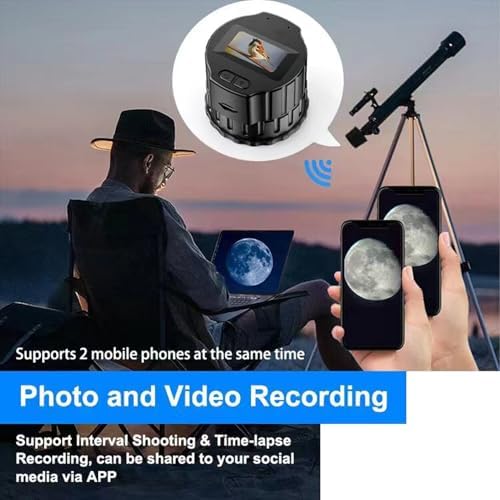
Image 1.1: The ASHATA Telescope Eyepiece Camera.
2. Producte acabatview
The ASHATA Telescope Eyepiece Camera is designed for astrophotography and general observation, allowing you to capture high-resolution photos and videos through your telescope or microscope. It features a 16MP sensor for 1080P recording and offers seamless connectivity with mobile devices.
Característiques principals:
- Imatges d'alta resolució: Capture 16MP photos and 1080P HD videos.
- Àmplia compatibilitat: Designed for 28mm to 50mm optical telescopes and microscopes.
- Connectivitat sense fils: Connects to your smartphone via built-in Wi-Fi for real-time viewing, control i compartició.
- Disseny portàtil: Compact and lightweight (0.2 lbs) for easy transport.
- Llarga vida útil de la bateria: Integrated 1000mAh battery provides up to 150 minutes of continuous use on a 1-hour charge.
- Emmagatzematge ampliable: Supports memory cards up to 256GB.

Image 2.1: The eyepiece camera connected to a telescope, displaying images on two mobile phones simultaneously. It supports photo and video recording, including interval shooting and time-lapse, shareable via the app.
3. Instruccions de configuració
3.1 Attaching the Camera to Your Telescope/Microscope
- Ensure your telescope or microscope eyepiece barrel is between 28mm and 50mm in diameter.
- Gently rotate the ASHATA Eyepiece Camera to attach it securely to the eyepiece of your optical device. Do not overtighten.
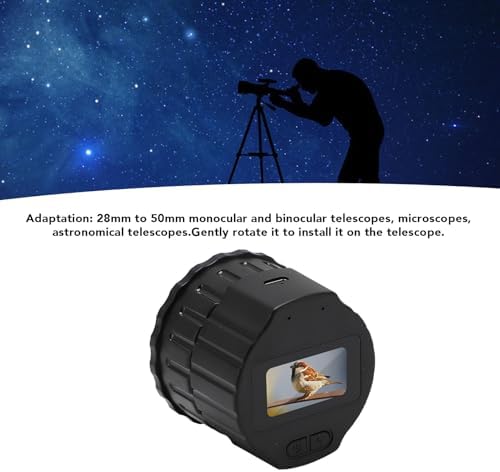
Image 3.1: The eyepiece camera mounted on a telescope, demonstrating its compatibility with 28mm to 50mm optical devices.
3.2 Càrrega inicial
Before first use, fully charge the camera using the provided Type-C USB cable. Connect the cable to the camera's Type-C port and a standard USB power adapter (not included) or a power bank.
3.3 Instal·lació i connexió de l'aplicació
- Download the dedicated application for the ASHATA Eyepiece Camera from your smartphone's app store.
- Activa la Wi-Fi al teu telèfon intel·ligent.
- Power on the eyepiece camera.
- Connect your smartphone to the camera's Wi-Fi network. The network name and password can typically be found in the camera's display or a sticker on the device.
- Open the application to establish a connection and begin live viewing.
4. Instruccions de funcionament
4.1 Captura de fotos i vídeos
Once connected to the app, you can control the camera directly from your smartphone. The app interface will provide options for:
- Captura de fotos: Tap the camera icon to take a still image.
- Gravació de vídeo: Tap the video icon to start and stop recording.
- Interval Shooting: Set specific time intervals for automatic photo capture.
- Gravació de lapse de temps: Capture a series of images over time to create a time-lapse video.

Image 4.1: The eyepiece camera capturing a bird, with the live feed displayed on a connected smartphone, illustrating real-time observation and recording capabilities.
4.2 Ajust del focus
The camera features manual focus. Adjust the focus ring on the camera or your optical device until the image on your smartphone screen is clear and sharp.

Image 4.2: The eyepiece camera displaying a full view angle, indicating the field of view capturat.
4.3 Compartint contingut
The companion app allows for immediate sharing of captured photos and videos to social media platforms or other applications on your smartphone.
5. Manteniment
5.1 Càrrega de la bateria
The built-in 1000mAh Li-ion battery can be recharged using any standard Type-C phone charger or power bank. A full charge takes approximately 1 hour and provides up to 150 minutes of continuous operation.

Image 5.1: The eyepiece camera highlighting its USB Type-C charging port and support for memory cards up to 256GB.
5.2 Emmagatzematge
The camera supports external memory cards up to 256GB for storing your photos and videos. Ensure the memory card is inserted correctly into the designated slot.
5.3 Neteja
Use a soft, dry cloth to clean the exterior of the camera. For the lens, use a specialized lens cleaning cloth and solution to avoid scratches. Do not use abrasive cleaners or solvents.
6. Solució De Problemes
- La càmera no s'encén: Assegureu-vos que la bateria estigui carregada. Connecteu-la a una font d'alimentació i torneu-ho a provar.
- Cannot connect to smartphone: Verify Wi-Fi is enabled on both devices. Ensure you have selected the correct camera Wi-Fi network and entered the correct password. Restart both the camera and your smartphone.
- La imatge és borrosa: Adjust the manual focus on the camera or your optical device. Ensure the camera is securely attached and aligned with the eyepiece.
- No image on app: Confirm the camera is powered on and successfully connected via Wi-Fi. Check if the app has necessary permissions on your phone.
- No es poden desar fotos/vídeos: Check if a memory card is inserted and has sufficient free space. Ensure the memory card is not corrupted.
7. Especificacions
| Marca | ASHATA |
| Nom del model | ASHATAsyeu4rtdng |
| Descripció de la lent de la peça ocular | ABS digital camera lens |
| Dimensions del producte (P x A x A) | 3.93" x 3.93" x 2.75" (100 mm x 100 mm x 70 mm) |
| Tipus d'enfocament | Enfocament manual |
| Dispositius compatibles | Telescopes (28mm to 50mm aperture) |
| Relació del zoom | 2 |
| Fabricant | ASHATA |
| Capacitat de la bateria | 1000 mAh |
| Temps de càrrega | Aprox. 1 hora |
| Temps d'ús continu | Aprox. 150 minuts |
| Suport d'emmagatzematge | Targeta de memòria de fins a 256 GB |
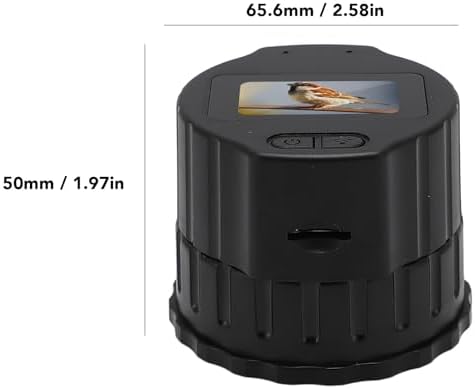
Imatge 7.1: Dimensional view of the eyepiece camera, showing its compact size.
8. Garantia i Suport
For warranty information or technical support, please refer to the contact details provided with your purchase or visit the official ASHATA weblloc. Conserveu el rebut de compra per a reclamacions de garantia.