
1. Introducció
Gràcies per la compraasing the Generic APAYADO-M70 Wired Mini Low Profile Keyboard. This manual provides essential information for setting up, operating, and maintaining your new keyboard. Please read this manual thoroughly before use to ensure proper function and longevity of your device.
2. Producte acabatview
2.1 Característiques clau
- Mida compacta: Slim and lightweight design (29×12×3.5cm; 220g) with a 78-key mini layout, saving desk space and enhancing portability.
- Pro baixfile Disseny: Keys feature a short travel distance for responsive keystrokes and a comfortable typing experience.
- Chocolate Keycaps: Alphanumeric translucent keycaps ensure letters and numbers are clearly visible.
- Retroil·luminació RGB: Integrated LED backlighting for enhanced visibility and aesthetics.
- Tecles silencioses: Bass buttons are designed for quiet operation, reducing typing noise.
2.2 Contingut del paquet
Si us plau, comproveu el paquet per veure si hi ha els elements següents:
- APAYADO-M70 Wired Mini Low Profile Teclat
- Cable USB (integrat)
- Manual d'usuari (aquest document)
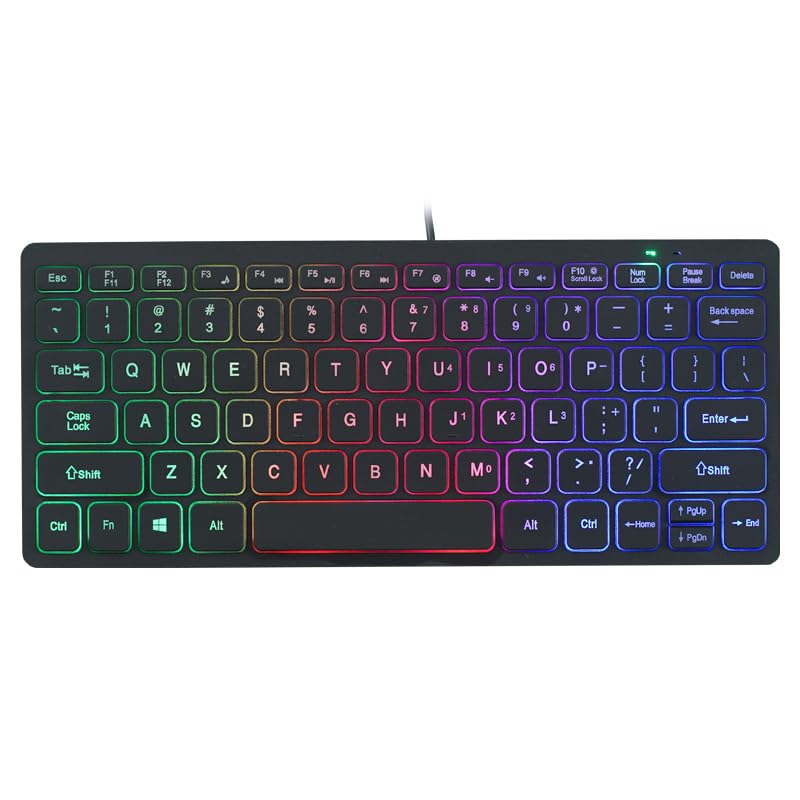
Image: The APAYADO-M70 Wired Mini Low Profile Keyboard, illustrating its compact form factor and illuminated keys.
3. Instruccions de configuració
- Descomprimir el teclat: Traieu amb cura el teclat del seu embalatge.
- Connexió a l'ordinador: Locate an available USB port on your computer (PC or Laptop). Insert the USB connector of the keyboard into the USB port.
- Instal·lació del controlador: El teclat és plug-and-play. El vostre sistema operatiu (Windows, macOS, Linux) hauria de detectar i instal·lar automàticament els controladors necessaris. Normalment no cal instal·lar cap programari addicional.
- Verificació de la funcionalitat: Open a text editor or word processor and type to ensure the keyboard is functioning correctly.
4. Instruccions de funcionament
4.1 Mecanografia bàsica
The APAYADO-M70 functions as a standard US English layout keyboard. Simply press the desired keys to input characters.
4.2 Control de retroil·luminació RGB
The keyboard features integrated RGB backlighting. To control the backlighting:
- Turn On/Off Backlighting: Premeu el botó FN tecla simultàniament amb la F10 clau (FN + F10) to toggle the LED lights on or off.
- Note: Specific RGB modes or brightness adjustments are not detailed in the product information. The FN+F10 combination is for basic on/off functionality.
5. Manteniment
Un manteniment adequat garanteix la longevitat i el rendiment del teclat.
- Neteja:
- Desconnecteu el teclat de l'ordinador abans de netejar-lo.
- Utilitzeu un drap suau i sense pelusa lleugerament dampEsbandiu amb aigua o una solució netejadora suau per netejar les tecles i la superfície.
- Eviteu utilitzar productes químics agressius, netejadors abrasius o dissolvents.
- Feu servir aire comprimit per eliminar la pols i les restes que hi ha entre les tecles.
- Emmagatzematge: Store the keyboard in a clean, dry environment away from extreme temperatures and direct sunlight.
- Manipulació: Avoid dropping the keyboard or exposing it to liquids. Do not attempt to disassemble the keyboard, as this will void any warranty.
6. Solució De Problemes
| Problema | Causa possible | Solució |
|---|---|---|
| El teclat no respon | Connexió USB fluixa, port USB defectuós, problema amb el controlador. |
|
| La retroiluminació no funciona | Backlight turned off, power issue. |
|
| Les tecles són enganxoses o no responen | Restes sota les tecles, vessament de líquid. |
|
7. Especificacions
| Model | APAYADO-M70 |
| Fabricant | APAYADO |
| Marca | Genèric |
| Tecnologia de connectivitat | USB per cable |
| Descripció del teclat | Membrane, Low-Profile |
| Característiques especials | Backlit, Lightweight, Low-Profile clau |
| Dimensions (L x A x A) | 29 × 12 × 3.5 cm (approx.) |
| Pes | 220 g (aprox.) |
| Dispositius compatibles | Portàtil, PC |
| Color/Backlight | Mixed Light (RGB) |
8. Garantia i Suport
This product is covered by a standard manufacturer's warranty. Please refer to the retailer's return policy or contact the seller for specific warranty terms and conditions. For technical support or inquiries, please contact your point of purchase or the manufacturer directly.
Conserveu el rebut de compra com a comprovant de compra per a reclamacions de garantia.