
1. Introducció
Welcome to the SuperRC XT505 Drone user manual. This guide provides essential information for the safe operation, setup, and maintenance of your new drone. Please read this manual thoroughly before your first flight to ensure proper usage and to maximize your flying experience.
The SuperRC XT505 is a foldable quadcopter equipped with a dual HD camera, GPS, and obstacle avoidance features, designed for both beginners and experienced pilots. It offers stable flight, high-quality aerial photography, and various intelligent flight modes.
2. Producte acabatview
2.1 Contingut del paquet
En desembalar, comproveu que hi hagi tots els elements que s'enumeren a continuació:
- SuperRC XT505 Drone
- Control remot
- 2 bateries de ions de liti
- Hèlixs (joc de recanvi inclòs)
- Bossa d'emmagatzematge
- Cable del carregador USB
- Tornavís
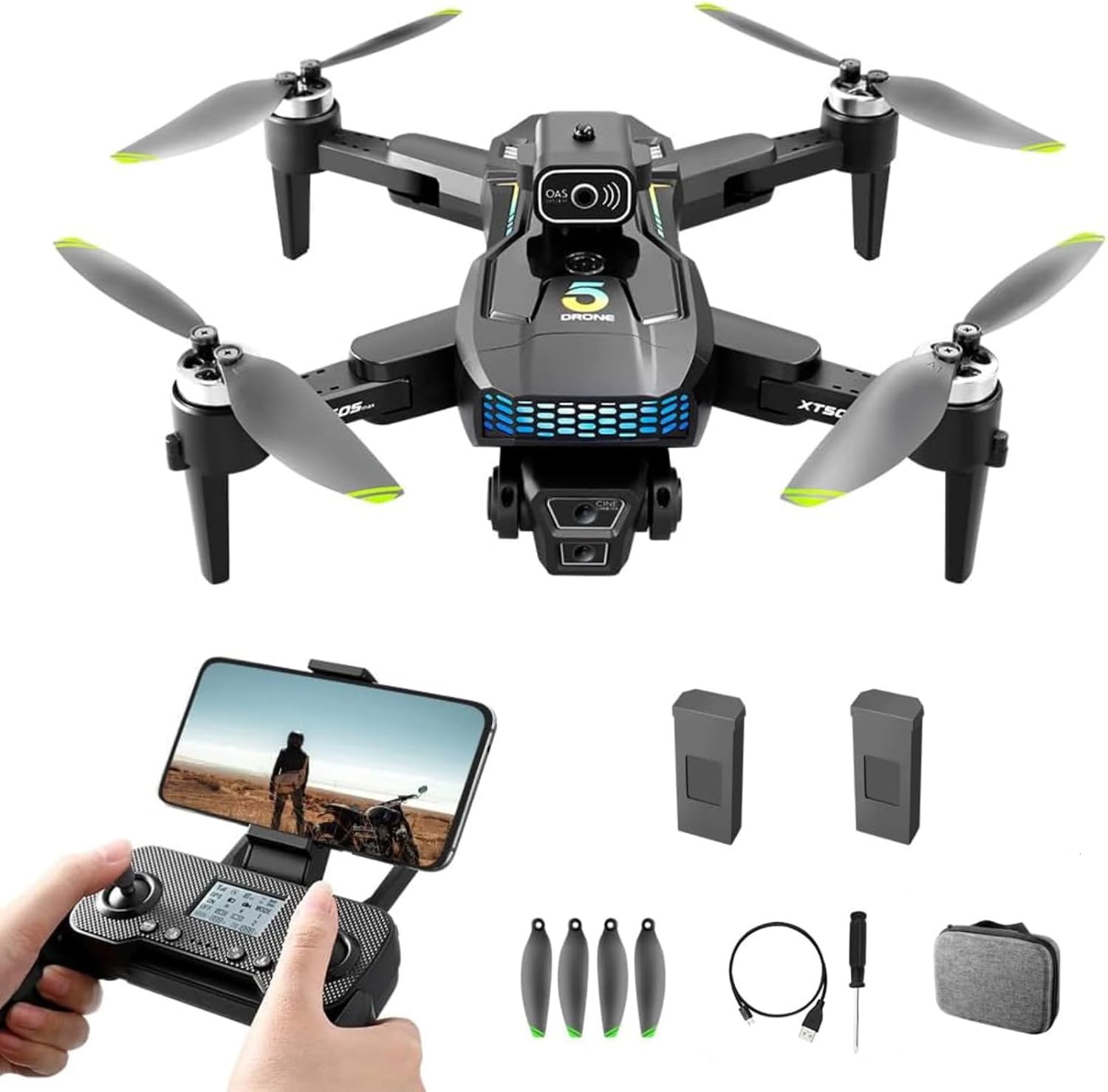
Image 2.1: The SuperRC XT505 Drone, remote control, two batteries, spare propellers, USB charging cable, screwdriver, and a storage bag.
2.2 Característiques clau
- Càmera HD dual: Equipped with an adjustable angle 1080P HD camera for high-quality aerial photos and videos.
- Funcionalitat GPS: Provides precise positioning and intelligent return-to-home capabilities.
- Evitació d'obstacles: Enhances flight safety by detecting and avoiding obstacles.
- Disseny plegable: Compacte i portàtil per a un fàcil transport.
- Enlairament/aterratge amb una sola tecla: Simplifies operation for beginners.
- Mode de manteniment d'altitud: Maintains a stable height for easier control and clearer footage.
- Control de veu: Allows for hands-free command execution.
- Multiple Intelligent Functions: Includes Waypoint fly, gesture selfie, 360° flips, circle fly, and rotation fly.
- Temps de vol ampliat: Two rechargeable batteries provide up to 32 minutes of flight.
- Motors sense escombretes: Offers strong wind resistance and stable flight performance.

Imatge 2.2: Una imatge detallada view of the drone's dual HD camera system, designed for accurate focusing and reduced screen shaking.

Image 2.3: The SuperRC XT505 Drone in flight, illustrating the powerful brushless motors that provide strong wind resistance and stable performance.

Image 2.4: The drone utilizing its optical flow visual hovering system, which uses a bottom camera for precise positioning and stable hovering both indoors and outdoors.
3. Guia de configuració
3.1 Instal·lació i càrrega de la bateria
- Drone Bateria: Insert the fully charged drone battery into the battery compartment on the drone. Ensure it clicks securely into place.
- Càrrega: Connect the drone battery to the USB charger cable and plug it into a 5V/2A USB power adapter (not included). The indicator light will show charging status and turn off when fully charged. Charging typically takes 60-90 minutes.
- Bateries de control remot: Open the battery compartment on the remote control and insert 3 AAA batteries (not included), observing polarity.
3.2 Instal·lació de l'hèlix
The propellers are marked A and B. Match the propellers to the corresponding motor arms (A to A, B to B). Secure them with the provided screws and screwdriver. Ensure they are firmly attached but not overtightened.
3.3 Configuració del control remot
- Enceneu el comandament a distància.
- Enceneu el drone.
- Col·loqueu el drone sobre una superfície plana i plana.
- Push the left joystick up then down to pair the remote with the drone. The drone's indicator lights will stop flashing and remain solid once paired.
- Perform gyroscope calibration by pushing both joysticks to the bottom-left corner simultaneously until the drone lights flash rapidly and then become solid.
- Perform compass calibration (for GPS models): Follow the app instructions or remote control prompts to rotate the drone horizontally and vertically until calibration is complete. This is crucial for GPS accuracy.
3.4 Descàrrega i connexió de l'aplicació
- Download the designated drone app (refer to the QR code in the packaging or search for 'SuperRC XT505' in your app store).
- Enceneu el drone i el comandament a distància.
- On your smartphone, connect to the drone's Wi-Fi network (usually named 'SuperRC-XXXXXX').
- Obre l'aplicació. Hauries de veure la imatge en directe del dron.
4. Instruccions de funcionament
4.1 Controls bàsics de vol
- Joystick esquerre (accelerador/guinyada): Up/Down controls altitude; Left/Right controls rotation (yaw).
- Joystick dret (Pitch/Roll): Up/Down controls forward/backward movement (pitch); Left/Right controls left/right movement (roll).
- Botons de retallar: Use to fine-tune drone stability if it drifts in any direction.
4.2 One-Key Takeoff/Landing
After pairing and calibration, press the One-Key Takeoff button on the remote control. The drone will automatically ascend to a stable hovering height. Press the One-Key Landing button to initiate an automatic descent and landing.
4.3 Altitude Hold Mode
The drone automatically maintains its current altitude, allowing you to focus on directional control and camera operation.
4.4 Mode sense cap
In Headless Mode, the drone's orientation is relative to the pilot. Pushing the right joystick forward will always make the drone fly away from you, regardless of its front-facing direction. This simplifies control for beginners.
4.5 Funcions especials
- Waypoint Fly: Draw a path on the app interface, and the drone will follow it automatically.
- Selfie gestual: Perform specific hand gestures in front of the camera to trigger photo or video recording. Refer to the app for specific gestures.
- Girs de 360°: Press the 360° flip button and move the right joystick in the desired direction to perform an aerial flip.
- Control de veu: Use predefined voice commands through the app to control drone functions.
- Mosca circular: The drone will fly in a circular path around a designated point.
- Rotation Fly: The drone will rotate in place.
5. Manteniment
5.1 Neteja
Regularly clean the drone body, propellers, and camera lens with a soft, dry cloth. Avoid using liquids or solvents that could damage electronic components.
5.2 Cura de la bateria
- Feu servir sempre el cable de càrrega original.
- No sobrecarregueu ni descarregueu excessivament les bateries.
- Emmagatzemeu les bateries en un lloc fresc i sec, lluny de la llum solar directa i de temperatures extremes.
- If not used for an extended period, charge batteries to approximately 50% capacity.
5.3 Emmagatzematge
When not in use, store the drone and its accessories in the provided storage bag to protect them from dust and damage.
6. Solució De Problemes
6.1 Problemes comuns i solucions
| Problema | Causa possible | Solució |
|---|---|---|
| Drone won't lift off or crashes immediately after takeoff. | Improper calibration, low battery, damaged propellers, uneven surface. | Ensure drone and remote batteries are fully charged. Perform gyroscope and compass calibration on a flat surface. Check propellers for damage and correct installation. Try flying in an open area. |
| Difficulty connecting to the app or no live video feed. | Incorrect Wi-Fi connection, app malfunction, interference. | Verify your phone is connected to the drone's Wi-Fi network. Restart the app and the drone. Ensure no other devices are connected to the drone's Wi-Fi. Reinstall the app if necessary. |
| Temps de vol curt. | Battery not fully charged, old battery, flying in strong winds. | Ensure batteries are fully charged before each flight. Consider replacing old batteries. Avoid flying in strong winds which consume more power. |
| El dron es desplaça durant el vol. | Improper calibration, wind interference, unbalanced propellers. | Perform gyroscope calibration. Use trim buttons to adjust stability. Check propellers for damage or debris. Fly in calm conditions. |
| Senyal GPS feble o no disponible. | Flying indoors, near tall buildings, or under heavy tree cover. | Vola en una zona oberta a l'aire lliure amb claredat view of the sky. Wait for the GPS indicator to show a strong signal before takeoff. |
7. Especificacions
| Característica | Detall |
|---|---|
| Marca | SuperRC |
| Nom del model | XT505 Drone |
| Resolució de captura de vídeo | 720p (Note: Product description states 1080P HD camera, please verify actual resolution) |
| Tecnologia de connectivitat | Wi-Fi |
| Tipus de control | Control d'aplicacions |
| Interval màxim | 1200 metres |
| Pes de l'article | 132 grams (4.7 unces) |
| Capacitat de la bateria | 2000 milionsamp Hores (ions de liti) |
| Dimensions del producte | 4.72 cm de llargada x 3.14 cm d'amplada x 1.6 cm d'alçada |
| Nivell d'habilitat | Tot (Apte per a principiants) |
| Característiques especials | Adjustable, One Button Return, One Key Rotation, Rechargeable, Speed Adjustment, Optical Flow, Obstacle Avoidance |
| Material | Plàstic |
| UPC | 751779287931 |
8. Garantia i Suport
SuperRC offers 24-hour service support for all customers. If you encounter any issues with the SuperRC XT505 Drone, its remote control, or the associated application, please contact the seller for prompt assistance and solutions.