
Introducció
This user manual provides comprehensive instructions for the operation, maintenance, and troubleshooting of your Bewinner Video Camera Camcorder. Please read this manual carefully before using the device to ensure proper functionality and to maximize your user experience.
The Bewinner Video Camera Camcorder is designed for capturing high-quality video and still images, featuring 2.7K QHD video resolution, 50MP photo capability, 16X digital zoom, and a 2.8-inch 270-degree rotatable screen. It is suitable for various applications including vlogging, live streaming, and general travel recording.
Contingut del paquet
En obrir el paquet, comproveu que hi hagi tots els elements següents:
- 1 x Bewinner Video Camera Camcorder
- 1 x 1500mAh Li-ion Battery (NP-40 type)
- 1 x cable USB
- 1 x bossa de transport
- 1 x Manual d'instruccions (aquest document)

Image: All items included in the Bewinner Video Camera Camcorder package.
Producte acabatview
Familiarize yourself with the various parts and controls of your camcorder.
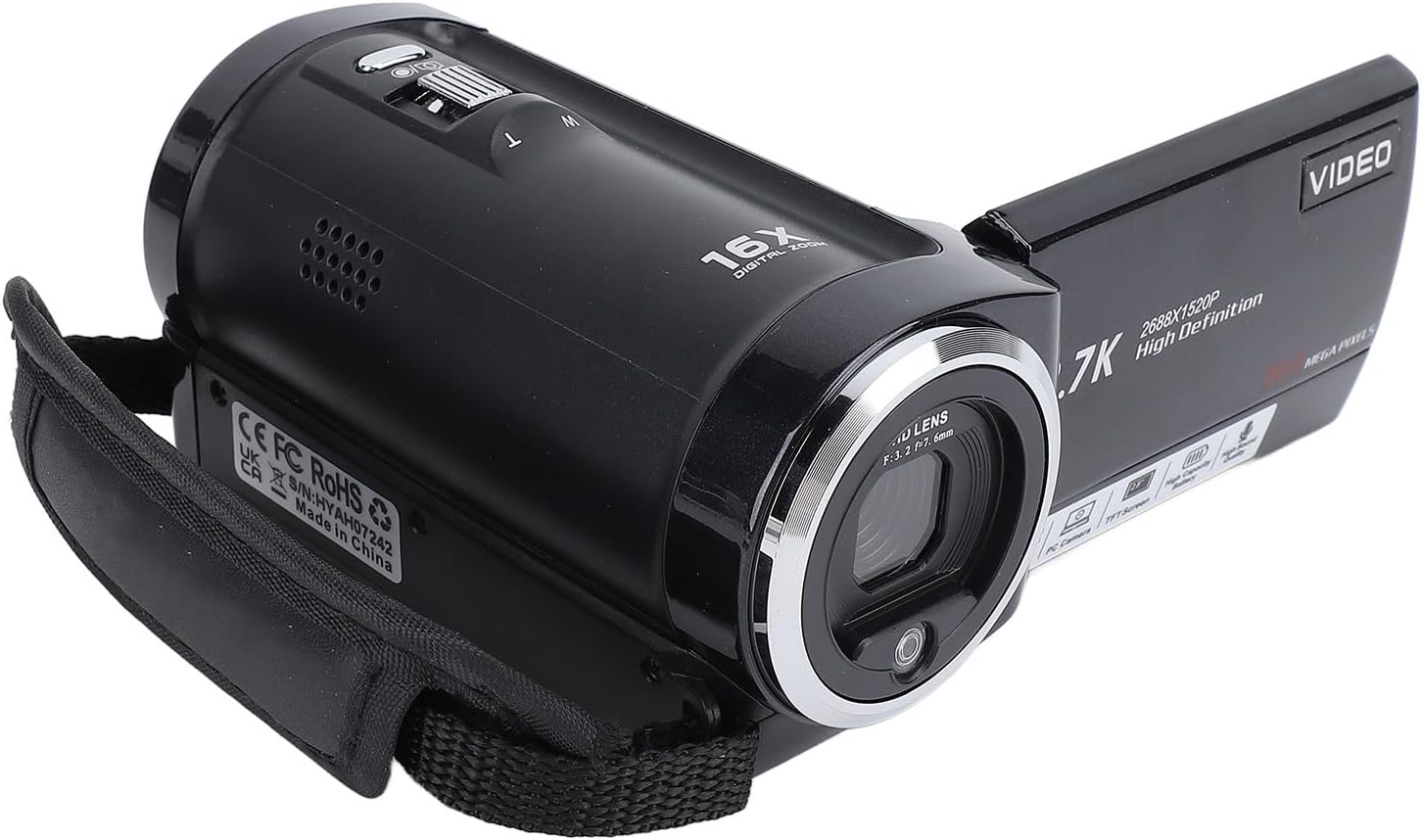
Imatge: Frontal i lateral view of the camcorder, highlighting the lens and general form factor.

Imatge: Part posterior view of the camcorder with the screen rotated, showing the control panel, USB port, and external microphone input.

Imatge: Superior view of the camcorder, illustrating the zoom control and other top-mounted buttons.
Components clau:
- Lent: Captura vídeo i imatges fixes.
- 2.8-inch Rotatable Screen: Per viewing live feed, playback, and menu navigation. Can rotate 270 degrees.
- Palanca de zoom (G/T): Controls the 16X digital zoom. 'W' for wide, 'T' for telephoto.
- Botó d'encesa: Encén/apaga la càmera de vídeo.
- Botó de mode: Canvia entre els modes de vídeo, foto i reproducció.
- Port USB: For connecting to a computer (webcam function, data transfer) or for charging.
- Port MIC IN: For connecting an external microphone (not included).
- Llum LED: Built-in light for low-light conditions.
- Compartiment de la bateria: Houses the NP-40 Li-ion battery.
- Ranura per a targeta SD: Supports Storage Card/SDHC Card up to 128GB (not included).
Configuració
1. Carregant la bateria
The camcorder comes with a rechargeable NP-40 Li-ion battery. Before first use, fully charge the battery.
- Obriu la tapa del compartiment de la bateria a la part inferior de la càmera de vídeo.
- Insert the NP-40 battery, ensuring the correct polarity.
- Tanqueu la tapa del compartiment de la bateria.
- Connect the camcorder to a power source (e.g., computer USB port or USB wall adapter) using the provided USB cable. The charging indicator will illuminate.
- Charging is complete when the indicator light turns off or changes color (refer to the camcorder's display for battery status). A full charge provides approximately 140 minutes of recording time.
The camcorder supports simultaneous charging and recording, allowing for extended use without interruption.
2. Inserció d'una targeta de memòria
A memory card (Storage Card/SDHC Card, up to 128GB) is required to save photos and videos. The card is not included.
- Localitza la ranura per a la targeta SD, normalment al lateral o a la part inferior de la càmera de vídeo.
- Insert the memory card with the metal contacts facing down (or as indicated by the diagram near the slot) until it clicks into place.
- Per treure la targeta, premeu-la suaument fins que faci clic i, a continuació, deixeu-la anar i s'expulsarà.
Nota: Ensure the camcorder is powered off before inserting or removing the memory card to prevent data corruption.
Instruccions de funcionament
1. Encès / apagat
- Per encendre, premeu i manteniu premut Poder botó.
- Per apagar-lo, manteniu premut el botó Poder botó de nou.
- The camcorder also features an auto power-off function (Off, 1 minute, 3 minutes, 5 minutes) which can be configured in the settings.
2. Basic Recording and Photography
The camcorder supports 2.7K QHD video recording and 50MP still image capture.
- Seleccioneu el mode: Premeu el botó Mode button to switch between Video Recording mode (indicated by a video camera icon) and Photo Capture mode (indicated by a camera icon).
- Enquadrant la teva foto: Use the 2.8-inch rotatable screen to compose your shot. The screen can be rotated 270 degrees for various viewing angles, including self-recording.
- Zoom: Utilitza el Palanca de zoom (W/T) to adjust the 16X digital zoom. Push towards 'T' for telephoto (zoom in) and 'W' for wide (zoom out).
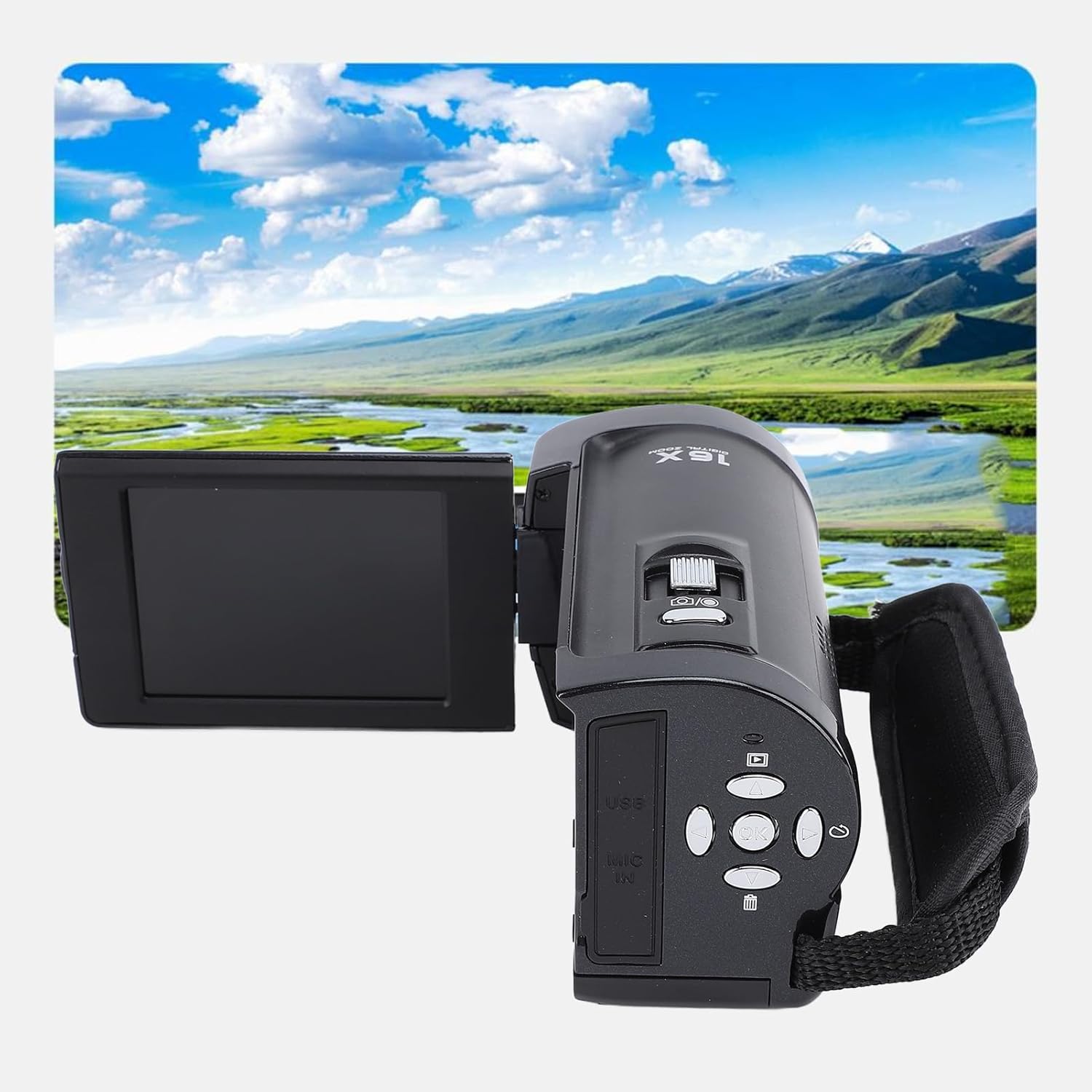
Image: Illustration of the 16X digital zoom function, showing how it can capture details from a distance.
- Gravació de vídeo: In Video Recording mode, press the Grava/D'acord button (usually marked with a red dot or 'OK') to start recording. Press it again to stop recording.
- Fent fotos: In Photo Capture mode, press the Shutter/OK botó per fer una foto.
3. Funcions i configuracions avançades
Access the camcorder's menu to configure various settings and utilize advanced functions.
- Navegació del menú: Use the directional buttons (Up, Down, Left, Right) to navigate through menu options and the OK botó per confirmar les seleccions.
- Llum LED incorporada: Activate the LED light for improved visibility in low-light environments. Refer to the manual for specific button or menu option.
- WebFunció de la càmera: Connect the camcorder to a computer via the USB cable. Select "Webcam" mode on the camcorder's screen (if prompted). This allows the camcorder to function as a webcam for live streaming (e.g., YouTube, Skype, TikTok, Facebook) or video calls.
- Compatibilitat amb micròfon extern: For clearer audio, connect an external microphone (not included) to the MIC IN port. Ensure the external microphone has its own power source if required.
- Anti-shake: Enable the electronic anti-shake feature in the settings to reduce blur from camera movement.
- Face Detection & Smile Capture: These features can be enabled in the settings to optimize focus and capture for human faces.
- Temporitzador automàtic: Set a delay (2, 5, or 10 seconds) before a photo is taken.
- Tret continu: Captura diverses fotos en una successió ràpida.
- Data St.amp: Overlay the date and time onto your photos and videos.
- Balanç de blancs: Adjust color temperature based on lighting conditions (Auto, Sunlight, Cloudy, Fluorescent Lamp, Incandescent).
- Compensació de l’exposició: Adjust the brightness of your images from -3.0EV to +3.0EV.
Manteniment
Una cura i un manteniment adequats allargaran la vida útil de la càmera de vídeo.
- Neteja de la lent: Use a soft, lint-free cloth specifically designed for camera lenses. Avoid using harsh chemicals or abrasive materials.
- Neteja de la pantalla: Gently wipe the screen with a microfiber cloth. For stubborn smudges, use a screen cleaning solution applied to the cloth, not directly to the screen.
- Neteja general: Wipe the camcorder body with a soft, dry cloth. Do not expose the camcorder to excessive dust, dirt, or moisture.
- Emmagatzematge: When not in use for extended periods, remove the battery and store the camcorder in a cool, dry place, preferably in its carrying bag to protect it from dust and scratches.
- Cura de la bateria: Do not expose batteries to extreme temperatures. If storing for a long time, charge the battery to about 50% capacity.
Resolució de problemes
Si teniu problemes amb la càmera de vídeo, consulteu els problemes i solucions més comuns següents:
| Problema | Causa possible | Solució |
|---|---|---|
| La càmera de vídeo no s'encén. | La bateria està esgotada o no està inserida correctament. | Ensure battery is fully charged and correctly inserted. Try charging the battery. |
| No es pot gravar vídeo ni fer fotos. | No memory card inserted, memory card full, or card error. | Insert a compatible memory card. Check available space. Format the card (this will erase all data). |
| Mala qualitat d'imatge/vídeo. | L'objectiu està brut, hi ha poca il·luminació o hi ha una configuració incorrecta. | Clean the lens. Use the built-in LED light in dim conditions. Adjust White Balance or Exposure Compensation. |
| La càmera de vídeo es bloqueja o deixa de respondre. | Error de programari o fallada temporal. | Traieu la bateria durant uns segons, torneu-la a inserir i torneu a engegar-la. |
| El micròfon extern no funciona. | Microphone not connected properly or requires separate power. | Ensure the microphone is securely plugged into the MIC IN port. Verify if the microphone needs its own power source and if it's turned on. |
Si el problema persisteix després de provar aquestes solucions, poseu-vos en contacte amb l'atenció al client.
Especificacions
| Característica | Detall |
|---|---|
| Sensor d'imatge | CMOS Sensor, Up to 50MP |
| Sensibilitat | Automàtic, ISO100, ISO200, ISO400 |
| Mitjans d'emmagatzematge | Support Storage Card/SDHC Card, Up to 128GB (Not Included) |
| Lent | Fixed Lens, F/2.6, f7.0mm |
| Interval d'enfocament | 1.2M to Endless far |
| Resolució d'imatge fixa | JPEG, Resolution: 50M, 48M, 36M, 30M, 24M, 20M, 16M, 12M, 8M, 5M |
| Resolució de vídeo | AVI, Resolution: 2.7K(2688*1520), FHD(1920*1080), HD(1280X720), VGA |
| Zoom | Zoom digital 16X |
| Anti Shaking | Electronic Anti Shake |
| Detecció de cares | Admet |
| So de vídeo | Admet |
| Balanç de blancs | Auto/Sunlight/Cloudy/Fluorescent Lamp/Incandescent |
| Compensació de l'exposició | -3.0EV to +3.0EV |
| Autònom | Off, 2 seconds, 5 seconds, 10 seconds |
| Apagat automàtic | Desactivat, 1 minut, 3 minuts, 5 minuts |
| Bateria | 1 x 1500mAh Li-ion Battery (NP-40) |
| Mida de la pantalla | 2.8 Inches, 270 Degree Rotation |
| Connectivitat | USB (for data transfer and webcam function) |
| Pes de l'article | 13.4 unces |
| Dimensions del paquet | 5.71 x 4.13 x 3.19 polzades |
| País d'origen | Xina |
Garantia i Suport
Per obtenir informació sobre la garantia i assistència tècnica, consulteu la pàgina oficial de Bewinner. weblloc web o contacteu directament amb el seu servei d'atenció al client. Conserveu el rebut de compra com a comprovant de compra per a qualsevol reclamació de garantia.
Informació de contacte:
- Marca: Guanyador
- Model: Bewinnerfyhp90zwmg
- Botiga Amazon: Visit the Bewinner Store on Amazon