
MageGee SKY87 75% Wireless Mechanical Keyboard (Gradient White Blue)
MageGee SKY87 75% Wireless Mechanical Keyboard User Manual
Model: SKY87 | Brand: MageGee
1. Introducció
Welcome to the user manual for your new MageGee SKY87 75% Wireless Mechanical Keyboard. This keyboard is designed for versatility and performance, offering multiple connectivity options, customizable features, and a comfortable typing experience. Please read this manual carefully to ensure proper setup and optimal use of your device.

This image displays the MageGee SKY87 75% Wireless Mechanical Keyboard in its Gradient White Blue color scheme, showcasinel seu disseny compacte i la retroiluminació RGB.
2. Contingut del paquet
Si us plau, verifiqueu que tots els elements que s'enumeren a continuació estiguin inclosos al vostre paquet:
- MageGee SKY87 75% Wireless Mechanical Keyboard
- Cable USB-C a USB-A
- 2.4GHz USB Receiver (stored in the keyboard's base)
- Extractor de tecles
- Tirador de commutació
- Interruptors de recanvi (la quantitat pot variar)
- Manual d'usuari (aquest document)

This image shows the complete contents of the MageGee SKY87 keyboard package, including the keyboard, cables, tools, and documentation.
3. Característiques
The MageGee SKY87 keyboard boasts a range of features designed to enhance your typing and gaming experience:
- Connectivitat multidispositiu: Supports BT5.0, 2.4GHz wireless, and USB wired modes, allowing connection to up to five devices simultaneously.
- Disseny intercanviable en calent: Easily replace 3-pin or 5-pin switches without soldering, enabling full customization of your typing feel. Comes with pre-lubed linear switches for smooth operation.
- Retroil·luminació RGB: Features 18+ RGB backlight modes and a separate strip light, with N-key rollover for responsive gaming.
- Estructura de la junta: Enhanced resilience and stability with an extended integrated silicone pad and PCB single key slotting, reducing hollow sounds.
- Tecles PBT: Durable double-shot PBT keycaps ensure characters remain vibrant and do not fade over time.
- Bateria d'alta capacitat: Built-in 8000mAh rechargeable battery for extended wireless use.
- Disseny compacte al 75%: 87 keys layout saves desktop space while retaining essential arrow keys and a number area.
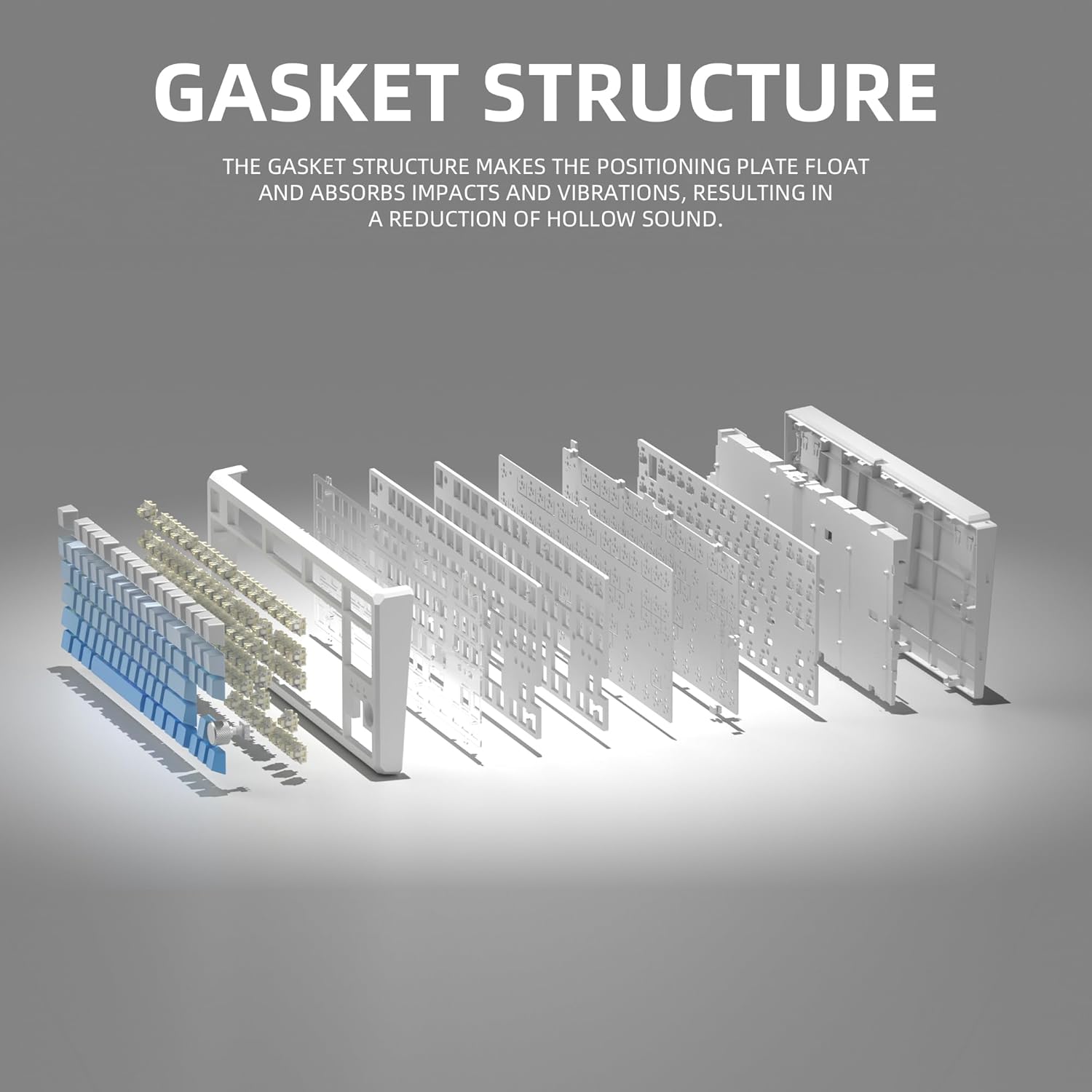
This image illustrates the internal gasket structure of the keyboard, highlighting its components that contribute to a softer and more elastic typing feel.

Un va explotar view detailing the various layers and components that form the keyboard's gasket structure, including the top case, keycaps, switches, foam pads, and PCB board.
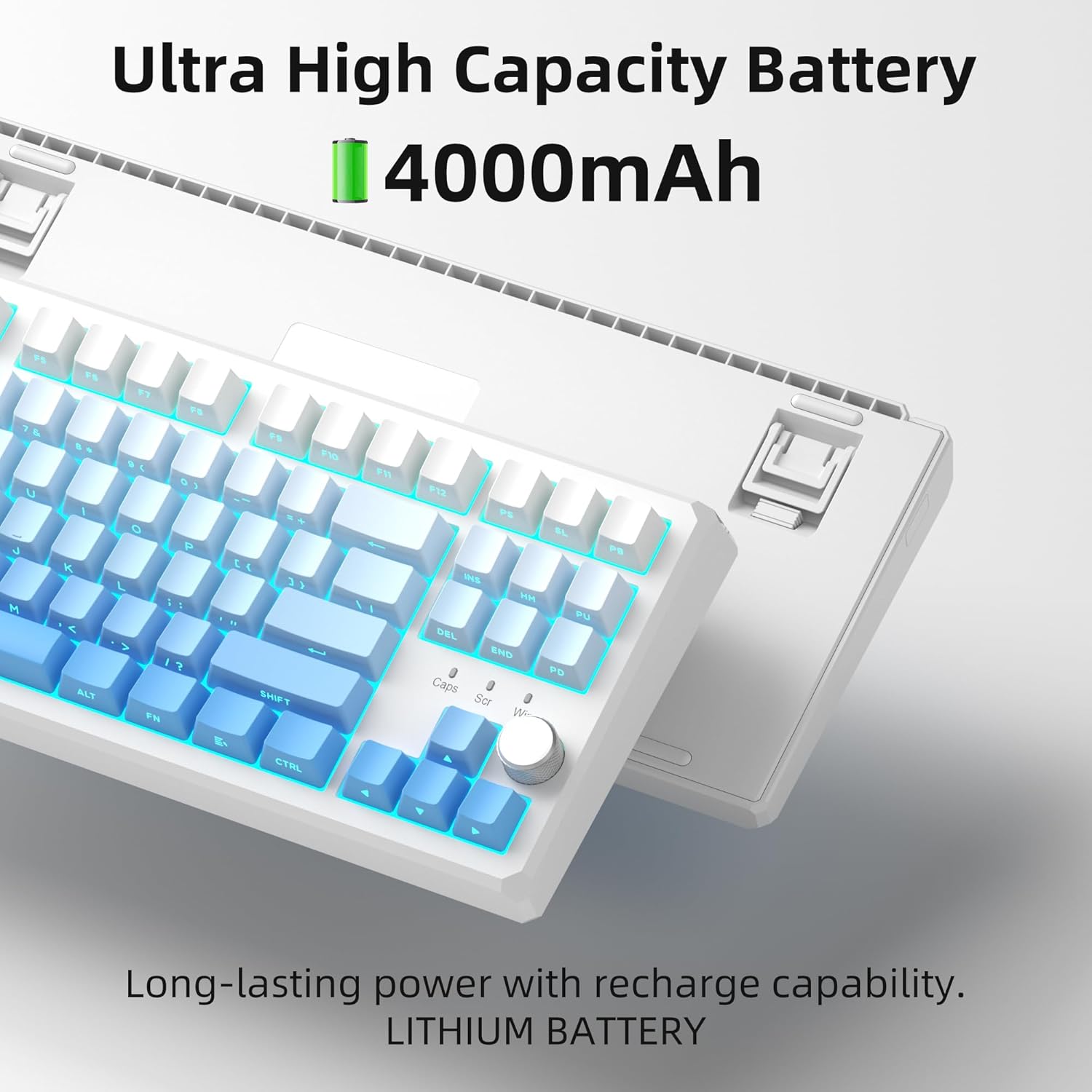
This image highlights the keyboard's internal battery, emphasizing its long-lasting power and rechargeable capability.
4. Configuració
4.1 Modes de connectivitat
The SKY87 keyboard supports three connection modes:
- Mode sense fil de 2.4 GHz: Per a una connexió estable i de baixa latència.
- Mode Bluetooth 5.0: For connecting to multiple devices (up to 5) and easy switching.
- Mode per cable USB: For direct connection and charging.

This image visually explains the three available connection modes for the keyboard: 2.4GHz wireless, Type-C wired, and Bluetooth 5.1, showing how it connects to different devices like a laptop, monitor, and tablet.
4.2 Connexió del teclat
- Connexió sense fil de 2.4 GHz:
- Locate the 2.4GHz USB receiver stored in the magnetic compartment on the back of the keyboard.
- Connecteu el receptor a un port USB disponible de l'ordinador.
- Ensure the keyboard is in 2.4GHz mode (refer to keyboard's mode switch, usually on the back or side).
- El teclat s'hauria de connectar automàticament.
- Connexió Bluetooth:
- Turn on the keyboard and switch it to Bluetooth mode.
- On your device (PC, Mac, Xbox, tablet), enable Bluetooth and search for new devices.
- Select 'MageGee SKY87' from the list of available devices to pair.
- You can pair up to 5 Bluetooth devices and switch between them using specific FN key combinations (refer to keyboard's keycap legends or quick guide).
- Connexió per cable USB:
- Connect the provided USB-C cable to the keyboard's USB-C port (located on the top edge).
- Connect the other end of the cable to a USB-A port on your computer.
- The keyboard will function in wired mode and charge simultaneously.
4.3 Ajust de l'angle del teclat
El teclat té duestage adjustable feet on its underside, allowing you to set your preferred typing angle for ergonomic comfort.

This image shows the adjustable two-stage tripod feet on the underside of the keyboard, designed for ergonomic angle adjustment.
5. Instruccions de funcionament
5.1 Control d'il·luminació RGB
The keyboard features a multi-function knob and dedicated keys for controlling the RGB backlighting:
- Girar el botó: Turn left/right to adjust backlight brightness.
- Short Press Knob: Press the knob to cycle through different RGB lighting modes (18+ modes available).
- Combinacions de tecles FN: Use FN + specific keys (refer to keycap legends) to change lighting effects, speed, or color.

This image focuses on the multi-function knob located on the keyboard, indicating its role in controlling the brightness of the RGB lighting.
5.2 Commutadors intercanviables en calent
The SKY87 keyboard allows for easy replacement of switches without soldering:
- Use the provided switch puller to gently remove the existing switch.
- Align the pins of the new 3-pin or 5-pin switch with the holes on the PCB.
- Press firmly until the switch clicks into place.
- Use the keycap puller to remove and replace keycaps as desired.

This image illustrates the hot-swappable sockets on the keyboard's PCB, demonstrating how switches can be easily inserted and removed, supporting both 3-pin and 5-pin switch types.

This image provides detailed specifications for the 'Blue Whale Switch', including its linear type, pre-travel, end force, tactile position, and total travel, along with a force curve graph.
5.3 Commutació multidispositiu
When in Bluetooth mode, you can quickly switch between paired devices using the designated FN key combinations (e.g., FN + 1, FN + 2, etc.). Refer to the keyboard's quick guide or keycap legends for specific combinations.
5.4 N-Key Rollover
The keyboard supports N-key rollover, meaning it can accurately register multiple simultaneous key presses. This feature is particularly beneficial for fast-paced gaming and touch typing.
5.5 Vídeos oficials de productes
Video 5.1: SKY87 Bluetooth Keyboard Overview
Aquest vídeo ofereix un finalview of the SKY87 Bluetooth Keyboard, demonstrating its features, unboxing, and showcasing the typing sound and RGB lighting effects.
Video 5.2: SKY87 Side Printed PBT Keycaps Keyboard
This video offers a closer look at the SKY87 keyboard, focusing on its side-printed PBT keycaps and demonstrating the typing experience.
6. Manteniment
To ensure the longevity and optimal performance of your MageGee SKY87 keyboard, follow these maintenance guidelines:
- Neteja: Regularly clean the keycaps and keyboard surface with a soft, dry cloth. For deeper cleaning, you can remove keycaps using the provided puller and use compressed air to clear debris from beneath.
- Cura del canvi: If replacing switches, handle them carefully to avoid bending the pins. Ensure switches are fully seated to prevent inconsistent key presses.
- Cura de la bateria: Avoid fully discharging the battery frequently. For long-term storage, charge the keyboard to about 50% and store in a cool, dry place.
- Emmagatzematge: When not in use, especially for extended periods, consider using a dust cover or the original packaging to protect the keyboard from dust and spills.
7. Solució De Problemes
If you encounter any issues with your keyboard, please refer to the following common troubleshooting steps:
- El teclat no respon:
- Ensure the keyboard is charged. Connect it via USB-C cable.
- Check the connection mode switch (2.4G/BT/Wired) on the keyboard and ensure it matches your intended connection.
- Per a 2.4 GHz, assegureu-vos que el receptor USB estigui ben connectat. Proveu un altre port USB.
- Per al Bluetooth, assegureu-vos que el Bluetooth estigui activat al dispositiu i que el teclat estigui emparellat. Intenteu tornar a emparellar el dispositiu.
- Reinicieu l'ordinador/dispositiu.
- Il·luminació RGB no funciona/incorrecta:
- Assegureu-vos que el teclat estigui encès.
- Rotate or short press the knob to adjust brightness or change lighting modes.
- Check if any FN key combinations have disabled the lighting.
- Claus que no es registren:
- If specific keys are not working, the switch might be faulty or not properly seated. Use the switch puller to remove and re-insert the switch.
- Assegureu-vos que no hi hagi restes allotjades sota la tapa de les tecles o l'interruptor.
- Connectivity Issues (Lag/Disconnections):
- For wireless modes, ensure there are no strong interferences (e.g., other 2.4GHz devices, large metal objects) between the keyboard and receiver/device.
- Apropeu-vos més al receptor/dispositiu.
- Ensure the keyboard battery is not low.
If the issue persists after trying these steps, please contact MageGee customer support for further assistance.
8. Especificacions
| Característica | Detall |
|---|---|
| Marca | MageGee |
| Model | Sky87 |
| Tecnologia de connectivitat | Sense fil 2.4G, Bluetooth 5.0, USB-C amb cable |
| Disposició del teclat | 75% (87 Keys), QWERTY |
| Tipus de canvi | Linear (Hot-swappable 3-pin/5-pin) |
| Material de claus | PBT de doble injecció |
| Il·luminació de fons | RGB (18+ modes) |
| Capacitat de la bateria | 8000 mAh (recarregable) |
| Dispositius compatibles | PC, Xbox, MAC |
| Pes de l'article | 2 lliures |
| Dimensions del paquet | 13 x 13 x 1 polzades |
| Fabricant | MAGEGEU |
| Primer disponible | 31 d'octubre de 2024 |
9. Garantia i Suport
Your MageGee SKY87 Mechanical Keyboard comes with a 1 anys de garantia des de la data de compra.
This warranty covers manufacturing defects and issues arising from normal use. It does not cover damage caused by misuse, accidents, unauthorized modifications, or improper maintenance.
For warranty claims, technical support, or any questions regarding your product, please contact MageGee customer support. You can typically find contact information on the manufacturer's official weblloc web o a través del vostre punt de compra.
MageGee aims to respond to inquiries within 12 hours and provide satisfactory solutions.
Ask a question about this manual
Ask about setup, troubleshooting, compatibility, parts, safety, or missing instructions. Manuals+ will review the question and use this page’s manual context to help answer it.