
1. Introducció
Gràcies per la compraasing the Max Power MPD437 Ultra PRO M2 Portable Bluetooth Speaker. This speaker is designed to provide high-quality audio in various environments, featuring water resistance and dust-proof capabilities for outdoor use. Please read this manual carefully before using the product to ensure proper operation and to maximize its lifespan.
Informació de seguretat
- No exposeu l'altaveu a temperatures extremes ni a la llum solar directa durant períodes prolongats.
- Eviteu deixar caure o sotmetre l'altaveu a forts impactes.
- No intenteu desmuntar ni modificar l'altaveu. Això anul·larà la garantia.
- Mantingueu l'altaveu allunyat de dispositius mèdics.
- Utilitzeu només el cable de càrrega subministrat.
2. Contingut del paquet
Assegureu-vos que tots els elements siguin presents al paquet:
- Max Power MPD437 Ultra PRO M2 Portable Bluetooth Speaker
- Cable d'alimentació
- Cable AUX
- Manual d'usuari (aquest document)
3. Producte acabatview
Familiarize yourself with the components of your Max Power MPD437 Ultra PRO M2 speaker.
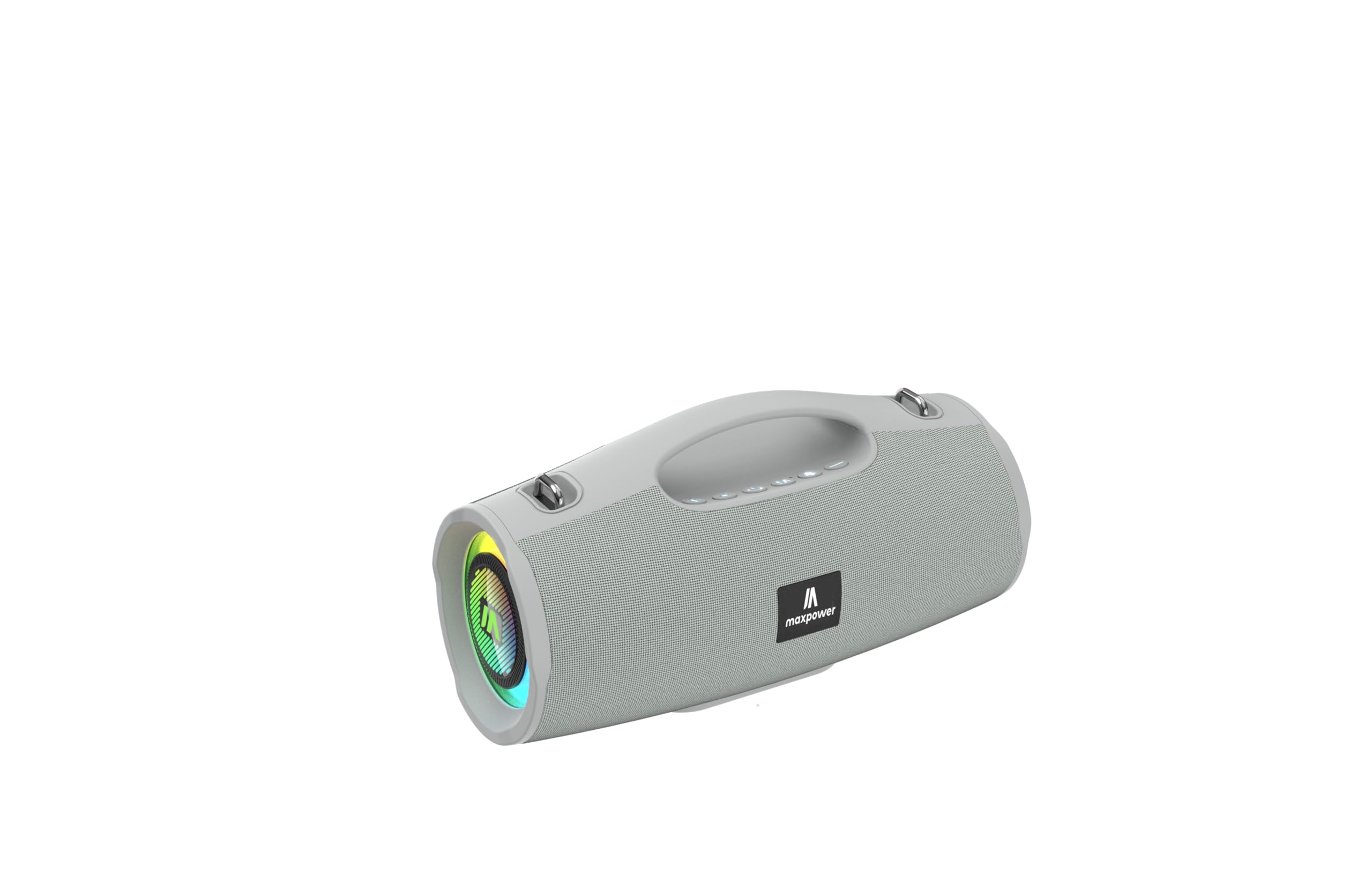
This image displays the Max Power MPD437 Ultra PRO M2 speaker. It features a robust grey casing, an integrated carrying handle at the top, and a series of control buttons. One end of the speaker is equipped with an LED light ring, indicating its operational status and adding visual effects.
Components clau:
- Nansa de transport integrada: Per a una fàcil portabilitat.
- Botons de control: For power, volume, playback, and mode selection.
- Reixa de l'altaveu: Protects the speaker drivers.
- Anell de llum LED: Provides visual effects and indicates status.
- Port de càrrega: Per connectar el cable d'alimentació.
- Entrada AUX: Per a connexió d'àudio amb cable.
4. Configuració
4.1 Càrrega de l'altaveu
- Connect the provided Power Cable to the charging port on the speaker.
- Plug the other end of the Power Cable into a suitable power source.
- L'indicador LED mostrarà l'estat de càrrega. Una càrrega completa triga aproximadament 3 hores.
- Desconnecta el cable de càrrega un cop estigui completament carregat.
4.2 Vinculació Bluetooth
- Press and hold the Power button to turn on the speaker. The speaker will enter Bluetooth pairing mode, indicated by a flashing LED light.
- Al dispositiu (telèfon intel·ligent, tauleta, ordinador portàtil), activeu el Bluetooth i cerqueu els dispositius disponibles.
- Select "MPD437 Ultra PRO M2" from the list of devices.
- Un cop emparellat, l'altaveu emetrà una confirmació audible i el llum LED deixarà de parpellejar.
- L'altaveu intentarà tornar a connectar-se automàticament amb l'últim dispositiu emparellat quan s'engegui.
4.3 Connexió AUX
- Connect one end of the provided AUX Cable to the AUX input port on the speaker.
- Connect the other end of the AUX Cable to the audio output jack of your device.
- L'altaveu canviarà automàticament al mode AUX.
5. Instruccions de funcionament
5.1 Encès/Apagat
- Encès: Premeu i manteniu premut el botó d'engegada durant 2-3 segons.
- Apagar: Premeu i manteniu premut el botó d'engegada durant 2-3 segons.
5.2 Control de volum
- Augmenta el volum: Premeu el botó '+'.
- Disminueix el volum: Premeu el botó '-'.
5.3 Playback Control (Bluetooth/AUX Mode)
- Reproduir/pausa: Premeu el botó Reproduir/Pausa.
- Pista següent: Premeu i manteniu premut el botó '+'.
- Pista anterior: Premeu i manteniu premut el botó '-'.
5.4 Selecció del mode
Press the 'M' (Mode) button to switch between Bluetooth, AUX, and FM Radio modes.
5.5 Funcionament de la ràdio FM
- Switch to FM Radio mode using the 'M' button.
- Press the Play/Pause button to automatically scan and save available FM stations.
- Use the '+' and '-' buttons to navigate between saved stations.
5.6 modes de llum LED
The speaker features vibrant LED lights. Press the dedicated LED button (if available, or a long press on a specific button) to cycle through different light modes or turn them off.
6. Manteniment
6.1 Neteja
- Netegeu l'altaveu amb un suau, damp tela.
- No utilitzeu netejadors abrasius, alcohol ni dissolvents químics.
- Ensure all ports are dry before charging or connecting cables.
6.2 Emmagatzematge
- Store the speaker in a cool, dry place away from direct sunlight.
- Si l'emmagatzemeu durant un període prolongat, carregueu la bateria aproximadament al 50% cada pocs mesos per mantenir-la en bon estat.
7. Solució De Problemes
| Problema | Causa possible | Solució |
|---|---|---|
| L'altaveu no s'encén. | La bateria està esgotada. | Charge the speaker using the provided power cable. |
| No hi ha so de l’altaveu. | El volum és massa baix o està silenciat. El dispositiu no està aparellat correctament. El cable AUX no està completament inserit. | Increase volume on both speaker and connected device. Re-pair Bluetooth. Ensure AUX cable is securely connected. |
| No es pot emparellar per Bluetooth. | Speaker is not in pairing mode. Device Bluetooth is off. Speaker is too far from device. | Ensure speaker is in pairing mode (flashing LED). Turn on Bluetooth on your device. Move speaker closer to your device (within 35 feet). |
| Mala recepció de ràdio FM. | Senyal feble a la ubicació actual. | Mou l'altaveu a un lloc amb millor recepció de senyal. |
8. Especificacions
| Nom del model | Ultra Pro M2 |
| Número de model de l'article | MPD437 |
| Marca | Potència màxima |
| Tipus d'altaveu | Altaveu portàtil |
| Tecnologia de connectivitat | Bluetooth, auxiliar |
| Tecnologia de comunicació sense fils | Bluetooth |
| Interval Bluetooth | 35 peus |
| Característiques especials | Dustproof, FM Radio, LED Light, Water Resistant |
| Nivell de resistència a l'aigua | Resistent a l'aigua |
| Font d'alimentació | Funciona amb bateria |
| Capacitat de la bateria | 3000 milionsamp Hores |
| Temps de càrrega | 3 hores |
| Mode de sortida d'àudio | estèreo |
| Ràtio senyal / soroll | 85 dB |
| Mètode de control | Toca |
| Dimensions del producte | 4.5 "P x 5" W x 9.9" H |
| Pes de l'article | 2.65 lliures |
| Components inclosos | AUX Cable, Power Cable |
| UPC | 785571466584 |
| GTIN | 785571466584 |
9. Garantia i Suport
9.1 Garantia limitada
The Max Power MPD437 Ultra PRO M2 Portable Bluetooth Speaker comes with a limited warranty. Please refer to the warranty card included in your package or contact Max Power customer support for detailed warranty terms and conditions.
9.2 Atenció al client
For technical assistance, troubleshooting, or warranty inquiries, please contact Max Power customer support. Contact information can typically be found on the product packaging or the official Max Power weblloc.