
1. Introducció
This manual provides detailed instructions for the FREEWOLF M68 60% Wireless Gaming Keyboard. Please read this manual carefully before using the product to ensure proper operation and longevity.

Figure 1: FREEWOLF M68 Wireless Gaming Keyboard (Shimmer color variant)
2. Producte acabatview
Característiques principals:
- Connectivitat trimodal: Supports wired (USB-C), 2.4GHz wireless, and Bluetooth 5.0 connections.
- Compatibilitat amb diversos dispositius: Connects to Windows, Mac, Linux, PC, Laptop, iPad, iOS, and Android devices.
- Disseny compacte al 60%: Features 67 keys, optimizing desktop space.
- Tecles PBT: Durable Polybutylene Terephthalate keycaps with clear legends.
- Rainbow LED Backlighting: Offers constant and breathing modes with adjustable brightness and speed.
- Bateria de llarga durada: Built-in 2000mAH battery provides extended usage.
- Disseny ergonòmic: Double leg braces allow for three adjustable typing angles.
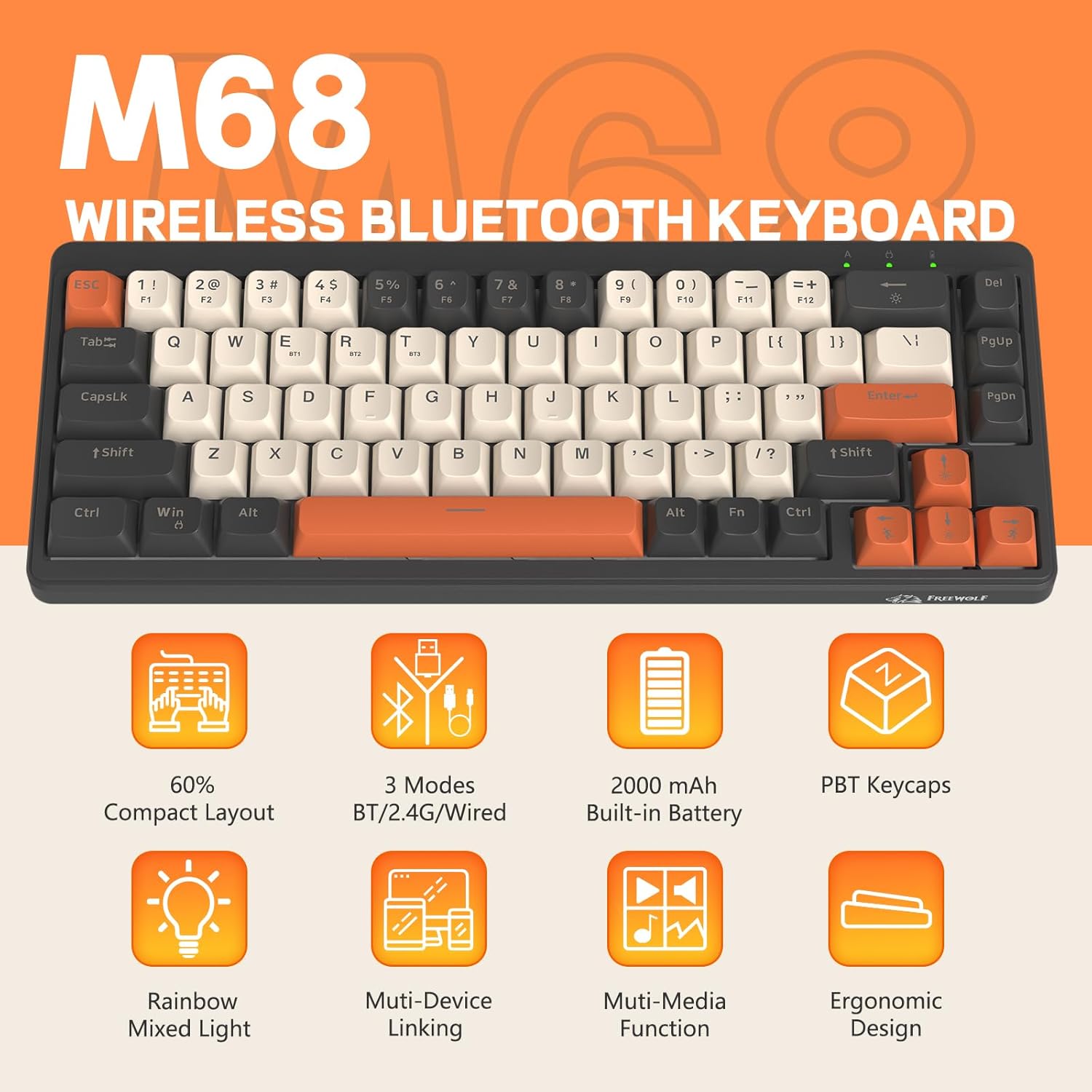
Figura 2: Mésview of FREEWOLF M68 key features.
3. Configuració i connexió
3.1. Tri-Mode Connection Overview
The M68 keyboard supports three connection methods: wired via USB-C, 2.4GHz wireless via a USB receiver, and Bluetooth 5.0. You can switch between these modes using the dedicated switch on the keyboard.

Figura 3: Detallada view of the 3-mode connection options.
3.2. Connexió per cable
- Localitza el port USB-C al teclat.
- Connecteu el cable USB-C proporcionat al teclat i l'altre extrem al port USB de l'ordinador.
- Ensure the mode switch on the keyboard is set to the wired (USB) position.
- El sistema reconeixerà automàticament el teclat.
3.3. Connexió sense fil de 2.4 GHz
- Locate the 2.4GHz USB receiver (often stored in a compartment on the keyboard).
- Connecteu el receptor USB a un port USB disponible de l'ordinador.
- Set the mode switch on the keyboard to the 2.4GHz wireless position.
- El teclat s'hauria de connectar automàticament. Si no, premeu FN + R per iniciar l'aparellament.
3.4. Connexió Bluetooth
The M68 can connect to up to three Bluetooth devices simultaneously.
- Set the mode switch on the keyboard to the Bluetooth position.
- To enter pairing mode for a specific channel (BT1, BT2, or BT3), press and hold FN + Q (per a BT1), FN + W (per a BT2), o FN + E (for BT3) until the corresponding indicator light flashes rapidly.
- On your device (PC, laptop, tablet, phone), open Bluetooth settings and search for "FREEWOLF M68".
- Seleccioneu el teclat per emparellar-lo. L'indicador lluminós s'il·luminarà fixament un cop connectat.
- Per canviar entre dispositius Bluetooth emparellats, premeu FN + Q/W/E breument.
4. Funcionament
4.1. Control de la llum de fons
The M68 features customizable rainbow LED backlighting.
- FN + Retrocés: Toggle backlight on/off or switch between constant and breathing modes.
- FN + Left Arrow: Disminueix la velocitat de la llum de fons.
- FN + fletxa dreta: Augmenta la velocitat de la retroiluminació.
- FN + fletxa amunt: Augmenta la brillantor de la retroiluminació.
- FN + fletxa avall: Reduir la brillantor de la retroiluminació.

Figure 4: Backlight adjustment key combinations.
4.2. Ajustament ergonòmic
The keyboard includes double leg braces on the back to adjust the typing angle for comfort.
- Flip the keyboard over to access the leg braces.
- Adjust the two-stage leg braces to achieve your preferred typing angle (flat, one stage, or two stages).

Figure 5: Ergonomic angle adjustments.
4.3. Gestió de la bateria
The keyboard has a built-in 2000mAH rechargeable battery.
- Càrrega: Connect the keyboard via the USB-C cable to a power source (computer USB port or wall adapter). The charging indicator will show status.
- Durada de la bateria: Up to 60 hours with backlight on, and up to 200 hours with backlight off.
- Estalvi d'energia: The keyboard will enter sleep mode after a period of inactivity to conserve battery. Press any key to wake it up.

Figure 6: Battery capacity information.
5. Manteniment
- Neteja: Use a soft, dry cloth to clean the keyboard surface. For keycaps, you may use a slightly damp drap. Eviteu la humitat excessiva.
- Eliminació de la tapa de les tecles: If necessary, use a keycap puller to carefully remove PBT keycaps for deeper cleaning or replacement.
- Emmagatzematge: Guardeu el teclat en un lloc fresc i sec, allunyat de la llum solar directa i de temperatures extremes.
- Eviteu líquids: Do not expose the keyboard to liquids to prevent damage to internal components.
6. Solució De Problemes
| Problema | Causa possible | Solució |
|---|---|---|
| El teclat no respon (amb cable) | Connexió de cable fluixa, mode incorrecte. | Ensure USB-C cable is securely connected. Check if the mode switch is set to wired. Try a different USB port. |
| Keyboard not responding (2.4GHz) | USB receiver not connected, incorrect mode, pairing issue. | Ensure USB receiver is plugged in. Set mode switch to 2.4GHz. Re-pair by pressing FN + R. Try a different USB port for the receiver. |
| El teclat no respon (Bluetooth) | Not paired, incorrect mode, device Bluetooth off. | Ensure device Bluetooth is on. Set mode switch to Bluetooth. Enter pairing mode (FN + Q/W/E) and re-pair. Forget the device on your system and re-pair. |
| La retroiluminació no funciona o està enganxada | Retroiluminació apagada, bateria baixa, error de programari. | Premeu FN + retrocés to toggle. Charge the keyboard. Try resetting the keyboard (refer to advanced functions if available, or disconnect/reconnect). |
| Les claus no es registren o s'escriuen dues vegades | Dust/debris under keycap, switch issue. | Carefully remove keycap and clean. If issue persists, contact support. |
7. Especificacions
| Model | M68 |
| Marca | LLOP LLIURE |
| Connectivitat | Cablejat (USB-C), sense fil de 2.4 GHz, Bluetooth 5.0 |
| Disseny de claus | 60% (67 tecles) |
| Material de claus | PBT (tereftalat de polibutilè) |
| Il·luminació de fons | Rainbow LED (RGB) |
| Capacitat de la bateria | 2000 mAh |
| Dispositius compatibles | Laptop, PC, Tablet (Windows, Mac, Linux, iOS, Android) |
| Dimensions del producte | 32.51 x 12.5 x 3.99 cm |
| Pes | 600 g |
| Característiques especials | Ergonomic (adjustable angles), Backlit |
8. Garantia i Suport
For warranty information, technical support, or customer service inquiries, please refer to the contact information provided with your purchase or visit the official FREEWOLF weblloc.
Si us plau, conserveu el comprovant de compra per a qualsevol reclamació de garantia.