
1. Introducció
This user manual provides detailed instructions for the safe and effective operation of the AMPBANK M256 Thermal Camera. Please read this manual thoroughly before using the device to ensure proper functionality and to prevent damage.
2. Informació de seguretat
Always adhere to the following safety guidelines to ensure safe operation and to prevent damage to the device or injury to yourself:
- Do not expose the camera to extreme temperatures, direct sunlight for prolonged periods, or high humidity.
- Eviteu deixar caure el dispositiu o sotmetre-lo a forts impactes.
- No intenteu desmuntar ni modificar la càmera. Això anul·larà la garantia i pot causar danys.
- Keep the lens clean using only a soft, lint-free cloth. Avoid abrasive materials or harsh chemicals.
- Ensure proper ventilation when operating the device, especially if connected to a smartphone for extended periods.
3. Producte acabatview
3.1. Què hi ha a la caixa

Image: The package contents include the M256 Thermal Imaging Camera, a Quick User Guide, a Cleaning Cloth, a Multifunctional Adapter Cable, a Carrying Bag, and the Packing Box.
En obrir el paquet, comproveu que hi hagi tots els components:
- AMPCàmera d'imatges tèrmiques BANK M256
- Multifunctional Adapter Cable
- Guia ràpida d'usuari
- Drap de neteja
- Bossa de transport
3.2. Característiques clau
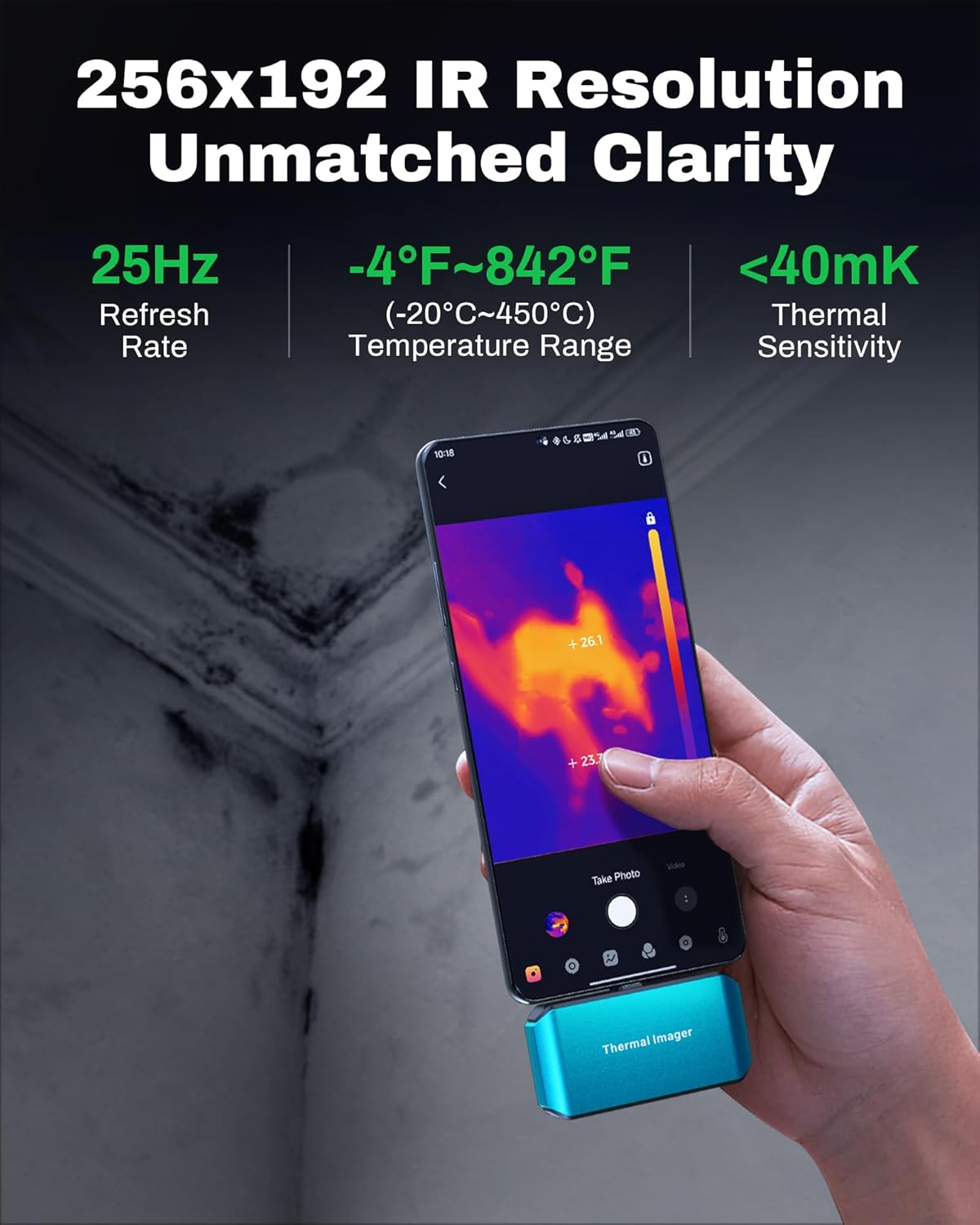
Image: The M256 camera connected to a smartphone, displaying a thermal image. Key specifications like 256x192 IR resolution, 25Hz refresh rate, -4°F~842°F temperature range, and less than 40mK thermal sensitivity are highlighted.
El AMPBANK M256 Thermal Camera offers advanced thermal imaging capabilities:
- Alta resolució: 256x192 infrared resolution for clear and detailed thermal images.
- Ampli rang de temperatures: Mesura temperatures de -4 °F a 842 °F (de -20 °C a 450 °C).
- Freqüència d'actualització ràpida: 25Hz refresh rate for smooth thermal video and real-time temperature monitoring.
- Alta precisió: Temperature accuracy of ±3.6°F (±2°C) or ±2%.
- Baix consum d'energia: Operates with just 0.35W, allowing for extended use with smartphone batteries.
- Compacte i portàtil: Weighs approximately 30g (0.07lb), making it easy to carry and use on the go.
3.3. Descripció física

Imatge: Un primer pla view of the M256 thermal camera, showcasing its compact blue design, central thermal lens, and integrated USB-C connector at the top.
The M256 camera features a durable, compact design with a USB-C connector for direct attachment to compatible Android smartphones and tablets. Its lightweight construction ensures portability and ease of use in various inspection scenarios.
4. Configuració
4.1. Connexió de la càmera

Image: The M256 thermal camera shown connected directly to a smartphone and also to a tablet and laptop using the included extension cable, demonstrating its versatile connectivity with Android devices and PCs.
The M256 Thermal Camera is designed for plug-and-play operation with Android devices and PCs.
- Per a telèfons intel·ligents/tauletes: Directly plug the USB-C connector of the M256 camera into your Android smartphone or tablet's USB-C port. If the port is obstructed or for more flexible positioning, use the provided multifunctional adapter cable.
- Per a PC: Connect the camera to your PC using the multifunctional adapter cable.
4.2. App Installation (ThermCam App)
To utilize the full functionality of the M256 camera, you need to install the dedicated 'ThermCam' application on your Android device.
- Descarrega: Cerca 'ThermCam' on the Google Play Store.
- Instal·lar: Seguiu les instruccions a la pantalla per instal·lar l'aplicació.
- Permisos: Grant necessary permissions when prompted by the app for proper operation (e.g., camera, storage).
5. Instruccions de funcionament
5.1. Funcionament bàsic
Once the camera is connected and the ThermCam app is installed and launched, the app will automatically detect the camera and display the thermal image feed.
- Viu View: The main screen of the app will show the real-time thermal image.
- Potència: The camera draws power directly from the connected device, so no separate power source is needed.
5.2. Captura d'imatges i vídeos

Image: Screenshots of the ThermCam app interface, illustrating the dedicated buttons for initiating video recording to capture dynamic infrared insights and photo capturing for snapping clear thermal images.
The ThermCam app allows you to capture both still thermal images and thermal videos.
- Photo Capturing: Tap the camera icon on the app interface to take a still thermal image.
- Gravació de vídeo: Tap the video camera icon to start recording thermal video. Tap again to stop.
- All captured media will be saved to your device's gallery or a designated folder within the app.
5.3. Temperature Measurement and Analysis

Image: A smartphone connected to the M256 camera, showing a thermal image of industrial equipment with temperature readings and a 'Smart Alerts' notification, indicating the camera's ability to accurately spot anomalies.
The ThermCam app provides various tools for temperature analysis:
- Temperatura del punt: Tap on any point in the thermal image to display its temperature.
- Mesura de l'àrea: Define an area to measure average, maximum, and minimum temperatures within that region.
- Alertes intel·ligents: Set temperature thresholds to receive alerts when temperatures exceed or fall below specified limits.
5.4. Advanced App Features

Image: A collage of smartphone screens displaying the ThermCam app, highlighting its diverse functionalities such as 3D analysis, various viewing modes, and calibration options, demonstrating how to get more from the app.
The ThermCam app includes advanced features for comprehensive analysis and reporting:
- 3D Analysis: Visualize thermal data in a 3D representation for deeper insights.
- Paletes de colors: Choose from multiple color palettes to optimize thermal image visualization based on your application (e.g., Iron, Rainbow, Grayscale).
- Mode d'imatge dins d'imatge: Overlay a visible light image with the thermal image for better context.
- Professional Reports: Generate detailed reports with captured images, data, and customizable information for sharing.
5.5. PC Software (TCView 2.0)

Image: A laptop displaying the TCView 2.0 software, showing thermal images and analysis tools, with the M256 camera connected via its cable. This illustrates the advanced features available with the PC software.
For more advanced image editing, real-time temperature tracking, and professional analysis, download the TCView 2.0 software from the official AMPBANC website. This software provides a robust platform for in-depth thermal data processing.
5.6. Aplicacions típiques

Image: Four distinct panels showing the M256 thermal camera being used for various applications: HVAC maintenance on a rooftop unit, electrical inspection of a circuit board, water leak inspection on a wall, and automotive inspection under a car hood, demonstrating its versatility.
El AMPBANK M256 Thermal Camera is suitable for a wide range of applications, including but not limited to:
- HVAC system inspection and maintenance
- Electrical system troubleshooting and inspection
- Water leak detection in residential and commercial buildings
- Automotive diagnostics and inspection
- Building insulation and energy efficiency audits
6. Manteniment
Proper maintenance ensures the longevity and optimal performance of your M256 Thermal Camera.
- Neteja de la lent: Use the provided cleaning cloth or a soft, lint-free cloth to gently wipe the thermal lens. Do not use harsh chemicals or abrasive materials, as they can damage the lens coating.
- Neteja del cos: Netegeu el cos de la càmera amb un drap suau iamp cloth. Avoid getting moisture into the USB-C port.
- Emmagatzematge: When not in use, store the camera in its carrying bag in a cool, dry place, away from direct sunlight and extreme temperatures.
7. Solució De Problemes
If you encounter issues with your M256 Thermal Camera, refer to the following common problems and solutions:
| Problema | Causa possible | Solució |
|---|---|---|
| Càmera no detectada pel telèfon/aplicació. | Loose connection, app permissions, incompatible device. | Ensure the camera is securely plugged in. Check app permissions in your phone settings. Verify your smartphone/tablet is compatible with USB-C OTG functionality. Try restarting the app or phone. |
| Thermal image is blurry or unclear. | Dirty lens, out of focus (if applicable), environmental factors. | Clean the thermal lens with the provided cloth. Ensure the target is within the camera's optimal measurement distance. Avoid extreme temperature gradients or reflective surfaces that can distort readings. |
| L'aplicació es bloqueja o es bloqueja. | Software glitch, insufficient device resources. | Close and restart the ThermCam app. Ensure your device has sufficient free RAM. Check for app updates on Google Play. |
| Lectures de temperatura inexactes. | Incorrect emissivity setting, environmental interference. | Adjust the emissivity setting in the app to match the material being measured. Ensure there are no strong heat sources or reflections interfering with the measurement. |
If the problem persists after trying these solutions, please contact AMPBANK customer support.
8. Especificacions
| Característica | Especificació |
|---|---|
| Resolució infraroja | 256 x 192 píxels |
| Interval de temperatura | -4 °F a 842 °F (-20 °C a 450 °C) |
| Precisió de la temperatura | ±3.6°F (±2°C) or ±2% |
| Freqüència d'actualització | 25 Hz |
| Sensibilitat tèrmica (NETD) | <40 mK |
| Consum d'energia | 0.35W |
| Interfície | USB-C |
| Compatibilitat de sistemes operatius | Android Smartphones/Tablets, PC |
| Dimensions | Aproximadament 4.33 x 3.54 x 1.97 cm (paquet) |
| Pes | Approximately 30g (0.07lb) |
9. Garantia i Suport
AMPBANK provides a standard warranty for the M256 Thermal Camera against defects in materials and workmanship under normal use. For specific warranty terms and conditions, please refer to the warranty card included with your product or visit the official AMPBANC weblloc.
Per a assistència tècnica, assistència per a la resolució de problemes o consultes de servei, contacteu amb AMPBANK customer support through the contact information provided on the official AMPBANC weblloc web o a la documentació del producte.