
1. Producte acabatview
The MOBAPAD N1 HD is a versatile wireless controller designed for an enhanced gaming experience across multiple platforms. It features advanced technologies such as Hall Effect Joysticks for precise control, ALPS Dual-Axis Motors for immersive HD vibration, and six-axis motion control. This controller is compatible with Nintendo Switch, PC, iOS, and Android devices, offering seamless connectivity and responsive performance.

Imatge: Frontal view of the MOBAPAD N1 HD Wireless Controller, showcasinel seu disseny ergonòmic i la disposició dels botons.
2. Característiques clau
- Compatibilitat multiplataforma: Fully compatible with Nintendo Switch, PC, iOS, and Android devices, ensuring broad usability.
- Joysticks d'efecte Hall: Provides smooth, precise, and durable control with minimal wear, ideal for accurate gaming.
- ALPS Dual-Axis Motors with HD Vibration: Delivers realistic and immersive haptic feedback for enhanced gameplay.
- Control de moviment de sis eixos: Built-in gyroscope enables enhanced motion control for compatible games.
- NFC for Amiibo Scanning: Supports NFC technology for scanning Amiibo figures on Nintendo Switch.

Image: The controller illustrating its immersive motion control capabilities with swirling lines around it.

Image: The controller positioned in front of a collection of Amiibo figures, highlighting its NFC scanning function.

Image: The controller shown alongside icons for Switch, Android/iOS, and PC, demonstrating its multi-device compatibility.
3. Configuració i connexió
Follow these steps to connect your MOBAPAD N1 HD controller to your desired device.
3.1. Connexió a la Nintendo Switch
- Al menú INICI, seleccioneu Controladors, doncs Canvia d'adherència/ordre.
- While the screen is displaying "Press L + R on the controller", press and hold the Botó d'inici on the MOBAPAD N1 HD controller for 3-5 seconds until the player LEDs begin to flash.
- Once connected, the player LED(s) corresponding to the controller number will remain lit.
3.2. Connexió a l'ordinador (Windows)
- Connect the controller to your PC using a USB-C cable. The controller will be recognized as a wired controller.
- For wireless connection, ensure your PC has Bluetooth enabled. Go to Bluetooth & other devices settings.
- Seleccioneu "Afegeix Bluetooth o un altre dispositiu" i trieu "Bluetooth".
- Manteniu premut el botó Botó d'inici on the controller until the LEDs flash rapidly, indicating pairing mode.
- Select "MOBAPAD N1 HD" from the list of available devices.
3.3. Connecting to iOS/Android Devices
- Activeu el Bluetooth al vostre dispositiu iOS o Android.
- Go to Bluetooth settings and search for new devices.
- Manteniu premut el botó Botó d'inici on the controller until the LEDs flash rapidly.
- Select "MOBAPAD N1 HD" from the list of available devices to pair.
4. Funcionament del controlador
Familiarize yourself with the controller's layout and functions for optimal gameplay.
4.1. Disposició dels botons
- Stick analògic esquerre: For movement and camera control. Features Hall Effect technology.
- Stick analògic dret: For camera control and aiming. Features Hall Effect technology.
- D-Pad: Directional input for menu navigation and specific game actions.
- Botons A/B/X/Y: Botons d'acció estàndard.
- Botons E/D: Botons a l'espatlla.
- Botons ZL/ZR: Botons de disparador.
- Botó Menys (-): Typically for opening in-game menus or specific functions.
- Botó més (+): Typically for opening in-game menus or specific functions.
- Botó d'inici: Returns to the system's home screen. Also used for pairing and NFC scanning.
- Botó de captura: Takes screenshots or video clips (Nintendo Switch).
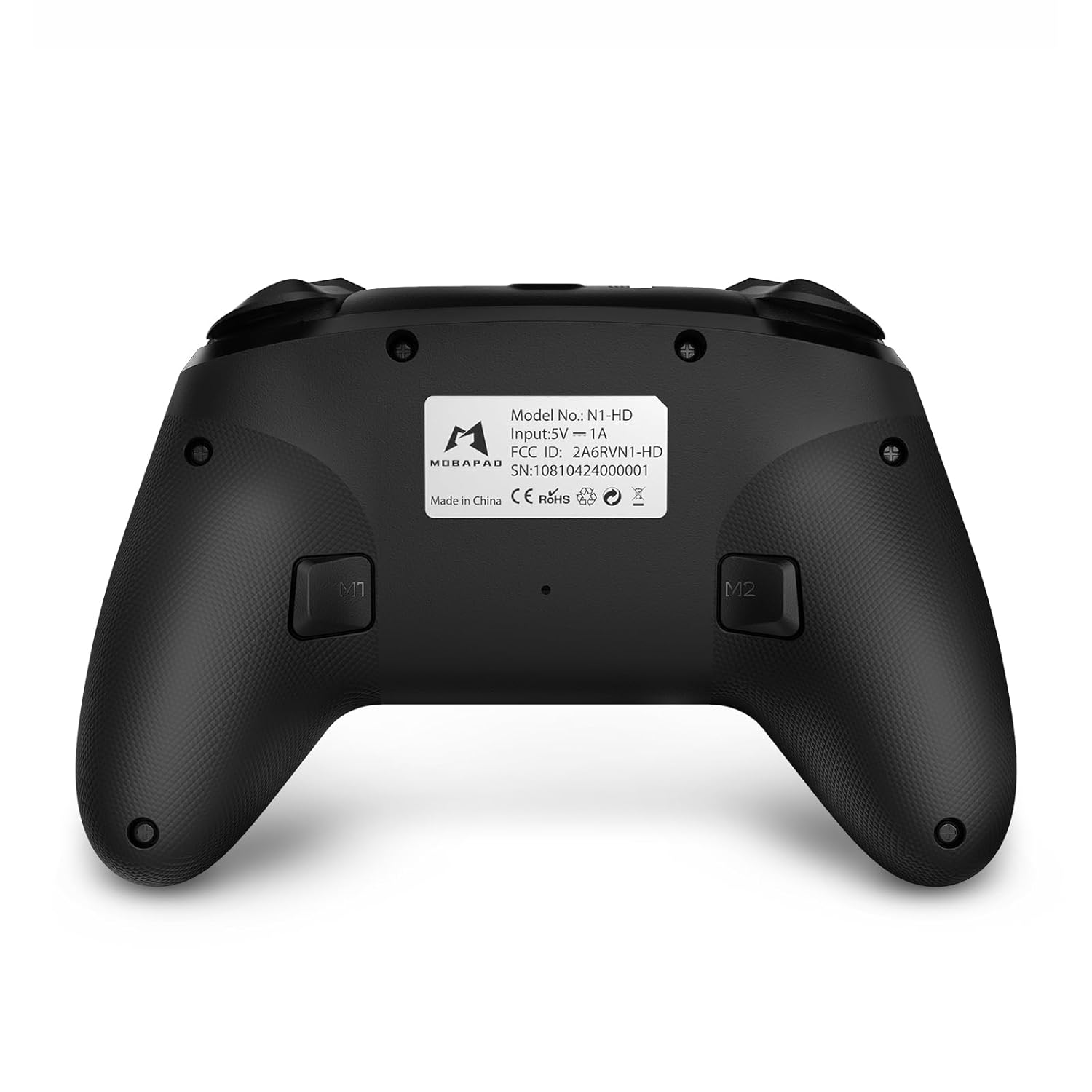
- Botons M1/M2: Programmable back buttons for custom macros or remapping.
Imatge: Detall frontal view of the MOBAPAD N1 HD controller, showing all buttons and joysticks.

Imatge: Enrere view of the MOBAPAD N1 HD controller, highlighting the M1 and M2 programmable buttons and product label.
4.2. NFC Functionality (Amiibo Scanning)
To use the NFC function for Amiibo scanning on Nintendo Switch:
- Ensure your controller is connected to the Nintendo Switch.
- In a compatible game, when prompted to scan an Amiibo, place the Amiibo figure directly over the Botó d'inici area on the controller.
- Hold the Amiibo in place until the game registers the scan.
5. Manteniment i cura
Un manteniment adequat garanteix la longevitat i el rendiment òptim del vostre controlador.
- Neteja: Feu servir un drap suau i sec per netejar el controlador. Per a la brutícia persistent, netegeu lleugerament.ampRenta el drap amb aigua. Evita productes químics agressius o materials abrasius.
- Emmagatzematge: Guardeu el controlador en un lloc fresc i sec, allunyat de la llum solar directa i de temperatures extremes.
- Cura de la bateria: The controller contains a Lithium Ion battery. Avoid fully discharging the battery frequently. If storing for extended periods, charge the battery to about 50% to prolong its lifespan. Do not expose the battery to fire or extreme heat.
- Manipulació: Eviteu deixar caure el controlador ni sotmetre'l a impactes forts, ja que això pot danyar els components interns.
6. Solució De Problemes
If you encounter issues with your MOBAPAD N1 HD controller, refer to the following common solutions.
| Problema | Causa possible | Solució |
|---|---|---|
| El controlador no es connecta. | Low battery, out of range, incorrect pairing mode, interference. | Charge the controller fully. Ensure it is within range of the device. Re-enter pairing mode (hold Home button). Move closer to the device or away from other wireless devices. |
| Els botons o els joysticks no responen. | Software glitch, physical obstruction, damage. | Restart the controller and the connected device. Check for any debris around the buttons/joysticks. If issues persist, contact customer support. |
| Vibration is weak or absent. | Vibration setting off, game does not support vibration, motor issue. | Check in-game settings and system settings to ensure vibration is enabled. Verify if the game supports vibration feedback. |
| NFC scanning fails. | Incorrect placement, game not prompting scan, controller not connected. | Ensure the Amiibo is placed directly over the Home button area. Confirm the game is prompting for an Amiibo scan. Verify controller is properly connected to the Switch. |
7. Especificacions
| Característica | Detall |
|---|---|
| Número de model | Mobapad N1 HD Black |
| Dimensions (L x A x A) | 5.91 x 2.36 x 3.94 polzades |
| Pes | 7.05 unces |
| Tipus de bateria | 1 bateria de ions de liti (inclosa) |
| Connectivitat | Wireless (Bluetooth), USB-C (wired) |
| Compatibilitat | Nintendo Switch, PC, iOS, Android |
| Característiques especials | Hall Effect Joysticks, ALPS Dual-Axis Motors, HD Vibration, Six-Axis Gyroscope, NFC |
8. Garantia i Suport
For warranty information or technical support, please contact MOBAPAD customer service. Refer to the official MOBAPAD weblloc web o la documentació de compra per conèixer els termes específics de la garantia i les dades de contacte.
You can visit the official MOBAPAD store on Amazon for more information: MOBAPAD Store