
Introducció
The SHOKZ OpenRun Pro 2 Mini headphones are designed for sports enthusiasts, offering a unique open-ear listening experience. Utilizing advanced bone conduction technology, these headphones deliver high-quality audio while allowing you to remain aware of your surroundings. The comfortable and secure fit, combined with long battery life and clear call quality, makes them ideal for active lifestyles.
Què hi ha a la caixa
- SHOKZ OpenRun Pro 2 Mini Headphones
- Cable de càrrega magnètica
- Maleta de transport
- Manual d'usuari
- Targeta d'atenció al client

Image: All items included in the SHOKZ OpenRun Pro 2 Mini package.
Configuració
Carregant els teus auriculars
Before first use, fully charge your OpenRun Pro 2 Mini headphones. Use the provided magnetic charging cable. Connect the magnetic end to the charging port on the headphones and the USB-A end to a compatible USB power adapter (0.5-2.5W recommended, not included).
- Durada de la bateria: Fins a 12 hores de reproducció d'àudio contínua.
- Càrrega ràpida: Una càrrega de 5 minuts proporciona aproximadament 1.5 hores d'escolta.

Image: Detail of the magnetic charging port on the headphones.
Encès/Apagat
- Per encendre: Press and hold the Volume+ button until the LED indicator flashes blue and the voice prompt says "Welcome to Shokz."
- Per apagar: Press and hold the Volume+ button until the LED indicator flashes red and the voice prompt says "Power off."
Emparellament Bluetooth
- Comença amb els auriculars apagats.
- Press and hold the Volume+ button for 5-7 seconds until the LED indicator flashes red and blue alternately, and the voice prompt says "Pairing."
- Open the Bluetooth settings on your device (smartphone, tablet, etc.) and select "OpenRun Pro 2 Mini" from the list of available devices.
- Once connected, the LED indicator will flash blue once, and the voice prompt will say "Connected."
Vinculació multipunt: The OpenRun Pro 2 Mini supports multipoint pairing, allowing you to connect to two devices simultaneously. Refer to the Shokz App or the full user guide for detailed instructions on enabling and managing multipoint pairing.
Instruccions de funcionament
Portar els auriculars
Place the headphones with the transducers resting on your cheekbones, just in front of your ears. The neckband should rest comfortably behind your head. Ensure the transducers are in full contact with your skin for optimal sound quality.
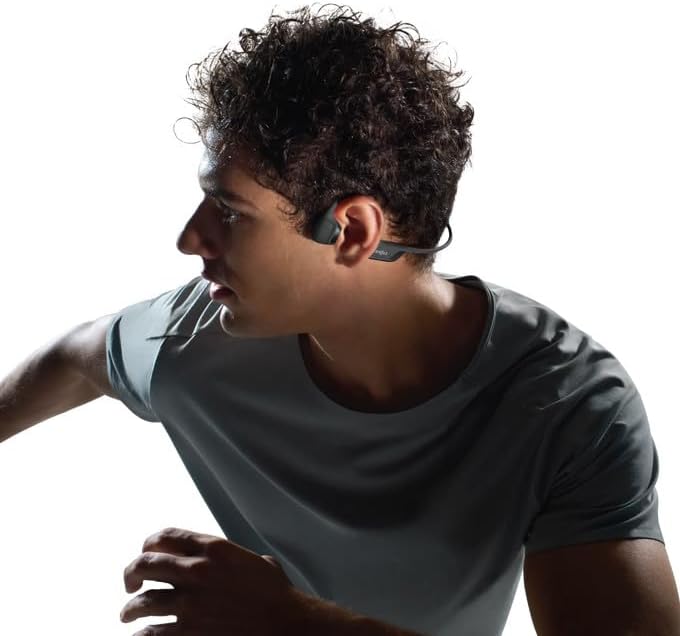
Image: Proper wearing position of the OpenRun Pro 2 Mini headphones.
The open-ear design ensures you remain aware of your surroundings, enhancing safety during outdoor activities.
Controls
- Pujar/baixar el volum: Use the Volume+ and Volume- buttons located on the right side of the neckband.
- Reproduir/pausa: Press the Multifunction button (on the left transducer) once.
- Saltar la pista endavant: Premeu dues vegades el botó Multifunció.
- Saltar pista enrere: Premeu tres vegades el botó multifunció.
- Respondre/Finalitzar la trucada: Press the Multifunction button once during an incoming call or active call.
- Activa l'Assistent de veu: Manteniu premut el botó multifunció durant 2 segons.
Modes EQ
Customize your audio experience using the Shokz App. Available EQ modes include:
- Mode estàndard: For balanced daily listening.
- Mode vocal: Enhances vocals for podcasts and audiobooks.
- Mode de reforç de greus: Increases bass for a more powerful sound.
- Mode d'augment d'aguts: Enhances high frequencies for clearer details.
- Mode personalitzat: Allows manual adjustment of the 5-band EQ.
Truca Qualitat
The headphones feature strategically positioned dual wind-resistant microphones and an AI noise reduction algorithm. This technology filters out up to 96.5% of background noise, including wind at speeds up to 15 miles per hour, ensuring crystal-clear phone calls.
Manteniment
Neteja
Netegeu els auriculars amb un suau, damp drap. Eviteu utilitzar productes químics agressius o materials abrasius. Assegureu-vos que el port de càrrega estigui sec abans de carregar.
Resistència a l'aigua
The OpenRun Pro 2 Mini headphones have an IP55 water resistance rating, making them resistant to sweat, light rain, and dust. They are not designed for submersion in water. Always ensure the charging port cover is securely closed to maintain water resistance.
Resolució de problemes
- Sense energia: Assegureu-vos que els auriculars estiguin completament carregats.
- Sense so: Check Bluetooth connection, device volume, and headphone volume. Ensure transducers are correctly placed on cheekbones.
- Qualitat de so baixa: Adjust EQ settings in the Shokz App. Ensure transducers are clean and properly positioned.
- Problemes de connectivitat: Prova de desvincular i tornar a vincular els auriculars amb el dispositiu. Assegura't que no hi hagi altres dispositius que interfereixin amb el senyal Bluetooth.
Especificacions
| Nom del model | OpenRun Pro 2 Mini |
| Número de model | SZ-HEA-0120 |
| Tecnologia de connectivitat | Bluetooth 5.3 |
| Tipus de controlador d'àudio | Bone Conduction Driver (DualPitch™ Technology) |
| Durada de la bateria | Fins a 12 hores |
| Temps de càrrega | Approx. 1 hour (for full charge) |
| Nivell de resistència a l'aigua | IP55 (Sweat and water resistant) |
| Pes de l'article | 10.9 unces (0.31 quilograms) |
| Material | Nickel-titanium alloy, plastic/silicone |
| Col·locació de l'orella | Orella oberta |

Image: Size comparison between Standard and Mini versions.
Garantia i suport
SHOKZ OpenRun Pro 2 Mini headphones come with a 2-year warranty. For detailed warranty information, product support, or to register your product, please refer to the included Customer Service Card or visit the official SHOKZ weblloc.