
1. Producte acabatview
The COUGAR FV150 RGB is a mid-tower gaming case designed for high-performance PC builds. It features a dual-chamber design, separating the main components from cables, storage drives, and the power supply unit (PSU) for a clean aesthetic and improved airflow. The case supports various motherboard form factors and offers extensive cooling options, including pre-installed ARGB fans.
Característiques principals:
- Dual-Chamber Design: Proporciona un clar view of your build through glass panels while concealing cables and other components.
- GPU Support: Accommodates graphics cards up to 400mm in length, with options for vertical GPU orientation.
- Compatibilitat de la placa base: Supports Mini-ITX, Micro-ATX, and ATX motherboards.
- Engineered Bottom Fan Bracket: Simplifies fan installation by allowing attachment prior to setup.
- Extensive Fan & Water Cooling Support: Multiple fan mounting points and radiator support up to 360mm.
- Seamless RGB Synchronization: Integrated universal fan hub for easy ARGB lighting control.
- Modern I/O Panel: Includes 2 x USB Type-A and 1 x USB 3.2 Type-C ports.
- Emmagatzematge flexible: Supports combinations of 3.5" HDDs and 2.5" SSDs.
- Magnetic Dust Filters: Located on the top and right side for easy maintenance.

Imatge 1.1: Anglesa view of the COUGAR FV150 RGB case, highlighting its dual-chamber design and pre-installed ARGB fans.
2. Configuració i instal·lació
Follow these steps for proper installation of your PC components into the COUGAR FV150 RGB case.
2.1 Desembalatge i inspecció inicial
- Traieu amb cura la caixa del seu embalatge.
- Inspeccioneu la caixa per detectar qualsevol signe de danys durant el transport.
- Remove the tempered glass side panel by unscrewing the thumb screws, if present, or by releasinel mecanisme de tancament.
2.2 Instal·lació de la placa base
- Ensure the correct standoffs are installed for your motherboard form factor (Mini-ITX, Micro-ATX, or ATX).
- Col·loqueu la protecció d'E/S a l'obertura posterior de la carcassa.
- Alineeu amb cura la placa base amb els separadors i la pantalla d'E/S i, a continuació, fixeu-la amb cargols.
2.3 Instal·lació de la unitat d'alimentació (PSU).
- The FV150 RGB supports bottom-mount PSUs.
- Slide the PSU into its designated compartment in the secondary chamber from the rear of the case.
- Fixeu la font d'alimentació amb cargols des de la part posterior exterior de la carcassa.
2.4 Instal·lació de la unitat d'emmagatzematge
- Locate the drive bays in the secondary chamber.
- For 3.5" HDDs, slide the drive into the appropriate tray and secure it.
- For 2.5" SSDs, mount them to the designated brackets or trays.
2.5 Instal·lació de la targeta gràfica (GPU)
- Traieu les cobertes de les ranures d'expansió necessàries a la part posterior de la carcassa.
- Insert your GPU into the PCIe slot on the motherboard and secure it with screws.
- The case supports GPUs up to 400mm. For vertical GPU mounting, a separate riser cable and bracket (not included) are required.
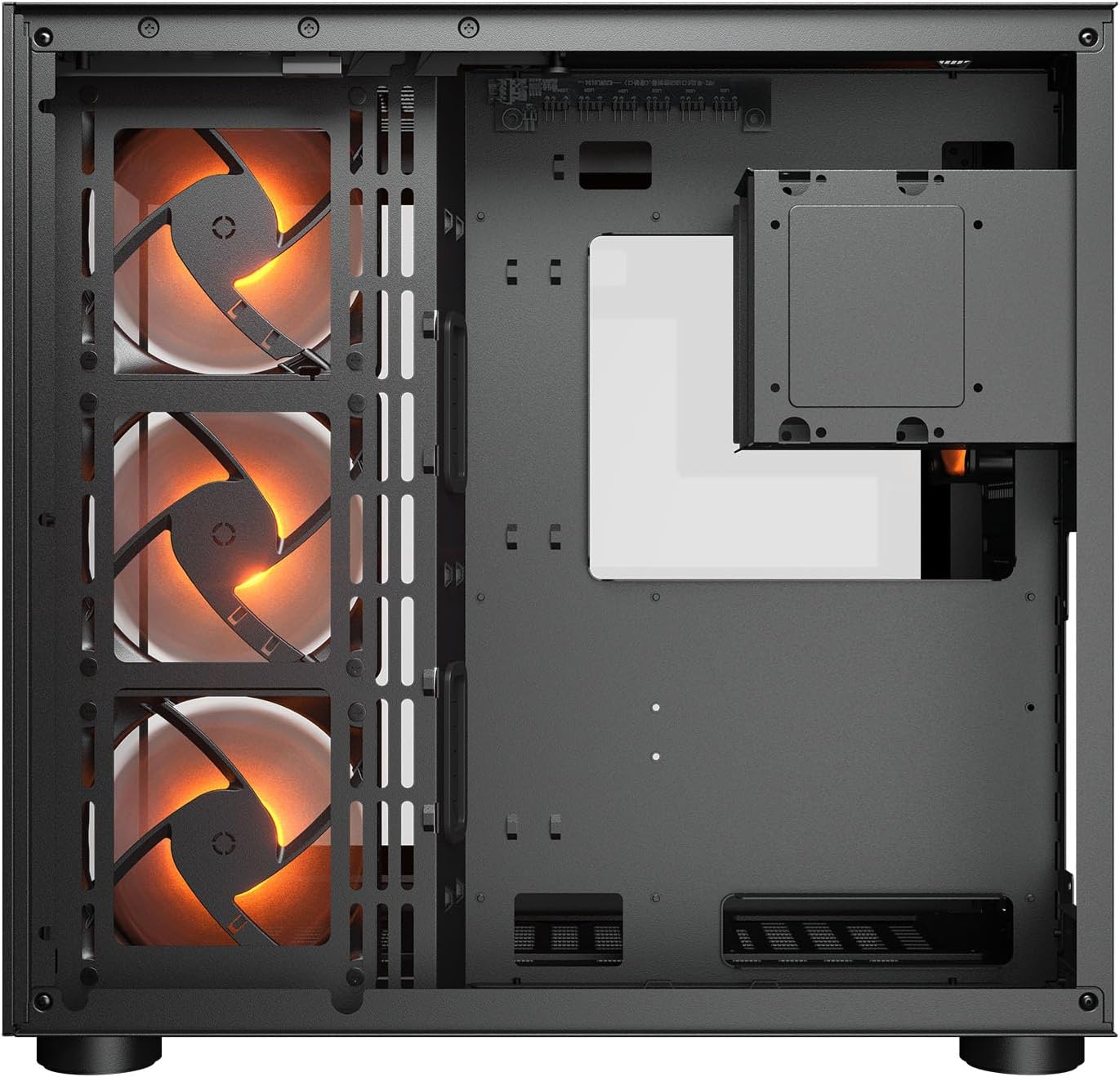
Imatge 2.1: Interna view illustrating the main chamber for motherboard and GPU installation, with pre-installed side fans.
2.6 Instal·lació del ventilador i del radiador
- The case comes with 3 x 120mm ARGB side fans and 1 x 120mm ARGB rear fan pre-installed.
- Additional fans can be installed at the top (3 x 120mm or 2 x 140mm) and bottom (3 x 120mm or 2 x 140mm).
- Utilize the engineered bottom fan bracket for easier installation of bottom fans.
- For water cooling, radiators up to 360mm can be mounted on the top and 240mm on the side.

Image 2.2: Top internal view, showing potential mounting locations for additional cooling fans or radiators.
2.7 Gestió de cables
- Route all power and data cables through the cutouts to the secondary chamber.
- Utilitzeu el ample space and tie-down points in the secondary chamber to organize cables for optimal airflow and a clean appearance.
2.8 Connecting Front I/O Panel
- Connect the front panel cables (USB 3.2 Type-C, USB Type-A, audio, power, reset, LED) to the corresponding headers on your motherboard.
3. Instruccions de funcionament
Un cop instal·lats i connectats tots els components, podeu engegar el sistema.
3.1 Encès
- Assegureu-vos que l'interruptor de la font d'alimentació estigui a la posició "ON".
- Press the power button on the front I/O panel of the case.
3.2 Control d'il·luminació RGB
- The integrated universal fan hub allows for easy synchronization of ARGB lighting.
- Connect the hub to your motherboard's ARGB header (5V 3-pin) to control lighting effects via motherboard software.
- Alternatively, use the dedicated RGB button on the front I/O panel to cycle through pre-set lighting modes if not connected to a motherboard header.
4. Manteniment
Un manteniment regular ajuda a garantir un rendiment òptim i una llarga vida útil dels components del teu PC.
4.1 Neteja del filtre de pols
- The COUGAR FV150 RGB features magnetic dust filters on the top and right side, along with a ventilated bottom cover.
- Gently remove the magnetic dust filters.
- Clean them using compressed air or by rinsing with water (ensure they are completely dry before reattaching).
- Periodically clean the ventilated bottom cover.
4.2 Neteja general
- Feu servir un drap suau i sec per netejar les superfícies exteriors de la carcassa.
- For tempered glass panels, use a glass cleaner and a microfiber cloth to avoid streaks.
- Eviteu utilitzar productes químics o materials abrasius que puguin danyar l'acabat.
5. Solució De Problemes
Aquesta secció ofereix solucions per a problemes comuns que podeu trobar.
5.1 El sistema no s'encén
- Comprova la font d'alimentació: Ensure the power supply unit is properly connected to the wall outlet and the PSU switch is in the 'ON' position.
- Connexions del panell frontal: Verifiqueu que el cable del botó d'engegada de la carcassa estigui connectat correctament al capçal del panell frontal de la placa base.
- Internal Power Cables: Confirm all necessary power cables (24-pin ATX, 8-pin CPU, PCIe for GPU) are securely connected to the motherboard and components.
5.2 Els ventiladors no giren o l'RGB no funciona
- Connexions del ventilador: Ensure all fan power cables are securely connected to the fan hub or motherboard headers.
- Connexions RGB: Verify the ARGB cables are correctly connected to the fan hub and the hub is connected to a 5V 3-pin ARGB header on the motherboard.
- Software/Button: If connected to the motherboard, check your motherboard's RGB control software. If not, try pressing the RGB button on the case's I/O panel to cycle modes.
5.3 Ports USB no funcionen
- Internal USB Headers: Confirm that the USB 3.0 and USB Type-C cables from the front I/O panel are correctly plugged into the corresponding headers on your motherboard.
- Motherboard Drivers: Ensure you have installed the latest chipset and USB drivers for your motherboard.
6. Especificacions
Detailed technical specifications for the COUGAR FV150 RGB Gaming Case.

Image 6.1: Case dimensions for planning your setup.
| Característica | Especificació |
|---|---|
| Nom del producte | FV150 RGB |
| Factor de forma de cas | Torre mitja |
| Compatibilitat amb la placa base | Mini-ITX, Micro-ATX, ATX |
| Dimensions (A x A x P) | 300 x 400 x 415 mm (11.8" x 15.7" x 16.3") |
| Panell d'E/S | USB 3.2 Gen 2 Type-C x 1, USB-A 3.0 x 2, 4 Pole Headset Audio Jack, RGB Button |
| Badia d'unitat de 3.5" | 2 |
| Badia d'unitat de 2.5" | 1+1 (converted from 3.5" drive bays) |
| Ranures d'expansió | 7+3 |
| Suport de GPU vertical | Sí |
| Suport del ventilador de refrigeració (superior) | 3 x 120 mm o 2 x 140 mm |
| Cooling Fan Support (Bottom) | 3 x 120 mm o 2 x 140 mm |
| Cooling Fan Support (Side) | 3 x 120 mm |
| Suport del ventilador de refrigeració (posterior) | 1 x 120 mm |
| Pre-installed Fans (Side) | 3 x 120mm ARGB (Reversed) |
| Pre-installed Fans (Rear) | 1 x 120mm ARGB |
| Pre-installed Fan Speed | 1000 (± 10%) RPM |
| Pre-installed Fan Connector | 5V 3 Pin (ARGB) / 3 Pin (Fan) |
| Nombre màxim de ventiladors | 10 |
| Suport de refrigeració per aigua (superior) | 360mm / 280mm / 240mm |
| Water Cooling Support (Side) | 240 mm / 120 mm |
| Suport de refrigeració per aigua (posterior) | 120 mm |
| RGB Hub Sync with M/B | Sí |
| Màx. Longitud de la targeta gràfica | 400 mm (15.7 polzades) |
| Màx. Alçada del refrigerador de la CPU | 180 mm (7.1 polzades) |
| Màx. Longitud de la PSU | 210 mm (8.3 polzades) |
| Material | Metall |
| Pes de l'article | 6.83 quilos |
7. Informació de la garantia
COUGAR products are manufactured to the highest quality standards. This product is covered by a manufacturer's warranty against defects in materials and workmanship. The specific duration and terms of the warranty may vary by region and retailer. Please retain your proof of purchase for warranty claims.
For detailed warranty information, please refer to the official COUGAR weblloc web o poseu-vos en contacte amb el vostre distribuïdor local.
8. Suport
If you encounter any issues or have questions regarding your COUGAR FV150 RGB Gaming Case that are not covered in this manual, please contact COUGAR customer support.
- Visita el lloc web oficial de COUGAR website for FAQs, driver downloads, and support contact information.
- Contact your retailer for assistance with product returns or exchanges.