
1. Producte acabatview
The EXVIST H.265 1080P 60fps PoE VGA Encoder is a high-performance device designed for converting VGA video signals into H.265/H.264 encoded streams. It supports various streaming protocols, including RTMP, RTSP, HLS, and UDP, making it suitable for live broadcasting, video conferencing, CCTV, and digital signage applications. With Power over Ethernet (PoE) capability and a VGA loopout, this encoder offers flexible installation and real-time monitoring.
2. Característiques clau
- High-Quality H.264/H.265 Encoding: Supports 1080P resolution at 60fps with efficient compression for clear video and minimal bandwidth usage.
- Alimentació per Ethernet (PoE): Powers the encoder directly through the Ethernet connection, simplifying setup and reducing cable clutter.
- VGA Loopout for Local Display: Provides a VGA output for direct connection to a local monitor, enabling real-time video monitoring.
- Multiple Protocols Supported: Compatible with RTSP, RTMP, HLS, and UDP protocols for versatile integration with various streaming platforms and systems.
- Àmplia gamma d'aplicacions: Ideal for IP television systems, live event broadcasts, digital signage, and CCTV monitoring across diverse environments.
3. Contingut del paquet
- EXVIST H.265 1080P 60fps PoE VGA Encoder (Model ON-VGA-16DP)
- Manual d'usuari
- Power Adapter (if PoE is not used)
4. Disseny del dispositiu
Familiarize yourself with the ports and indicators on the encoder unit.

Figura 4.1: Front and Rear Panel of the EXVIST VGA Encoder. The front panel includes PWR (Power indicator), RUN (Operation indicator), Microphone input, VGA IN, and VGA OUT ports. The rear panel features a Reset button, DC12V power input, and a NETWORK port (supporting PoE).
- Indicador PWR: S'il·lumina quan el dispositiu està encès.
- Indicador RUN: Flashes during normal operation.
- Entrada de micròfon: 3.5mm audio input for external microphone.
- Entrada VGA: Connects to the VGA video source.
- SORTIDA VGA: VGA loopout for connecting to a local display.
- Botó de reset: Press and hold to restore factory default settings.
- DC12V: Power input for standard power adapter (if PoE is not used).
- XARXA: RJ45 Ethernet port for network connection and PoE power input.
5. Instruccions de configuració
5.1 Connexió física
- Connect your VGA video source (e.g., computer, camcorder) to the VGA IN port on the encoder using a VGA cable.
- If local monitoring is required, connect a VGA display to the SORTIDA VGA port on the encoder using a VGA cable.
- Connecteu un cable Ethernet des del commutador de xarxa (preferiblement un commutador compatible amb PoE) al XARXA port on the encoder. If using a non-PoE switch, connect the provided DC12V power adapter to the DC12V port.
- Optionally, connect an external microphone to the Entrada de micròfon port.
- Comproveu que el PWR indicator is illuminated and the CÓRRER indicator is flashing, indicating the device is powered on and operating.
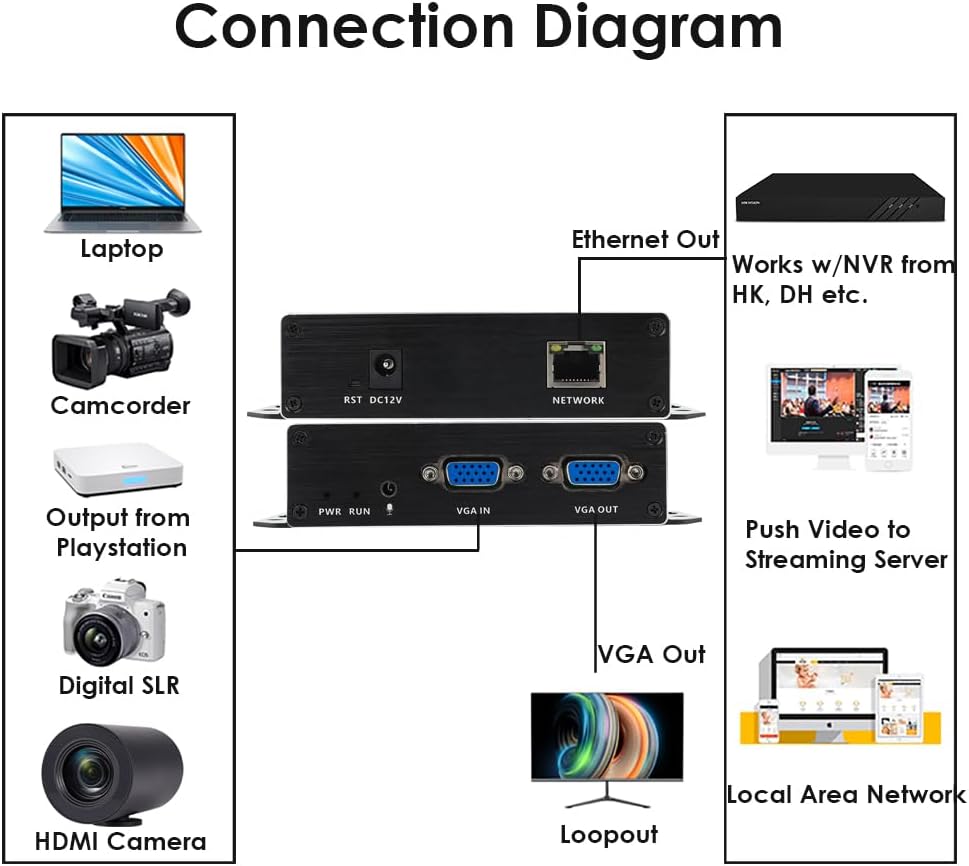
Figura 5.1: Typical Connection Diagram for the EXVIST VGA Encoder.
5.2 Network Configuration and Web Accés a la interfície
The encoder typically has a default IP address (e.g., 192.168.1.168). To access the web interfície:
- Ensure your computer is on the same network segment as the encoder. You may need to temporarily set your computer's IP address to be in the same subnet (e.g., 192.168.1.x).
- Obre a web browser (e.g., Chrome, Firefox) and enter the encoder's default IP address (e.g., http://192.168.1.168) a la barra d'adreces.
- Log in using the default username and password (refer to the device label or included documentation for default credentials, commonly admin/admin or admin/123456).
- Once logged in, you can configure network settings (e.g., static IP, DHCP) to integrate the encoder into your existing network infrastructure.
6. Instruccions de funcionament
6.1 Video and Audio Settings
Dins del web interface, navigate to the Video/Audio settings to configure input and output parameters.

Figura 6.1: Audio Settings in the Web Interfície.
- Entrada d'àudio: Select the desired audio source (e.g., VGA embedded audio, external microphone).
- Samples: Ajustar àudio samptaxa de ling.
- Codec type: Choose the audio encoding format (e.g., AAC).
- Taxa de bits: Set the audio bitrate for quality and bandwidth control.
- Canal: Select audio channels (e.g., Stereo, Mono).
- Volum de sortida: Adjust the output audio level.
- Recordeu fer clic Desa after making changes.
6.2 Streaming Configuration (RTMP, RTSP, HLS, UDP)
The encoder supports various streaming protocols. Configure them under the 'Push' or 'Network' sections of the web interfície.

Figura 6.2: RTMP Streaming Settings in the Web Interfície.
- RTMP: For live streaming to platforms like YouTube, Facebook Live, Twitch. Enter the Stream Server URL and Stream Key in the 'Video push' field (e.g.,
rtmp://a.rtmp.youtube.com/live2/streamkey). Enable the stream and select the push mode. - RTSP: For surveillance systems or media servers. Configure the RTSP URL and stream mode (Complex, Video, Audio).
- HLS/UDP: Configure as per your specific application requirements.
- Always click Desa after modifying streaming settings.

Figura 6.3: Supported Protocols by the EXVIST VGA Encoder.
7. Manteniment
- Neteja: Use a soft, dry cloth to clean the device. Avoid liquid cleaners or solvents.
- Ventilació: Ensure the encoder is placed in a well-ventilated area to prevent overheating. Do not block ventilation openings.
- Actualitzacions de firmware: Periodically check the EXVIST official weblloc web per a actualitzacions de firmware per garantir un rendiment òptim i l'accés a noves funcions.
- Gestió de cables: Ensure all cables are securely connected and not under strain.
8. Solució De Problemes
- Sense energia: Check power connections. If using PoE, ensure the network switch port provides power. If using a power adapter, ensure it is correctly connected and the outlet is functional.
- No Video Output (Loopout): Verify VGA cable connections. Ensure the video source is active and outputting a signal.
- Sense connexió de xarxa: Check Ethernet cable. Verify network settings (IP address, subnet mask, gateway) in the encoder's web interface. Ensure your computer is on the same subnet for initial access.
- Problemes de transmissió en temps real: Double-check streaming protocol settings (RTMP URL, RTSP URL, etc.). Ensure internet connectivity and sufficient bandwidth. Verify firewall settings on your network.
- Forgot Password/Settings: Utilitza el RESET button on the rear panel to restore factory default settings. Note that this will erase all custom configurations.
9. Especificacions
| Característica | Especificació |
|---|---|
| Número de model | ON-VGA-16DP |
| Entrada de vídeo | 1x VGA |
| Sortida de vídeo | 1x VGA Loopout |
| Codificació de vídeo | H.265 / H.264 |
| Resolució | Up to 1080P @ 60fps |
| Entrada d'àudio | 3.5mm Microphone, VGA Embedded Audio |
| Protocols de streaming | RTMP, RTSP, HLS, UDP, HTTP, Multicast, TS/SRT, ONVIF |
| Interfície de xarxa | 1x RJ45 Ethernet (PoE supported) |
| Font d'alimentació | DC 12V or Power over Ethernet (PoE) |
| Dimensions del producte | 4.33 x 2.95 x 0.98 polzades (110 x 75 x 25 mm) |
| Pes de l'article | 6.1 unces (173 grams) |
| Temperatura de funcionament | De 0 °C a 50 °C (32 °F a 122 °F) |
10. Informació de la garantia
This EXVIST product comes with a Limited Warranty. Please refer to the warranty card included with your product or visit the official EXVIST weblloc web per obtenir informació detallada sobre els termes i condicions de la cobertura i la durada de la garantia.
11. Atenció al client
For technical assistance, troubleshooting, or product inquiries, please contact EXVIST customer support through their official website or the contact information provided in your product packaging. When contacting support, please have your product model number (ON-VGA-16DP) and purchase details ready.