
1. Introducció
Thank you for choosing the FLEXISPOT 28-Inch Height Adjustable Standing Desk Converter. This product is designed to transform your existing desk into an active sit-stand workstation, promoting a healthier and more dynamic work environment. Its unique two-tier design provides ample space for your monitor, keyboard, and mouse, allowing for seamless transitions between sitting and standing positions.
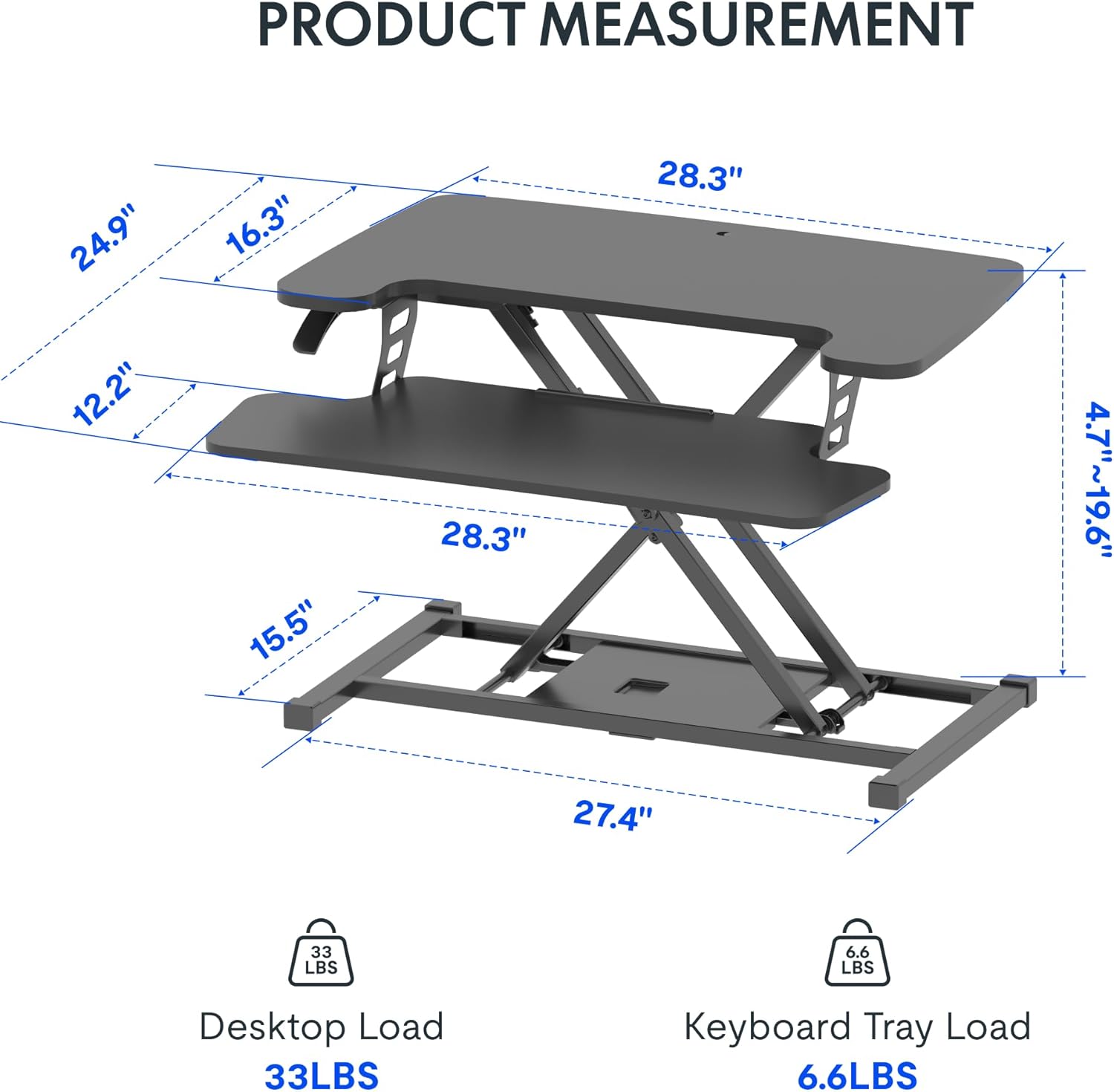
Image: The FLEXISPOT 28-Inch Height Adjustable Standing Desk Converter in a typical office setup, showcasing its two-tier design and compact footprint.
2. Informació de seguretat
- Llegiu atentament totes les instruccions abans de muntar i utilitzar.
- Ensure all components are securely fastened before placing items on the desk converter.
- Do not exceed the maximum weight capacity: 33 lbs for the desktop and 6.6 lbs for the keyboard tray.
- Keep hands and fingers clear of moving parts during height adjustment to prevent injury.
- Place the desk converter on a stable, level surface.
- Avoid placing liquids directly on the surface to prevent spills and potential damage to electronic devices.
3. Contingut del paquet
Upon opening your package, verify that all the following components are present:
- FLEXISPOT 28-Inch Height Adjustable Standing Desk Converter (main unit)
- Safata del teclat
- Maquinari de muntatge (cargols, clau Allen)
- Manual d'instruccions (aquest document)
4. Muntatge i muntatge
The FLEXISPOT 28-Inch Height Adjustable Standing Desk Converter comes largely pre-assembled. The primary step required is attaching the keyboard tray.
- Desembalar: Traieu amb cura tots els components de l'embalatge.
- Posicioneu la unitat principal: Place the main desk converter unit on your existing desk in the desired location.
- Fixeu la safata del teclat: Align the keyboard tray with the pre-drilled holes on the underside of the main unit's lower platform. Secure it using the provided screws and Allen wrench. Ensure it is firmly attached.
- Organitzar els cables: Route any monitor or peripheral cables to prevent interference with the height adjustment mechanism.
No complex steps are required for assembly. A Phillips screwdriver may be needed for some keyboard tray attachments, though an Allen wrench is typically included for the main connections.
5. Instruccions de funcionament
Ajust de l'alçada:
The desk converter features a powerful gas spring system for smooth and effortless height adjustment. It allows you to transition between sitting and standing positions with a single lever.
- Per elevar: Gently lift the adjustment lever located on the side of the desk converter. While holding the lever, apply slight upward pressure to the desktop. The gas spring will assist in raising the unit. Release the lever once the desired height (between 4.7" and 19.7") is reached.
- Abaixar: Gently lift the adjustment lever. While holding the lever, apply downward pressure to the desktop. The unit will smoothly lower. Release the lever once the desired height is reached.
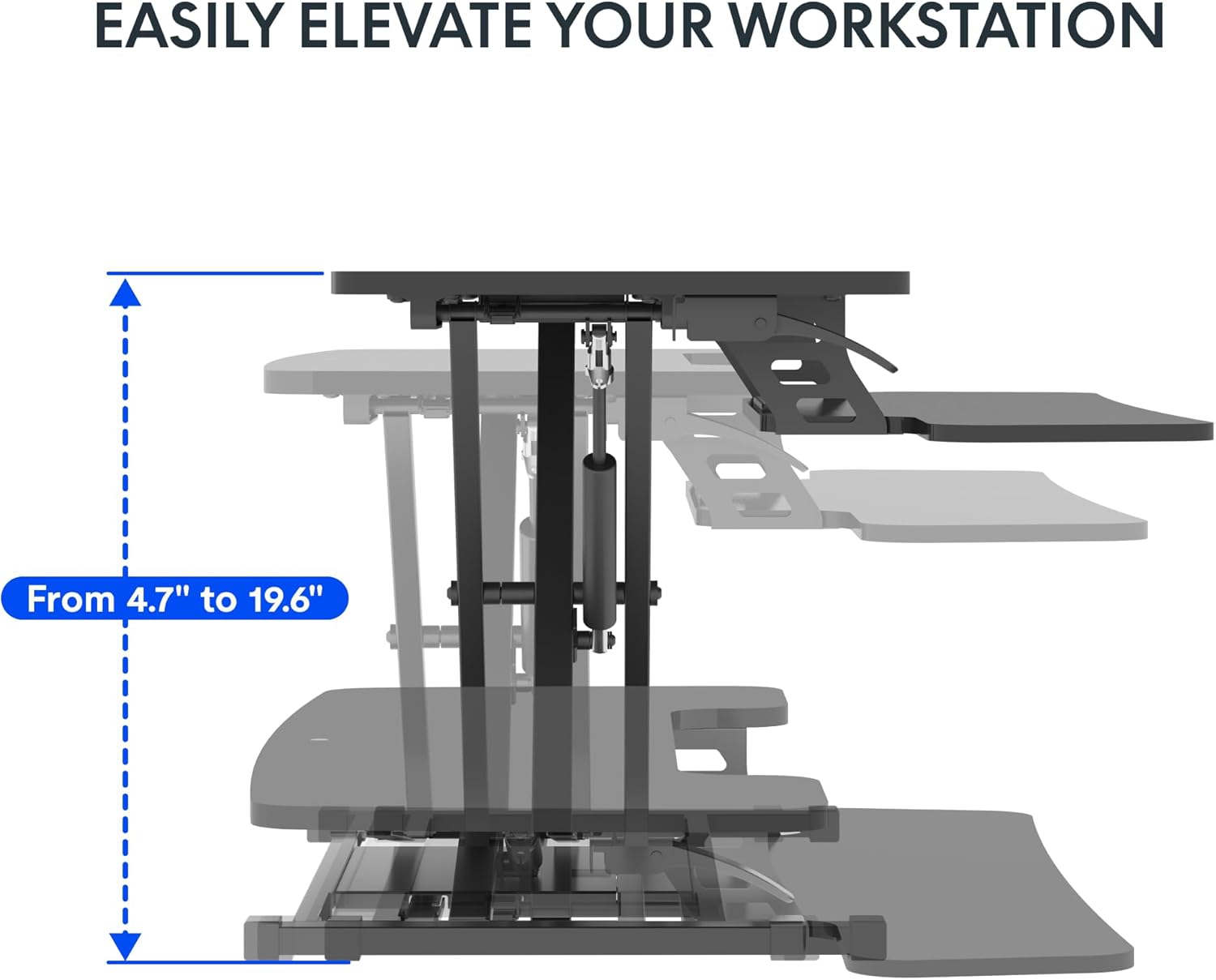
Image: Visual representation of the desk converter's height adjustment range, showing the smooth transition from minimum to maximum height.
Keyboard Tray Angle Adjustment (if applicable):
Some models may offer an adjustable angle for the keyboard tray. Consult your specific model's features for details on how to adjust if this functionality is present.
6. Manteniment
- Neteja: Netegeu les superfícies amb un suau, damp drap. Eviteu netejadors abrasius o productes químics agressius que puguin danyar l'acabat.
- Inspecció: Reviseu periòdicament tots els cargols i connexions per assegurar-vos que romanen ajustats. Torneu a apretar-los si cal.
- Moviment: When moving the desk converter, ensure it is in its lowest position and lift it carefully to avoid strain or damage.
7. Solució De Problemes
| Problema | Causa possible | Solució |
|---|---|---|
| Desk converter is difficult to raise or lower. | Excessive weight on the desktop; mechanism not fully engaged. | Reduce weight on the desktop. Ensure the adjustment lever is fully engaged when attempting to move the unit. Apply even pressure. |
| Unit feels wobbly. | Connexions fluixes; superfície irregular. | Check and tighten all assembly screws. Ensure the desk converter is placed on a flat, stable surface. |
| Keyboard tray is not stable. | Keyboard tray not securely attached. | Verify that the keyboard tray is correctly installed and all screws are tightened. |
8. Especificacions
- Model: 28-Inch Height Adjustable Standing Desk Converter
- Marca: FLEXISPOT
- Dimensions de l'escriptori: 28.3 cm x 16.3 cm
- Keyboard Tray Dimensions: 28.3 cm x 12.2 cm
- Dimensions base: 27.4 cm x 15.5 cm
- Interval d'ajust d'alçada: 4.7" - 19.6"
- Capacitat de pes de l'escriptori: 33 lliures
- Keyboard Tray Weight Capacity: 6.6 lliures
- Material: Metall, Fusta
- Color: Negre clàssic
- Pes de l'article: 23.2 lliures
- Muntatge requerit: Sí (mínim)
- UPC: 840460420143
- ASIN: B0DMSHH497

Image: Detailed product measurements for the FLEXISPOT 28-Inch Height Adjustable Standing Desk Converter, including desktop, keyboard tray, base, and height range.
9. Garantia i Suport
For warranty information, technical support, or to inquire about replacement parts, please contact FLEXISPOT customer service. Refer to the official FLEXISPOT website or your purchase documentation for the most current contact details and warranty terms.
You can visit the official FLEXISPOT store for more information: FLEXISPOT Store