
1. Introducció
This manual provides comprehensive instructions for the assembly, operation, and maintenance of your FLEXISPOT 42 inch Desk Converter. This height-adjustable riser is designed to transform your traditional desk into an active sit-stand workstation, promoting varied postures for enhanced comfort and productivity.
The unique U-shaped design expands the keyboard workspace, accommodating dual monitors and a laptop, along with a wide keyboard tray.

Image 1.1: FLEXISPOT 42 inch Desk Converter in a typical office setup.
2. Informació de seguretat
- Always ensure the desk riser is placed on a stable, flat surface.
- No supereu la capacitat màxima de pes: 33 lbs (15 kg) for the desktop i 6.6 lbs (3 kg) for the keyboard tray. Exceeding these limits can compromise stability and lead to damage or injury.
- Mantingueu les mans i els dits allunyats de les peces mòbils durant l'ajust d'alçada per evitar que us pessiguin.
- Distribute weight evenly across the desktop to maintain balance.
- Assegureu-vos que tots els cargols i elements de fixació estiguin ben ajustats abans d'utilitzar-los i comproveu periòdicament si hi ha fluïdesa.
3. Contingut del paquet
Abans del muntatge, verifiqueu que tots els components siguin presents i no estiguin danyats. Si hi ha alguna peça que falti o que estigui danyada, poseu-vos en contacte amb el servei d'atenció al client.
- Main Desk Converter Unit
- Safata del teclat
- Assembly Hardware (screws, brackets)
- Manual d'instruccions (aquest document)
4. Muntatge i muntatge
The FLEXISPOT Desk Converter is designed for quick assembly. Only the keyboard tray requires attachment.
Eines necessàries:
- Tornavís (no inclòs)
Passos de muntatge:
- Carefully remove all components from the packaging. Place the main desk converter unit on a stable, flat surface.
- Identify the keyboard tray and its corresponding mounting brackets.
- Align the keyboard tray brackets with the pre-drilled holes on the underside of the main desktop unit.
- Secure the brackets to the desktop using the provided screws. Ensure they are tightened firmly but do not overtighten.
- Attach the keyboard tray to the brackets using the remaining screws. Verify that the keyboard tray is level and stable.

Image 4.1: Illustration of keyboard tray attachment.
5. Instruccions de funcionament
The desk converter features a gas-spring lifting mechanism for smooth and effortless height adjustment.
Ajust de l'alçada:
- Clear any obstructions from around the desk converter.
- Locate the adjustment lever, typically on the side of the desktop.
- To raise the desk, gently squeeze the lever and lift the desktop to your desired height. The gas spring will assist the movement.
- To lower the desk, gently squeeze the lever and apply downward pressure to the desktop. Guide it smoothly to your preferred sitting height.
- Release the lever to lock the desk converter in position.

Image 5.1: Height adjustment range from 4.7 inches to 19.6 inches.
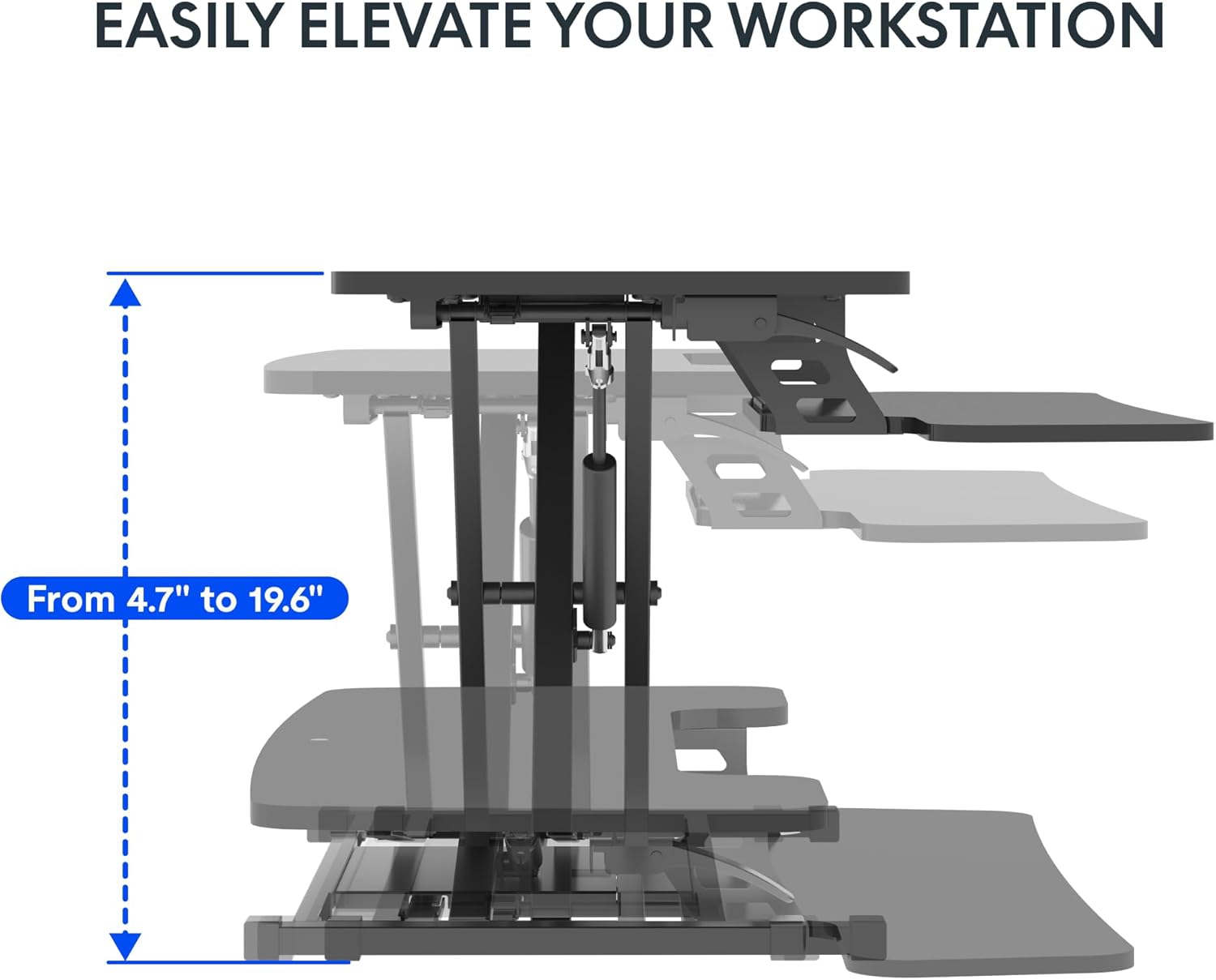
Image 5.2: Spacious two-tier design for monitors and keyboard.
6. Manteniment
Regular maintenance ensures the longevity and optimal performance of your desk converter.
- Neteja: Netegeu les superfícies amb un suau, damp drap. Eviteu netejadors abrasius o productes químics agressius que puguin danyar l'acabat.
- Comprovació de fixacions: Periodically inspect all screws and bolts, especially those securing the keyboard tray and the main frame. Tighten any loose fasteners to maintain stability.
- Comprovació del mecanisme: Ensure the lifting mechanism operates smoothly. If you notice any stiffness or unusual noises, contact support. Do not attempt to lubricate or disassemble the gas spring mechanism yourself.
7. Solució De Problemes
If you encounter issues with your desk converter, refer to the following common problems and solutions:
- Desk Converter is Unstable or Wobbles:
- Ensure the desk converter is placed on a completely flat and stable surface.
- Verify that all assembly screws, particularly those for the keyboard tray and the base, are securely tightened.
- Check that the weight on the desktop and keyboard tray does not exceed the specified capacity (33 lbs desktop, 6.6 lbs keyboard tray) and is evenly distributed.
- A slight wobble may be noticeable at maximum height; this is normal for some adjustable risers.
- Dificultat per ajustar l'alçada:
- Ensure the adjustment lever is fully engaged when attempting to raise or lower the desk.
- Check for any obstructions preventing the mechanism from moving freely.
- Verify that the weight on the desktop is within the specified limits. Excessive weight can make adjustment difficult.
- Keyboard Tray Screws Do Not Fit or Come Loose:
- Ensure you are using the correct screws for the keyboard tray attachment. Refer to the assembly instructions.
- If screws consistently come loose, consider using slightly larger or coarser threaded screws of appropriate length, or apply a thread-locking compound (e.g., Loctite) if suitable for the material.
- Desktop Appears Slanted:
- Check the underlying desk surface for levelness.
- Inspect the desk converter's frame for any visible damage or bending. If damage is present, discontinue use and contact support.
8. Especificacions
Detailed product specifications for the FLEXISPOT 42 inch Desk Converter.

Imatge 8.1: Dimensions del producte i capacitats de càrrega.
| Característica | Detall |
|---|---|
| Marca | FLEXISPOT |
| Número de model | XLCB |
| Nom del model | MT137 |
| Dimensions del producte (P x A x A) | 24.9 "P x 42" W x 19.6" H |
| Dimensions de l'escriptori | 41.7 cm x 16.3 cm |
| Dimensions de la safata del teclat | 34.6 cm x 12.2 cm |
| Dimensions de la base | 27.4 cm x 15.5 cm |
| Interval d'ajust d'altura | 4.7" - 19.6" |
| Capacitat de pes de l'escriptori | 33 lliures (15 kg) |
| Capacitat de pes de la safata del teclat | 6.6 lliures (3 kg) |
| Pes de l'article | 27.2 lliures (12.3 kg) |
| Color | Negre clàssic |
| Tipus de material superior | Fusta |
| Material base | Metall |
| Mecanisme d'elevació | Manual (Gas Spring) |
| Muntatge requerit | Sí |
| Persones recomanades per al muntatge | 1 |
9. Garantia i Suport
The FLEXISPOT 42 inch Desk Converter comes with a Garantia limitada. For specific details regarding warranty coverage, duration, and terms, please refer to the warranty card included with your product or visit the official FLEXISPOT weblloc.
For technical assistance, troubleshooting not covered in this manual, or to inquire about replacement parts, please contact FLEXISPOT customer support directly. You can often find support contact information on the manufacturer's weblloc web o a través de la vostra plataforma de compra.
Visit the official FLEXISPOT Store for more information: FLEXISPOT Store on Amazon