
1. Producte acabatview
The MekedeTech DUDUAUTO DUDU4 is an advanced Android car multimedia head unit designed specifically for Ford F150 models from 2009 to 2014. This unit features a 9.5-inch in-cell screen, an 8-core UIS8581A CPU, 4GB RAM, and 64GB ROM, providing a significant upgrade to your vehicle's infotainment system. It supports both wired and wireless CarPlay and Android Auto, offering seamless smartphone integration.
Les característiques clau inclouen:
- 9.5-inch 1280*720 in-cell screen for clear visuals.
- 8-Core UIS8581A CPU with 4GB RAM and 64GB ROM for responsive performance.
- Integrated Wireless and Wired CarPlay and Android Auto.
- Qualcomm 3031 Bluetooth 5.0 chip for stable and high-quality audio streaming and calls.
- Support for 4G LTE (via SIM card) and 5G Wi-Fi connectivity.
- Compatibility with original steering wheel controls for convenience and safety.
- Optional 360-degree panoramic system support.
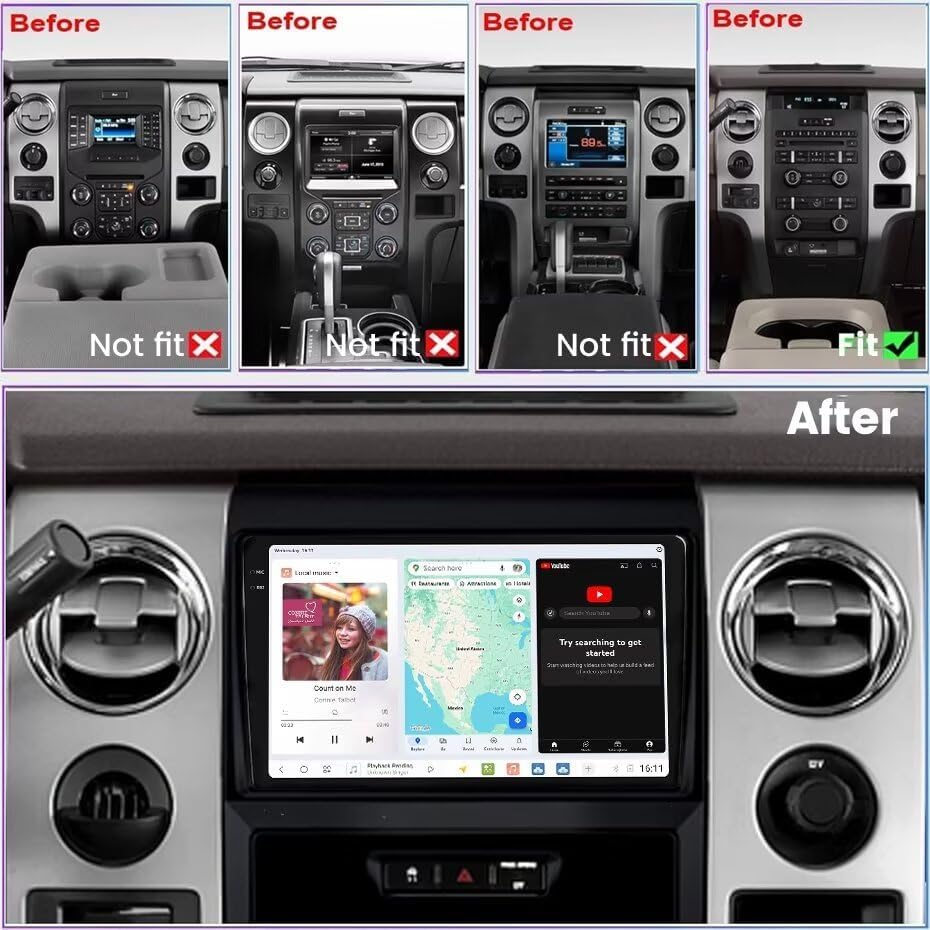
Image: This image illustrates various Ford F150 dashboard configurations from 2009-2014, showing which original setups are compatible ('Fit') and incompatible ('Not fit') with the DUDUAUTO DUDU4 unit. The 'After' section displays the DUDUAUTO DUDU4 unit seamlessly integrated into a compatible F150 dashboard, showcasing its large screen and user interface.
2. Configuració i instal·lació
2.1 Contingut del paquet
Abans de començar la instal·lació, comproveu que tots els components siguin presents al paquet:
- 9.5 inch screen (Main Unit)
- Kit de bisell
- Plug and play harness and CANbus
- RCA harness
- USB cables (multiple)
- Reverse cables
- Micròfon (MIC)
- Fakra 4G Antenna
- Fakra GPS Antenna (for DUDU7 only, not included with DUDU4)

Image: This image displays the complete contents of the DUDUAUTO DUDU4 package, including the main machine unit, power cable with CANbus box, microphone, RCA cable, reversing camera cable, USB plugs (x3), Fakra 4G antenna, and Fakra GPS antenna (note: GPS antenna shown is for DUDU7/DUDU6, DUDU4 may have integrated GPS or different antenna).
2.2 Procés d'instal·lació
The DUDUAUTO DUDU4 is designed for easy, plug-and-play installation. It integrates with your vehicle's existing wiring and retains original steering wheel control functions. For detailed installation steps, it is recommended to consult vehicle-specific tutorials or a professional installer.
Passos generals:
- Preparació: Ensure the vehicle's battery is disconnected before starting.
- Treure la unitat original: Carefully remove the factory radio and dashboard bezel.
- Connecteu el cablejat: Connect the provided plug-and-play harness to the vehicle's wiring and the DUDU4 unit. Ensure all necessary connections, including power, speakers, USB, RCA, and antennas, are securely made.
- Connexions d'antena: Connect the Radio Antenna, WiFi antenna, GPS Antenna, and 4G Antenna to their respective ports on the back of the unit.
- CANbus Integration: The included CANbus box facilitates communication with the vehicle's systems, retaining features like steering wheel controls.
- Funcionalitat de prova: Before fully reassembling the dashboard, reconnect the battery and test all functions of the new head unit.
- Torneu a muntar: Secure the DUDU4 unit and reattach the new bezel kit.

Image: This diagram illustrates the rear panel of the DUDU4 unit, labeling various connection ports. These include the Reverse video cable (C), 6Pin USB (D), 4Pin USB (E), Protocol Serial (F) for CANbus, 360 panoramic device port, RCA Cable (B) with 4G Card Slot, Radio Antenna (8), WiFi (7), GPS Antenna (6), 4G Antenna (4), and Power Cable (G). Individual connectors for MIC, 4G Antenna, GPS Antenna, 6Pin USB, 4Pin USB, RCA Cable, and Reversing camera are also shown.
3. Instruccions de funcionament
3.1 Encès/Apagat
The unit powers on automatically with the vehicle's ignition. To turn off the screen while driving, refer to the system settings for display options. The unit typically enters a sleep mode when the ignition is off for quick boot-up.
3.2 User Interface (DUDU OS 3.5)
The DUDUAUTO DUDU4 operates on DUDU OS 3.5, an Android-based system designed for automotive use. It offers both "Simple" and "Enthusiast" modes, allowing customization of the interface to suit user preferences. Navigate the system using the responsive touchscreen.

Image: This image showcases various screens and features of the DUDU OS 3.5 user interface, including navigation, media playback, vehicle settings, and system information. It highlights the intuitive design and customizable options available.
3.3 CarPlay sense fil i Android Auto
The unit supports both wireless and wired CarPlay (for iOS devices) and Android Auto (for Android devices). This allows for seamless integration of your smartphone's navigation, communication, and media apps directly onto the head unit's display.
- Wireless CarPlay (iOS System):
- Connecta el teu iPhone a la unitat mitjançant Bluetooth.
- On the unit, click on "Car Link" and wait for the connection to establish.
- Wired Android Auto (Android System):
- Connect your Android phone to the unit using a USB cable.
- On the unit, click on "Car Link" and wait for the connection to establish.

Image: This image demonstrates the wireless CarPlay and Android Auto functionality, showing smartphone applications mirrored on the DUDUAUTO DUDU4 screen. It includes visual guides for connecting both iOS (Wireless CarPlay via Bluetooth) and Android (Wired Android Auto via USB) devices.
3.4 Connectivity (Bluetooth, Wi-Fi, 4G LTE)
- Bluetooth 5.0: Connect your phone for hands-free calls and audio streaming. The Qualcomm 3031 chip ensures low power consumption and stable signal.
- Wi-Fi: Connect to a Wi-Fi hotspot (e.g., from your phone) to access online features, download apps, and browse the internet. Supports 802.11a/b/g/n/ac and 5G Wi-Fi.
- 4G LTE: Insert a 4G SIM card into the designated slot (part of the RCA cable assembly) to enable direct internet access on the unit without needing a separate hotspot.
3.5 Navegació
The unit supports GPS navigation with 3 modes (L1 B1 E1). You can use pre-installed navigation apps or download others from the Google Play Store. Offline maps can be cached for use without an internet connection.
3.6 Configuració d'àudio
The DUDU4 features a TDA7838 power amplifier and AK7604 DSP for enhanced audio quality. Access the audio settings menu to adjust equalizer, balance, fader, and subwoofer levels to customize your listening experience.
4. Manteniment
- Neteja de pantalla: Use a soft, lint-free cloth specifically designed for electronics screens. Avoid abrasive cleaners or harsh chemicals.
- Actualitzacions de programari: Periodically check for system software updates through the unit's settings menu to ensure optimal performance and access to new features.
- Gestió de dades: Manage storage by regularly clearing cache and uninstalling unused applications to maintain system responsiveness.
5. Solució De Problemes
| Problema | Causa possible | Solució |
|---|---|---|
| La unitat no s'encén. | Connexió d'alimentació fluixa, fusible fundit, problema amb la bateria del vehicle. | Check all power connections. Inspect vehicle fuses. Ensure vehicle battery is charged. |
| No hi ha so o hi ha mala qualitat de so. | Speaker wiring issues, incorrect audio settings, faulty speaker. | Verify speaker connections. Check audio settings (volume, balance, fader, EQ). Test with different audio sources. |
| El CarPlay/Android Auto no es connecta. | Bluetooth/USB connection issues, phone settings, app malfunction. | Ensure Bluetooth is enabled on phone and unit. For wired, try a different USB cable. Restart phone and unit. Check phone's CarPlay/Android Auto settings. |
| Senyal GPS feble o imprecis. | Col·locació d'antenes GPS, interferències ambientals. | Assegureu-vos que l'antena GPS estigui muntada en un lloc clar i sense obstacles. view del cel. Comproveu la connexió de l'antena. |
| Els comandaments del volant no funcionen. | CANbus connection issue, incorrect CANbus settings. | Verify CANbus box is correctly connected. Access unit settings to configure steering wheel controls if necessary. |
| Screen glare or fingerprints. | Environmental factors, screen type. | Clean screen regularly with a microfiber cloth. Adjust screen angle if possible. |
6. Especificacions
The following table details the technical specifications of the MekedeTech DUDUAUTO DUDU4 Android Car Radio:
| Característica | Especificació |
|---|---|
| Nom del model | MKD-DUDU4-4-64 |
| Sistema operatiu | Android 10 |
| CPU | 8 Core UIS8581A |
| RAM | 4 GB |
| ROM (Memory Storage Capacity) | 64GB (Note: Product specifications list 32GB, but title/feature bullets indicate 64GB. Please verify with product packaging.) |
| Mida de la pantalla | 9.5 polzades |
| Tipus de visualització | In-cell, OLED (Note: Product specifications list OLED, but feature bullets mention in-cell. In-cell is a type of display technology, OLED is another. Clarification may be needed.) |
| Resolució | 1280*720 |
| Tipus de pantalla tàctil | Capacitiva |
| Xip Bluetooth | Qualcomm 3031 (BT5.0) |
| Tipus de Wi-Fi | 802.11a/b/g/n/ac, supports 5G WIFI |
| GPS | 3 mode L1 B1 E1 (Supported Satellite Navigation System: GPS) |
| Poder Ampmés viu | TDA7838 |
| DSP | AK7604 |
| Circuit integrat de ràdio | TDA4755 |
| Treball Voltage | 9 V ~ 16 V |
| Tecnologia de connectivitat | Bluetooth, USB, Wi-Fi, Wireless |
| Característiques especials | Built-In Bluetooth, Touchscreen, Wired Android Auto, Wireless CarPlay, 4G LTE support |
| Tipus de vehicle compatible | Ford F150 (2009-2014), RV, SUV, Truck |
| Pes de l'article | 2.24 quilos |

Image: This table provides a detailed comparison of different DUDU series models (DUDU4, DUDU5, DUDU6, DUDU7) across various specifications such as RAM/ROM, CPU, Memory type, GPS, MIC, USB interface, Power amplifier, DSP, Amp, Android version, Car machine system, Audio output, BT chip, Filter capacitance, Screen, CP/AA, Network, Radio, Voice Control, and Supporting accessories. The DUDU4 model is highlighted with its specific features.
7. Garantia i Suport
7.1 Informació de la garantia
The MekedeTech DUDUAUTO DUDU4 Android Car Radio comes with a 1 any de garantia des de la data de compra. Aquesta garantia cobreix defectes de fabricació i avaries en condicions d'ús normal. Conserveu el comprovant de compra per a reclamacions de garantia.
The warranty does not cover damage caused by improper installation, misuse, accidents, unauthorized modifications, or normal wear and tear.
7.2 Atenció al client
For technical assistance, troubleshooting, or warranty inquiries, please contact MekedeTech customer support. You can find more information and contact details on the official MekedeTech store page: