
1. Introducció
Thank you for choosing the ORDRO G730 5K Digital Camera. This manual provides essential information for setting up, operating, and maintaining your camera. Please read it thoroughly before use to ensure optimal performance and longevity of your device.
Què hi ha a la caixa
- 1 x ORDRO G730 Digital Camera
- 1 x 64GB targeta de memòria
- 2 x piles recarregables
- 1 x Flexible Tripod Stand
- 1 x micròfon extern
- 1 x comandament a distància
- 1 x cable USB
- 1 x Manual d'usuari (aquest document)
2. Informació de seguretat
To prevent damage to your camera or injury to yourself or others, please observe the following safety precautions:
- No exposeu la càmera a l'aigua ni a la humitat.
- Eviteu deixar caure la càmera o sotmetre-la a impactes forts.
- Mantingueu la càmera allunyada de camps magnètics forts.
- No intenteu desmuntar ni modificar la càmera.
- Use only ORDRO-approved accessories and power sources.
- Guardeu la càmera en un lloc fresc i sec quan no la feu servir.
3. Primers passos
3.1 Instal·lació de la bateria
- Obriu la tapa del compartiment de la bateria que es troba a la part inferior de la càmera.
- Insert the rechargeable battery, ensuring the correct polarity.
- Tanqueu la tapa del compartiment de la bateria fins que faci clic de manera segura.
3.2 Inserció de la targeta de memòria
The camera supports SD cards. A 64GB card is included.
- Localitza la ranura per a targetes SD al lateral de la càmera.
- Introduïu la targeta SD amb els contactes metàl·lics mirant cap a la part frontal de la càmera fins que encaixi al seu lloc.
- Per treure-la, premeu suaument la targeta fins que surti.
3.3 Engegada/apagada
Press and hold the Power button to turn the camera on or off. The 3.2-inch IPS touch flip screen will illuminate upon startup.
4. Producte acabatview
Familiaritzeu-vos amb els components i els controls de la càmera.
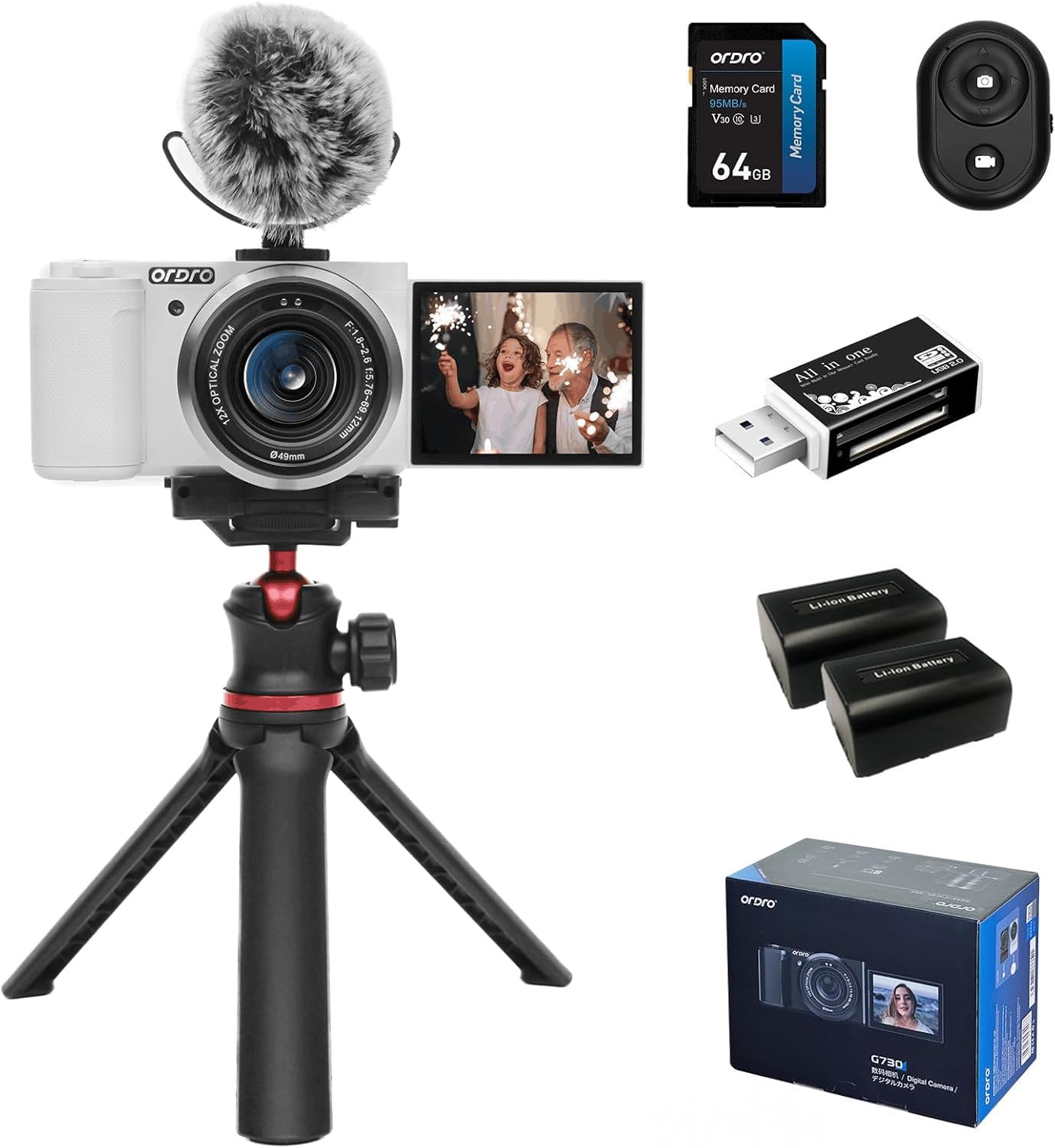
Figura 4.1: Frontal view of the ORDRO G730 Digital Camera, showing the lens and ORDRO branding.
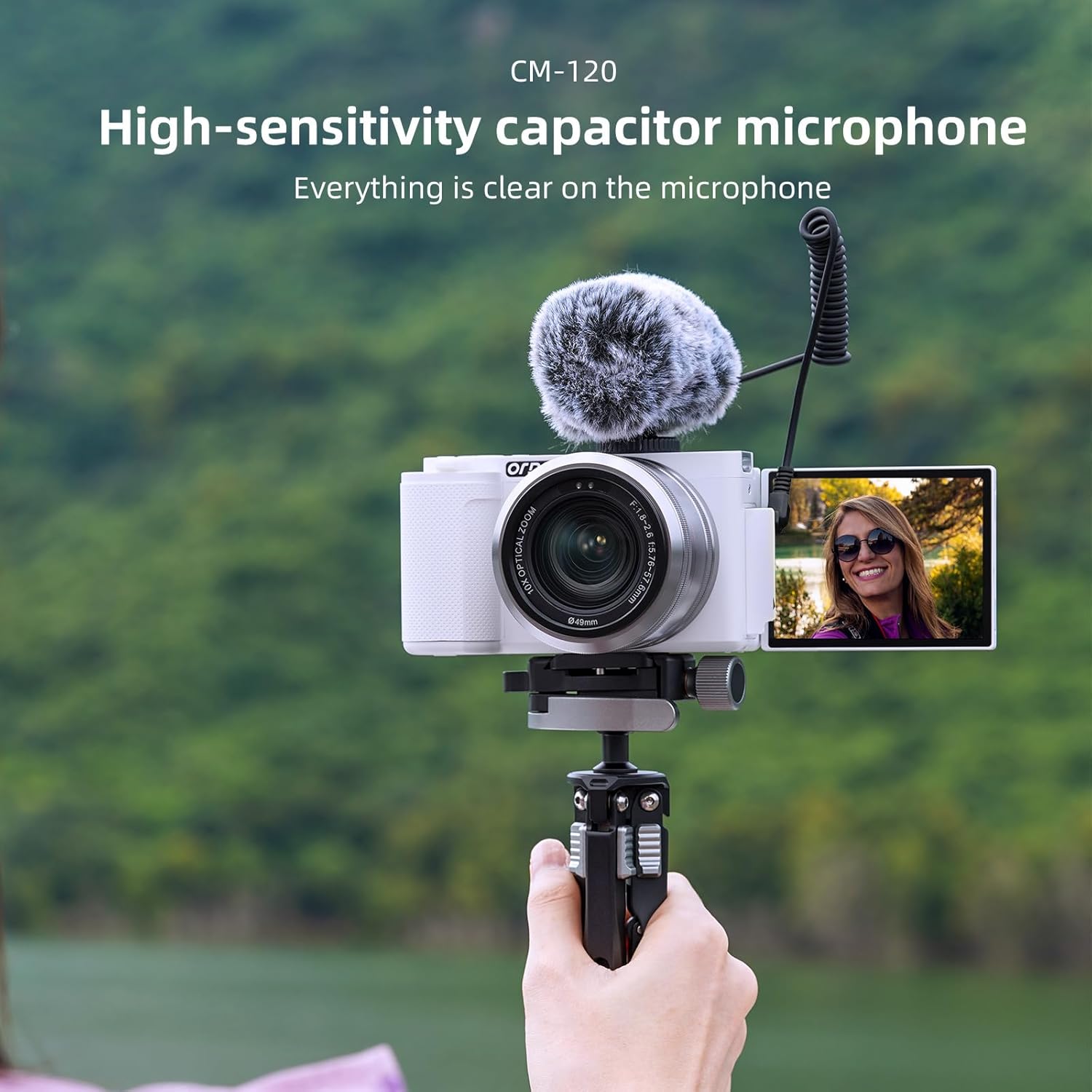
Figura 4.2: lateral view of the ORDRO G730 Digital Camera, illustrating the 3.2-inch IPS touch flip screen in an open position.

Figura 4.3: Esquena view of the ORDRO G730 Digital Camera, highlighting the control buttons and the touch screen interface.

Figure 4.4: The ORDRO G730 camera shown with an external microphone attached, demonstrating its expandability for audio recording.

Figure 4.5: The ORDRO G730 camera mounted on its flexible tripod, illustrating a stable setup for various shooting angles.
5. Instruccions de funcionament
5.1 Modes de tret
The ORDRO G730 offers a variety of shooting modes to suit different scenarios:
- Automòbil intel·ligent: Automatically adjusts settings for optimal results.
- Programa automàtic: Allows some manual control while the camera sets exposure.
- Prioritat d'obertura: Tu ajustes l'obertura del diafragma, la càmera ajusta la velocitat d'obturació.
- Prioritat de l'obturador: Tu ajustes la velocitat d'obturació, la càmera ajusta l'obertura.
- Exposició manual: Control manual complet sobre l'obertura i la velocitat d'obturació.
- Vídeo: Mode dedicat per a la gravació de vídeo.
- Selecció d'escena: Pre-set modes for specific scenes (e.g., Landscape, Portrait).
- Macro: Per a fotografia de primer pla.
- Visió nocturna per infrarojos: Per disparar en condicions de poca llum o foscor.
In most modes (except Intelligent Auto), you can adjust white balance, color temperature, saturation, and apply filters.
5.2 Photography Features
- Resolució: Capture still images up to 64MP.
- Zoom òptic: Utilize the 12x optical zoom (5.76mm to 69.12mm) for detailed shots from a distance.
- Modes d'enfocament: Switch between AF (Autofocus) and MF (Manual Focus) for precise control. The camera supports face detection autofocus.
- Balanç de blancs: Adjust white balance settings (e.g., Auto) and use the White Balance Shift feature for accurate color representation.
- Filtres: Apply from 15 creative filters to enhance your photos.
- WDR (ampli rang dinàmic): Improves detail in both bright and dark areas of an image.
- Face Beauty & Face Capture: Enhance portraits and automatically detect faces for optimal focus and exposure.
- Tret continu: Capture a sequence of photos rapidly.

Figura 5.1: Mésview of the ORDRO G730's video (5K 30fps, 4K 60fps, 2.7K 60fps, 1080p 60fps) and photo (64M, 56M, 48M, 36M, 30M) capabilities.

Figure 5.2: Demonstration of enhanced portrait beautification and white balance shift options for fine-tuning image appearance.

Figure 5.3: Visual representation of the 15 creative filters available to style your photos.
5.3 Video Recording Features
- Resolució de vídeo: Record videos in UHD 5K30p, 4K HDR, or Full HD at 60fps.
- càmera lenta: Capture moments and play them back at a reduced speed.
- Lapse de temps: Create dynamic short videos of gradual changes.
- Enregistrament en bucle: Continuously record, overwriting older footage quan la targeta de memòria estigui plena.
Video 5.4: An official product video demonstrating the ORDRO G730 digital camera's vlogging capabilities, including its 270° flip LCD screen, 4K video recording, and enhanced portrait beautification features. This video highlights the camera's ease of use for capturing unique moments and supports 4K HDR video recording and Full HD at 60fps, showcasing 5K Ultra HD image quality and a 3.2-inch touch screen with 1024x768 color gamut.
Vídeo 5.5: Presentació oficial del producte en vídeoasing the ORDRO G730 digital camera's features for video and photo vlogging. It demonstrates the camera's manual focus, white balance shift, creative filters, and compact design, emphasizing its suitability for vlogging anywhere, anytime. The video also highlights the 270° flip LCD screen for easy self-recording.
5.4 Using the 3.2-inch IPS Touch Flip Screen
The camera features a 3.2-inch IPS touch flip screen with a resolution of up to 1024x768 pixels. This screen can be flipped 270 degrees, making it ideal for self-recording, vlogging, and shooting from various angles. Use the touch interface to navigate menus and adjust settings.
5.5 Funcionament del control remot
The included mini remote control allows you to operate the camera from a distance, preventing camera shake and enabling convenient self-portraits or group shots. Refer to the remote control's specific instructions for pairing and functions.

Figure 5.6: The mini remote control in use with the ORDRO G730 camera, providing convenient wireless operation.
6. Connectivitat
6.1 Connexió Wi-Fi
The ORDRO G730 supports Wi-Fi connectivity for seamless content creation and sharing. Download the "OD Cam" app on your smartphone to remotely control photo shooting and video recording, and to transfer files.

Figure 6.1: The ORDRO G730 camera demonstrating Wi-Fi connectivity for instant photo and video sharing with a smartphone.
6.2 sortida HDMI
Connect your camera to a TV or monitor using an HDMI cable (not included) to view les teves fotos i vídeos en una pantalla més gran.
6.3 WebFuncionalitat de la càmera
La càmera es pot utilitzar com a webcam. Connect it to your computer via the USB cable and select "Webcam" mode. This is suitable for live streaming, video calls, and online teaching.
6.4 External Microphone
For enhanced audio quality, connect the included external microphone to the camera's 3.5mm jack.

Figure 6.2: The high-sensitivity capacitor microphone (CM-120) attached to the camera, ensuring clear audio capture.
6.5 Muntatge de trípode
The camera features a standard 1/4-inch tripod mount for stability and compatibility with various tripods, including the flexible tripod provided.
7. Manteniment
7.1 Neteja de la càmera
- Feu servir un drap suau i sec per netejar el cos de la càmera.
- For the lens, use a lens cleaning cloth and specialized lens cleaning solution.
- No utilitzeu netejadors abrasius ni dissolvents.
7.2 Cura de la bateria
- Carregueu les piles completament abans del primer ús.
- Traieu les piles si no fareu servir la càmera durant un període prolongat.
- Guardeu les piles en un lloc fresc i sec.
7.3 Emmagatzematge
When not in use, store the camera in its protective bag in a dry, dust-free environment, away from extreme temperatures.
8. Solució De Problemes
Si teniu problemes amb la càmera ORDRO G730, consulteu els problemes i solucions més comuns següents:
| Problema | Causa possible | Solució |
|---|---|---|
| La càmera no s'encén. | Low or uncharged battery; incorrectly inserted battery. | Carregueu la bateria completament. Assegureu-vos que la bateria estigui inserida correctament. |
| Mala qualitat d'imatge/vídeo. | Incorrect settings; dirty lens; insufficient lighting. | Check shooting mode and settings. Clean the lens. Ensure adequate lighting or use Night Vision mode. |
| Problemes de connexió Wi-Fi. | Incorrect Wi-Fi settings; app not installed. | Ensure Wi-Fi is enabled on camera and smartphone. Download and install the "OD Cam" app. |
| La càmera es bloqueja o deixa de respondre. | Software glitch; full memory card. | Remove and reinsert the battery to reset. Check memory card space. |
Si el problema persisteix, poseu-vos en contacte amb l'atenció al client.
9. Especificacions
Detailed technical specifications for the ORDRO G730 Digital Camera:
| Característica | Especificació |
|---|---|
| Nom del model | G730 |
| Tecnologia del sensor fotogràfic | CMOS (IMX415) |
| Resolució de fixes efectius | 64 MP |
| Resolució de vídeo | 5K30p, 2880p (4K) |
| Zoom òptic | 12x |
| Distància focal | 5.76 mm a 69.12 mm |
| Apertura màxima | F.no 1.8 ~ 2.6 |
| Mida de la pantalla | 3.2 polzades |
| Tipus de visualització | IPS Touch Flip LCD |
| Resolució de pantalla màxima | 1024*768 píxels |
| Estabilització d'imatge | Digital |
| Tecnologia de connectivitat | Wi-Fi, USB 3.0, HDMI |
| Admet File Format | JPEG, MP4 |
| Capacitat d'emmagatzematge de memòria | 64 GB (External-Memory Size) |
| Tipus de pila de bateria | Ió de liti |
| Pes de l'article | 1.18 Milligrams (Note: This value seems unusually low and may be a data entry error. Please refer to product packaging for accurate weight.) |
| Característiques especials | Night Vision, WDR, Face Detection, Time-lapse, Slow Motion, Loop Recording, Filters |
10. Garantia i Suport
Your ORDRO G730 Digital Camera comes with a standard manufacturer's warranty. Please refer to the warranty card included in your package for specific terms and conditions. For technical support, service, or inquiries, please visit the official ORDRO weblloc o poseu-vos en contacte amb el seu departament d'atenció al client.