
1. Introducció
Thank you for choosing the Hivento Smart Tower Fan AT-932. This intelligent tower fan is designed to provide efficient and comfortable air circulation with its WiFi connectivity, multiple speed and mode settings, oscillation, and convenient timer function. Please read this manual carefully before use to ensure proper operation and maintenance.
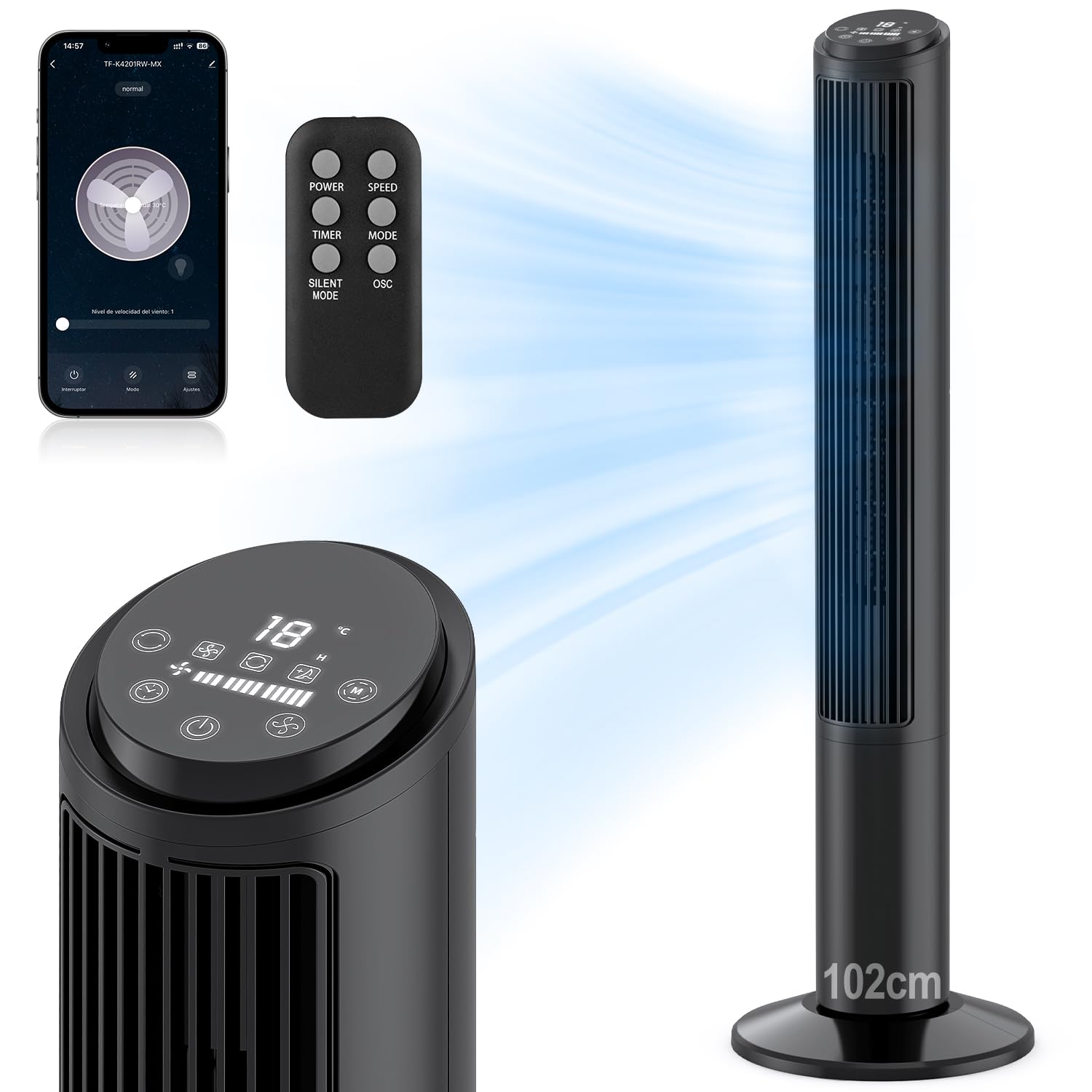
Image: Hivento Smart Tower Fan AT-932, showcasing el seu elegant disseny negre.
2. Instruccions de seguretat
Per reduir el risc d'incendi, descàrrega elèctrica o lesions, observeu les següents precaucions de seguretat:
- Desendolleu sempre el ventilador abans de netejar-lo o fer qualsevol manteniment.
- No feu funcionar el ventilador amb un cable o un endoll danyats.
- Keep fingers and other objects away from the fan grille when in operation.
- Assegureu-vos que el ventilador estigui col·locat sobre una superfície estable i anivellada per evitar que bolqui.
- No utilitzeu el ventilador en mullat o damp ambients.
- This fan features a bladeless design for enhanced safety, especially around children and pets. It also includes a child lock function.

Image: Bladeless design of the fan, highlighting safety features like a safety plug and child lock, with a child nearby.
3. Contingut del paquet
Si us plau, comproveu el paquet per veure si hi ha els elements següents:
- Hivento Tower Fan (x1)
- Installation Accessories (Base parts) (x1 set)
- Comandament a distància (x1)
- Manual d'usuari (x1)
4. Configuració
4.1 Muntatge de base
The tower fan requires minimal assembly. The base consists of two identical parts. Simply cross these two parts and attach them to the bottom of the fan unit. Ensure they are securely fastened.
4.2 Connexió d'alimentació
Connecteu el cable d'alimentació a una presa de corrent estàndard de 120 V CA.
4.3 Encès inicial
Press the power button on the control panel or remote control to turn on the fan. The LED display will illuminate.
4.4 WiFi Setup (App Control)
To use the smart features, download the Tuya Smart app on your smartphone. Follow the in-app instructions to pair your fan:
- Download and open the Tuya Smart app.
- Registreu-vos o inicieu sessió al vostre compte.
- Tap 'Add Device' or the '+' icon.
- Select the fan from the device list or use auto-scan.
- Follow the app's prompts to connect the fan to your 2.4GHz WiFi network. This usually involves resetting the device by pressing and holding the power button until the indicator light flashes.
- Once connected, you can control the fan via the app.

Image: Step-by-step guide on a smartphone screen demonstrating how to pair the Hivento Smart Tower Fan with the Tuya Smart app.
5. Instruccions de funcionament
5.1 Tauler de control i pantalla LED
The fan features an intuitive LED display and touch controls on the top. The display shows ambient temperature, current speed, mode, and timer settings.
- Botó d'encesa: Encén/apaga el ventilador.
- Botó de velocitat: Ajusta la velocitat del ventilador (Baixa, Mitjana, Alta).
- Botó de mode: Canvia ciclàticament pels modes de funcionament (Normal, Natural, Repòs).
- Botó del temporitzador: Configura el temporitzador d'apagada automàtica.
- Botó d'oscil·lació: Activa/desactiva l'oscil·lació.

Image: Close-up of the fan's LED display and touch control panel, along with the remote control, indicating various functions.
5.2 Control remot
The included remote control allows convenient operation from a distance. It duplicates all functions available on the control panel.
- POTÈNCIA: Encén/apaga el ventilador.
- VELOCITAT: Ajusta la velocitat del ventilador.
- TEMPORIZADOR: Configura el temporitzador d'apagada automàtica.
- Mode: Cycles through operating modes.
- MODE SILENCIÓS: Activates a quiet operation mode (often the Sleep mode).
- OSC: Activa/desactiva l'oscil·lació.

Image: The Hivento Smart Tower Fan oscillating, with a remote control shown in the foreground, illustrating remote operation.
5.3 Smart Control (WiFi & Voice)
After successful WiFi setup, you can control your fan from anywhere using the Tuya Smart app. The fan is also compatible with voice assistants like Amazon Alexa and Google Assistant for hands-free operation.
- Control de l'aplicació: Adjust settings, change modes, set timers, and monitor the fan remotely via your smartphone.
- Control de veu: Integrate with Alexa or Google Assistant to control the fan with voice commands (e.g., "Alexa, turn on the fan," "Hey Google, set fan speed to medium").
5.4 Modes and Speeds
The fan offers 3 speed settings and 2 operating modes:
- Velocitats: Low, Medium, High. Select the desired airflow intensity.
- Mode natural: Simula una brisa natural variant la velocitat del ventilador.
- Mode de repòs: Operates at a low, quiet speed for minimal disturbance during sleep, with a noise level of less than 30 dB.

Image: Graphic illustrating the fan's 2 modes (Natural, Sleep) and 3 speeds (Low, Medium, High), along with 70° oscillation and 6 m/s airflow.
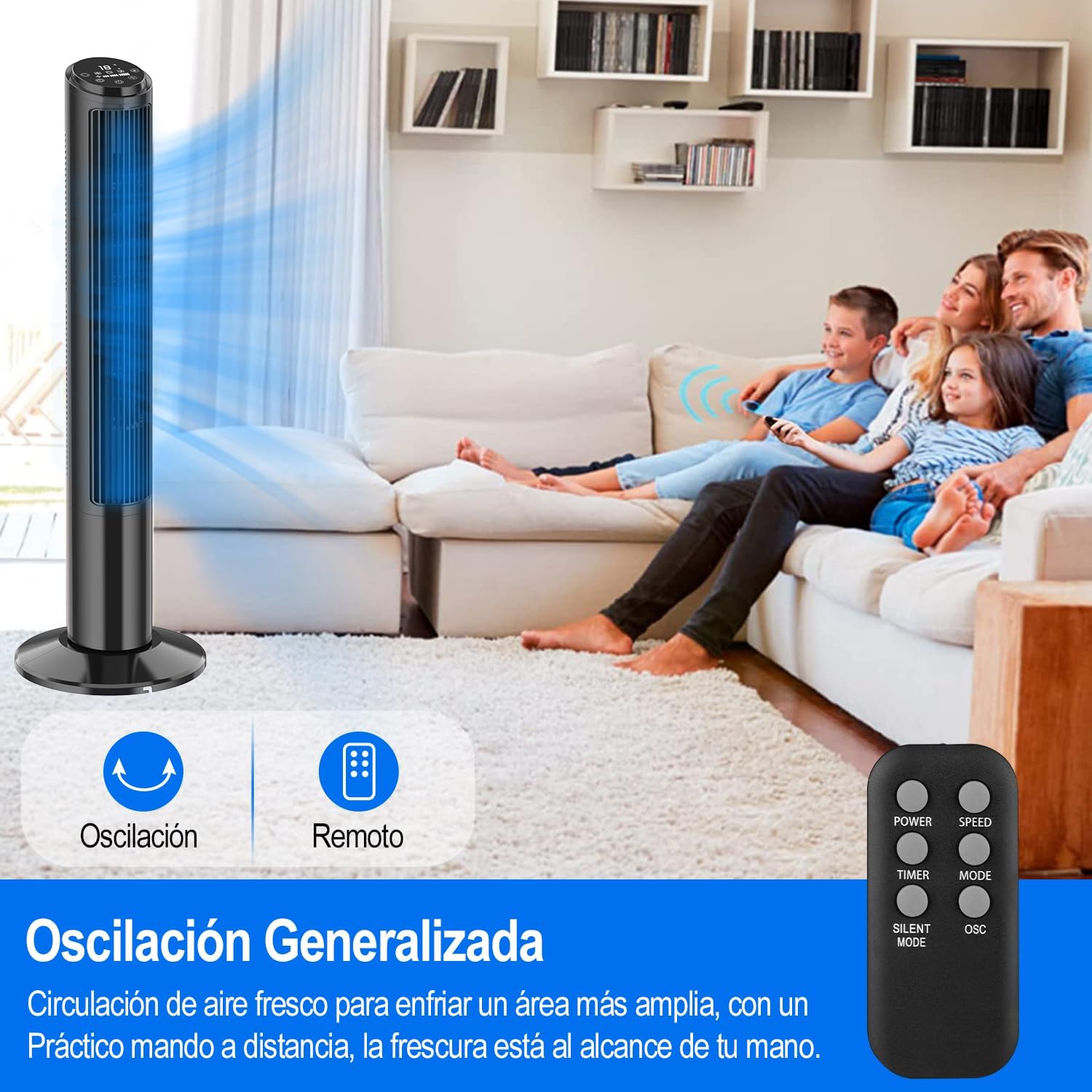
Image: A person sleeping peacefully with the Hivento Smart Tower Fan operating quietly in the background, demonstrating its low noise level for sleep.
5.5 Funció d'oscil·lació
Activate the oscillation function to distribute airflow across a wider area. The fan oscillates up to 70 degrees.
5.6 Funció de temporitzador
Set the fan to automatically turn off after a specified period, from 0 to 15 hours. This is useful for energy saving or for use during sleep.

Image: Graphic showing the fan's timer function, allowing settings from 0 to 15 hours.
6. Manteniment
Una neteja regular ajuda a mantenir el rendiment del ventilador i n'allarga la vida útil.
- Neteja de l'exterior: Netegeu les superfícies exteriors amb un damp tela. No utilitzeu netejadors abrasius ni dissolvents.
- Cleaning the Air Inlet/Outlet: Use a soft brush or vacuum cleaner with a brush attachment to remove dust from the air inlet and outlet grilles.
- Emmagatzematge: When not in use for extended periods, unplug the fan and store it in a cool, dry place.
Precaució: No submergiu el ventilador a l'aigua ni deixeu que l'aigua degoti a la carcassa del motor.
7. Solució De Problemes
| Problema | Causa possible | Solució |
|---|---|---|
| El ventilador no s'encén. | No hi ha font d'alimentació; el cable d'alimentació no està correctament connectat. | Ensure the fan is plugged into a working outlet; Check the power cord connection. |
| El ventilador s'atura inesperadament. | Timer function activated; Overheating. | Check if the timer is set; Unplug and allow the fan to cool down before restarting. |
| El comandament a distància no funciona. | Les piles estan gastades o mal inserides; Obstrucció entre el comandament a distància i el ventilador. | Replace batteries; Ensure clear line of sight to the fan's receiver. |
| La connexió WiFi falla. | Incorrect WiFi password; Router too far; Only 5GHz WiFi available. | Verify WiFi password; Move fan closer to router; Ensure you are connecting to a 2.4GHz network. |
8. Especificacions
| Característica | Detall |
|---|---|
| Marca | Hivento |
| Nom del model | Hivento Tower Fan AT-932 |
| Número de model | AT-932 |
| Color | Negre |
| Dimensions (PxAxA) | 20 x 20 x 102 cm (7.87 x 7.87 x 40.16 polzades) |
| Font d'alimentació | CA (120 volts) |
| Consum d'energia | 50 watts |
| Nombre de velocitats | 3 |
| Modes de funcionament | 2 (Natural, Sleep) |
| Oscil·lació | 70° |
| Temporitzador | Fins a 15 hores |
| Nivell de soroll | Minimum 30 Decibels |
| Tipus de control | App Control, Remote Control, Touch |
| Característiques especials | WiFi Function, Bladeless Design, LED Display, Child Lock |
| Material | Plàstic |

Image: The Hivento Smart Tower Fan with its dimensions (102cm height, 32cm base diameter) highlighted, demonstrating its compact and portable design.
9. Garantia i Suport
Specific warranty information is not provided in the product data. For warranty details, technical support, or any product-related inquiries, please contact Hivento customer service through the retailer's platform or the official brand weblloc.
You can visit the Hivento store for more information: Hivento Store


