
1. Producte acabatview
The KODLIX AD69 Mini PC is a compact and powerful computing solution designed for various applications, from business and office tasks to multimedia and light gaming. It features an AMD Ryzen 9 6900HX processor and AMD Radeon 680M graphics, offering robust performance in a small form factor.

2. Configuració i instal·lació
2.1 Què hi ha a la caixa
- 1x AD69 Mini PC
- 1x adaptador de corrent dels EUA
- 1x cable HDMI
- 1x Mount Support
- 1 x manual d'usuari
2.2 Sobrepassament físicview i disseny del port
Familiarize yourself with the ports and buttons on your KODLIX AD69 Mini PC.

2.3 Connexió inicial
- Connect the power adapter to the DC 19V input port on the rear of the Mini PC and plug it into a power outlet.
- Connect your monitor(s) using the HDMI2.1 ports or USB4 ports (with appropriate adapters if needed). The device supports up to 8K resolution and quad display output.
- Connect your keyboard and mouse to the available USB3.2 ports.
- For wired network access, connect an Ethernet cable to the 2.5GbE LAN port.
- Premeu el botó d'engegada a la part frontal del dispositiu per engegar-lo.
2.4 RAM and SSD Installation/Upgrade
The KODLIX AD69 Mini PC supports expansion of both RAM and SSD storage. It comes with 32GB DDR5 RAM (2x16GB) and a 1TB M.2 2280 PCIe 4.0 SSD, with support for up to 64GB RAM and dual PCIe 4.0 SSDs (up to 4TB total).
- Apagueu el mini PC i desconnecteu tots els cables.
- Carefully remove the bottom cover of the Mini PC. Refer to the provided video for detailed steps.
- To install/upgrade RAM: Locate the two DDR5 SODIMM slots. Gently push the clips outwards to release existing modules or insert new modules at a 45-degree angle and push down until the clips secure them.
- To install/upgrade SSD: Locate the M.2 2280 PCIe 4.0 SSD slots. Insert the SSD into the slot and secure it with the provided screw.
- Replace the bottom cover and reconnect all cables.
3. Instruccions de funcionament
3.1 Encès/Apagat
- To Power On: Press the power button on the front of the Mini PC. The power indicator light will illuminate.
- To Power Off: From the operating system, select 'Shut down'. Alternatively, press and hold the power button for 5 seconds to force a shutdown (use only when necessary).
3.2 Sistema operatiu
The KODLIX AD69 Mini PC comes pre-installed with Windows 11. It is also compatible with various Linux distributions.
3.3 Configuració de múltiples pantalles
The Mini PC supports up to four displays simultaneously, with resolutions up to 8K@60Hz, providing extensive screen real estate for multitasking, video editing, or immersive entertainment.

- Use the 2x HDMI2.1 ports for direct display connections.
- Utilize the 2x USB4 ports with compatible USB-C to DisplayPort or USB-C to HDMI adapters for additional displays.
3.4 Network and Wireless Connectivity
- Ethernet per cable: The device features a 2.5GbE LAN port for high-speed wired network connections.
- Wi-Fi 6E: Enjoy fast and low-latency wireless connectivity with Wi-Fi 6E (802.11ax) supporting 2.4G/5G/6G triple bands.
- Bluetooth 5.3: Connect various wireless peripherals such as headsets, mice, keyboards, and printers.
4. Rendiment per sobreview
4.1 Processador i gràfics
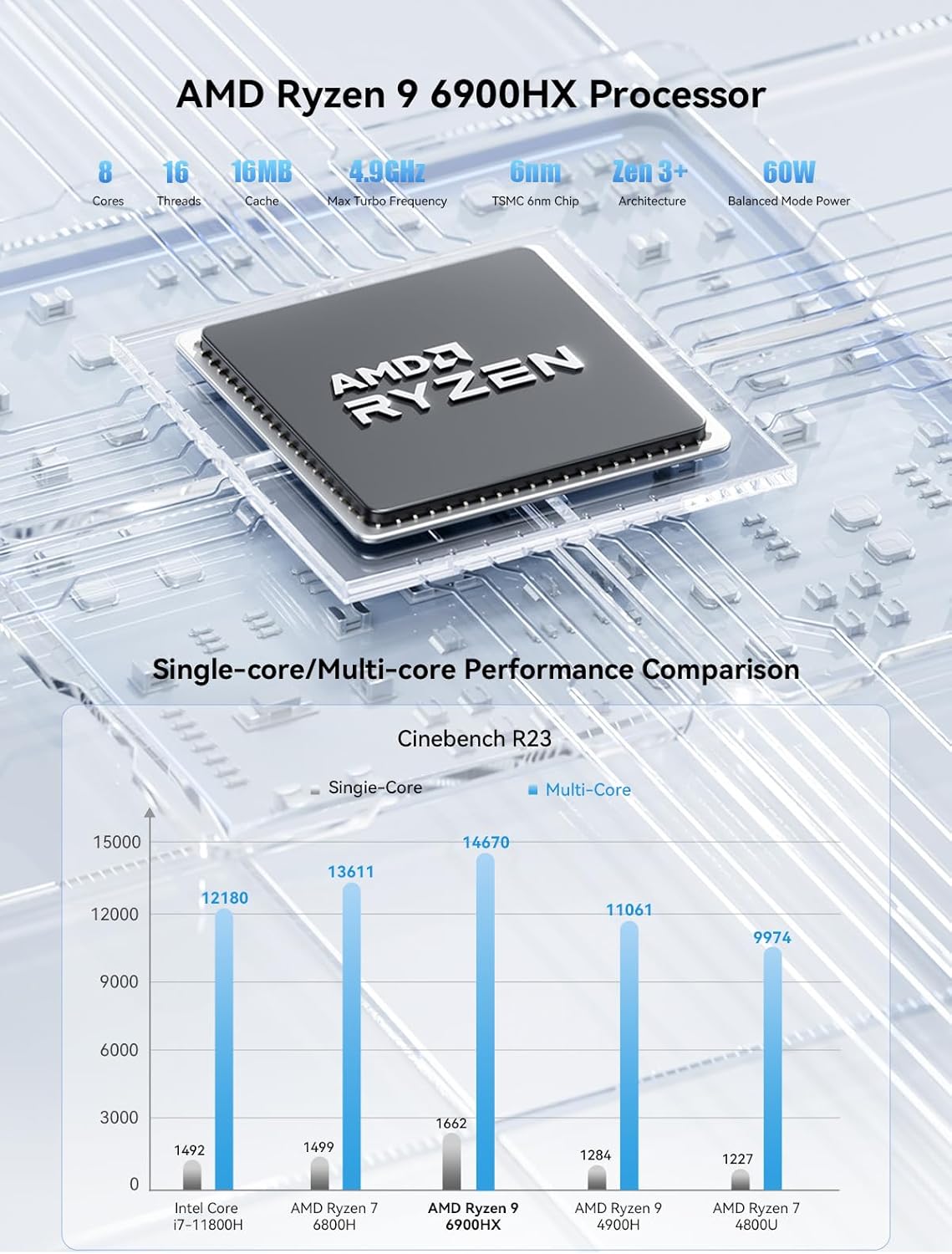
The KODLIX AD69 is powered by an AMD Ryzen 9 6900HX processor (8 cores/16 threads, up to 4.9GHz) and integrated AMD Radeon 680M graphics (based on RDNA2 architecture). This combination provides excellent performance for multitasking, content creation, and light gaming.
4.2 Memòria i emmagatzematge
Equipped with 32GB DDR5 RAM (4800MHz, dual channel) and a 1TB M.2 2280 PCIe 4.0 SSD, the AD69 offers fast data access and ample space. Both RAM and SSD are expandable for future needs.

5. Manteniment
5.1 Sistema de refrigeració
The AD69 Mini PC features an efficient cooling system designed to maintain stable performance even under high loads. This system helps reduce DDR temperature by 35% and SSD temperature by 39%.

5.2 Keeping Vents Clear
Ensure that the ventilation holes on the sides and bottom of the Mini PC are not obstructed to allow for proper airflow and prevent overheating.
6. Solució De Problemes
If you encounter any issues with your KODLIX AD69 Mini PC, please try the following basic troubleshooting steps:
- Sense energia: Check all power connections. Ensure the power adapter is securely plugged into the Mini PC and a working power outlet.
- Sense pantalla: Verify that your monitor(s) are correctly connected and powered on. Try different display cables or ports.
- Perifèrics que no funcionen: Ensure USB devices are properly connected. Try different USB ports.
- Problemes de xarxa: For wired connections, check the Ethernet cable and router. For Wi-Fi, ensure the Wi-Fi 6E module is enabled in Windows settings and connected to your network.
- El sistema no respon: Press and hold the power button for 5 seconds to force a shutdown, then restart the device.
For further assistance, please refer to the official KODLIX support channels.
7. Especificacions tècniques
| Característica | Especificació |
|---|---|
| Processador | AMD Ryzen 9 6900HX (8 Cores/16 Threads, up to 4.9 GHz) |
| Gràfics | AMD Radeon 680M (12 Core 2400MHz) |
| RAM | 32 GB DDR5 4800MHz (Dual Channel, expandable to 64GB) |
| Emmagatzematge | 1 TB M.2 2280 PCIe 4.0 SSD (Dual slot expansion up to 4TB) |
| Sortida de visualització | 2x USB4 (8K@60Hz), 2x HDMI2.1 (8K@60Hz) - Quad Display Support |
| Treball en xarxa | 2.5GbE LAN, Wi-Fi 6E (802.11ax), Bluetooth 5.3 |
| Ports USB | 2x USB4, 4x USB3.2 |
| Àudio | 1x presa d'àudio de 3.5 mm |
| Sistema operatiu | Windows 11 (pre-installed) |
| Dimensions | 7.15 x 6.32 x 4.41 polzades |
| Pes | 3.12 lliures |
8. Garantia i Suport
For warranty information and technical support, please refer to the documentation included with your product or visit the official KODLIX weblloc web. Conserveu el rebut de compra com a comprovant de compra per a reclamacions de garantia.