
1. Introducció
Gràcies per la compraasing the LONPOO LP-816 Compact Micro HiFi System. This manual provides essential information for the safe and efficient operation of your new audio system. Please read this manual thoroughly before use and retain it for future reference.
2. Instruccions de seguretat
- Font d'alimentació: Assegureu-vos que la font d'alimentació voltage coincideix amb la classificació indicada a la unitat.
- Ventilació: No bloquegeu cap obertura de ventilació. Deixeu prou espai al voltant de la unitat per a un flux d'aire adequat.
- Aigua i humitat: No exposeu la unitat a la pluja, la humitat ni a líquids que gotegen o esquitxen. No col·loqueu objectes plens de líquids, com ara gerros, a sobre de la unitat.
- Calor: Mantingueu la unitat allunyada de fonts de calor com ara radiadors, registres de calor, estufes o altres aparells (inclosos amplificadors) que produeixen calor.
- Neteja: Desendolleu la unitat de la presa de corrent abans de netejar-la. Feu servir només un drap suau i sec. No utilitzeu netejadors líquids ni netejadors en aerosol.
- Manteniment: No intenteu atendre aquest producte vosaltres mateixos. Consulteu tots els serveis a personal de servei qualificat.
- Col·locació: Col·loqueu la unitat sobre una superfície estable i plana per evitar que caigui.
3. Contingut del paquet
Verifiqueu que tots els elements que s'enumeren a continuació s'inclouen al vostre paquet:
- LONPOO LP-816 Micro HiFi System Unit
- Control remot
- Adaptador d'alimentació
- Antena FM
- Manual d'usuari (aquest document)
4. Producte acabatview
4.1 Front and Rear Panel Controls
Familiarize yourself with the various buttons, ports, and indicators on your LP-816 system.
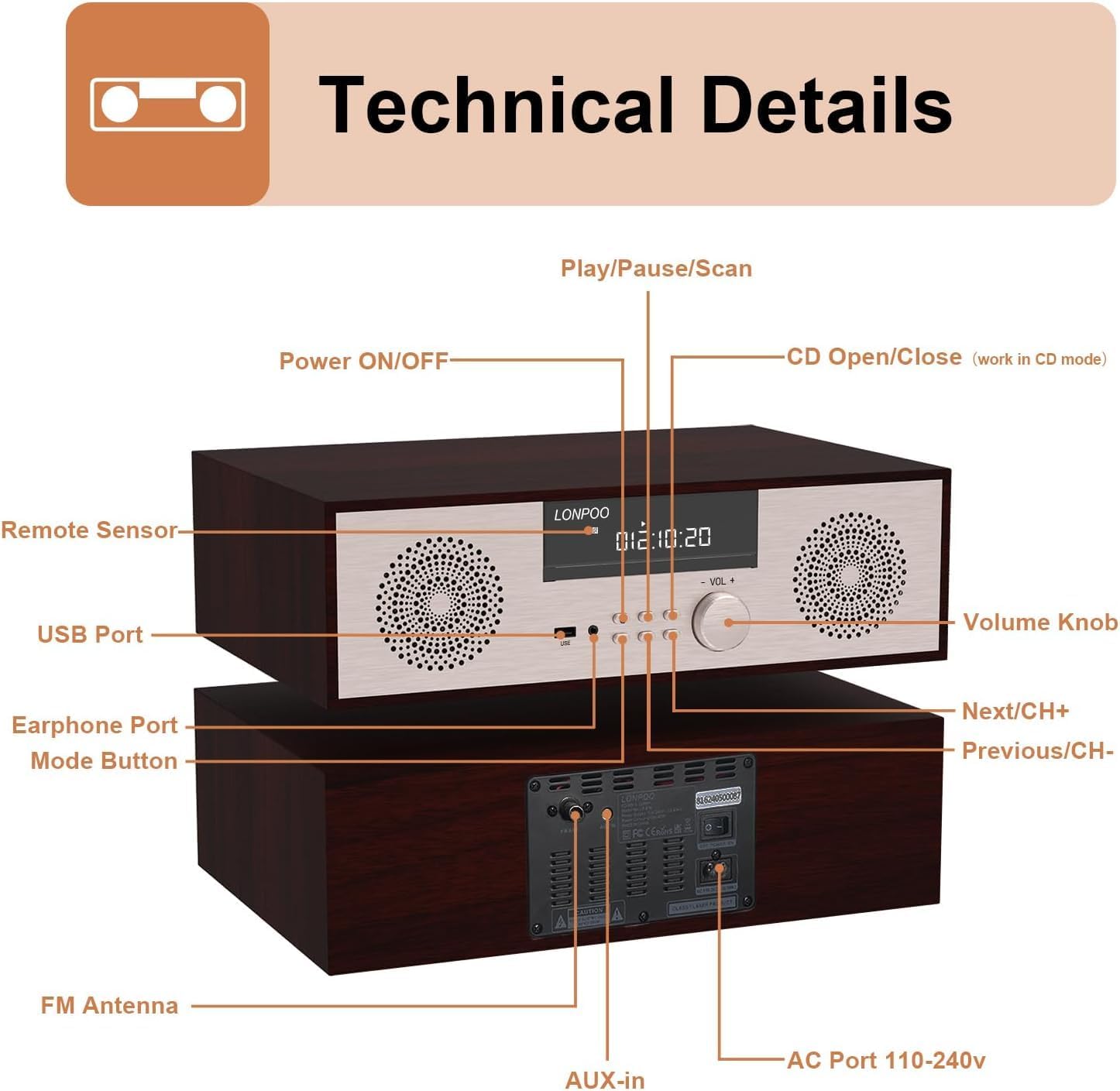
Imatge: Davant i darrere view of the LONPOO LP-816 system, highlighting the LCD display, control buttons, volume knob, USB port, earphone port, mode button, remote sensor, CD compartment, AUX-in, FM antenna port, and AC power port.
- Encès/apagat: Encén o apaga la unitat.
- Pantalla LCD: Shows current mode, track information, frequency, and time.
- Compartiment de CD: Per inserir CD d'àudio.
- Port USB: Connect USB flash drives for audio playback.
- Port per a auriculars: Jack de 3.5 mm per connectar auriculars.
- Botó de mode: Switches between CD, FM, Bluetooth, AUX, and USB modes.
- Play/Pause/Scan Button: Controls playback and initiates FM scan.
- Botó Següent/CH+: Skips to the next track or FM preset.
- Botó Anterior/CH-: Skips to the previous track or FM preset.
- Pom de volum: Ajusta el volum d'àudio.
- Sensor remot: Rep senyals del comandament a distància.
- Entrada AUX: Jack de 3.5 mm per connectar dispositius d'àudio externs.
- Antena FM: Connects the included FM antenna for radio reception.
- AC Port 110-240V: Connecta l'adaptador de corrent.
4.2 Control remot
The remote control provides convenient access to all functions of the LP-816 system.

Image: Close-up of the LONPOO LP-816 remote control, showing various buttons for power, mode selection, volume, track control, EQ, and numeric input.
Insert two AAA batteries (not included) into the remote control, observing the correct polarity.
5. Configuració
5.1 Col·locació
Place the LP-816 system on a flat, stable surface. Ensure there is adequate space around the unit for proper ventilation. Avoid placing it near strong magnetic fields or direct sunlight.
5.2 Connexió de l'antena FM
Connect the supplied FM antenna to the 'FM Antenna' port on the rear of the unit. Extend the antenna fully for optimal FM reception.
5.3 Connexió d'alimentació
Connect the power adapter to the 'AC Port 110-240V' on the rear of the unit, then plug the adapter into a wall outlet.
6. Instruccions de funcionament
6.1 Encès/Apagat
Press the 'Power ON/OFF' button on the front panel or the remote control to turn the unit on or off.
6.2 Reproducció de CD
To play an audio CD:
- Press the 'Mode' button until 'CD' mode is selected on the display.
- Press the 'CD Open/Close' button (if available on the unit or remote) or gently insert the CD into the slot. The unit will automatically load the CD.
- The CD will begin playing automatically. If not, press the 'Play/Pause' button.
- Use the 'Next/CH+' and 'Previous/CH-' buttons to skip tracks.
- Press 'Play/Pause' to pause or resume playback.

Image: The LONPOO LP-816 system with its CD player compartment open, ready to accept a disc.
6.3 Ràdio FM
Per escoltar la ràdio FM:
- Press the 'Mode' button until 'FM' mode is selected.
- Escaneig automàtic: Press and hold the 'Play/Pause/Scan' button to automatically scan and save available FM stations.
- Sintonització manual: Use the 'Next/CH+' and 'Previous/CH-' buttons to manually tune to a specific frequency.
- Seleccionant preajustos: Use the 'Next/CH+' and 'Previous/CH-' buttons (short press) to cycle through saved preset stations.

Image: The LONPOO LP-816 system displaying an FM radio frequency (87.50 MHz) on its screen, with a visual representation of the FM band.
6.4 Connexió Bluetooth
Per connectar un dispositiu Bluetooth:
- Press the 'Mode' button until 'BT' (Bluetooth) mode is selected. The display will show 'BT' and the unit will enter pairing mode.
- Al dispositiu compatible amb Bluetooth (per exemple, un telèfon intel·ligent), activeu Bluetooth i cerqueu els dispositius disponibles.
- Select 'LP-816' from the list of devices.
- Once paired, the unit will indicate a successful connection, and you can play audio from your device through the LP-816.

Image: The LONPOO LP-816 system displaying 'BT' on its screen, with a smartphone nearby showing a successful Bluetooth connection to 'LP-816'.
Connexió d'entrada AUX de 6.5
To play audio from an external device via AUX-in:
- Connect a 3.5mm audio cable (not included) from the headphone jack or line-out of your external device to the 'AUX-in' port on the rear of the LP-816.
- Press the 'Mode' button until 'AUX' mode is selected.
- Play audio from your external device. The sound will be output through the LP-816 speakers.
Reproducció USB 6.6
Per reproduir àudio files from a USB flash drive:
- Insert a USB flash drive into the 'USB Port' on the front panel.
- Press the 'Mode' button until 'USB' mode is selected.
- La unitat detectarà automàticament i començarà a reproduir àudio compatible files de la unitat USB.
- Use the 'Next/CH+' and 'Previous/CH-' buttons to skip tracks.

Image: A close-up of the LONPOO LP-816 system's front panel, showing a USB flash drive inserted into the USB port.
6.7 Sortida d'auriculars
Connect standard 3.5mm headphones to the 'Earphone Port' on the front panel for private listening. When headphones are connected, sound will no longer be output from the main speakers.
7. Manteniment
7.1 Neteja
To clean the unit, first unplug it from the power outlet. Use a soft, dry, lint-free cloth to wipe the exterior surfaces. Do not use abrasive cleaners, waxes, or solvents as they may damage the finish.
7.2 Cura del reproductor de CD
Handle CDs by their edges to avoid fingerprints and scratches. If a CD is dirty, wipe it gently with a soft, dry cloth from the center outwards. Do not use solvents or abrasive cleaners on CDs.
8. Solució De Problemes
| Problema | Causa possible | Solució |
|---|---|---|
| Sense poder | Cable d'alimentació no connectat; Presa de corrent no activa | Assegureu-vos que el cable d'alimentació estigui ben connectat. Proveu una altra presa de corrent. |
| Sense so | Volume too low; Mute function active; Incorrect mode selected; Headphones connected | Increase volume. Deactivate mute. Select correct input mode. Disconnect headphones. |
| El CD no es reprodueix | CD inserted incorrectly; CD is dirty or scratched; CD format not supported | Reinsert CD correctly. Clean or replace CD. Ensure CD is an audio CD. |
| Bluetooth no connectat | Bluetooth not in pairing mode; Device too far; Device already connected to another unit | Ensure unit is in BT pairing mode. Move device closer. Disconnect from other devices. |
| Mala recepció FM | Antenna not extended; Weak signal; Interference | Extend and adjust FM antenna. Relocate unit for better signal. |
9. Especificacions
- Model: LP-816
- Dimensions del producte (L x A x A): 15.8 x 10.5 x 4.5 polzades
- Pes de l'article: 11.57 lliures
- Tecnologia de connectivitat: Auxiliar, Bluetooth, USB
- Tipus d'altaveu: estèreo
- Sortida d'àudio: RMS de 40 Watts
- Característiques: CD Player, FM Radio, Bluetooth, AUX-in, Headphone Output, DSP Technology
10. Garantia i Suport
LONPOO products are designed and manufactured to the highest quality standards. For warranty information and technical support, please refer to the warranty card included with your product or visit the official LONPOO weblloc web. Conserveu el rebut de compra com a comprovant de compra.