
Introducció
This manual provides comprehensive instructions for the installation, operation, and maintenance of your LongPlus LP8MEF8D1 4K 16-Channel PoE Security Camera System. This system is designed to provide high-resolution surveillance with advanced features such as 12MP cameras, H.265+ video compression, a 16-channel NVR with a 4TB hard drive for 24/7 recording, and intelligent person/vehicle detection. Please read this manual thoroughly before using the product to ensure proper setup and functionality.

Figure 1: LongPlus 4K PoE Security Camera System Overview
Què hi ha a la caixa
Verifiqueu que tots els elements que s'enumeren a continuació s'inclouen al vostre paquet:
- 16CH NVR with 4TB HDD
- 4K Dome Turret PoE Security Camera x 8
- 60ft Ethernet Cable x 8
- 3.28ft Ethernet Cable x 1
- 6.56ft HDMI Cable x 1
- Ratolí USB x 1
- Cable d'alimentació x 1
- Adapter (48VDC 1.875A) x 1
- Accessoris d'instal·lació
- Guia de configuració ràpida
Video 1: Unboxing and Setup Guide for the LongPlus 12MP 4K-UHD 16CH NVR Security Camera System. This video demonstrates the contents of the package and initial setup steps.
Instruccions de configuració
Follow these steps to set up your LongPlus PoE Security Camera System:
- Connecteu el NVR a un monitor: Use the provided HDMI or VGA cable to connect the NVR to a monitor.
- Power On the NVR: Connect the power adapter to the NVR and plug it into an electrical outlet. Turn on the NVR power switch.
- Connecteu-vos a la xarxa: Connect an Ethernet cable from the LAN port of the NVR to your router's LAN port for internet access.
- Connect PoE Cameras: Connect each PoE camera to any available PoE camera port on the NVR using the provided Ethernet cables. The cameras are plug-and-play and should automatically connect.
- Connecteu el ratolí USB: Plug the USB mouse into an available USB port on the NVR for navigation.
- Configuració inicial: Follow the on-screen prompts to select your language and complete the initial system configuration.
Video 2: Detailed Setup Guide for the LongPlus 12MP 4K-UHD 16CH NVR Security Camera System. This video illustrates the step-by-step process of connecting the NVR, cameras, and peripherals.
Instruccions de funcionament
4K UHD Resolution and Wide View Angle
The system captures video in crystal-clear 4K (3840x2160) resolution, providing superior detail, contrast, and color accuracy. The cameras feature a 132° wide-angle lens, offering extensive coverage and minimizing blind spots.

Figure 2: Comparison illustrating 4K UHD video quality.

Figure 3: Visual representation of the 132° wide view angle.
AI Motion Detection and Activity Zones
The smart PoE cameras utilize AI object detection to accurately identify humans and vehicles, reducing false alarms. Real-time alerts are sent upon detection. You can define specific activity zones to monitor critical areas and privacy masks to exclude sensitive regions from detection.

Figure 4: Smart AI motion detection distinguishing between people and vehicles.

Figure 5: Configuring motion detection zones and privacy masks.
Triple Night Vision Modes
The cameras offer three night vision modes: IR Night Vision, Color Night Vision, and Smart Night Vision. Low-light color night vision provides vibrant, full-color footage up to 100ft/30m, allowing for clear identification of faces and objects in various lighting conditions.

Figure 6: Demonstration of Full-Color, AI, and IR night vision modes.
Audio and Strobe Light Alarm with Two-Way Audio
Upon detecting a human or vehicle, the PoE dome camera can automatically trigger an audio and strobe light alarm to deter intruders. The integrated two-way audio feature allows for real-time communication through the camera.

Figure 7: Using two-way audio for communication.

Figure 8: Strobe light alarm in action.
Flexible Storage and Smart Playback
The NVR includes a 4TB HDD for 24/7 continuous recording, expandable up to 20TB. H.265+ compression saves over 75% storage space compared to H.264. Easily playback live view and recorded events via the Longvision APP/Client with highlighted timelines.

Figure 9: Interface showing 24/7 recording and smart playback features.
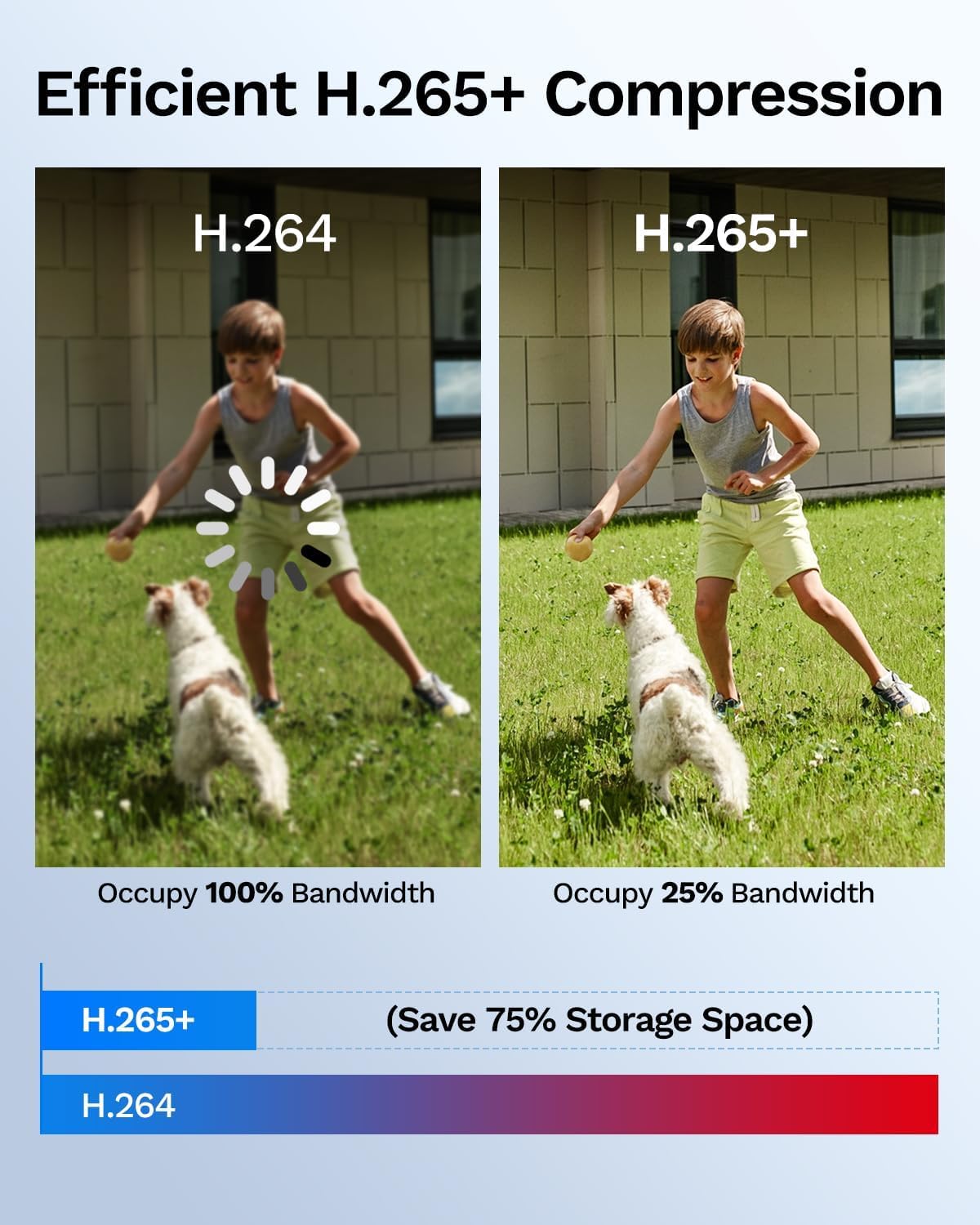
Figure 10: Comparison of H.264 vs. H.265+ compression for storage efficiency.
Remote Access and Sharing
Accedeix a foo en directetage and manage your security system remotely using the Longvision app, compatible with iOS, Mac, Windows, and Android devices. The system supports sharing video access with up to 32 users.

Figura 11: Viewvigilància d'alimentstage remotely on various devices.

Figure 12: Sharing access to the security system with family members.
Video 3: Product Features Introduction for the LongPlus 4K-UHD PoE Security Camera System. This video highlights key functionalities and benefits of the system.
Vídeo 4: Acabatview of the 8-Channel LongPlus PoE Security Camera System. This video provides a general demonstration of the system's capabilities.
Manteniment
Un manteniment regular garanteix un rendiment òptim i la longevitat del vostre sistema de seguretat:
- Lents netes: Netegeu periòdicament les lents de la càmera amb un drap suau i sec.amp drap per eliminar la pols i les taques que poden afectar la claredat de la imatge.
- Comproveu els cables: Inspect all cable connections for wear, damage, or loose connections. Ensure waterproof gaskets are properly sealed for outdoor cameras.
- Actualitzacions de programari: Regularly check for and install firmware updates for the NVR and cameras to enhance security and features.
- Estat del disc dur: Monitor the NVR's hard drive health through the system settings to prevent data loss.
- Font d'alimentació: Ensure the NVR and cameras receive stable power. Avoid using unapproved power adapters.
Resolució de problemes
If you encounter issues, refer to these common troubleshooting tips:
- Sense visualització de vídeo: Check HDMI/VGA cable connections to the monitor and ensure the monitor is on the correct input source. Verify the NVR is powered on.
- Camera Not Showing: Ensure the Ethernet cable is securely connected to both the camera and the NVR's PoE port. Check if the camera's status light is on. Restart the NVR.
- Sense gravació: Verify the 4TB HDD is properly installed and recognized by the NVR. Check recording schedules and ensure sufficient storage space.
- Problemes d'accés remot: Ensure the NVR is connected to the internet and your mobile device has a stable network connection. Verify app settings and user permissions.
- Alertes de moviment falses: Adjust motion detection sensitivity and refine activity zones to exclude irrelevant areas.
For further assistance, please contact LongPlus technical support.
Especificacions
| Característica | Descripció |
|---|---|
| Marca | LongPlus |
| Número de model | LP8MEF8D1 |
| Tecnologia de connectivitat | Cablejat (PoE) |
| Resolució de captura de vídeo | 4K (3840x2160) |
| Nombre de canals | 16 |
| Emmagatzematge NVR | 4TB HDD (Included), Expandable up to 20TB |
| Tipus de càmera | 8x 4K Dome Turret PoE Cameras |
| Lent | F=2.8mm, f/1.6 Lens; 132° FOV |
| Gamma de visió nocturna | Up to 100 Feet (30m) |
| Característiques especials | Person/Vehicle Detection, Triple Night Vision (IR/Color/Smart), Two-Way Audio, Strobe Light Alarm, IP67 Weatherproof |
| Compatibilitat de sistemes operatius | Android, iOS, Windows, macOS |
| Interfície del maquinari | Ethernet, HDMI, USB, VGA |
| Mode d'enregistrament | Event, Schedule, 24/7 Continuous |
Garantia i Suport
LongPlus provides a 2 any de garantia for this product. Additionally, lifetime technical support is available to all customers. If you have any questions or require assistance, please do not hesitate to contact our professional technical team. We aim to respond to all inquiries within 24 hours.
Per obtenir ajuda, visiteu el LongPlus Store on Amazon or refer to the contact information provided in your Quick Setup Guide.