
OMOTON B0DN67GQD1
OMOTON 2.4G Wireless Keyboard User Manual
Model: B0DN67GQD1
Introducció
Thank you for choosing the OMOTON 2.4G Wireless Keyboard. This manual provides detailed instructions for setting up, operating, and maintaining your keyboard to ensure optimal performance and longevity. Please read this manual thoroughly before using the product.

Image: The OMOTON 2.4G Wireless Keyboard in grey, shown with its compact design and the included USB-A and Type-C 2-in-1 receiver.
Contingut del paquet
- 1 x OMOTON 2.4G Wireless Keyboard (Grey, 285mm x 120mm)
- 1 x USB 2-in-1 Receiver (USB-A and Type-C compatible)
- 1 x Manual d'usuari
Note: 2 AAA batteries are required for operation and are not included in the package.
Guia de configuració
1. Instal·lació de bateries
- Localitzeu el compartiment de la bateria a la part inferior del teclat.
- Obriu la tapa del compartiment de la bateria.
- Introduïu dues (2) piles AAA, assegurant-vos de la polaritat correcta (+/-).
- Tanqueu bé la tapa del compartiment de la bateria.
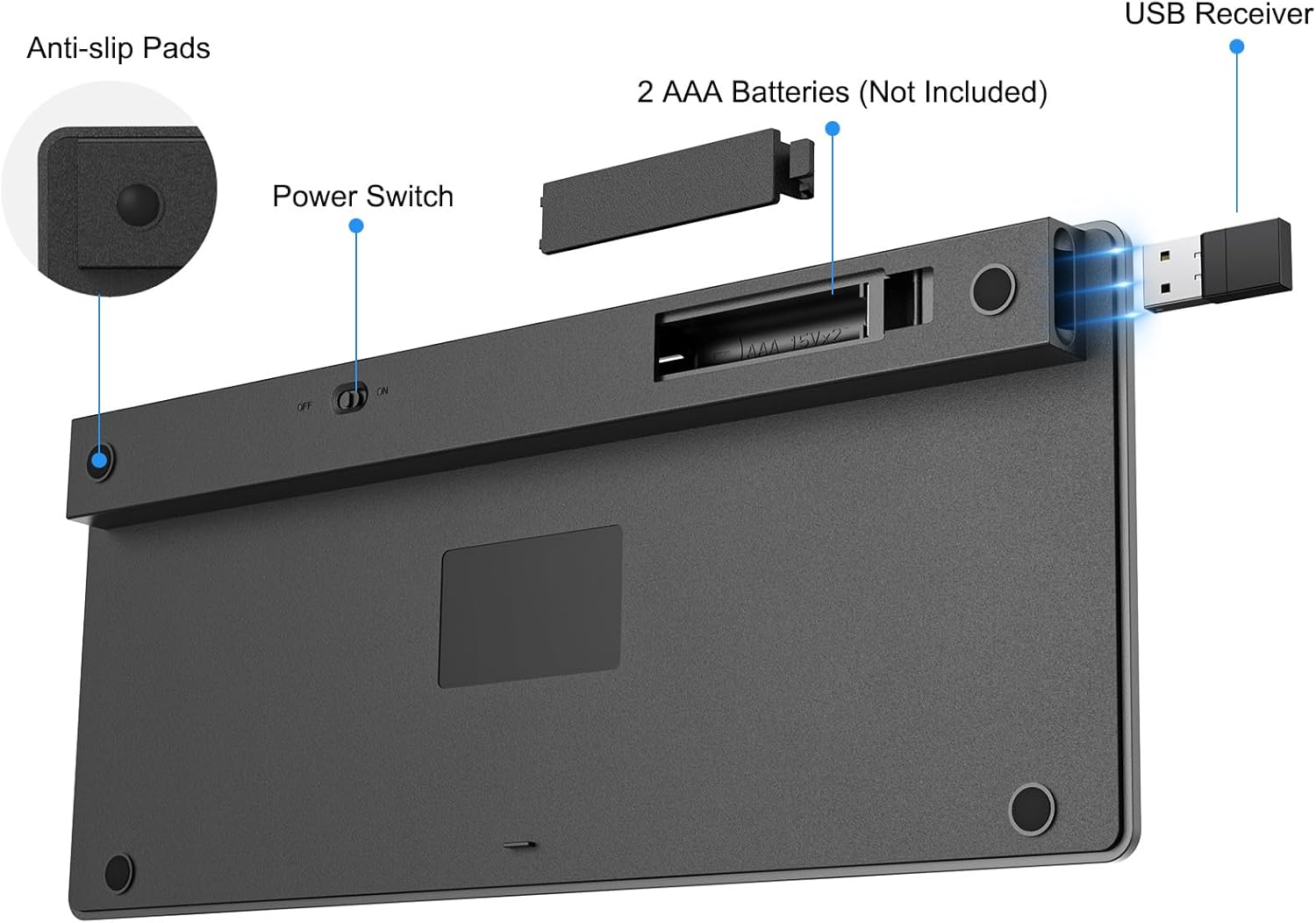
Imatge: View of the keyboard's underside, highlighting the battery compartment, power switch, and the storage slot for the USB receiver.
2. Connexió del receptor USB
- Locate the USB 2-in-1 receiver, typically stored within the keyboard's battery compartment or included separately.
- Identify the appropriate USB port on your device (USB-A or USB-C).
- Plug the USB receiver into an available USB port on your computer, laptop, tablet, or smart TV.
- El sistema hauria de detectar i instal·lar automàticament els controladors necessaris.

Image: The versatile USB-A and Type-C 2-in-1 receiver, demonstrating its compatibility with both USB-A and USB-C ports on different laptops.
3. Engegar el teclat
- Locate the power switch on the underside of the keyboard.
- Feu lliscar l'interruptor a la posició "ON".
- El teclat ja està llest per utilitzar-lo.
Instruccions de funcionament
System Compatibility and Switching
This keyboard is compatible with Windows, iOS/iPadOS, Mac OS, and Android operating systems. To ensure proper function of multimedia keys and layout, switch to the correct system mode:
| Sistema operatiu | Combinació de tecles |
|---|---|
| Windows | Premeu Fn + Q |
| iOS / iPadOS | Premeu Fn + W |
| Mac OS | Premeu Fn + E |
| Android | Premeu Fn + R |
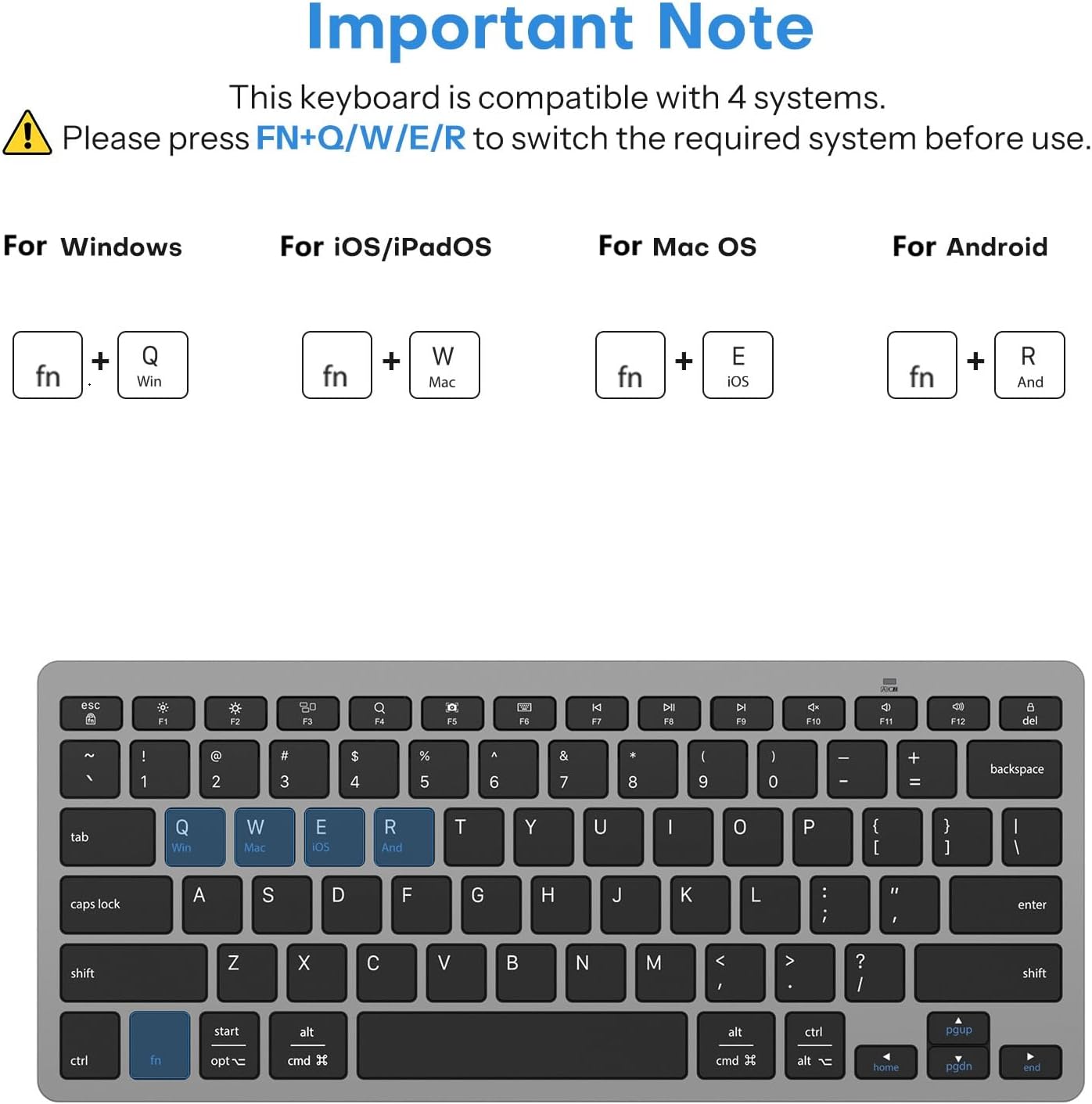
Image: Visual guide illustrating the Fn key combinations (Fn+Q, Fn+W, Fn+E, Fn+R) used to switch the keyboard's compatibility mode for Windows, iOS/iPadOS, Mac OS, and Android respectively.
Claus multimèdia
The keyboard features optimized multimedia keys for quick access to various functions. These functions are typically accessed by pressing the Fn en combinació amb la tecla de funció corresponent (F1-F12).
- Fn + F1: Esc
- Fn + F2: Brightness -
- Fn + F3: Brillantor +
- Fn + F4: Mission Control (Mac OS)
- Fn + F5: Search (Android: N/A)
- Fn + F6: Screenshot (Mac OS: N/A)
- Fn + F7: Virtual keyboard (Mac OS/Android: N/A)
- Fn + F8: Pista anterior
- Fn + F9: Reproduir/Pausa
- Fn + F10: Pista següent
- Fn + F11: Mut
- Fn + F12Volum -
- Fn + Del: Pantalla de bloqueig
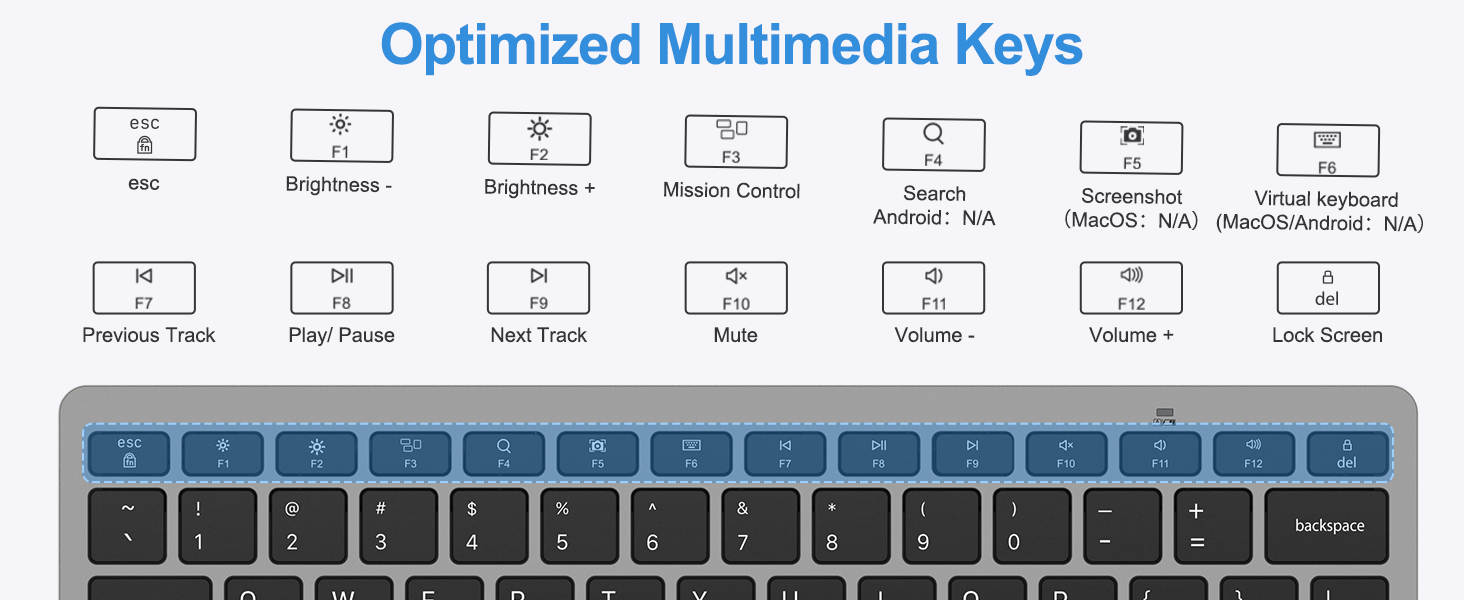
Image: An illustration of the keyboard layout highlighting the row of function keys (F1-F12) and their corresponding multimedia shortcuts when used with the Fn key.
Característiques de disseny ergonòmic
The OMOTON 2.4G Wireless Keyboard is designed for comfortable and efficient typing:
- Precision Scissor-Switch Keys: Provides a responsive, quiet, and smooth typing experience.
- Optimal Tilt Angle: Reduces wrist strain during extended typing sessions.
- Peus de goma antilliscants: Garanteix estabilitat en diverses superfícies.
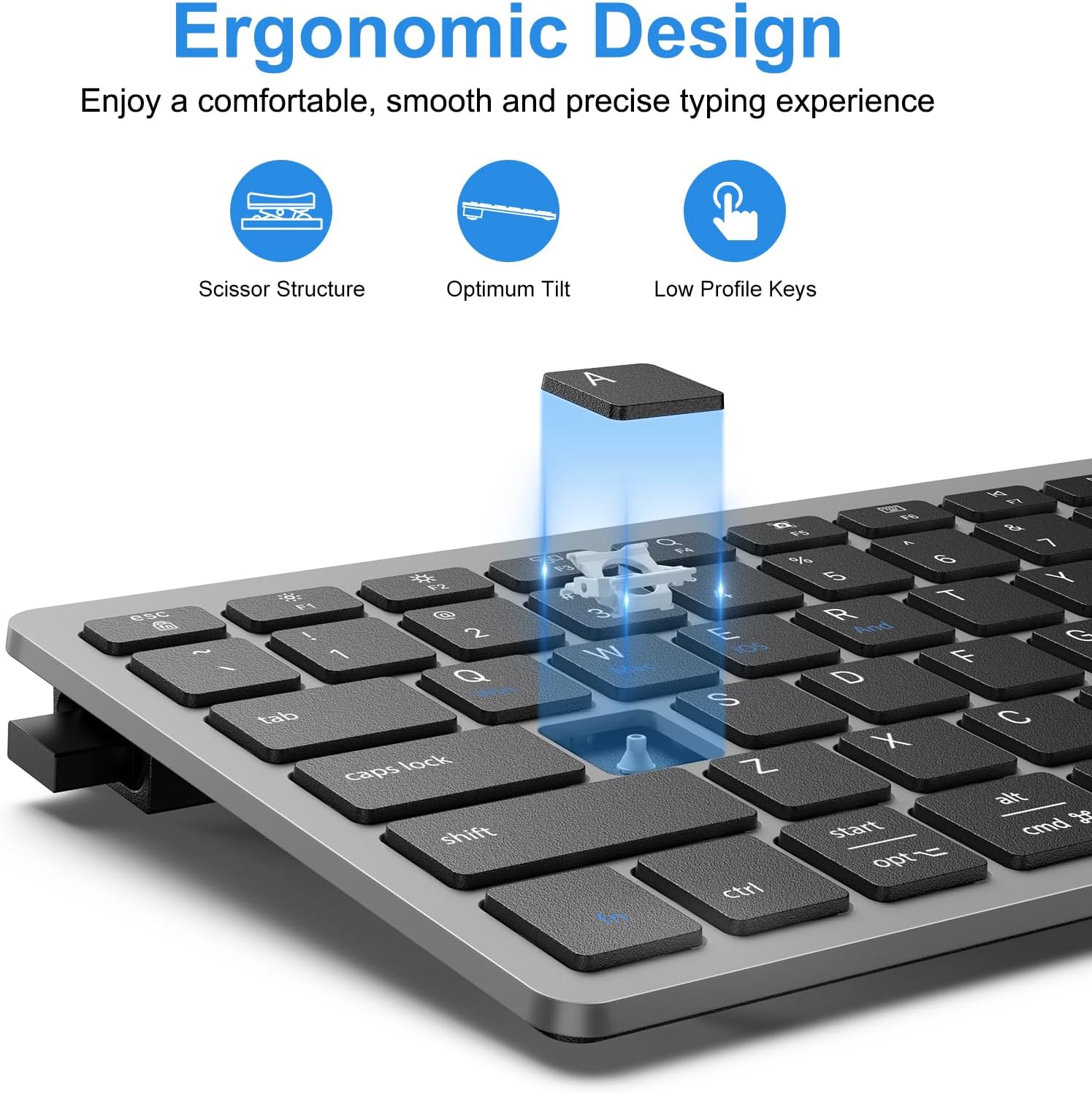
Imatge: Una imatge detallada view of the keyboard's keys, illustrating the internal scissor structure, the optimal tilt angle for comfortable typing, and the low-profile design of the keys.
Manteniment
Neteja del teclat
- Apagueu el teclat abans de netejar-lo.
- Utilitzeu un drap suau i sense pelusa lleugerament dampamb aigua o una solució de neteja suau.
- Eviteu la humitat excessiva i no ruixeu productes de neteja directament sobre el teclat.
- Per a la pols i les restes entre les tecles, feu servir aire comprimit.
Cura de la bateria
- Replace batteries when the keyboard's performance degrades or it stops responding.
- Traieu les piles si no heu d'utilitzar el teclat durant un període prolongat per evitar fuites.
- Eliminar les bateries usades d'acord amb la normativa local.
Resolució de problemes
| Problema | Causa possible | Solució |
|---|---|---|
| El teclat no respon |
|
|
| Keys not typing correctly or repeating |
|
|
| Problemes de connexió sense fil |
|
|
Especificacions
| Característica | Detall |
|---|---|
| Model | B0DN67GQD1 |
| Tecnologia de connectivitat | 2.4G Wireless (USB-A & Type-C Receiver) |
| Dispositius compatibles | Laptop, PC, Smart TV (Windows 7/8/10, iOS/iPadOS, Mac OS, Android) |
| Descripció del teclat | Wireless, Ultra Slim, Compact |
| Tipus de clau | Scissor-Switch Keys |
| Nombre de claus | 78 |
| Color | Gris |
| Material | Plàstic |
| Dimensions del producte (L x A x A) | 11.2 x 4.7 x 0.8 inches (285mm x 120mm) |
| Pes de l'article | 11.3 unces |
| abast sense fils | Fins a 33 peus (10 m) |
| Tipus de bateria | 2 piles AAA (no incloses) |
| Durada de la bateria | Fins a 6 mesos (amb mode de repòs automàtic) |

Image: The keyboard being placed into a sleeve, illustrating its slim and portable design with dimensions of 285mm (11.2 inches) in length and 120mm (4.7 inches) in width, and a weight of 260g (0.57lb).
Garantia i Suport
For warranty information and technical support, please refer to the official OMOTON website or contact their customer service directly. Contact details can typically be found on the product packaging or the manufacturer's official support page.
You can visit the OMOTON Store for more information: OMOTON Store on Amazon
Ask a question about this manual
Ask about setup, troubleshooting, compatibility, parts, safety, or missing instructions. Manuals+ will review the question and use this page’s manual context to help answer it.