
1. Introducció
The CHROX X99 Pro Android 13.0 TV Box is a smart multimedia player designed to transform your television into a powerful entertainment hub. Featuring the latest Android 13.0 operating system and a robust H313 Quad-core processor, this device offers fast performance, 4K video playback, and extensive connectivity options for an enhanced viewexperiència.
2. Contingut del paquet
Si us plau, verifiqueu que tots els elements que s'enumeren a continuació estiguin inclosos al vostre paquet:
- 1 x CHROX X99 Pro Android 13.0 TV Box
- 1 x adaptador de corrent
- 1 x comandament a distància
- 1 x cable HDMI
- 1 x Manual d'usuari (aquest document)
3. Producte acabatview
The CHROX X99 Pro TV Box is equipped with advanced hardware to deliver a smooth and responsive user experience. Below is an overview of the device and its ports.

Figura 3.1: superior view of the CHROX X99 Pro Android TV Box, showing the 'X99 Pro' logo and '5G' indicator.
3.1 Front and Side Panels

Figura 3.2: lateral view of the CHROX X99 Pro Android TV Box, highlighting the USB ports and TF card slot.
The side panel features two USB ports (one USB 3.0 and one USB 2.0) for connecting external storage devices, keyboards, mice, or other peripherals. A TF card slot is also present for expanding storage.
3.2 Panell posterior
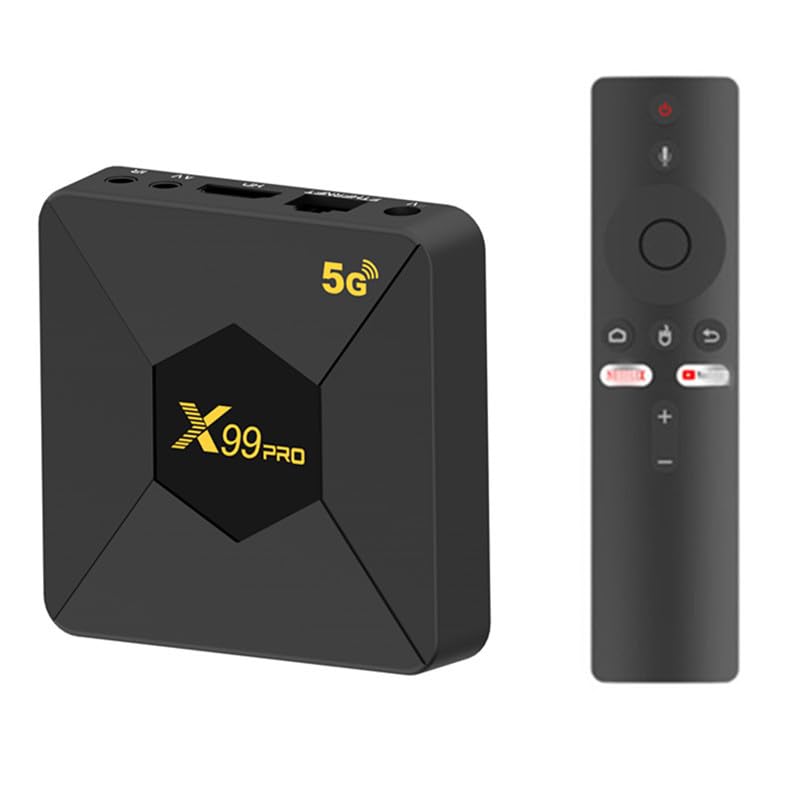
Figura 3.3: posterior view of the CHROX X99 Pro Android TV Box, showing the power input, Ethernet, HDMI, AV, and IR ports.
The rear panel provides essential connectivity:
- Entrada d'alimentació DC 5V: Connecteu aquí l'adaptador de corrent proporcionat.
- Ethernet (RJ-45): Per a la connexió de xarxa amb cable.
- HDMI: Connect to your TV or display for video and audio output.
- DE: Sortida de vídeo/àudio analògica per a televisors antics.
- IR: External IR receiver port (if applicable).
4. Guia de configuració
Follow these steps for initial setup of your CHROX X99 Pro TV Box:
- Connectar-se al televisor: Use the provided HDMI cable to connect the HDMI port on the TV Box to an HDMI input port on your television. Note the HDMI input number on your TV (e.g., HDMI 1, HDMI 2).
- Connecteu-vos a l'alimentació: Plug the power adapter into the DC 5V input port on the TV Box, then plug the adapter into a wall outlet. The device should power on automatically, or you may need to press the power button on the remote control.
- Connectar-se a la xarxa (opcional):
- Connexió per cable: Connecteu un cable Ethernet del vostre encaminador al port Ethernet del televisor.
- Connexió sense fil: Skip this step for now; you will configure Wi-Fi during the initial software setup.
- Selecciona l'entrada de TV: Engegueu el televisor i utilitzeu el comandament a distància per seleccionar la font d'entrada HDMI correcta que correspongui a on heu connectat el descodificador.
- Configuració inicial: The Android system will boot up. Follow the on-screen prompts to select your language, connect to Wi-Fi (if not using Ethernet), and complete any other initial configuration steps.
5. Instruccions de funcionament
5.1 Control remot
The included remote control allows you to navigate the Android interface. Familiarize yourself with its buttons:
- Botó d'encesa: Encén/apaga el dispositiu o el posa en mode d'espera.
- Botons de navegació (amunt/avall/esquerra/dreta): Moure el cursor o la selecció.
- Botó D'acord: Confirms selection or opens an item.
- Botó enrere: Torna a la pantalla anterior.
- Botó d'inici: Torna a la pantalla d'inici principal d'Android.
- Botó de menú: Accedeix a menús sensibles al context.
- Botons de volum: Ajusta el volum de l'àudio.
5.2 Navegació per la interfície d'Android
The CHROX X99 Pro runs on Android 13.0, providing a user-friendly interface. Use the remote control's navigation buttons to move between apps and settings. Press the OK button to launch an application or confirm a selection.
5.3 Installing and Managing Applications
You can install applications from the pre-installed app store or by sideloading APK files. To manage apps:
- Vés a Configuració > Aplicacions a view installed applications.
- Select an app to see options like Obert, Força d'aturada, Desinstal·la, Esborra les dades, o Esborra la memòria cau.
5.4 Configuració de la xarxa
To configure network connectivity:
- Vés a Configuració> Xarxa i Internet.
- For Wi-Fi, select Wi-Fi, trieu la vostra xarxa i introduïu la contrasenya.
- For Ethernet, ensure the cable is connected; the device should automatically obtain an IP address.
5.5 Vinculació Bluetooth
To connect Bluetooth devices (e.g., headphones, game controllers):
- Vés a Configuració > Dispositius connectats > Vincular dispositiu nou.
- Posa el teu dispositiu Bluetooth en mode de vinculació.
- Select your device from the list on the TV Box to pair.
6. Especificacions
Detailed technical specifications for the CHROX X99 Pro Android 13.0 TV Box:
| Característica | Especificació |
|---|---|
| Marca | CHROX |
| Nom del model | X99 Pro |
| Sistema operatiu | Android 13.0 |
| CPU | H313 Quad-core Cortex-A53 |
| GPU | Mali-T720MP2 |
| RAM | 2 GB DDR3 |
| ROM | EMMC de 8 GB |
| Wi-Fi | 2.4G/5GHz Dual Band |
| Ethernet | 10/100M RJ-45 |
| Bluetooth | Admet |
| Host USB | 1x USB 3.0, 1x USB 2.0 |
| Sortida de vídeo | HDMI 2.0 (up to 8K, 6K@30fps MAX Resolution Output with HDR, CEC, HDCP 2.2) |
| Lector de targetes | Targetes SD / SDHC / MMC |
| Descodificació de vídeo | 8K H.265, 4K@60fps, 3D support |
| Formats de vídeo compatibles | AVI, RM, RMVB, TS, VOB, MKV, MOV, ISO, WMV, ASF, FLV, DAT, MPG, MPEG |
| Formats d'àudio compatibles | MP3, WMA, AAC, WAV, OGG, AC3, DDP, TRUEHD, DTS, HD, FLAC, APE |
| Formats de fotos compatibles | JPEG d'alta definició, BMP, GIF, PNG, TIFF |
7. Solució De Problemes
If you encounter issues with your TV Box, refer to the following common problems and solutions:
- Sense energia:
- Assegureu-vos que l'adaptador de corrent estigui connectat correctament al televisor i a una presa de corrent que funcioni.
- Proveu una presa de corrent diferent.
- No es mostra al televisor:
- Check that the HDMI cable is firmly connected to both the TV Box and the TV.
- Verifiqueu que el televisor estigui configurat a la font d'entrada HDMI correcta.
- Prova un altre cable HDMI o port HDMI al televisor.
- Sense connexió Wi-Fi:
- Vés a Configuració > Xarxa i Internet > Wi-Fi and ensure Wi-Fi is enabled.
- Check if your Wi-Fi password is entered correctly.
- Reinicieu el vostre encaminador Wi-Fi i el televisor.
- Ensure the TV Box is within range of your Wi-Fi router.
- El control remot no respon:
- Substituïu les piles del comandament a distància.
- Ensure there are no obstructions between the remote control and the TV Box's IR receiver.
- Applications Crashing or Freezing:
- Vés a Configuració > Aplicacions, select the problematic app, and try Esborra la memòria cau or Esborra les dades.
- If the issue persists, try Desinstal·la and then reinstall the app.
- Ensure the TV Box has sufficient free storage space.
8. Manteniment
To ensure the longevity and optimal performance of your CHROX X99 Pro TV Box, follow these maintenance guidelines:
- Mantenir net: Regularly wipe the device with a soft, dry cloth. Avoid using liquid cleaners or abrasive materials.
- Ventilació: Assegureu-vos que el dispositiu estigui col·locat en una zona ben ventilada per evitar el sobreescalfament. No bloquegeu cap obertura de ventilació.
- Temperatura i humitat: Operate the device within recommended temperature and humidity ranges. Avoid extreme heat, cold, or damp ambients.
- Apagueu correctament: Always power off the device correctly through the system menu or by using the remote control's power button to put it into standby. Avoid simply unplugging it from the power source.
- Actualitzacions de programari: Comproveu periòdicament si hi ha actualitzacions del sistema a Configuració per assegurar-vos que disposeu de les darreres funcions i pegats de seguretat.
- Eviteu danys físics: Do not drop, strike, or attempt to disassemble the device. Unauthorized opening voids any warranty.
9. Garantia i Suport
The CHROX X99 Pro Android 13.0 TV Box comes with a standard manufacturer's warranty. Please refer to the warranty card included in your package for specific terms and conditions, including the warranty period and coverage details.
For technical support, troubleshooting assistance beyond this manual, or warranty claims, please contact the seller or manufacturer directly through the contact information provided at the point of purchase or on the product packaging. When contacting support, please have your product model (X99 Pro) and purchase details readily available.