
Hy-T26
Hy-T26 Pro Wireless Bluetooth Translation Earbuds User Manual
Model: Hy-T26
Producte acabatview
The Hy-T26 Pro Wireless Bluetooth Translation Earbuds are designed to facilitate seamless communication across language barriers, offering real-time two-way translation. These earbuds also provide high-quality audio for music and calls, featuring a comfortable ear-hanging design and extended battery life.
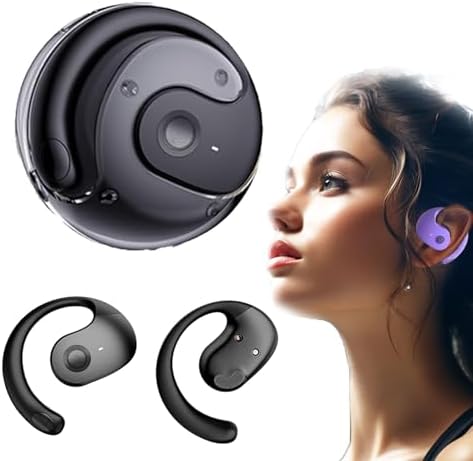
Image: Hy-T26 Pro Earbuds and their compact charging case, showcasinl'elegant disseny negre.
Key features include Bluetooth 5.3 connectivity, IPX5 waterproof rating, and a 300mAh charging compartment capacity for extended use. The earbuds are equipped with 16mm dynamic speakers for 360° Hi-Fi stereo sound and noise reduction technology for clear audio.
Guia de configuració
Follow these steps to set up your Hy-T26 Pro Translation Earbuds for first-time use.
1. Càrrega dels auriculars i l'estoig
- Abans del primer ús, carregueu completament l'estoig de càrrega i els auriculars.
- Connecteu el cable de càrrega tipus C al port de càrrega de la carcassa i a una font d'alimentació.
- Els indicadors lluminosos de la caixa mostraran l'estat de càrrega.
- Una càrrega completa de la funda triga aproximadament 2 hores.

Image: Visual representation of the Hy-T26 Pro earbuds and charging case, highlighting battery duration: 4.5 hours use time, 2 hours charging time, and 15 hours total playtime with the charging case.
2. Downloading the Companion Application
For full translation functionality, it is essential to download the dedicated companion application. Based on user feedback, the application is named NebulaBudsAPP. Cerca this application on your device's app store (Android or iOS).
- Open your smartphone's app store (Google Play Store for Android or Apple App Store for iOS).
- Cerca "NebulaBudsAPP".
- Baixeu i instal·leu l'aplicació.
3. Emparellament amb el dispositiu
- Assegureu-vos que els auriculars estiguin carregats i col·locats a l'estoig de càrrega.
- Obre l'estoig de càrrega. Els auriculars entraran automàticament en mode d'emparellament.
- On your smartphone or tablet, go to Bluetooth settings and turn Bluetooth on.
- Select "Hy-T26 Pro" from the list of available devices to connect.
- Un cop connectat, sonarà un so de confirmació i els auriculars estaran llestos per al seu ús.

Image: A visual guide demonstrating the smart pairing connection process: Download App, Headphones pairing, Connect Bluetooth, Open App, Set Target language, and Start conversation.
Instruccions de funcionament
Learn how to use your Hy-T26 Pro Earbuds for various functions, including translation, audio playback, and calls.
1. Using the Translation Function
The core feature of the Hy-T26 Pro is its real-time translation capability, which requires the companion app.
- Ensure your earbuds are connected to your device via Bluetooth.
- Obriu el NebulaBudsAPP al teu telèfon intel·ligent.
- Within the app, select the source language (the language being spoken) and the target language (the language you want to hear/see the translation in).
- Choose the desired translation mode (e.g., two-way conversation, lecture mode, or text/picture translation).
- Speak clearly into the earbud's microphone. The app will process your speech and provide real-time translation through the earbuds and/or display it on your screen.
- For two-way conversations, the other party can speak into their earbud (if they also have one paired to their device and app) or into your phone's microphone, and the translation will be provided to both parties.

Image: Depicts the cross-language communication feature, showing real-time translation of speech and text/picture translation capabilities on a laptop and smartphone screen.
The earbuds are designed for efficient communication anytime, anywhere, making them suitable for travel, professional use, and sports.

Image: The Hy-T26 Pro earbuds and charging case positioned near a smartphone, symbolizing efficient communication capabilities in various settings.
2. Audio Playback and Calls
- Reproducció de música: Once connected, your earbuds will automatically play audio from your device. Use your device's controls to play, pause, skip tracks, and adjust volume.
- Fer/Rebre trucades: When a call comes in, the earbuds will ring. Tap the control button on either earbud to answer or end a call. Press and hold to reject a call.
- Control de veu: The earbuds support voice control. Refer to the app or your device's settings for specific voice command functionalities.

Image: A man wearing the Hy-T26 Pro earbuds, illustrating the comfortable ear-hanging style that allows ears to breathe freely and ensures a stable, non-in-ear fit.
Manteniment
Proper maintenance ensures the longevity and optimal performance of your Hy-T26 Pro Earbuds.
- Neteja: Netegeu regularment els auriculars i l'estoig de càrrega amb un drap suau, sec i sense borrissol. No utilitzeu productes de neteja abrasius ni dissolvents.
- Emmagatzematge: Quan no els utilitzeu, guardeu els auriculars a la seva funda de càrrega per protegir-los i mantenir-los carregats.
- Resistència a l'aigua: The earbuds have an IPX5 waterproof level, meaning they are resistant to splashes and sweat. Do not submerge them in water or expose them to heavy rain. Dry them thoroughly if they get wet.
- Càrrega: Use only the provided Type-C cable for charging. Avoid using damaged cables or chargers.
Resolució de problemes
If you encounter issues with your Hy-T26 Pro Earbuds, refer to the following common solutions.
| Problema | Possible causa/solució |
|---|---|
| Els auriculars no s'emparellan/connecten. |
|
| La funció de traducció no funciona. |
|
| Mala qualitat d'àudio o desconnexions. |
|
| Els auriculars no es carreguen. |
|
Especificacions
| Característica | Detall |
|---|---|
| Nom del model | Hy-T26 |
| Tecnologia de connectivitat | Sense fil (Bluetooth) |
| Versió Bluetooth | 5.3 |
| Distància de transmissió | 10 metres |
| Nivell impermeable | IPX5 |
| Tipus d'ús | Ear-hanging type |
| Interfície de càrrega | Tipus-C |
| Capacitat del compartiment de càrrega | 300 mAh |
| Use Time (Earbuds) | 4.5 hores |
| Temps de càrrega (cas) | 2 hores |
| Temps de joc total amb estoig | 15 hores |
| Tipus de controlador d'àudio | Conductor dinàmic |
| Mida del controlador d'àudio | 16 mil·límetres |
| Tipus de control | Control de veu |
| Components inclosos | Estoig de càrrega sense fil |
| Pes de l'article | 3.53 unces |
| Dimensions del paquet | 3.94 x 3.94 x 1.97 polzades |
| Fabricant | Genèric |
| País d'origen | Xina |
Garantia i Suport
For warranty information and customer support, please refer to the documentation included with your purchase or contact the seller directly. The manufacturer, Generic, typically provides support for product defects and operational issues.
Es recomana conservar el comprovant de compra per a qualsevol reclamació de garantia.
Ask a question about this manual
Ask about setup, troubleshooting, compatibility, parts, safety, or missing instructions. Manuals+ will review the question and use this page’s manual context to help answer it.